
Springboot websocket学习Demo
使用的是springboot2.1.4版本
    <parent>

        <groupId>org.springframework.boot</groupId>

        <artifactId>spring-boot-starter-parent</artifactId>

        <version>2.1.4.RELEASE</version>

        <relativePath /> <!-- lookup parent from repository -->

    </parent>
引入依赖
        <dependency>

            <groupId>org.springframework.boot</groupId>

            <artifactId>spring-boot-starter-websocket</artifactId>

        </dependency>
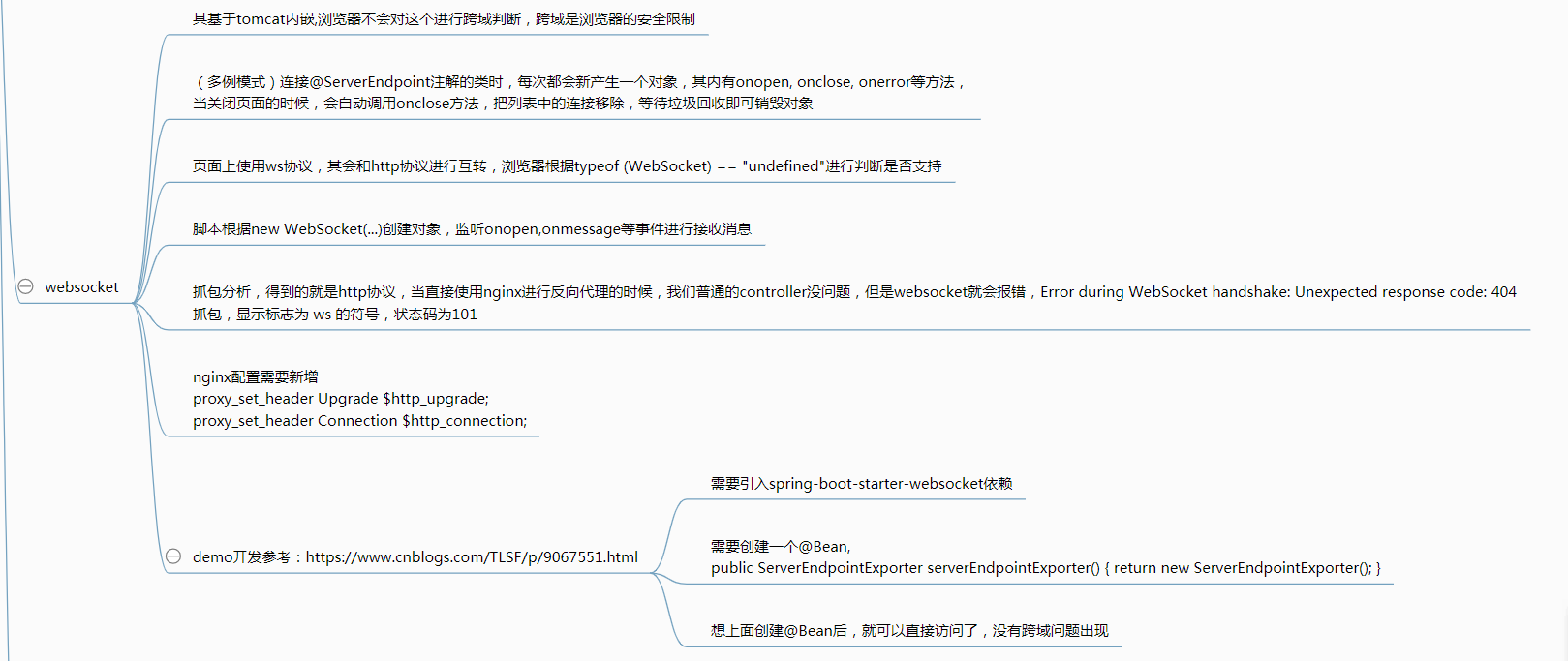
要使用websocket需要一个Bean,否则报错Error during WebSocket handshake:之类的问题
    @Bean

    public ServerEndpointExporter serverEndpointExporter() {

        return new ServerEndpointExporter();

    }
后端代码WebSocketServer.java
import java.io.IOException;

import java.util.concurrent.ConcurrentHashMap;

import javax.websocket.OnClose;

import javax.websocket.OnError;

import javax.websocket.OnMessage;

import javax.websocket.OnOpen;

import javax.websocket.Session;

import javax.websocket.server.PathParam;

import javax.websocket.server.ServerEndpoint;

import org.springframework.stereotype.Component;

import lombok.extern.slf4j.Slf4j;

@ServerEndpoint("/imserver/{userId}")

@Component

@Slf4j

public class WebSocketServer {

    /**静态变量,用来记录当前在线连接数。应该把它设计成线程安全的。*/

    private static int onlineCount = 0;

    /**concurrent包的线程安全Set,用来存放每个客户端对应的MyWebSocket对象。*/

    private static ConcurrentHashMap<String,WebSocketServer> webSocketMap = new ConcurrentHashMap<>();

    /**与某个客户端的连接会话,需要通过它来给客户端发送数据*/

    private Session session;

    /**接收userId*/

    private String userId="";

    public WebSocketServer() {

        log.info(this.toString());

    }

    /**

     * 连接建立成功调用的方法*/

    @OnOpen

    public void onOpen(Session session,@PathParam("userId") String userId) {

        this.session = session;

        this.userId=userId;

        if(webSocketMap.containsKey(userId)){

            webSocketMap.remove(userId);

            webSocketMap.put(userId,this);

            //加入set中

        }else{

            webSocketMap.put(userId,this);

            //加入set中

            addOnlineCount();

            //在线数加1

        }

        log.info("用户连接:"+userId+",当前在线人数为:" + getOnlineCount());

        try {

            sendMessage("连接成功");

        } catch (IOException e) {

            log.error("用户:"+userId+",网络异常!!!!!!");

        }

    }

    /**

     * 连接关闭调用的方法

     */

    @OnClose

    public void onClose() {

        if(webSocketMap.containsKey(userId)){

            webSocketMap.remove(userId);

            //从set中删除

            subOnlineCount();

        }

        log.info("用户退出:"+userId+",当前在线人数为:" + getOnlineCount());

    }

    /**

     * 收到客户端消息后调用的方法

     *

     * @param message 客户端发送过来的消息*/

    @OnMessage

    public void onMessage(String message, Session session) {

        log.info("用户消息:"+userId+",报文:"+message);

        //可以群发消息

        //消息保存到数据库、redis

        if(isNotBlank(message)){

            try {

                //解析发送的报文

                String toUserId = this.userId + "";

                log.info(this.userId + ", msg = " + message);

                webSocketMap.get(toUserId).sendMessage(message);

            }catch (Exception e){

                e.printStackTrace();

            }

        }

    }

    private static boolean isNotBlank(String str){

        return str!=null && !str.equals("");

    }

    /**

     *

     * @param session

     * @param error

     */

    @OnError

    public void onError(Session session, Throwable error) {

        log.error("用户错误:"+this.userId+",原因:"+error.getMessage());

        error.printStackTrace();

    }

    /**

     * 实现服务器主动推送

     */

    public void sendMessage(String message) throws IOException {

        this.session.getBasicRemote().sendText(message);

    }

    /**

     * 发送自定义消息

     * */

    public static void sendInfo(String message,@PathParam("userId") String userId) throws IOException {

        log.info("发送消息到:"+userId+",报文:"+message);

        if(isNotBlank(userId)&&webSocketMap.containsKey(userId)){

            webSocketMap.get(userId).sendMessage(message);

        }else{

            log.error("用户"+userId+",不在线!");

        }

    }

    public static synchronized int getOnlineCount() {

        return onlineCount;

    }

    public static synchronized void addOnlineCount() {

        WebSocketServer.onlineCount++;

    }

    public static synchronized void subOnlineCount() {

        WebSocketServer.onlineCount--;

    }

}
前端代码index.html
<!DOCTYPE html>

<html lang="en">

<head>

<meta charset="UTF-8">

<meta name="viewport" content="width=device-width, initial-scale=1.0">

<meta http-equiv="X-UA-Compatible" content="ie=edge">

<title>Document</title>

</head>

<body>

Welcome<br/><input id="text" type="text"/>

<button onclick="send()">发送消息</button>

<hr/>

<button onclick="closeWebSocket()">关闭WebSocket连接</button>

<hr/>

<div id="message"></div>

</body>

<script>

var websocket = null;

//判断当前浏览器是否支持WebSocket

if ('WebSocket' in window) {

websocket = new WebSocket("ws://localhost:8080/demo/imserver/11");

}

else {

alert('当前浏览器 Not support websocket')

}

//连接发生错误的回调方法

websocket.onerror = function () {

setMessageInnerHTML("WebSocket连接发生错误");

};

//连接成功建立的回调方法

websocket.onopen = function () {

setMessageInnerHTML("WebSocket连接成功");

}

//接收到消息的回调方法

websocket.onmessage = function (event) {

setMessageInnerHTML(event.data);

}

//连接关闭的回调方法

websocket.onclose = function () {

setMessageInnerHTML("WebSocket连接关闭");

}

//监听窗口关闭事件,当窗口关闭时,主动去关闭websocket连接,防止连接还没断开就关闭窗口,server端会抛异常。

window.onbeforeunload = function () {

closeWebSocket();

}

//将消息显示在网页上

function setMessageInnerHTML(innerHTML) {

document.getElementById('message').innerHTML += innerHTML + '<br/>';

}

//关闭WebSocket连接

function closeWebSocket() {

websocket.close();

}

//发送消息

function send() {

var message = document.getElementById('text').value;

websocket.send(message);

}

</script>

</html>
后面是我的总结,如果有什么地方不对的,请留言:
Springboot websocket学习Demo的更多相关文章
- WebSocket 学习(三)--用nodejs搭建服务器
前面已经学习了WebSocket API,包括事件.方法和属性.详情:WebSocket(二)--API WebSocket是基于事件驱动,支持全双工通信.下面通过三个简单例子体验一下. 简单开始 ...
- (转)WebSocket学习
石墨文档:https://shimo.im/docs/3UkyOPJvmj4f9EAP/ (二期)17.即时通讯技术websocket [课程17]java We...实现.xmind0.1MB [课 ...
- WebSocket 学习--用nodejs搭建服务器
最简单的socket服务端 var net = require("net"); server1 = net.createServer(function(client){ clien ...
- springboot+websocket+sockjs进行消息推送【基于STOMP协议】
springboot+websocket+sockjs进行消息推送[基于STOMP协议] WebSocket是在HTML5基础上单个TCP连接上进行全双工通讯的协议,只要浏览器和服务器进行一次握手,就 ...
- 基于SpringBoot+WebSocket搭建一个简单的多人聊天系统
前言 今天闲来无事,就来了解一下WebSocket协议.来简单了解一下吧. WebSocket是什么 首先了解一下WebSocket是什么?WebSocket是一种在单个TCP连接上进行全双工 ...
- MacOS下SpringBoot基础学习
学于黑马和传智播客联合做的教学项目 感谢 黑马官网 传智播客官网 微信搜索"艺术行者",关注并回复关键词"springboot"获取视频和教程资料! b站在线视 ...
- Springboot+Websocket+JWT实现的即时通讯模块
场景 目前做了一个接口:邀请用户成为某课程的管理员,于是我感觉有能在用户被邀请之后能有个立马通知他本人的机(类似微博.朋友圈被点赞后就有立马能收到通知一样),于是就闲来没事搞了一套. 涉及技术栈 ...
- WebSocket学习笔记IE,IOS,Android等设备的兼容性问
WebSocket学习笔记IE,IOS,Android等设备的兼容性问 一.背景 公司最近准备将一套产品放到Andriod和IOS上面去,为了统一应用的开发方式,决定用各平台APP嵌套一个HTML5浏 ...
- WebSocket学习笔记——无痛入门
WebSocket学习笔记——无痛入门 标签: websocket 2014-04-09 22:05 4987人阅读 评论(1) 收藏 举报 分类: 物联网学习笔记(37) 版权声明:本文为博主原 ...
随机推荐
- TTL门和MOS门悬空输入的处理
引言 本来是数字电路学习时很重要的考点,但是总容易忘掉,所以记录一下~ 内容 TTL TTL电路中的TTL是Transistor-Transistor-Logic的英文缩写,指的是晶体管逻辑电路,即T ...
- Python _PyQt5对话框
Python 调用PyQt5 制作对话框,退出时候有二次确认(注:默认是直接退出) 1 # -*- ytf-8 -*- 2 """ 3 用PyQt建一个对话框,退出时提示 ...
- PEP8编程规范
1.PEP8编程规范 [少加空格多写注释,严格对齐] 1.缩进 缩进table = 4个空格:设置好后使用编辑器的自然table 2.if条件书写规范 if的条件多的时候用左边括号对齐:if条件完毕后 ...
- oracle 11.2.0.4静默安装
oracle 11.2.0.4静默安装 1.安装包 1.1.上传安装包 xshell可用rz命令,选择安装包. mobaxterm可用左侧栏上传功能. 2.安装准备 2.1.关闭防火墙.SELinux ...
- [LeetCode题解]21. 合并两个有序链表 | 递归
解题思路 使用递归实现: 定义函数功能:合并两个有序链表,并返回链表的头 结束条件:两个链表其中一个为空,返回另一个链表 递推公式: l1.val < l2.val:l1.next = Merg ...
- mysql case when语句的使用
case具有两种格式.简单case函数和case搜索函数. 简单函数 CASE [col_name] WHEN [value1] THEN [result1]-ELSE [default] END 搜 ...
- bWAPP----iFrame Injection
iFrame Injection 直接上代码 1 <div id="main"> 2 3 <h1>iFrame Injection</h1> 4 ...
- ①SpringCloud 实战:引入Eureka组件,完善服务治理
简介 Netflix Eureka 是一款由 Netflix 开源的基于 REST 服务的注册中心,用于提供服务发现功能.Spring Cloud Eureka 是 Spring Cloud Netf ...
- Ubuntu16.04安装搜狗输入法报错:dkpg:处理归档sogoupinyin.deb(--install)时出错,安装sogoupinyin将破坏fcitx-ui-qimpanel
系统:ubuntu16.04 事件:安装搜狗拼音时报错 报错信息(ubuntu语言是英文的报错信息): dpkg: regarding sogoupinyin_2.3.2.07_amd64-831.d ...
- FL Studio录制面板知识讲解
FL Studio录制面板可以设置与录制有关的选项,它还有一个用来设置音符对齐的全局吸附选择器.刚接触水果这款音乐制作软件的同学通常不是很清楚这里的知识的,下面小编就给大家讲解一下. 1.首先,我们来 ...