
Jquery调用webService的四种方法 转载-记录
我总结几个关键点
1. 服务必须声明为ScriptService(否则会出现下面的问题)
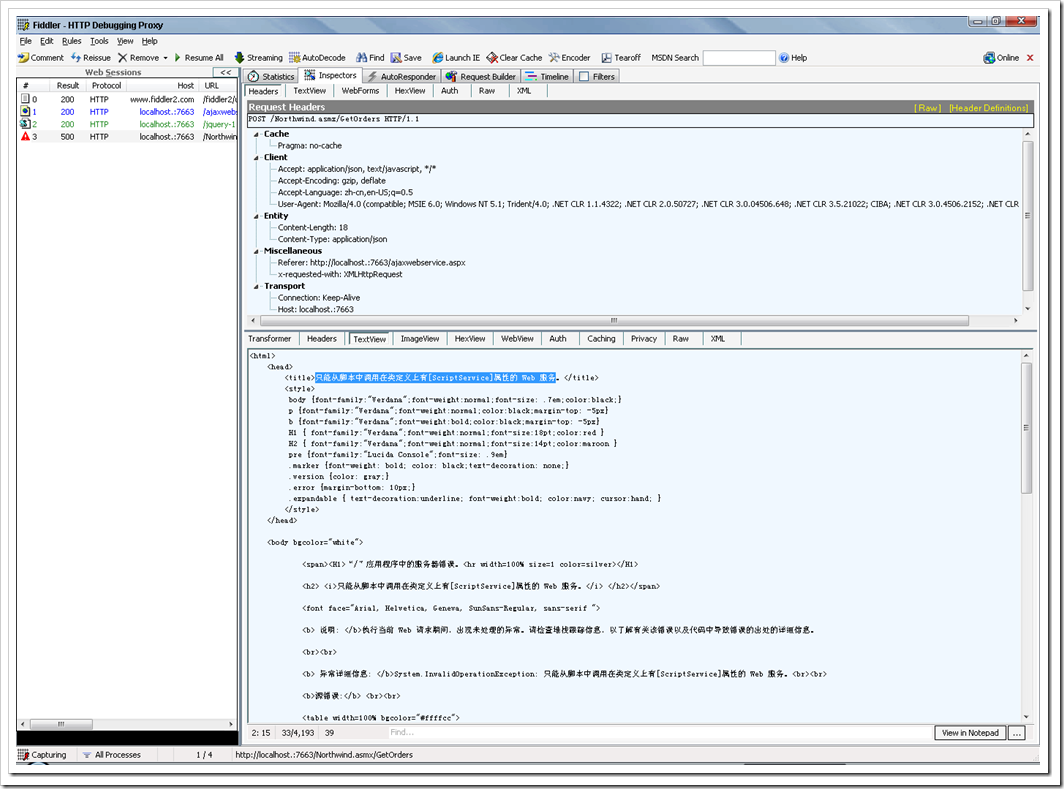
2.服务的方法不需要任何更改,保持原状
3.客户端用jquery的.ajax方法来调用
3.1 type必须是post
3.2 contentType必须是application/json
3.3 dataType必须是json
4.默认返回的json都是用d为根键的
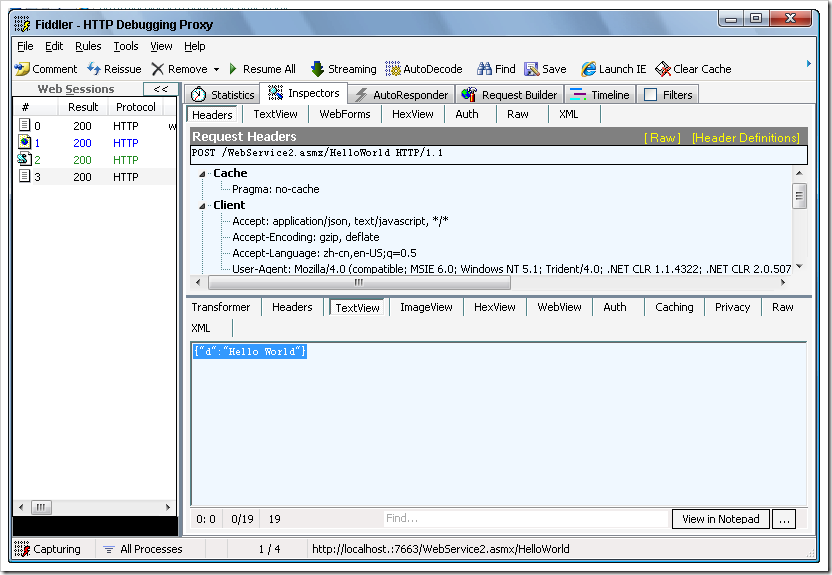
1、编写4种WebService方法
[WebServiceBinding(ConformsTo = WsiProfiles.BasicProfile1_1)]
[ScriptService] //令WebService成功传入Json参数,并以Json形式返回结果
[GenerateScriptType(typeof(Person))] //不是必要,但推荐添加(如果Person里面再嵌套另一个复杂类型,则必要声明)
[ToolboxItem(false)]
public class WebService1 : System.Web.Services.WebService
{
/// <summary>
/// 无任何参数
/// </summary>
/// <returns></returns>
[WebMethod]
public string HelloWorld()
{
return "Hello World";
}
/// <summary>
/// 传入参数
/// </summary>
/// <param name="name"></param>
/// <returns></returns>
[WebMethod]
public string Hello(string name)
{
return string.Format("Hello {0}", name);
}
/// <summary>
/// 返回泛型列表
/// </summary>
/// <param name="i"></param>
/// <returns></returns>
[WebMethod]
public List<int> CreateArray(int i)
{
List<int> list = new List<int>();
while (i >= 0)
{
list.Add(i--);
}
return list;
}
/// <summary>
/// 返回复杂类型
/// </summary>
/// <param name="name"></param>
/// <param name="age"></param>
/// <returns></returns>
[WebMethod]
public Person GetPerson(string name, int age)
{
return new Person()
{
Name = name,
Age = age
};
}
}
/// <summary>
/// 复杂类型
/// </summary>
public class Person
{
public string Name { get; set; }
public int Age { get; set; }
}
2、编写js调用以上方法
<!DOCTYPE html PUBLIC "-//W3C//DTD XHTML 1.0 Transitional//EN" "http://www.w3.org/TR/xhtml1/DTD/xhtml1-transitional.dtd">
<html xmlns="http://www.w3.org/1999/xhtml">
<head runat="server">
<title>无标题页</title>
<style type="text/css">
input
{
width:200px;
}
</style>
<script type="text/javascript" src="jquery-1[1].2.6.min.js"></script>
<script type="text/javascript">
$(function(){
/*
1、WebService请求类型都为Post,WebService的Url为“[WebServiceUrl]/[WebMethod]”
2、contentType声明为Json
3、data要用Json的字符串格式传入
4、设置了dataType为json后,result就直接为返回的Json对象。
*/
//调用无参数方法
$("#btnHelloWorld").click(function(){
$.ajax({
type: "POST",
contentType:"application/json",
url:"WebService1.asmx/HelloWorld",
data:"{}",
dataType:'json',
success:function(result){
alert(result.d);
}
});
});
//传入1个参数
$("#btnHello").click(function(){
$.ajax({
type: "POST",
contentType:"application/json",
url:"WebService1.asmx/Hello",
data:"{name:'KiMoGiGi'}",
dataType:'json',
success:function(result){
alert(result.d);
}
});
});
//返回泛型列表
$("#btnArray").click(function(){
$.ajax({
type: "POST",
contentType:"application/json",
url:"WebService1.asmx/CreateArray",
data:"{i:10}",
dataType:'json',
success:function(result){
alert(result.d.join(" | "));
}
});
});
//返回复杂类型
$("#btnPerson").click(function(){
$.ajax({
type: "POST",
contentType:"application/json",
url:"WebService1.asmx/GetPerson",
data:"{name:'KiMoGiGi',age:26}",
dataType:'json',
success:function(result){
var person = result.d;
var showText = [];
for(var p in person){
showText.push(p + ":" + person[p]);
}
alert(showText.join("\r\n"));
}
});
});
});
</script>
</head>
<body>
<form id="form1" runat="server">
<p>
<input type="button" id="btnHelloWorld" value="HelloWorld" />
</p>
<p>
<input type="button" id="btnHello" value="Hello" />
</p>
<p>
<input type="button" id="btnArray" value="CreateArray" />
</p>
<p>
<input type="button" id="btnPerson" value="GetPerson" />
</p>
</form>
</body>
</html>
Jquery调用webService的四种方法 转载-记录的更多相关文章
- Jquery调用webService的四种方法
1.编写4种WebService方法 [WebService(Namespace = "http://tempuri.org/")] [WebServiceBinding(Conf ...
- php调用webservice的几种方法
原文:php调用webservice的几种方法 1.WSDL模式: $soap = new SoapClient("http://192.168.6.69:8899/Service1.asm ...
- jQuery事件绑定的四种方法
jQuery中提供了四种绑定事件的方法,分别是bind.live.delegate.on,对应的解除监听的函数分别是unbind.die.undelegate.off: 一.on()方法(首选方法) ...
- 通用的调用WebService的两种方法。(调用别人提供的wsdl)(转)
转载自:http://blog.sina.com.cn/s/blog_65933e020101incz.html1.调用WebService的Client端采用jax-ws调用WebService:流 ...
- C#调用webService的几种方法
转自: WebClient 用法小结 http://www.cnblogs.com/hfliyi/archive/2012/08/21/2649892.html http://www.cnblogs. ...
- asp.net远程调用WebService的两种方法(转载)
一,静态方法在“解决方案‘项目名’” -> 相应的文件夹,如“Web References” ->右键“添加WEB引用”->在URL里写入地址.二,动态方法在“解决方案‘项目名’” ...
- Java开发WebService的几种方法--转载
webservice的应用已经越来越广泛了,下面介绍几种在Java体系中开发webservice的方式,相当于做个记录. 1.Axis2 Axis是apache下一个开源的webservice开发组件 ...
- Java中遍历map的四种方法 - 转载
在Java中如何遍历Map对象 How to Iterate Over a Map in Java 在java中遍历Map有不少的方法.我们看一下最常用的方法及其优缺点. 既然java中的所有map都 ...
- java调用webservice接口 几种方法
webservice的 发布一般都是使用WSDL(web service descriptive language)文件的样式来发布的,在WSDL文件里面,包含这个webservice暴露在外面可供使 ...
随机推荐
- css的repaint和reflow
css的repaint和reflow 浏览器为了重新渲染部分或整个页面,重新计算页面元素位置和几何结构(geometries)的进程叫做 reflow. 由于 reflow 是一种浏览器中的用户拦截( ...
- Windows XP密钥(共38枚)
翱翔博客(http://hi.baidu.com/guoguo6688/home) Windows XP Professional VOL版密钥:=========================== ...
- 清理8组nodes中表的历史数据,平均每个node中的表有1.5亿条记录,需要根据date_created字段清理8000W数据记录,这个字段没有索引。
清理8组nodes中表的历史数据,平均每个node中的表有1.5亿条记录,需要根据date_created字段清理8000W数据记录,这个字段没有索引. 环境介绍 线上磁盘空间不足,truncate ...
- 字符串的MD5的32位加密和16位加密
import java.security.MessageDigest; import java.util.Locale; public class MD5Util { public static St ...
- spring集成mongodb封装的简单的CRUD
1.什么是mongodb MongoDB是一个基于分布式文件存储的数据库.由C++语言编写.旨在为WEB应用提供可扩展的高性能数据存储解决方案. mongoDB MongoDB是一个介 ...
- 一、Cocos2dx在visualStudio或者vc++中环境搭建(入门篇)
本文由qinning199原创,转载请注明:http://www.cocos2dx.net/?p=106 0.概述 Cocos2dx-win32的项目能够被向导生成 向导支持vs2008,vs2010 ...
- MVC Razor中 如何截断字符串
有时候显示的内容过长,使用MVC编程时,如何截断显示的内容呢.我知道你肯定有很多办法这样做的,但是在学习MVC时,还是使用一些新的办法做吧> Razor 标记语法编程. @helper Trun ...
- C++对象模型2--指针cout结果
在开始之前,首先科普一下cout指针的知识,这样才能在测试程序中很好的理解: 看下面的代码: void main(void) { int a = 10; int *p = &a; cout & ...
- MySqlQueryList
//辅助查询列表,或实例 public class MySqlQueryList { #region List<T> ToList<T>(string sql, params ...
- Dojo实现Tabs页报错(二)