
LDdecay计算和做图
先下载PopLDdecay软件(开源GitHub)
https://github.com/BGI-shenzhen/PopLDdecay
PopLDdecay的安装
1) INSTALL  Method1

----------------------------------------------------------------------------------------------------------------

################################################################################################################

Just execute as follows :

	git clone https://github.com/BGI-shenzhen/PopLDdecay.git

	chmod 755 configure ; ./configure ;

	make;

	mv PopLDdecay  bin/ ;

**Note:** If fail to link,try to <b>re-install</b> the libraries [**_zlib_**](https://zlib.net/)

2) INSTALL Method2

----------------------------------------------------------------------------------------------------------------

################################################################################################################

A) Method2 For linux/Unix

	For linux/Unix , execute as follows :

			 tar -zxvf  PopLDdecayXXX.tar.gz

			 cd PopLDdecayXXX;

			 cd src;

			 make ; make clean

			 ../bin/PopLDdecay

	#I had compiled and installed these gz library packages [zlib] on the linux X64 platform

	if Link do not work ,try Re-install the gz library and copy them to the library Dir

	        	 PopLDdecayXX/src/include/zlib

B) Method2 For macOS  platform INSTALL

	you should  must  pre-install the library [zlib] and copy them to the corresponding library directory

	#step1 :Should must <b>re-install</b> the gz library [zlib]

			  see  [zlib] website

	#step2  :  # Copy these gz library file into the corresponding library directory

			  cp libz.a libz.so*  PopLDdecayXX/src/include/zlib

	#step3  :

	          sh make.sh # or [make && make clean]

C) Other Method

Note if it can't work . follow below  B1-B6  or use the  static Compiled [BamDeal_Linux ]

############################################

	   #autoscan ./

	   #cp configure.scan configure.ac

# if can't work,  follow below 6  commands

	  B1:     aclocal             #//   src/automake-1.9/aclocal

	  B2:     autoconf            #//   src/automake-1.9/autoconf

	  B3:     autoheader          #//   src/automake-1.9/autoheader

	  B4:     automake --add-missing   #//  src/automake-1.9/automake  --add-missing

	  B5:      ./configure

	  B6:      make

#############################################

#swimming in the sky & flying in the sea#
PopLDdecay的使用
step1
查看PopLDdecay的使用方法
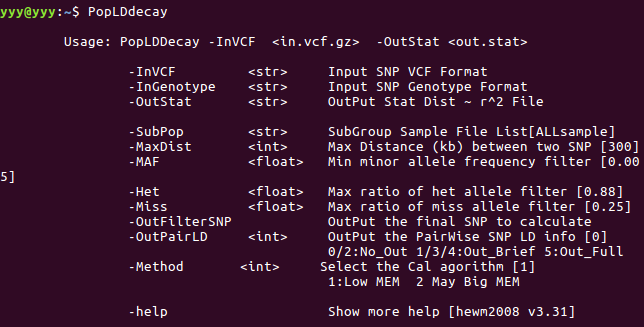
sample:
# 1)  For gatk VCF file deal , run PopLDdecay  direct

          ./bin/PopLDdecay    -InVCF  SNP.vcf.gz  -OutStat Lddecay.stat.gz

# 2)  For plink [.ped .map], chang plink 2 genotype first  2) run PopLDdecay

           perl bin/mis/plink2genotype.pl    -inPED in.ped -inMAP in.map  -outGenotype out.genotype ;      ./bin/PopLDdecay        -InGenotype out.genotype -OutStat LDdecay.stat.gz

# 3)  To Calculate the subgroup GroupA LDdecay in VCF Files   # put GroupA sample names into GroupA_sample.list file

          ./bin/PopLDdecay   -InVCF    -OutStat    -SubPop    GroupA_sample.list
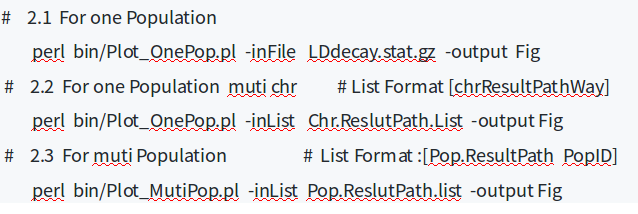
step2:

sample:
LDdecay计算和做图的更多相关文章
- 用 GraphScope 像 NetworkX 一样做图分析
NetworkX 是 Python 上最常用的图分析包,GraphScoep 兼容 NetworkX 接口.本文中我们将分享如何用 GraphScope 像 NetworkX 一样在(大)图上进行分析 ...
- QiniuUpload- 一个方便用七牛做图床然后插入markdown的小工具
最近一段时间有用markdown做笔记,其他都好,但是markdown插入图片挺麻烦的,特别是想截图之后直接插入的时候.需要首先把图片保存了,然后还要上传到一个地方生成链接才能插入.如果有个工具可以直 ...
- python做图笔记
1. 工具选择 了解了基本python,rodeo,anaconda套件这三种工具. (1)基本python,下载安装python的最新版(目前是python3.7).注意要使用安装版.安装好后,一般 ...
- win10 uwp 使用 asp dotnet core 做图床服务器客户端
原文 win10 uwp 使用 asp dotnet core 做图床服务器客户端 本文告诉大家如何在 UWP 做客户端和 asp dotnet core 做服务器端来做一个图床工具 服务器端 从 ...
- matplotlib 做图通过弹出窗口展示 spyder
tools =>preferences=>Ipython console=>Graphics Graphics backend 中Backend 由Inline改为 Automati ...
- [Erlang07] Erlang 做图形化编程的尝试:纯Erlang做2048游戏
用Erlang久了,以为erlang做类似于As3,JS的图形化界面是绝对不可能的,多少次,多少次想用erlang做个炫酷的图形游戏.终于:折腾出来了结果:纯Erlang也可以做到! 因为以前接触过W ...
- 矢量做图组件OTGisX的使用(类似Mapbase)
一:组件添加到工具栏 要在应用程序中应用OTGisX控件,首先要把所下载的OTGisX组件添加到.Net工程中.并将其添加到工具箱托盘中.添加方式为:在工具箱上单击右键,选择“选择项”,会出现“选择工 ...
- 山东省济南市历城第二中学——洛谷图论入门题--基本题必做 图的遍历—3.骑马修栅栏(fence)
由于我这个破题提交了十四五遍,所以我决定写篇博客来记录一下. 这个题的题目描述是这样的 首先一看这个题我瞬间就想到了一笔画问题(欧拉回路). 对于能够一笔画的图,我们有以下两个定理. 定理1:存在欧拉 ...
- 使用GitHub API上传文件及GitHub做图床
本文介绍GitHub API基础及上传文件到仓库API,并应用API将GitHub作为图床 GitHub API官方页面 GitHub API版本 当前版本为v3,官方推荐在请求头中显示添加版本标识. ...
随机推荐
- google/dense_hash_map
这个库使用时需要注意的地方: 1.在插入数据之前,需要先调用set_empty_key()设置一个空Key,Key的值可以为任意符合类型的.但请注意之后插入的Key不能和空Key相同,否则会abort ...
- 用插件NPOI读写excel
1.用插件NPOIusing NPOI.SS.UserModel;using NPOI.XSSF.UserModel;using NPOI.HSSF.UserModel; public class E ...
- 2、awk的输出
1.常见的输出格式整理 awk '{print "this is " $1, $2, $1*$2, NR, NF, $NF}' file1 ###字符输出,字段输出,运算输出, ...
- Part8-不用内存怎么行_2440内存初始化lesson2
1.2440地址空间 先去找PCB原理图,看CPU引出的内存地址线和数据线的宽度. 说明内存的其实地址是0x30000000为起始地址. 初始化内存其实是去初始化存储器控制器,只有初始化好这个存储器控 ...
- hdu 4269 Defend Jian Ge
#include <cctype> #include <algorithm> #include <vector> #include <string> # ...
- C高级第一次作业
未来两周学习内容 复习指针的定义和引用 指针的应用场景: 指针作为函数参数(角色互换) 指针作为函数的参数返回多个值 指针.数组和地址间的关系 使用指针进行数组操作 数组名(指针)作为函数参数(冒泡排 ...
- Web API集成Azure AD认证
1.声明的介绍 基于角色的授权管理,适用于角色变化不大,并且用户权限不会频繁更改的场景. 在更复杂的环境下,仅仅通过给用户分配角色并不能有效地控制用户访问权限. 基于声明的授权有许多好处,它使认证和授 ...
- POJ - 2586 Y2K Accounting Bug (找规律)
Accounting for Computer Machinists (ACM) has sufferred from the Y2K bug and lost some vital data for ...
- background-image属性的设置
对于图片,首先我们先想到是背景图片.因为我们许许多的装饰都是用背景图片来实现的.既然这样,那么就从CSS控制背景图片讲起吧.1.CSS控制背景图片: 对于一个网页,我们开始设计的时候,可能没有过 ...
- C# 真正完美的 汉字转拼音
网上有很多说自己整理的汉字转拼音是完美的,但使用后才发现都是半吊的瓶子,问题多多. 常见的生僻字,或多音字识别,转换后简直让人感觉可怕. 主流的转换有三种:hash匹配,Npinyin,微软PinYi ...