
CoreAnimation 核心动画二 锚点
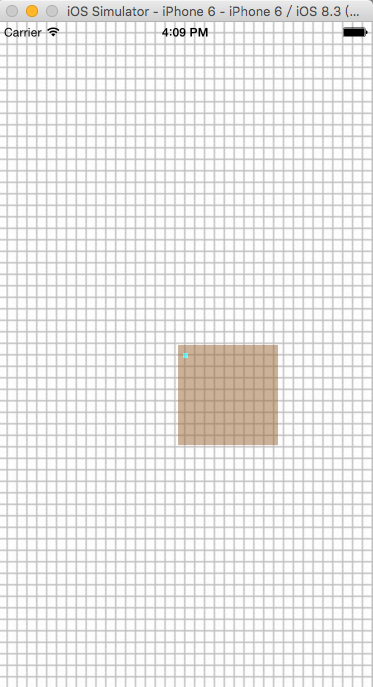
锚点: anchorPoint 以锚点为中心 执行动画 (与 渔夫固定船的点时一致的)
anchorPoint 默认是 0.5,0.5 (注意: 锚点 是一个比例)
anchorPoint 在左上角的时候 为 0,0
anchorPoint 在右上角的时候 为 1,0
anchorPoint 在左下角的时候 为 0,1
anchorPoint 在右下角的时候 为 1,1
 #import "ViewController.h"

 @interface ViewController ()

 {

     CALayer *APLayer;

     CALayer *ship;

 }

 @end

 @implementation ViewController

 - (void)viewDidLoad {

     [super viewDidLoad];

     self.view.backgroundColor = [UIColor whiteColor];

     UIImageView *imageView = [[UIImageView alloc] initWithFrame:self.view.frame];

     imageView.image = [UIImage imageNamed:@"网格.jpg"];

     [self.view addSubview:imageView];

     [self addShipLayer];

 }

 - (void)addShipLayer {

     ship = [[CALayer alloc] init];

     ship.backgroundColor = [UIColor brownColor].CGColor;

     ship.bounds = CGRectMake(, , , );

     ship.position = self.view.center;

 //    透明度 设置

     ship.opacity = 0.5;

     [self.view.layer addSublayer:ship];

     NSLog(@"锚点y:%f\n锚点x:%f", ship.anchorPoint.y, ship.anchorPoint.x);

     APLayer = [[CALayer alloc] init];

     APLayer.bounds = CGRectMake(, , , );

 //    通过ship的尺寸  设置 APLayer 的中心点

 //   position.x = ship的宽*锚点的X     position.y = ship的高*锚点的Y

     CGFloat x = CGRectGetWidth(ship.bounds)*(ship.anchorPoint.x);

     CGFloat y = CGRectGetHeight(ship.bounds)*(ship.anchorPoint.y);

     APLayer.position = CGPointMake(x, y);

     APLayer.backgroundColor = [UIColor cyanColor].CGColor;

     [ship addSublayer:APLayer];

 }

 - (void)touchesBegan:(NSSet *)touches withEvent:(UIEvent *)event {

     UITouch *touch = [touches anyObject];

     CGPoint touchPoint = [touch locationInView:self.view];

 //    通过点击屏幕的x点/屏幕的宽度 得到点击的点 与屏幕一个比例

     CGFloat x = touchPoint.x/CGRectGetWidth([UIScreen mainScreen].bounds);

 //    通过点击屏幕的y点/屏幕的高度 得到点击的点 与屏幕一个比例

     CGFloat y = touchPoint.y/CGRectGetHeight([UIScreen mainScreen].bounds);

 //    改变ship 的锚点

     ship.anchorPoint = CGPointMake(x, y);

     CGFloat cx = CGRectGetWidth(ship.bounds)*ship.anchorPoint.x;

     CGFloat cy = CGRectGetHeight(ship.bounds)*ship.anchorPoint.y;

     APLayer.position = CGPointMake(cx, cy);

     NSLog(@"锚点y:%f\n锚点x:%f", ship.anchorPoint.y, ship.anchorPoint.x);

 //    角度值经计算转化为幅度值。要把角度值转化为弧度制,可以使用一个简单的公式Mπ/180

     ship.transform = CATransform3DMakeRotation (*M_PI/, , , );

 }

 - (void)touchesEnded:(NSSet *)touches withEvent:(UIEvent *)event {

     ship.transform = CATransform3DIdentity;

 }

 - (void)didReceiveMemoryWarning {

     [super didReceiveMemoryWarning];

     // Dispose of any resources that can be recreated.

 }

 @end
CoreAnimation 核心动画二 锚点的更多相关文章
- iOS开发CoreAnimation解读之一——初识CoreAnimation核心动画编程
iOS开发CoreAnimation解读之一——初识CoreAnimation核心动画编程 一.引言 二.初识CoreAnimation 三.锚点对几何属性的影响 四.Layer与View之间的关系 ...
- CoreAnimation 核心动画 / CABasicAnimation/ CAKeyframeAnimation
- (void)createBaseAnimation{ //基础动画 CABasicAnimation *animation = [CABasicAnimation animation]; anim ...
- iOS CoreAnimation 核心动画
一 介绍 一组非常强大的动画处理API 直接作用在CALAyer上,并非UIView(UIView动画) CoreAnimation是所有动画的父类,但是不能直接使用,应该使用其子类 属性: dura ...
- ios开发图层layer与核心动画二:CATransform3D,CAlayear和UIView区别,layer的position和anchorpoint
一:CATransform3D #import "ViewController.h" @interface ViewController () @property (weak, n ...
- CoreAnimation 核心动画一 (一些常用属性 和 方法)
1.常用属性: frame bounds center alpha Transition 过渡 transform 动画效果 2.常用方法: +(void)setAnimati ...
- CoreAnimation 核心动画
- (void)createBaseAnimation{ //基础动画 CABasicAnimation *animation = [CABasicAnimation animation]; anim ...
- iOS_核心动画(二)
目 录: 一.Core Animation开发步骤 二.Core Animation的继承结构 三.CAAnimation常用的属性 四.CAPropertyAnimation(属性动画) 五.CAB ...
- iOS核心动画高级技巧之图层变换和专用图层(二)
iOS核心动画高级技巧之CALayer(一) iOS核心动画高级技巧之图层变换和专用图层(二)iOS核心动画高级技巧之核心动画(三)iOS核心动画高级技巧之性能(四)iOS核心动画高级技巧之动画总结( ...
- 核心动画——Core Animation
一. CALayer (一). CALayer简单介绍 在iOS中,你能看得见摸得着的东西基本上都是UIView,比方一个button.一个文本标签.一个文本输入框.一个图标等等.这些都是UIView ...
随机推荐
- secureCRT使用VIM时对语法高亮
国内私募机构九鼎控股打造APP,来就送 20元现金领取地址:http://jdb.jiudingcapital.com/phone.html 内部邀请码:C8E245J (不写邀请码,没有现金送) 国 ...
- 【转】单例模式(python/c++)
1. 什么是单例模式(Singleton pattern)? 单例模式是一种常用的软件设计模式.在它的核心结构中只包含一个被称为单例类的特殊类.通过单例模式可以保证系统中一个类只有一个实例而且该实例易 ...
- StructureMap 学习笔记(1)
前言 一个偶然的机会接触到了StructureMap,当时客户要求让程序具有较好的测试性,自然而然就想到了IOC 容器. 之后就去Google了一下, 不经意间在StackOverFlow找到一篇帖子 ...
- URAL 1776 C - Anniversary Firework DP
C - Anniversary FireworkTime Limit: 20 Sec Memory Limit: 256 MB 题目连接 http://acm.hust.edu.cn/vjudge/c ...
- MYSQL源码 与 DBUG
一.前言 在规模稍微大点的项目中,为了方便快速找到bug的所在,我们往往需要在代码中加入一些调试用的代码,比如加入一些printf,打印出一些重点的信息:加入assert,进行断言判断.这些比较随意的 ...
- PHP生成条形码
前阵子在做一个商家优惠券的功能,需要用到条形码,于是将资料重新整理下. 1.什么是条形码? 百度百科定义:条形码(barcode)是将宽度不等的多个黑条和空白,按照一定的编码规则排列,用以表达一组信息 ...
- mkimage command not found
转载:http://blog.csdn.net/armeasy/article/details/6217621 UIMAGE arch/arm/boot/uImage"mkimage&qu ...
- Eclipse launch failed.Binary not found解决方案
配置完成后建立工程测试,发现建立Hello World c++ Project类型的项目后可以运行测试,直接建立空项目写个测试类无法运行,提示"launch failed.Binary no ...
- Destroying the bus stations
Destroying the bus stations Time Limit: 1000MS Memory Limit: 65536K Total Submissions: 1832 Acce ...
- linux - 文件查找及压缩
文件查找: 1. which 查找可以执行文件,只搜索$PATH里的目录 $ which ls /bin/ls which只搜索$PATH里的目录,如果搜索当前目录的文件是没有任何结果的 $ ...