
【Android 界面效果25】android中include标签的使用
在一个项目中我们可能会需要用到相同的布局设计,如果都写在一个xml文件中,代码显得很冗余,并且可读性也很差,所以我们可以把相同布局的代码单独写成一个模块,然后用到的时候可以通过<include /> 标签来重用layout代码。
app_title.xml:
- <?xml version="1.0" encoding="utf-8"?>
- <RelativeLayout android:id="@+id/titleLayout" android:layout_width="fill_parent" android:layout_height="wrap_content"
- android:background="@drawable/bt" xmlns:android="http://schemas.android.com/apk/res/android">
- <TextView android:text="@string/login" android:id="@+id/title" android:textSize="20px" android:textColor="@color/white"
- android:layout_width="wrap_content" android:layout_centerInParent="true" android:layout_height="wrap_content"/>
- <Button android:text="返回" android:id="@+id/refresh" android:layout_width="wrap_content" android:layout_height="wrap_content"
- android:layout_alignParentRight="true" android:focusable="false" android:textColor="@color/white"
- android:background="@drawable/okbutton" android:layout_marginRight="3px"/>
- </RelativeLayout>
app_tradelogin.xml:
- <?xml version="1.0" encoding="utf-8"?>
- <!-- android:layout_below与 android:layout_above 是必须设置的,否则界面不规则,不设置android:layout_above本界面没有滑动效果-->
- <ScrollView android:layout_below="@+id/titleLayout" android:layout_above="@+id/appbottom" android:layout_width="fill_parent"
- android:layout_height="fill_parent" android:layout_centerInParent="true" xmlns:android="http://schemas.android.com/apk/res/android">
- <LinearLayout android:id="@+id/theWholeLinearLayout" android:orientation="vertical" android:layout_width="fill_parent"
- android:layout_height="wrap_content" android:paddingLeft="10px" android:paddingTop="6px" android:paddingRight="10px" >
- <LinearLayout android:id="@+id/linearLayoutLeft" android:orientation="vertical" android:layout_width="fill_parent" android:layout_height="wrap_content">
- <TableLayout android:id="@+id/widget43" android:layout_width="fill_parent"
- android:layout_height="fill_parent" android:orientation="vertical"
- xmlns:android="http://schemas.android.com/apk/res/android" android:stretchColumns="1">
- <TableRow >
- <!-- 引用定义好的TextView样式,如果这里的属性和样式里定义的属性重复,则这里会替换样式里定义的属性-->
- <TextView android:id="@+id/traderName" android:text="@string/traderName" style="@style/StyleTextInfo1" mce_style="@style/StyleTextInfo1"/>
- <Spinner android:id="@+id/traderNameS" android:layout_width="fill_parent" android:layout_height="wrap_content">
- </Spinner>
- </TableRow>
- <TableRow>
- <TextView android:id="@+id/departName" android:text="@string/departName" style="@style/StyleTextInfo1" mce_style="@style/StyleTextInfo1"/>
- <Spinner android:id="@+id/departNameS" android:layout_width="fill_parent" android:layout_height="wrap_content"/>
- </TableRow>
- <TableRow >
- <TextView android:id="@+id/strComponyName" android:text="@string/accType" style="@style/StyleTextInfo1" mce_style="@style/StyleTextInfo1"/>
- <Spinner android:id="@+id/accTyte" android:layout_width="fill_parent" android:layout_height="wrap_content"/>
- </TableRow>
- <TableRow >
- <TextView android:id="@+id/strUserAcc" android:text="@string/userAcc" style="@style/StyleTextInfo1" mce_style="@style/StyleTextInfo1"/>
- <EditText android:id="@+id/accEditText" android:text="" android:numeric="decimal" style="@style/StyleEditText1" mce_style="@style/StyleEditText1"/>
- </TableRow>
- <TableRow >
- <TextView android:id="@+id/userPwd" android:text="@string/userPWD" style="@style/StyleTextInfo1" mce_style="@style/StyleTextInfo1"/>
- <EditText android:id="@+id/userPwdET" android:text="" android:password="true" style="@style/StyleEditText1" mce_style="@style/StyleEditText1"/>
- </TableRow>
- <TableRow >
- <TextView android:id="@+id/commPwd" android:text="@string/commPWD" style="@style/StyleTextInfo1" mce_style="@style/StyleTextInfo1"/>
- <EditText android:id="@+id/commPwdET" android:text="" android:password="true" style="@style/StyleEditText1" mce_style="@style/StyleEditText1"/>
- </TableRow>
- </TableLayout>
- </LinearLayout>
- <LinearLayout android:orientation="vertical" android:layout_width="fill_parent" android:layout_height="wrap_content">
- <LinearLayout android:id="@+id/linearLayoutTab1" android:layout_height="wrap_content"
- android:layout_width="fill_parent" android:orientation="horizontal">
- <LinearLayout android:id="@+id/linearLayoutTab2" android:layout_height="wrap_content"
- android:layout_width="fill_parent" android:orientation="horizontal" android:layout_weight="1">
- <CheckBox android:id="@+id/recordAcc" android:layout_width="wrap_content" android:layout_height="wrap_content"/>
- <TextView android:id="@+id/commPwd" android:text="@string/saveUserAcc" style="@style/StyleTextInfo1" mce_style="@style/StyleTextInfo1"/>
- </LinearLayout>
- <LinearLayout android:id="@+id/linearLayoutTab2" android:layout_height="wrap_content"
- android:layout_width="fill_parent" android:orientation="horizontal" android:layout_weight="1">
- <CheckBox android:id="@+id/hideAcc" android:layout_width="wrap_content" android:layout_height="wrap_content"/>
- <TextView android:id="@+id/commPwd" android:text="@string/ycUserAcc" style="@style/StyleTextInfo1" mce_style="@style/StyleTextInfo1"/>
- </LinearLayout>
- </LinearLayout>
- <LinearLayout android:id="@+id/linearLayoutTab1" android:layout_height="wrap_content"
- android:layout_width="fill_parent" android:orientation="horizontal">
- <LinearLayout android:layout_width="220px" android:layout_height="wrap_content" android:orientation="horizontal"
- android:gravity="center">
- <Button android:id="@+id/confirmexch" android:gravity="center" android:layout_width="wrap_content"
- android:layout_height="50px" android:textSize="22dp" android:text="@string/login" android:layout_weight="1"
- android:focusable="false" android:textColor="@color/white" android:background="@drawable/buttonl"/>
- </LinearLayout>
- <LinearLayout android:id="@+id/linearLayoutTab" android:layout_height="wrap_content"
- android:layout_width="fill_parent" android:gravity="center">
- <ImageView android:layout_width="wrap_content" android:layout_height="50px" android:id="@+id/myImage"/>
- </LinearLayout>
- </LinearLayout>
- </LinearLayout>
- </LinearLayout>
- </ScrollView>
app_bottom.xml:
- <?xml version="1.0" encoding="utf-8"?>
- <LinearLayout android:id="@+id/appbottom" android:orientation="vertical" android:layout_width="fill_parent"
- android:layout_height="wrap_content" android:layout_alignParentBottom="true"
- xmlns:android="http://schemas.android.com/apk/res/android">
- <LinearLayout android:orientation="horizontal" android:layout_width="fill_parent"
- android:layout_height="wrap_content" android:background="@drawable/light">
- <ImageView android:id="@+id/about" android:layout_width="30px" android:layout_height="wrap_content" android:src="@drawable/ttt"
- android:layout_alignParentLeft="true"/>
- <TextView android:id="@+id/light" android:layout_width="fill_parent" android:layout_height="wrap_content" android:textColor="@color/black"/>
- </LinearLayout>
- <LinearLayout android:orientation="horizontal" android:layout_width="fill_parent"
- android:layout_height="wrap_content" android:background="@drawable/mainmenu">
- <Button android:id="@+id/quotButton" android:layout_weight="1" android:layout_width="52px" android:layout_height="wrap_content"
- android:textColor="@color/white" android:text="" android:background="@drawable/button1"/>
- <Button android:id="@+id/entrustButton" android:layout_weight="1" android:layout_width="52px" android:layout_height="wrap_content"
- android:textColor="@color/white" android:text="" android:background="@drawable/button1"/>
- <Button android:id="@+id/queryButton" android:layout_weight="1" android:layout_width="52px" android:layout_height="wrap_content"
- android:textColor="@color/white" android:text="" android:background="@drawable/button1"/>
- <Button android:id="@+id/yinZhengButton" android:layout_weight="1" android:layout_width="52px" android:layout_height="wrap_content"
- android:textColor="@color/white" android:text="" android:background="@drawable/button1"/>
- <Button android:id="@+id/recordButton" android:layout_weight="1" android:layout_width="52px" android:layout_height="wrap_content"
- android:textColor="@color/white" android:text="" android:background="@drawable/button1"/>
- <Button android:id="@+id/logoutButton" android:layout_weight="1" android:layout_width="52px" android:layout_height="wrap_content"
- android:textColor="@color/white" android:text="" android:background="@drawable/button1"/>
- </LinearLayout>
- </LinearLayout>
tradelogin_portrait.xml:
- <?xml version="1.0" encoding="utf-8"?>
- <RelativeLayout android:layout_width="fill_parent" android:layout_height="fill_parent" style="@style/StyleLayoutMain" mce_style="@style/StyleLayoutMain"
- xmlns:android="http://schemas.android.com/apk/res/android">
- <!-- include标签内不能设置RelativeLayout属性,如android:layout_alignParentBottom,因为不起作用 -->
- <!-- include标签内设置id属性后(android:id),其引用的布局layout内的id属性就不起作用了,怀疑是其引用的layout外层包裹了一层include标签
- 或者是覆盖了其内的属性id-->
- <!-- 如果没有include标签,所有布局代码都写在一个xml文件中,界面会显得很冗余,可读性很差。而且界面加载的时候是按照顺序加载的,前面的布局不能
- 调用其后面的布局id。而采用include后,一个include中可以引用其后的include中的布局id属性 -->
- <include android:id="@id/titleLayout" layout="@layout/app_title" />
- <include layout="@layout/app_tradelogin"/>
- <include layout="@layout/app_bottom"/>
- </RelativeLayout>
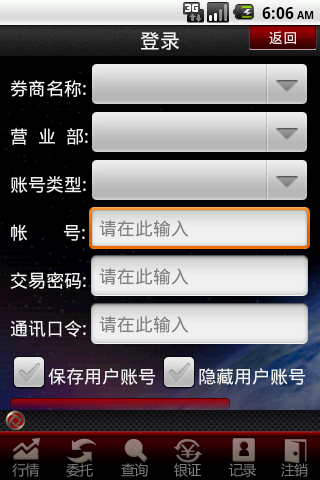
效果如下:
【Android 界面效果25】android中include标签的使用的更多相关文章
- android中include标签使用详解
android中include标签是为了便于控件的覆用的一个很好解决方案. 但是也有一些需要注意的地方,下面是本人在项目中碰到过的一个问题,做此记录,便于以后查看. include标签用法. ...
- Android中include标签的使用
在Android的开发中,我们知道布局文件可以让我们很方便的对各个UI控件进行位置安排跟属性设置,而在程序中可以直接取得控件并赋予对应操作功能.但是,如果是一个复杂的界面设计,我们把所有布局都放在一个 ...
- Android中include标签的使用(打开引用布局,隐藏当前布局)
在开发app的时候,有时候一个布局会反复用到,可以把反复用到的布局单独写一个xml文件,什么时候用到就用includ标签引入xml 下面是我写的反复用到的一个xml,里面有2个button,一个Tex ...
- 【Android 界面效果19】Android中shape的使用
Android中常常使用shape来定义控件的一些显示属性,今天看了一些shape的使用,对shape有了大体的了解,稍作总结: 先看下面的代码: <shape> ...
- 【Android 界面效果32】ImageView中XML属性src和background的区别
background会根据ImageView组件给定的长宽进行拉伸,而src就存放的是原图的大小,不会进行拉伸. src是图片内容(前景),bg是背景,可以同时使用. 此外:scaleType只对sr ...
- 【Android 界面效果30】Android中ImageSwitcher结合Gallery展示SD卡中的资源图片
本文主要是写关于ImageSwitcher结合Gallery组件如何展示SDCard中的资源图片,相信大家都看过API Demo 中也有关于这个例子的,但API Demo 中的例子是展示工程中Draw ...
- 【Android 界面效果12】EditText中的多行输入问题
------- 源自梦想.永远是你IT事业的好友.只是勇敢地说出我学到! ---------- 我们在使用EditText进行多行输入的时候,通常的写法如下: <EditText android ...
- 【Android 界面效果31】Android--侧滑菜单应用的实现
侧滑菜单应用现在非常多,而且实现方式也多种多样.通过在网上的多方查找,我找到郭霖少侠的这篇文章:http://blog.csdn.net/guolin_blog/article/details/874 ...
- 【Android 界面效果21】Android ViewPager使用详解
这是谷歌官方给我们提供的一个兼容低版本安卓设备的软件包,里面包囊了只有在安卓3.0以上可以使用的api.而viewpager就是其中之一利用它,我们可以做很多事情,从最简单的导航,到页面菜单等等.那如 ...
随机推荐
- poj 2299 Ultra-QuickSort(求逆序对)
Ultra-QuickSort Time Limit: 7000MS Memory Limit: 65536K Total Submissions: 52778 Accepted: 19348 ...
- LoadRunner执行自动化以及报告自动化的方法
There are three major articles KB articles on Automating LR: 1. Command line arguments for the LoadR ...
- C#中的Collection 3
IList<T> 和 ICollection<T> 最重要的一些类型 List<T>: Encapsulates[T], like array, but also ...
- (剑指Offer)面试题17:合并两个排序的链表
题目: 输入两个递增排序的链表,合并这两个链表并使新链表中的结点仍然时按照递增排序的. 链表结点定义如下: struct ListNode{ int val; ListNode* next; }; 思 ...
- Linux 批量添加用户
#!/bin/bashfor i in $(seq 1 50) #会建立1-50的用户douseradd student$i -g studentecho student$i |passwd ...
- 把自定义类实例存储到LSO
使用flash.net.registerClassAlias( )方法保留类型信息并把类实例添加到共享对象的data属性上. LSOs 使用特殊的二进制格式,Action Message Format ...
- Codeforces Round #136 (Div. 1)C. Little Elephant and Shifts multiset
C. Little Elephant and Shifts Time Limit: 20 Sec Memory Limit: 256 MB 题目连接 http://codeforces.com/pro ...
- Codeforces Round #309 (Div. 2) A. Kyoya and Photobooks 字符串水题
A. Kyoya and Photobooks Time Limit: 20 Sec Memory Limit: 256 MB 题目连接 http://codeforces.com/contest/5 ...
- 《Java并发编程实战》第三章 对象的共享 读书笔记
一.可见性 什么是可见性? Java线程安全须要防止某个线程正在使用对象状态而还有一个线程在同一时候改动该状态,并且须要确保当一个线程改动了对象的状态后,其它线程能够看到发生的状态变化. 后者就是可见 ...
- ORA-01489: result of string concatenation is too long
ORA-01489: result of string concatenation is too long Cause: String concatenation result is more tha ...