
spring 5.x 系列第17篇 —— 整合websocket (xml配置方式)
源码Gitub地址:https://github.com/heibaiying/spring-samples-for-all
一、说明
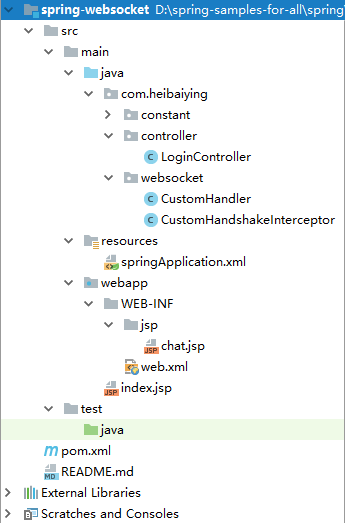
1.1 项目结构说明
- 项目模拟一个简单的群聊功能,为区分不同的聊天客户端,登录时候将临时用户名存储在session当中;
- CustomHander为消息的自定义处理器;
- CustomHandershakerInterceptor为自定义的 websocket 的握手拦截器;
- 项目以web的方式构建。
1.2 依赖说明
除了基本的spring 依赖外,还需要导入webSocket的依赖包
 <!--spring webSocket 的依赖包 -->
<dependency>
    <groupId>org.springframework</groupId>
    <artifactId>spring-websocket</artifactId>
    <version>5.1.3.RELEASE</version>
</dependency>
二、spring websocket
2.1 创建消息处理类,继承自TextWebSocketHandler
/**
 * @author : heibaiying
 * @description : 自定义消息处理类
 */
public class CustomHandler extends TextWebSocketHandler {

    private Map<String, WebSocketSession> nameAndSession = new ConcurrentHashMap<>();

    // 建立连接时候触发
    @Override
    public void afterConnectionEstablished(WebSocketSession session)  {
        String username = getNameFromSession(session);
        nameAndSession.putIfAbsent(username, session);
    }

    // 关闭连接时候触发
    @Override
    public void afterConnectionClosed(WebSocketSession session, CloseStatus status) {
        String username = getNameFromSession(session);
        nameAndSession.remove(username);
    }

    // 处理消息
    @Override
    protected void handleTextMessage(WebSocketSession session, TextMessage message) throws Exception {
        // 防止中文乱码
        String msg = URLDecoder.decode(message.getPayload(), "utf-8");
        String username = getNameFromSession(session);
        // 简单模拟群发消息
        TextMessage reply = new TextMessage(username + " : " + msg);
        nameAndSession.forEach((s, webSocketSession)
                -> {
            try {
                webSocketSession.sendMessage(reply);
            } catch (IOException e) {
                e.printStackTrace();
            }
        });
    }

    private String getNameFromSession(WebSocketSession session) {
        Map<String, Object> attributes = session.getAttributes();
        return (String) attributes.get(Constant.USER_NAME);
    }
}
2.2 创建websocket 握手拦截器(如果没有权限拦截等需求,这一步不是必须的)
/**
 * @author : heibaiying
 * @description : 可以按照需求实现权限拦截等功能
 */
public class CustomHandshakeInterceptor extends HttpSessionHandshakeInterceptor {

    @Override
    public boolean beforeHandshake(ServerHttpRequest request, ServerHttpResponse response, WebSocketHandler wsHandler, Map<String, Object> attributes) throws Exception {
        InetSocketAddress remoteAddress = request.getRemoteAddress();
        InetAddress address = remoteAddress.getAddress();
        System.out.println(address);
        /*
         * 最后需要要显示调用父类方法,父类的beforeHandshake方法
         * 把ServerHttpRequest 中session中对应的值拷贝到WebSocketSession中。
         * 如果我们没有实现这个方法,我们在最后的handler处理中 是拿不到 session中的值
         * 作为测试 可以注释掉下面这一行 可以发现自定义处理器中session的username总是为空
         */
        return super.beforeHandshake(request, response, wsHandler, attributes);
    }
}
2.3 配置websocket
<?xml version="1.0" encoding="UTF-8"?>
<beans xmlns="http://www.springframework.org/schema/beans"
       xmlns:xsi="http://www.w3.org/2001/XMLSchema-instance"
       xmlns:context="http://www.springframework.org/schema/context"
       xmlns:mvc="http://www.springframework.org/schema/mvc"
       xmlns:websocket="http://www.springframework.org/schema/websocket"
       xsi:schemaLocation="http://www.springframework.org/schema/beans
        http://www.springframework.org/schema/beans/spring-beans.xsd
        http://www.springframework.org/schema/context
        http://www.springframework.org/schema/context/spring-context-4.1.xsd
        http://www.springframework.org/schema/mvc
        http://www.springframework.org/schema/mvc/spring-mvc-4.1.xsd
        http://www.springframework.org/schema/websocket
        http://www.springframework.org/schema/websocket/spring-websocket.xsd">

    <!-- 开启注解包扫描-->
    <context:component-scan base-package="com.heibaiying.*"/>

    <!--使用默认的Servlet来响应静态文件 -->
    <mvc:default-servlet-handler/>

    <!-- 开启注解驱动 -->
    <mvc:annotation-driven/>

    <!-- 配置视图解析器 -->
    <bean class="org.springframework.web.servlet.view.InternalResourceViewResolver"
          id="internalResourceViewResolver">
        <!-- 前缀 -->
        <property name="prefix" value="/WEB-INF/jsp/"/>
        <!-- 后缀 -->
        <property name="suffix" value=".jsp"/>
    </bean>

    <!--配置webSocket-->
    <bean id="customHandler" class="com.heibaiying.websocket.CustomHandler"/>
    <websocket:handlers>
        <!--指定webSocket 地址-->
        <websocket:mapping path="/socket" handler="customHandler"/>
        <!--webSocket握手-->
        <websocket:handshake-interceptors>
            <bean class="com.heibaiying.websocket.CustomHandshakeInterceptor"/>
        </websocket:handshake-interceptors>
    </websocket:handlers>

</beans>
2.4 前端 websocket 的实现
<%@ page contentType="text/html;charset=UTF-8" language="java" %>
<html>
<head>
    <title>${sessionScope.get("username")}您好!欢迎进入群聊大厅!</title>
</head>
<body>
<input id="message" type="text">
<button id="btn">发送消息</button>
<div id="show">

</div>
<script>
    let btn = document.getElementById("btn");
    let message = document.getElementById("message");
    let show = document.getElementById("show");
    let ws = new WebSocket("ws://localhost:8080/socket");
    ws.onmessage = function (evt) {
        let node = document.createElement("div");
        node.innerHTML = "<h5>" + evt.data + "</h5>";
        show.appendChild(node);
    };
    btn.addEventListener("click", function () {
        let data = message.value;
        console.log(data);
        if (data) {
            ws.send(encodeURI(data));
        } else {
            alert("请输入消息后发送");
        }
        message.value = "";
    });
    // 关闭页面时候关闭ws
    window.addEventListener("beforeunload", function(event) {
        ws.close();
    });
</script>
</body>
</html>
2.5 简单登录的实现
<%@ page contentType="text/html;charset=UTF-8" language="java" %>
<html>
<head>
    <title>Title</title>
</head>
<body>
<form action="${pageContext.request.contextPath}/login" method="post">
    <input name="username" type="text">
    <button id="btn">输入临时用户名后登录!</button>
</form>
</body>
</html>
@Controller
public class LoginController {

    @PostMapping("login")
    public String login(String username, HttpSession session){
        session.setAttribute(Constant.USER_NAME,username);
        return "chat";
    }
}
附:源码Gitub地址:https://github.com/heibaiying/spring-samples-for-all
spring 5.x 系列第17篇 —— 整合websocket (xml配置方式)的更多相关文章
- spring 5.x 系列第18篇 —— 整合websocket (代码配置方式)
源码Gitub地址:https://github.com/heibaiying/spring-samples-for-all 一.说明 1.1 项目结构说明 项目模拟一个简单的群聊功能,为区分不同的聊 ...
- spring 5.x 系列第13篇 —— 整合RabbitMQ (xml配置方式)
源码Gitub地址:https://github.com/heibaiying/spring-samples-for-all 一.说明 1.1 项目结构说明 本用例关于rabbitmq的整合提供简单消 ...
- spring 5.x 系列第11篇 —— 整合memcached (xml配置方式)
文章目录 一.说明 1.1 XMemcached客户端说明 1.2 项目结构说明 1.3 依赖说明 二.spring 整合 memcached 2.1 单机配置 2.2 集群配置 2.3 存储基本类型 ...
- spring 5.x 系列第9篇 —— 整合mongodb (xml配置方式)
源码Gitub地址:https://github.com/heibaiying/spring-samples-for-all 一.说明 1.1 项目结构说明 配置文件位于resources下,项目以单 ...
- spring 5.x 系列第15篇 —— 整合dubbo (xml配置方式)
文章目录 一. 项目结构说明 二.项目依赖 三.公共模块(dubbo-common) 四. 服务提供者(dubbo-provider) 4.1 productService是服务的提供者( 商品数据用 ...
- spring 5.x 系列第1篇 —— springmvc基础 (xml配置方式)
文章目录 一.搭建hello spring工程 1.1 项目搭建 1.2 相关配置讲解 二.配置自定义拦截器 三.全局异常处理 四.参数绑定 4.1 参数绑定 4.2 关于日期格式转换的三种方法 五. ...
- spring 5.x 系列第14篇 —— 整合RabbitMQ (代码配置方式)
源码Gitub地址:https://github.com/heibaiying/spring-samples-for-all 一.说明 1.1 项目结构说明 本用例关于rabbitmq的整合提供简单消 ...
- spring 5.x 系列第12篇 —— 整合memcached (代码配置方式)
文章目录 一.说明 1.1 XMemcached客户端说明 1.2 项目结构说明 1.3 依赖说明 二.spring 整合 memcached 2.1 单机配置 2.2 集群配置 2.3 存储基本类型 ...
- spring 5.x 系列第10篇 —— 整合mongodb (代码配置方式)
源码Gitub地址:https://github.com/heibaiying/spring-samples-for-all 一.说明 1.1 项目结构说明 配置文件位于com.heibaiying. ...
随机推荐
- 【转】NIO与传统IO的区别
转自:http://blog.csdn.net/zhouhl_cn/article/details/6568119 传统的socket IO中,需要为每个连接创建一个线程,当并发的连接数量非常巨大时, ...
- Gradle Android它自己的编译脚本教程的最新举措(提供demo源代码)
一.前言 Gradle 是以 Groovy 语言为基础,面向Java应用为主.基于DSL(领域特定语言)语法的自己主动化构建工具. 上面这句话我认为写得非常官方,大家仅仅需知道Gradle能够用来an ...
- 2 abp 领域层创建实体
领域层: LearningMpaAbp.Core项目 基础服务层:EntityFramework对应的项目 1 在领域层新建Tasks文件夹 在文件夹下新建Task类 但是注意 Task类必须要继 ...
- XF相对布局
using System; using Xamarin.Forms; using Xamarin.Forms.Xaml; [assembly: XamlCompilation (XamlCompila ...
- ubuntu 关闭 phpmyadmin
apache 有很多管理服务器的命令.apt-get installl phpmyadmin后突然想暂时关闭phpmyadmin,只需要a2disconf phpmyadmin即可.需要启用的时候再输 ...
- MEF 插件式开发 - WPF 初体验
原文:MEF 插件式开发 - WPF 初体验 目录 MEF 在 WPF 中的简单应用 加载插件 获取元数据 依赖注入 总结 MEF 在 WPF 中的简单应用 MEF 的开发模式主要适用于插件化的业务场 ...
- Win8 Metro(C#)数字图像处理--2.54迭代法图像二值化
原文:Win8 Metro(C#)数字图像处理--2.54迭代法图像二值化 [函数名称] 迭代法图像二值化 int IterativeThSegment(WriteableBitm ...
- Win8 Metro(C#)数字图像处理--2.42图像光照效果算法
原文:Win8 Metro(C#)数字图像处理--2.42图像光照效果算法 [函数名称] 图像光照效果 SunlightProcess(WriteableBitmap src,int X,in ...
- 浅谈.NET编译时注入(C#-->IL)
原文:浅谈.NET编译时注入(C#-->IL) .NET是一门多语言平台,这是我们所众所周知的,其实现原理在于因为了MSIL(微软中间语言)的一种代码指令平台.所以.NET语言的编译就分为了两部 ...
- 解决C++项目使用sqlite中文乱码问题
我参考的是这篇文章:https://www.2cto.com/database/201411/354891.html 理论是:sqlite使用的是UTF-8,C++中用的字符串是ascii或unico ...