
WPF整理-使用ResourceDictionary管理Logical Resources
“Logical resources may be of various types, such as brushes, geometries, styles, and templates.
Placing all those resources in a single file such as App.xaml hinders maintainability. A better
approach would be to separate resources of different types (or based on some other criteria) to
their own files. Still, they must be referenced somehow from within a common file such as App.
xaml so they are recognized.”
为了增加资源文件的可维护性,我们应该使用ResourceDictionary对资源进行:分类、汇总。
如何实现呢?举个例子
1.新建一个WPF Application,在Application中添加一个New Item,选择ResourceDictionary。

譬如,命名为Brushes.xaml,我们用它来存放一些笔刷。打开,我们添加一个笔刷如下:
Brushes.xaml:
<ResourceDictionary xmlns="http://schemas.microsoft.com/winfx/2006/xaml/presentation"

                    xmlns:x="http://schemas.microsoft.com/winfx/2006/xaml">

    <LinearGradientBrush EndPoint="1,0" x:Key="brush1">

        <GradientStop Color="Violet" Offset="0" />

        <GradientStop Color="Orange" Offset=".7" />

        <GradientStop Color="Brown" Offset="1" />

    </LinearGradientBrush>

</ResourceDictionary>
2.在App.xaml中Merge则个Resource。
“Open App.xaml. We need to merge external resource dictionaries into the main
application dictionary.”
打开App.xaml,添加如下内容:
<Application x:Class="ManagingLogicalResources.App"

             xmlns="http://schemas.microsoft.com/winfx/2006/xaml/presentation"

             xmlns:x="http://schemas.microsoft.com/winfx/2006/xaml"

             StartupUri="MainWindow.xaml">

    <Application.Resources>

        <ResourceDictionary>

            <ResourceDictionary.MergedDictionaries>

                <ResourceDictionary Source="Brushes.xaml"/>

            </ResourceDictionary.MergedDictionaries>

        </ResourceDictionary>

    </Application.Resources>

</Application>
3.这样我们就可以在页面中正常使用了。
<Window x:Class="ManagingLogicalResources.MainWindow"

        xmlns="http://schemas.microsoft.com/winfx/2006/xaml/presentation"

        xmlns:x="http://schemas.microsoft.com/winfx/2006/xaml"

        Title="MainWindow" Height="350" Width="525">

    <Grid>

        <Ellipse Fill="{StaticResource brush1}"/>

    </Grid>

</Window>
效果如下: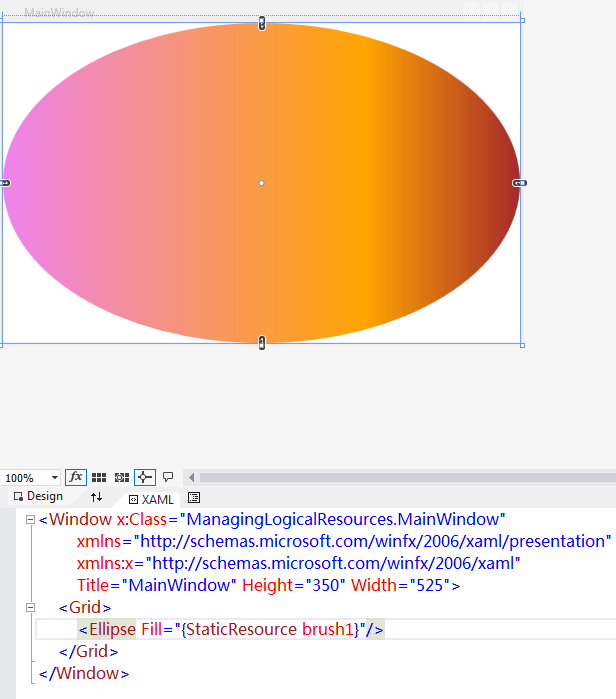
-----------------------------------
在实际开发中更常用的做法是:直接在使用的View内部Merge。
<Window x:Class="WPFMergedDicitonary.MainWindow"

        xmlns="http://schemas.microsoft.com/winfx/2006/xaml/presentation"

        xmlns:x="http://schemas.microsoft.com/winfx/2006/xaml"

        Title="MainWindow" Height="350" Width="525">

    <Window.Resources>

        <ResourceDictionary>

            <ResourceDictionary.MergedDictionaries>

                <ResourceDictionary Source="Brushes.xaml"/>

            </ResourceDictionary.MergedDictionaries>

        </ResourceDictionary>

    </Window.Resources>

    <Grid>

        <Ellipse Fill="{StaticResource brush1}"/>

    </Grid>

</Window>
效果同上,如下:
WPF整理-使用ResourceDictionary管理Logical Resources的更多相关文章
- 使用ResourceDictionary管理Logical Resources
WPF整理-使用ResourceDictionary管理Logical Resources “Logical resources may be of various types, such as br ...
- WPF整理-使用逻辑资源
"Traditional application resources consist of binary chunks of data, typically representing thi ...
- WPF整理-Style
"Consistency in a user interface is an important trait; there are many facets of consistency, ...
- WPF整理-XAML构建后台类对象
1.XAML 接触WPF的第一眼就是XAML---XAML是用来描绘界面的.其实不然! "Actually, XAML has nothing to do with UI. It's mer ...
- WPF整理-使用用户选择主题的颜色和字体
“Sometimes it's useful to use one of the selected colors or fonts the user has chosen in theWindows ...
- WPF整理-自定义一个扩展标记(custom markup extension)
"Markup extensions are used to extend the capabilities of XAML, by providing declarativeoperati ...
- WPF整理-XAML访问静态属性
"XAML provides an easy way to set values of properties—type converters and the extended propert ...
- WPF整理--动态绑定到Logical Resource
“What happens if we replace aspecific resource? Would that be reflected in all objects using the res ...
- WPF整理-二进制资源和内容
WPF中的Binary Resource(二进制资源)是相对于前面所说的Logical resource(逻辑资源)而说的,一般指Image.XML文件等. 注意:这里说的是Resource" ...
随机推荐
- No plugin found for prefix 'mybatis-generator' in the current project
http://blog.csdn.net/you23hai45/article/details/50792430 1.错误描述 F:\workspaces\Mybatis>mvn mybatis ...
- 关于python数据序列化的那些坑
-----世界上本来没那么多坑,python更新到3以后坑就多了 无论哪一门语言开发,都离不了数据储存与解析,除了跨平台性极好的xml和json之外,python要提到的还有自身最常用pickle模块 ...
- JS 模块化和打包方案收集
1.这里想讨论的是拆分规则,不是在问哪个工具怎么使用.2.这里没有在想找正确答案,因为感觉这个问题要结合具体业务场景. 随着项目开发越来越大,一开始代码全打包到一个文件的方式,让文件越来越大,接下来要 ...
- ***HTML +CSS 总结与归纳
一.首先W3C标准 结构.表现.动作 与 html.css.javascript相对应,它本意是结构表现分离,而且按照html规范编写结构. 标签方面: -所有标签都要小写.关闭.并且合理嵌套,i ...
- Selenium 简单的例子
Selenium是一个web自动化验收测试框架. Selenium Client Driver - Selenium 2.0 Document http://seleniumhq.github.i ...
- IntelliJ Idea 常用快捷键 列表
1. -----------自动代码-------- 常用的有fori/sout/psvm+Tab即可生成循环.System.out.main方法等boilerplate样板代码 例如要输入for(U ...
- 开发常用技巧之css字体编码
简介: 当我们写css时,通常需要设置字体名称,我们可以直接写中文,这样没错,但是文件编码为GB2312.UTF-8等不匹配将会出现乱码.因此将中文字体名称转为unicode编码来避免出现这些错误. ...
- Visual Studio 禁用Resharpe插件
和普通的插件不一样,对于Resharper7+版本需要使用启动参数:/Resharper.Suspend
- 【NuGet】搭建自己团队或公司的NuGet
昨天接到领导安排,要搭建自己的NuGet,归结原因是自己前段时间在NuGet中安装mongoDb driver时,发现访问不了,无奈领导找的运维解决,也是此次任务的“导火索”……,好了,还是干活吧. ...
- ps教程连接
教程1:http://www.68ps.com/jc/ps_tp.asp 教程2:http://www.3lian.com/edu/photoshop/