
WPF整理-使用逻辑资源
"Traditional application resources consist of binary chunks of data, typically representing things such as icons, bitmaps, strings, and XML. In fact, the .NET framework provides
generic support for these through the ResourceManager class.
WPF is no different—binary resources play an important role in a typical application.
However, WPF goes a lot further with another kind of resource: logical resources.
These are objects, any objects, which can be shared and used in a multitude of locations
throughout the application; they can even be accessed across assemblies. Some
of WPF's features, such as implicit (automatic) styles and type-based data templates,
rely on the logical resources system."
传统的资源一般是指大块的二进制资源,典型的如图片、xml文件等,.NET提供了ResourceManager类来管理这些资源。而WPF引进了另一种形式的资源-logical resources(逻辑资源),它可以是任何需要共享的对象。WPF的许多特性也都依赖逻辑资源系统。
“These objects are typically placed inside a
ResourceDictionary and located at runtime using a hierarchical search.”
下面通过一个例子,说明为什么需要logical resource、如何在XAML中及Code behind file中访问logical resource。
1.为什么需要Logical Resource?
假如我们需要为一个rectangle的Fill属性赋一个LinearGradientBrush值。通常实现如下:
        <Rectangle Height="100" Stroke="Red">

            <Rectangle.Fill>

                <LinearGradientBrush >

                    <GradientStop Offset="0.3" Color="Green"/>

                    <GradientStop Offset="0.8" Color="Brown"/>

                </LinearGradientBrush>

            </Rectangle.Fill>

        </Rectangle>
假如,现在我们另外还有1个Rectangle需要同样的Brush,当然我们可以Copy上面的<Rectangle.Fill>...</Rectangle.Fill>,这样可以满足需求,但是这样的Copy很让人头疼。
Logical resource能够解决这个问题。
2.定义logical resource
我们可以把上面的Brush放到Window.Resources中,如下:
    <Window.Resources>

        <LinearGradientBrush x:Key="brush1">

            <GradientStop Offset="0.3" Color="Green"/>

            <GradientStop Offset="0.8" Color="Yellow"/>

        </LinearGradientBrush>

    </Window.Resources>
注意以下2点:
a.“Every element (deriving from FrameworkElement) has a Resources property of type
ResourceDictionary. This means that every element can have resources associated with
it.”
每个element都有Resources属性。
b.“The Resources property is a dictionary.In XAML, the x:Key attribute must be specified (most of the time; exceptions to this rule
will be discussed in relation to styles and data templates).”
在XAML中x:key必须声明,style和data templates有些例外(x:Type)。
3.在XAML中使用
添加完成后,我们可以在XAML中通过StaticResource(后面介绍DynamicResource)这个markup extension,很方便的使用这个logical resource
<Rectangle Height="100" Fill="{StaticResource brush1}"/>
4.在Code Behind File中使用
如为下面的Ellipse赋Fill值
<Ellipse x:Name="ellipse2" Stroke="Red" StrokeThickness="20" Height="100" />
我们有两种方法获取这个Resource。
方法a:通过FrameworkElement.FindResource ,此方法在找不到的时候放回null,因此最好加个null判断。
Brush brush1 = (Brush)ellipse2.FindResource("brush1");

if (brush1 != null)

{

   ellipse2.Fill = brush1;

}
方法b.是资源可以通过它的索引直接获得。由于我们知道定义资源的是哪个element,我们可以直接使用element.Resources["name"]获得。本例定义的是Window的资源,因此是:
Brush brush = (Brush)this.Resources["brush1"];
5.Logical Resource是如何匹配的?
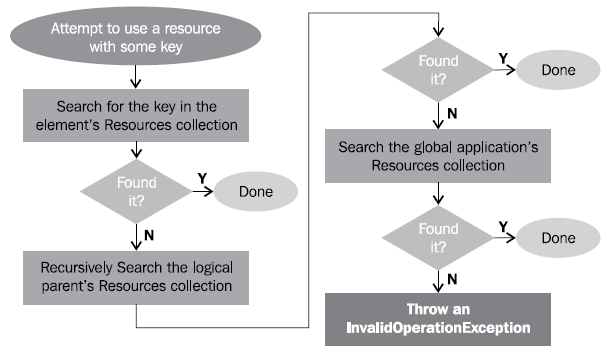
如上面的
<Rectangle Height="100" Fill="{StaticResource brush1}"/>
“This causes a search from the current element (the Rectangle) up the element tree, looking
for a resource with the key brush1; if found, its associated object is used as the property's
value. If not found on any element up to the root Window, the search continues within the
resources of Application (typically located in the App.xaml file). If not found even there,
a runtime exception is thrown. This is depicted in the following diagram:”
附:完整的XAML和Code Behind File如下:
<Window x:Class="UsingLogicalResources.MainWindow"

        xmlns="http://schemas.microsoft.com/winfx/2006/xaml/presentation"

        xmlns:x="http://schemas.microsoft.com/winfx/2006/xaml"

        Title="MainWindow" Height="350" Width="525">

    <Window.Resources>

        <LinearGradientBrush x:Key="brush1">

            <GradientStop Offset="0.3" Color="Green"/>

            <GradientStop Offset="0.8" Color="Yellow"/>

        </LinearGradientBrush>

    </Window.Resources>

    <StackPanel>

        <Rectangle Height="100" Stroke="Red">

            <Rectangle.Fill>

                <LinearGradientBrush >

                    <GradientStop Offset="0.3" Color="Green"/>

                    <GradientStop Offset="0.8" Color="Brown"/>

                </LinearGradientBrush>

            </Rectangle.Fill>

        </Rectangle>

        <Ellipse x:Name="ellipse2" Stroke="Red" StrokeThickness="20" Height="100" />

        <Rectangle Height="100" Fill="{StaticResource brush1}"/>

    </StackPanel>

</Window>
using System;

using System.Collections.Generic;

using System.Linq;

using System.Text;

using System.Threading.Tasks;

using System.Windows;

using System.Windows.Controls;

using System.Windows.Data;

using System.Windows.Documents;

using System.Windows.Input;

using System.Windows.Media;

using System.Windows.Media.Imaging;

using System.Windows.Navigation;

using System.Windows.Shapes;

namespace UsingLogicalResources

{

    /// <summary>

    /// Interaction logic for MainWindow.xaml

    /// </summary>

    public partial class MainWindow : Window

    {

        public MainWindow()

        {

            InitializeComponent();

            //Brush brush1=(Brush)this.Resources["brush1"];

            Brush brush1 = (Brush)ellipse2.FindResource("brush1");

            if (brush1 != null)

            {

                ellipse2.Fill = brush1;

            }

        }

    }

}
运行,如下: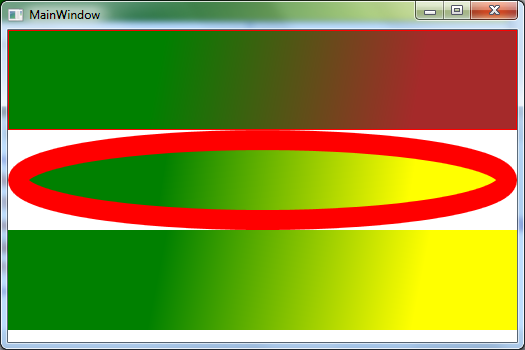
WPF整理-使用逻辑资源的更多相关文章
- WPF整理-二进制资源和内容
WPF中的Binary Resource(二进制资源)是相对于前面所说的Logical resource(逻辑资源)而说的,一般指Image.XML文件等. 注意:这里说的是Resource" ...
- WPF教程九:理解WPF中的对象资源
在WPF中,所有继承自FrameworkElement的元素都包含一个Resources属性,这个属性就是我们这篇要讲的资源. 这一篇讲解的资源是不是上一篇的程序集资源(那个是在编译过程中打包到程序集 ...
- WPF整理-Style
"Consistency in a user interface is an important trait; there are many facets of consistency, ...
- WPF整理-XAML构建后台类对象
1.XAML 接触WPF的第一眼就是XAML---XAML是用来描绘界面的.其实不然! "Actually, XAML has nothing to do with UI. It's mer ...
- 【转载】国外程序员整理的Java资源大全
以下转载自: 推荐!国外程序员整理的Java资源大全中文版 https://github.com/akullpp/awesome-java英文版 Java 几乎是许多程序员们的入门语言,并且也是 ...
- WPF之神奇的资源
原文:WPF之神奇的资源 WPF中的资源有两种,一种称为"程序集资源"(assembly resource),另一种称为"对象资源"(object resour ...
- WPF整理-使用用户选择主题的颜色和字体
“Sometimes it's useful to use one of the selected colors or fonts the user has chosen in theWindows ...
- WPF整理-自定义一个扩展标记(custom markup extension)
"Markup extensions are used to extend the capabilities of XAML, by providing declarativeoperati ...
- WPF整理-XAML访问静态属性
"XAML provides an easy way to set values of properties—type converters and the extended propert ...
随机推荐
- Swift3.0P1 语法指南——枚举
原档: https://developer.apple.com/library/prerelease/ios/documentation/Swift/Conceptual/Swift_Programm ...
- jquery解析php通过ajax传过来的json二维数组对象
ajax获得php传过来的json二维数组对象,jquery解析 php代码: <?php $news = array( '武汉'=>array(1,2,3), '广州'=>arra ...
- JS表单验证-12个常用的JS表单验证
JS表单验证-12个常用的JS表单验证 最近有个项目用到了表单验证,小编在项目完结后的这段时间把常用的JS表单验证demo整理了一下,和大家一起分享~~~ 1. 长度限制 <p>1. 长度 ...
- 浏览器兼容innerText nextElementSibling firstElementChild
//下面是封装的方法,可以直接使用 //获dom对象的innerText的取值 function getInnerText(element){ //判断浏览器是否支持innerText if(type ...
- netty 解析http请求 post
http://blog.csdn.net/neosmith/article/details/50383548
- java 跨域
jsonp做前端跨域需要服务器的支持的,造成json字符串前缀 var a=...或者 a[].... 实在有点麻烦,故还是后台跨域取数据好了 package com.pro.domain; impo ...
- FixFFmpeg 修改官方编译的ffmpeg能在 XP 上运行的工具
把 fixff.cmd 和 FixFFmpeg.exe 拷贝到 ffmpeg 所在的目录 运行 fixff.cmd 自动修复; fixffmpeg-20160924.7z
- errno.h
linux 中c语言使用errno.h头文件来记录错误信息以及定义返回错误代码的宏. strerror(errno)打印错误信息 1. warning: implicit declaration of ...
- (2016弱校联盟十一专场10.3) D Parentheses
题目链接 把左括号看成A右括号看成B,推一下就行了.好久之前写的,推到最后发现是一个有规律的序列. #include <bits/stdc++.h> using namespace std ...
- Android笔记:HTTP相关
发送HTTP请求 HttpURLConnection.HttpClient XML解析 Pull 解析.SAX 解析.DOM 解析 解析JSON 格式数据 官方提供的JSONObject.谷歌的开源库 ...