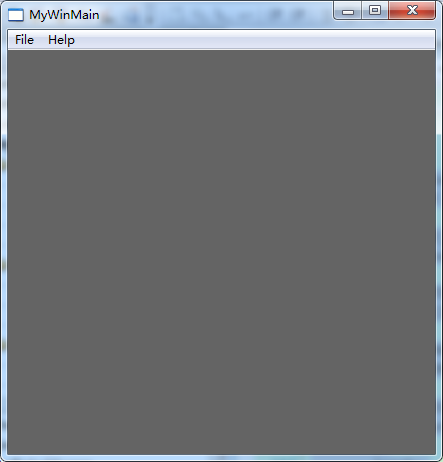
我们在学习标准C++的时候,都知道每个应用程序运行时都会先进入入口点函数main,而当从main函数跳出时程序就结束了。在Windows编程里面,也是一样的,只是我们的入口点函数不叫main,叫WinMain,这个函数不同于main,我们不能乱来,它的定义必须与声明保持一致。

 C++ Code 
1
2
3
4
5
6
7
8
9
10
11
12
13
14
15
16
17
18
19
20
21
22
23
24
25
26
27
28
29
30
31
32
33
34
35
36
37
38
39
40
41
42
43
44
45
46
47
48
49
50
51
52
53
54
55
56
57
58
59
60
61
62
63
64
65
66
67
68
69
70
71
72
73
74
75
76
77
78
79
80
81
82
83
84
85
86
87
88
89
90
91
92
93
94
95
96
97
98
99
100
101
102
103
104
105
106
107
108
109
110
111
112
113
114
115
116
117
118
119
120
121
122
123
124
125
126
127
128
129
130
131
132
133
134
135
136
137
138
139
140
141
142
143
144
145
146
147
148
149
150
151
152
153
154
155
156
157
158
159
160
161
162
163
164
165
166
167
168
169
170
171
172
173
174
175
176
177
178
179
180
181
182
183
184
185
186
187
188
189
190
191
 
// MyWinMain.cpp : Defines the entry point for the application.
//

#include "stdafx.h"
#include "MyWinMain.h"

// Global Variables:
HINSTANCE hInst = NULL;                                 // current instance
 };                  // The title bar text
 };            // the main window class name

// Forward declarations of functions included in this code module:
ATOM                MyRegisterClass(HINSTANCE hInstance);
BOOL                InitInstance(HINSTANCE, int);
LRESULT CALLBACK    WndProc(HWND, UINT, WPARAM, LPARAM);
INT_PTR CALLBACK    About(HWND, UINT, WPARAM, LPARAM);

int APIENTRY _tWinMain( HINSTANCE hInstance,
                        HINSTANCE hPrevInstance,
                        LPTSTR    lpCmdLine,
                        int       nCmdShow)
{
    UNREFERENCED_PARAMETER(hPrevInstance);
    UNREFERENCED_PARAMETER(lpCmdLine);

// TODO: Place code here.
    MSG msg;
    HACCEL hAccelTable;

// Initialize global strings
    LoadString(hInstance, IDS_APP_TITLE, szTitle, MAX_LOADSTRING);
    LoadString(hInstance, IDC_MYWINMAIN, szWindowClass, MAX_LOADSTRING);
    MyRegisterClass(hInstance);

// Perform application initialization:
    if (!InitInstance (hInstance, nCmdShow))
    {
        return FALSE;
    }

hAccelTable = LoadAccelerators(hInstance, MAKEINTRESOURCE(IDC_MYWINMAIN));

// Main message loop:
))
    {
        if (!TranslateAccelerator(msg.hwnd, hAccelTable, &msg))
        {
            TranslateMessage(&msg);
            DispatchMessage(&msg);
        }
    }

return (int) msg.wParam;
}

//
//  FUNCTION: MyRegisterClass()
//
//  PURPOSE: Registers the window class.
//
//  COMMENTS:
//
//    This function and its usage are only necessary if you want this code
//    to be compatible with Win32 systems prior to the 'RegisterClassEx'
//    function that was added to Windows 95. It is important to call this function
//    so that the application will get 'well formed' small icons associated
//    with it.
//
ATOM MyRegisterClass(HINSTANCE hInstance)
{
    WNDCLASSEX wcex;

wcex.cbSize = sizeof(WNDCLASSEX);

wcex.style          = CS_HREDRAW | CS_VREDRAW;
    wcex.lpfnWndProc    = WndProc;
    wcex.cbClsExtra     = ;
    wcex.cbWndExtra     = ;
    wcex.hInstance      = hInstance;
    wcex.hIcon          = LoadIcon(hInstance, MAKEINTRESOURCE(IDI_MYWINMAIN));
    wcex.hCursor        = LoadCursor(NULL, IDC_ARROW);
    wcex.hbrBackground  = (HBRUSH)(COLOR_WINDOW + );
    wcex.lpszMenuName   = MAKEINTRESOURCE(IDC_MYWINMAIN);
    wcex.lpszClassName  = szWindowClass;
    wcex.hIconSm        = LoadIcon(wcex.hInstance, MAKEINTRESOURCE(IDI_SMALL));

return RegisterClassEx(&wcex);
}

//
//   FUNCTION: InitInstance(HINSTANCE, int)
//
//   PURPOSE: Saves instance handle and creates main window
//
//   COMMENTS:
//
//        In this function, we save the instance handle in a global variable and
//        create and display the main program window.
//
BOOL InitInstance(HINSTANCE hInstance, int nCmdShow)
{
    HWND hWnd;

hInst = hInstance; // Store instance handle in our global variable

hWnd = CreateWindow(szWindowClass, szTitle, WS_OVERLAPPEDWINDOW,
                        CW_USEDEFAULT, , NULL, NULL, hInstance, NULL);

if (!hWnd)
    {
        return FALSE;
    }

ShowWindow(hWnd, nCmdShow);
    UpdateWindow(hWnd);

return TRUE;
}

//
//  FUNCTION: WndProc(HWND, UINT, WPARAM, LPARAM)
//
//  PURPOSE:  Processes messages for the main window.
//
//  WM_COMMAND  - process the application menu
//  WM_PAINT    - Paint the main window
//  WM_DESTROY  - post a quit message and return
//
//
LRESULT CALLBACK WndProc(HWND hWnd, UINT message, WPARAM wParam, LPARAM lParam)
{
    int wmId, wmEvent;
    PAINTSTRUCT ps;
    HDC hdc;

switch (message)
    {
    case WM_COMMAND:
        wmId    = LOWORD(wParam);
        wmEvent = HIWORD(wParam);
        // Parse the menu selections:
        switch (wmId)
        {
        case IDM_ABOUT:
            DialogBox(hInst, MAKEINTRESOURCE(IDD_ABOUTBOX), hWnd, About);
            break;
        case IDM_EXIT:
            DestroyWindow(hWnd);
            break;
        default:
            return DefWindowProc(hWnd, message, wParam, lParam);
        }
        break;
    case WM_PAINT:
        hdc = BeginPaint(hWnd, &ps);
        // TODO: Add any drawing code here...
        EndPaint(hWnd, &ps);
        break;
    case WM_DESTROY:
        PostQuitMessage();
        break;
    default:
        return DefWindowProc(hWnd, message, wParam, lParam);
    }
    ;
}

// Message handler for about box.
INT_PTR CALLBACK About(HWND hDlg, UINT message, WPARAM wParam, LPARAM lParam)
{
    UNREFERENCED_PARAMETER(lParam);
    switch (message)
    {
    case WM_INITDIALOG:
        return (INT_PTR)TRUE;

case WM_COMMAND:
        if (LOWORD(wParam) == IDOK || LOWORD(wParam) == IDCANCEL)
        {
            EndDialog(hDlg, LOWORD(wParam));
            return (INT_PTR)TRUE;
        }
        break;
    }
    return (INT_PTR)FALSE;
}

回顾下WinMain的更多相关文章

  1. 全面进攻python之前回顾下自己近三个月的自学之路

    人生是在一直试错的过程中成长起来的.这句话貌似很有道理,但回顾了下自己近三个月python自学学习之路,又觉得自己对这句话又有了新的看法------行动之前必须要有正确的选择,这样做错了才能成长. 2 ...

  2. 回顾下TCP/IP协议

    首先要知道什么是TCP/IP协议,从字面意思来看TCP是“Transmission Control Protocol”的缩写,也就是传输控制协议.IP是“Internet Protocol”的缩写,即 ...

  3. 回顾下$.ajax()方法参数

    1.url: 要求为String类型的参数,(默认为当前页地址)发送请求的地址. 2.type: 要求为String类型的参数,请求方式(post或get)默认为get.注意其他http请求方法,例如 ...

  4. 从故纸堆里,回顾下Web技术的发展历程

    通过对比这些年的计算机图书来让大家感受下前些年Web技术的发展历程. Web开发框架,目前是Spring Boot+JPA,我正好出过本书,从中大家能感受到现在的技术. <Spring Boot ...

  5. html5 canvas 奇怪的形状水平渐变(因为大多数的之前的文章把基础都打过了,所以开始写的快了,如果有不明白的,可以回顾下之前的)

    <!DOCTYPE html PUBLIC "-//W3C//DTD XHTML 1.0 Transitional//EN" "http://www.w3.org/ ...

  6. linux下epoll实现机制

    linux下epoll实现机制 原作者:陶辉 链接:http://blog.csdn.net/russell_tao/article/details/7160071 先简单回顾下如何使用C库封装的se ...

  7. #Deep Learning回顾#之LeNet、AlexNet、GoogLeNet、VGG、ResNet

    CNN的发展史 上一篇回顾讲的是2006年Hinton他们的Science Paper,当时提到,2006年虽然Deep Learning的概念被提出来了,但是学术界的大家还是表示不服.当时有流传的段 ...

  8. 【转载】GPU 加速下的图像处理

    Instagram,Snapchat,Photoshop. 所有这些应用都是用来做图像处理的.图像处理可以简单到把一张照片转换为灰度图,也可以复杂到是分析一个视频,并在人群中找到某个特定的人.尽管这些 ...

  9. Python2.6-原理之类和oop(下)

    来自<python学习手册第四版>第六部分 五.运算符重载(29章) 这部分深入介绍更多的细节并看一些常用的重载方法,虽然不会展示每种可用的运算符重载方法,但是这里给出的代码也足够覆盖py ...

随机推荐

  1. javascript快速入门20--Cookie

    Cookie 基础知识 我们已经知道,在 document 对象中有一个 cookie 属性.但是 Cookie 又是什么?“某些 Web 站点在您的硬盘上用很小的文本文件存储了一些信息,这些文件就称 ...

  2. spring注入之使用标签 @Autowired @Qualifier

      使用标签的缺点在于必需要有源代码(由于标签必须放在源代码上),当我们并没有程序源代码的时候.我们仅仅有使用xml进行配置. 比如我们在xml中配置某个类的属性            <bea ...

  3. 【业务自动化】iTop,全面支持ITIL流程的一款ITSM工具

    iTop产品针对的主要应用场景为:内部IT支持.IT外包管理.数据中心运维管理和企业IT资产管理.常青管理从绿象认证产品中选取了iTop作为主要推荐产品,本类别的绿象认证产品还包括:OTRS和RT3等 ...

  4. e.which

    e.which is not an event, which is a property of the event object, which most people label as e in th ...

  5. 微信小程序 - 更改button状态

    wxml <button class='yes-orders' style='{{status_css}}' bindtap='clickExpress'> {{statusOrders} ...

  6. javaSE中的输入输出流---一个读取流,相应多个输出流。并且生成的碎片文件都有有序的编号

    <span style="font-size:18px;">package com.io.other.split; import java.io.File; impor ...

  7. Vue 前端路由 vue-router

    1.前端路由 后端路由:多页面,服务器端渲染好返回给浏览器. 前端路由:改变url不向服务器发送请求:前端可以监听url变化:前端可以解析url并执行相应操作. 前后端分离:后端只提供API来返回数据 ...

  8. JavaScriptl 类数组转换为数组

    slice和Array.form方法,具体见示例代码: <!DOCTYPE html> <html lang="zh"> <head> < ...

  9. iOS编程 手动忽略clang编译器警告

    在iOS开发过程中, 我们可能会碰到一些系统方法弃用, weak.循环引用.不能运行之类的警告. 有代码洁癖的孩子们非常想消除他们, 今天就让我们来一次Fuck 警告.! 首先学会主要的语句 #pra ...

  10. Java中super的几种使用方法并与this的差别

    1.     子类的构造函数假设要引用super的话,必须把super放在函数的首位. class Base { Base() { System.out.println("Base" ...