
netty中的websocket
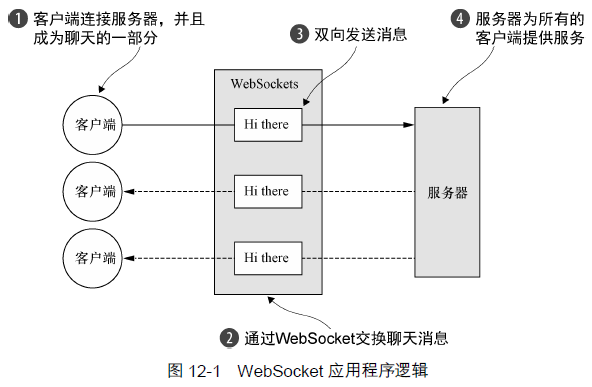
使用WebSocket 协议来实现一个基于浏览器的聊天室应用程序,图12-1 说明了该应用程序的逻辑:
(1)客户端发送一个消息;
(2)该消息将被广播到所有其他连接的客户端。
WebSocket
在从标准的HTTP或者HTTPS协议切换到WebSocket时,将会使用一种称为升级握手①的机制。因此,使用WebSocket的应用程序将始终以HTTP/S作为开始,然后再执行升级。这个升级动作发生的确切时刻特定于应用程序;它可能会发生在启动时,也可能会发生在请求了某个特定的URL之后。
有关WebSocket更多的信息见《websocket之一:websocket简介》
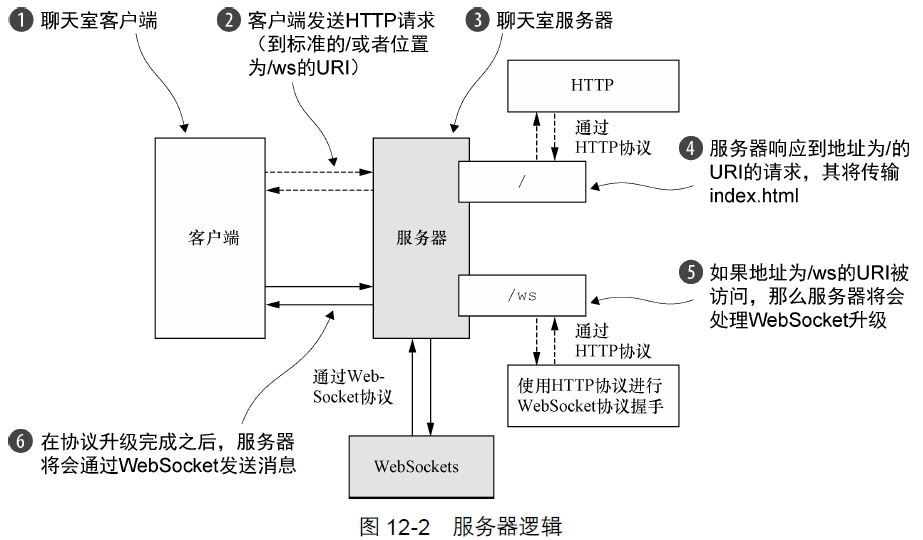
回到示例,我们的应用程序将采用下面的约定:如果被请求的URL 以/ws 结尾,那么我们将会把该协议升级为WebSocket;否则,服务器将使用基本的HTTP/S。在连接已经升级完成之后,所有数据都将会使用WebSocket 进行传输。图12-2 说明了该服务器逻辑,一如在Netty 中一样,它由一组ChannelHandler 实现。我们将会在下一节中,解释用于处理HTTP 以及WebSocket 协议的技术时,描述它们。
1、处理HTTP 请求
首先,我们将实现该处理HTTP 请求的组件。这个组件将提供用于访问聊天室并显示由连接的客户端发送的消息的网页。代码清单12-1 给出了这个HttpRequestHandler 对应的代码,其扩展了SimpleChannelInboundHandler 以处理FullHttpRequest 消息。messageReceived()方法的实现是如何转发任何目标URI 为/ws 的请求的。
主要任务有:
1、如果是ws协议,则不处理直接转发给下一个handler;
2、如果是http协议,
- 先校验是否符合http1.1规范;
- 输出html页面,用于聊天室的客户端;(见《Netty实现简单HTTP服务器》)
- 输出完index.html页面后,根据keep-alive决定是否要关闭连接;
package com.dxz.nettydemo.websocket;

import static io.netty.handler.codec.http.HttpHeaders.Names.CONTENT_TYPE;

import static io.netty.handler.codec.http.HttpResponseStatus.OK;

import static io.netty.handler.codec.http.HttpVersion.HTTP_1_1;

import java.io.File;

import java.io.RandomAccessFile;

import java.net.URISyntaxException;

import java.net.URL;

import io.netty.channel.ChannelFuture;

import io.netty.channel.ChannelFutureListener;

import io.netty.channel.ChannelHandlerContext;

import io.netty.channel.DefaultFileRegion;

import io.netty.channel.SimpleChannelInboundHandler;

import io.netty.handler.codec.http.DefaultFullHttpResponse;

import io.netty.handler.codec.http.DefaultHttpResponse;

import io.netty.handler.codec.http.FullHttpRequest;

import io.netty.handler.codec.http.FullHttpResponse;

import io.netty.handler.codec.http.HttpHeaders;

import io.netty.handler.codec.http.HttpResponse;

import io.netty.handler.codec.http.HttpResponseStatus;

import io.netty.handler.codec.http.HttpVersion;

import io.netty.handler.codec.http.LastHttpContent;

import io.netty.handler.ssl.SslHandler;

import io.netty.handler.stream.ChunkedNioFile;

//扩展SimpleChannelInboundHandler 以处理FullHttpRequest 消息

public class HttpRequestHandler extends SimpleChannelInboundHandler<FullHttpRequest> {

    private final String wsUri;

    private static final File INDEX;

    static {

        URL location = HttpRequestHandler.class.getProtectionDomain().getCodeSource().getLocation();

        try {

            String path = location.toURI() + "index.html";

            path = !path.contains("file:") ? path : path.substring(5);

            INDEX = new File(path);

        } catch (URISyntaxException e) {

            throw new IllegalStateException("Unable to locate index.html", e);

        }

    }

    public HttpRequestHandler(String wsUri) {

        this.wsUri = wsUri;

    }

    @Override

    protected void messageReceived(ChannelHandlerContext ctx, FullHttpRequest request) throws Exception {

        //如果请求了WebSocket协议升级,则增加引用计数(调用retain()方法),并将它传递给下一个ChannelInboundHandler

        //或者说是不处理WebSocket相关的请求,将其转发给下一个handler

        if (wsUri.equalsIgnoreCase(request.getUri())) {

            //之所以需要调用retain()方法,是因为调用channelRead()

            //方法完成之后,它将调用FullHttpRequest 对象上的release()方法以释放它的资源

            ctx.fireChannelRead(request.retain());

        } else {

            //处理100 Continue请求以符合HTTP1.1 规范

            if (HttpHeaders.is100ContinueExpected(request)) {

                send100Continue(ctx);

            }

            RandomAccessFile file = new RandomAccessFile(INDEX, "r");

            /*FullHttpResponse response = new DefaultFullHttpResponse(HTTP_1_1, OK);

            //设置消息头类型

            response.headers().set(CONTENT_TYPE, "text/html; charset=UTF-8");

            //构造响应消息体

            StringBuilder buf = new StringBuilder();*/

            HttpResponse response = new DefaultHttpResponse(request.getProtocolVersion(), HttpResponseStatus.OK);

            response.headers().set(HttpHeaders.Names.CONTENT_TYPE, "text/html; charset=UTF-8");

            boolean keepAlive = HttpHeaders.isKeepAlive(request);

            //如果请求了keep-alive,    则添加所需要的HTTP头信息

            if (keepAlive) {

                response.headers().set(HttpHeaders.Names.CONTENT_LENGTH, file.length());

                response.headers().set(HttpHeaders.Names.CONNECTION, HttpHeaders.Values.KEEP_ALIVE);

            }

            //将HttpResponse    写到客户端

            ctx.write(response);

            //将index.html写到客户端

            if (ctx.pipeline().get(SslHandler.class) == null) {

                ctx.write(new DefaultFileRegion(file.getChannel(), 0, file.length()));

            } else {

                ctx.write(new ChunkedNioFile(file.getChannel()));

            }

            //写LastHttpContent并冲刷至客户端

            ChannelFuture future = ctx.writeAndFlush(LastHttpContent.EMPTY_LAST_CONTENT);

            //如果没有请求keep-alive,在写操作完成后关闭Channel

            if (!keepAlive) {

                future.addListener(ChannelFutureListener.CLOSE);

            }

            if(file != null) {

                try {

                    file.close();

                } catch (Exception e) {

                    // TODO Auto-generated catch block

                    e.printStackTrace();

                }

            }

        }

    }

    private static void send100Continue(ChannelHandlerContext ctx) {

        FullHttpResponse response = new DefaultFullHttpResponse(HttpVersion.HTTP_1_1, HttpResponseStatus.CONTINUE);

        ctx.writeAndFlush(response);

    }

    @Override

    public void exceptionCaught(ChannelHandlerContext ctx, Throwable cause) throws Exception {

        cause.printStackTrace();

        ctx.close();

    }

}
2、处理WebSocket帧
帧类型见《websocket之一:websocket简介》中的帧类型介绍。
由IETF 发布的WebSocket RFC,定义了6 种帧,Netty 为它们每种都提供了一个POJO 实现。
WebSocketFrame 中定义的对应6种帧的类型
| 帧 类 型 | 描 述 |
| BinaryWebSocketFrame | 包含了二进制数据 |
| TextWebSocketFrame | 包含了文本数据 |
| ContinuationWebSocketFrame | 包含属于上一个BinaryWebSocketFrame或TextWebSocketFrame 的文本数据或者二进制数据 |
| CloseWebSocketFrame | 表示一个CLOSE 请求,包含一个关闭的状态码和关闭的原因 |
| PingWebSocketFrame | 请求传输一个PongWebSocketFrame |
| PongWebSocketFrame | 作为一个对于PingWebSocketFrame 的响应被发送 |
我们的聊天应用程序将使用下面几种帧类型:
CloseWebSocketFrame;
PingWebSocketFrame;
PongWebSocketFrame;
TextWebSocketFrame。
TextWebSocketFrame 是我们唯一真正需要处理的帧类型。为了符合WebSocket RFC,Netty 提供了WebSocketServerProtocolHandler 来处理其他类型的帧。
package com.dxz.nettydemo.websocket;

import io.netty.channel.ChannelHandlerContext;

import io.netty.channel.SimpleChannelInboundHandler;

import io.netty.channel.group.ChannelGroup;

import io.netty.handler.codec.http.websocketx.TextWebSocketFrame;

import io.netty.handler.codec.http.websocketx.WebSocketServerProtocolHandler;

public class TextWebSocketFrameHandler extends SimpleChannelInboundHandler<TextWebSocketFrame> {

    private final ChannelGroup group;

    public TextWebSocketFrameHandler(ChannelGroup group) {

        this.group = group;

    }

    //重写userEventTriggered()方法以处理自定义事件

    @Override

    public void userEventTriggered(ChannelHandlerContext ctx, Object evt) throws Exception {

        //如果是HANDSHAKE_COMPLETE事件表示握手成功,则从该Channelipeline中移除HttpRequestHandler,

        //因为将不会接收到任何HTTP 消息了

        if (evt == WebSocketServerProtocolHandler.ServerHandshakeStateEvent.HANDSHAKE_COMPLETE) {

            ctx.pipeline().remove(HttpRequestHandler.class);

            //通知所有已经连接的WebSocket 客户端新的客户端已经连接上了

            group.writeAndFlush(new TextWebSocketFrame("Client " + ctx.channel() + " joined"));

            //将新的WebSocket Channel添加到ChannelGroup 中,以便它可以接收到所有的消息

            group.add(ctx.channel());

        } else {

            super.userEventTriggered(ctx, evt);

        }

    }

    @Override

    protected void messageReceived(ChannelHandlerContext arg0, TextWebSocketFrame msg) throws Exception {

        //增加消息的引用计数,并将写到ChannelGroup 中所有已经连接的客户端

        System.out.println("服务端收到:"+msg.text());

        group.writeAndFlush(new TextWebSocketFrame("server ack:" + msg.text()));

    }

}
3、初始化ChannelPipeline
为了将ChannelHandler 安装到ChannelPipeline 中,你扩展了ChannelInitializer,并实现了initChannel()方法。
package com.dxz.nettydemo.websocket;

import io.netty.channel.Channel;

import io.netty.channel.ChannelInitializer;

import io.netty.channel.ChannelPipeline;

import io.netty.channel.group.ChannelGroup;

import io.netty.handler.codec.http.HttpObjectAggregator;

import io.netty.handler.codec.http.HttpServerCodec;

import io.netty.handler.codec.http.websocketx.WebSocketServerProtocolHandler;

import io.netty.handler.stream.ChunkedWriteHandler;

public class ChatServerInitializer extends ChannelInitializer<Channel> {

    private final ChannelGroup group;

    public ChatServerInitializer(ChannelGroup group) {

        this.group = group;

    }

    @Override

    protected void initChannel(Channel ch) throws Exception {

        //将所有需要的ChannelHandler 添加到ChannelPipeline 中

        ChannelPipeline pipeline = ch.pipeline();

        pipeline.addLast(new HttpServerCodec());

        pipeline.addLast(new ChunkedWriteHandler());

        pipeline.addLast(new HttpObjectAggregator(64 * 1024));

        pipeline.addLast(new HttpRequestHandler("/ws"));

        pipeline.addLast(new WebSocketServerProtocolHandler("/ws"));

        pipeline.addLast(new TextWebSocketFrameHandler(group));

    }

}
基于WebSocket 聊天服务器的ChannelHandler
| ChannelHandler | 职 责 |
| HttpServerCodec | 将字节解码为HttpRequest、HttpContent 和LastHttpContent。并将HttpRequest、HttpContent 和LastHttpContent 编码为字节 |
| ChunkedWriteHandler | 写入一个文件的内容 |
| HttpObjectAggregator | 将一个HttpMessage 和跟随它的多个HttpContent 聚合为单个FullHttpRequest 或者FullHttpResponse(取决于它是被用来处理请求还是响应)。安装了这个之后, ChannelPipeline 中的下一个ChannelHandler 将只会收到完整的HTTP 请求或响应 |
| HttpRequestHandler | 处理FullHttpRequest(那些不发送到/ws URI 的请求) |
| WebSocketServerProtocolHandler | 按照WebSocket 规范的要求,处理WebSocket 升级握手、PingWebSocketFrame 、PongWebSocketFrame 和CloseWebSocketFrame |
| TextWebSocketFrameHandler | 处理TextWebSocketFrame 和握手完成事件 |
Netty 的WebSocketServerProtocolHandler 处理了所有委托管理的WebSocket 帧类型以及升级握手本身。如果握手成功,那么所需的ChannelHandler 将会被添加到ChannelPipeline中,而那些不再需要的ChannelHandler 则将会被移除。
WebSocket 协议升级之前的ChannelPipeline 的状态如图12-3 所示。这代表了刚刚被ChatServerInitializer 初始化之后的ChannelPipeline。
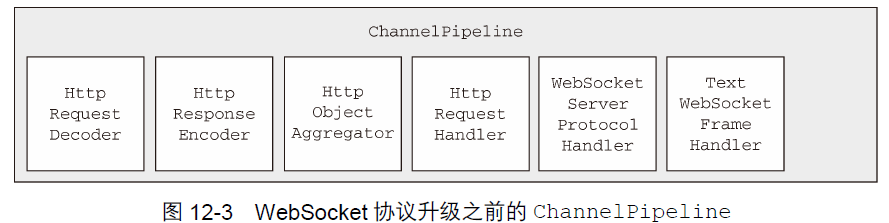
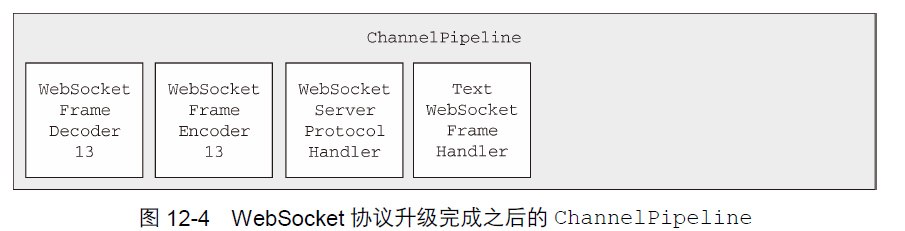
当WebSocket 协议升级完成之后,WebSocketServerProtocolHandler 将会把HttpRequestDecoder 替换为WebSocketFrameDecoder,把HttpResponseEncoder 替换为
WebSocketFrameEncoder。为了性能最大化,它将移除任何不再被WebSocket 连接所需要的ChannelHandler。这也包括了图12-3 所示的HttpObjectAggregator 和HttpRequest
Handler。
图12-4 展示了这些操作完成之后的ChannelPipeline。需要注意的是,Netty目前支持4个版本的WebSocket协议,它们每个都具有自己的实现类。Netty将会根据客户端(这里指浏览
器)所支持的版本①,自动地选择正确版本的WebSocketFrameDecoder和WebSocketFrameEncoder。
4、引导
package com.dxz.nettydemo.websocket;

import java.net.InetSocketAddress;

import io.netty.bootstrap.ServerBootstrap;

import io.netty.channel.Channel;

import io.netty.channel.ChannelFuture;

import io.netty.channel.ChannelInitializer;

import io.netty.channel.EventLoopGroup;

import io.netty.channel.group.ChannelGroup;

import io.netty.channel.group.DefaultChannelGroup;

import io.netty.channel.nio.NioEventLoopGroup;

import io.netty.channel.socket.nio.NioServerSocketChannel;

import io.netty.util.concurrent.ImmediateEventExecutor;

public class ChatServer {

    private final ChannelGroup channelGroup = new DefaultChannelGroup(ImmediateEventExecutor.INSTANCE);

    private final EventLoopGroup group = new NioEventLoopGroup();

    private Channel channel;

    public ChannelFuture start(InetSocketAddress address) {

        ServerBootstrap bootstrap = new ServerBootstrap();

        bootstrap.group(group).channel(NioServerSocketChannel.class).childHandler(createInitializer(channelGroup));

        ChannelFuture future = bootstrap.bind(address);

        future.syncUninterruptibly();

        channel = future.channel();

        return future;

    }

    protected ChannelInitializer<Channel> createInitializer(ChannelGroup group) {

        return new ChatServerInitializer(group);

    }

    public void destroy() {

        if (channel != null) {

            channel.close();

        }

        channelGroup.close();

        group.shutdownGracefully();

    }

    public static void main(String[] args) throws Exception {

        String portStr= "9999";

        int port = Integer.parseInt(portStr);

        final ChatServer endpoint = new ChatServer();

        ChannelFuture future = endpoint.start(new InetSocketAddress(port));

        Runtime.getRuntime().addShutdownHook(new Thread() {

            @Override

            public void run() {

                endpoint.destroy();

            }

        });

        future.channel().closeFuture().syncUninterruptibly();

    }

}
5、测试
启动WebSocket服务端后,浏览器访问http://localhost:9999/
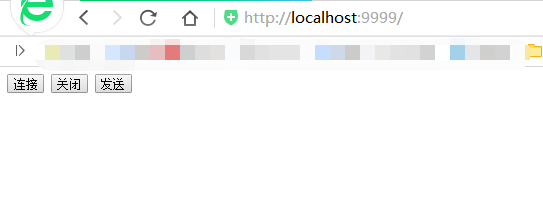
点击连接和发送后,服务端收到并打印客户端发送的消息

netty中的websocket的更多相关文章
- 一款基于Netty开发的WebSocket服务器
代码地址如下:http://www.demodashi.com/demo/13577.html 一款基于Netty开发的WebSocket服务器 这是一款基于Netty框架开发的服务端,通信协议为We ...
- Netty 中的心跳机制
在TCP长连接或者WebSocket长连接中一般我们都会使用心跳机制–即发送特殊的数据包来通告对方自己的业务还没有办完,不要关闭链接. 网络的传输是不可靠的,当我们发起一个链接请求的过程之中会发生什么 ...
- Netty(五)序列化protobuf在netty中的使用
protobuf是google序列化的工具,主要是把数据序列化成二进制的数据来传输用的.它主要优点如下: 1.性能好,效率高: 2.跨语言(java自带的序列化,不能跨语言) protobuf参考文档 ...
- 【C#】MVC项目中搭建WebSocket服务器
前言 因为项目需要,前端页面中需要不断向后台请求获取一个及一个以上的状态值.最初的方案是为每个状态值请求都建立一个定时器循环定时发起Ajax请求,结果显而 易见.在HTTP1.1协议中,同一客户端浏览 ...
- 带你认识HTML5中的WebSocket
这篇文章主要介绍了带你认识HTML5中的WebSocket,本文讲解了HTML5 中的 WebSocket API 是个什么东东.HTML5 中的 WebSocket API 的用法.带Socket. ...
- 【转】Netty那点事(二)Netty中的buffer
[原文]https://github.com/code4craft/netty-learning/blob/master/posts/ch2-buffer.md 上一篇文章我们概要介绍了Netty的原 ...
- Spring 4.0 中的 WebSocket 架构
两年前,客户端与服务器端的全双工双向通信作为一个很重要的功能被纳入到WebSocket RFC 6455协议中.在HTML5中,WebSocket已经成为一个流行词,大家对这个功能赋予很多构想,很多时 ...
- Netty那点事: 概述, Netty中的buffer, Channel与Pipeline
Netty那点事(一)概述 Netty和Mina是Java世界非常知名的通讯框架.它们都出自同一个作者,Mina诞生略早,属于Apache基金会,而Netty开始在Jboss名下,后来出来自立门户ne ...
- Netty中的EventLoop和线程模型
一.前言 在学习了ChannelHandler和ChannelPipeline的有关细节后,接着学习Netty的EventLoop和线程模型. 二.EventLoop和线程模型 2.1. 线程模型 线 ...
随机推荐
- cmake手册
cmake手册 部分转载自:http://www.cnblogs.com/coderfenghc/tag/cmake/ CMake2.8.3 主索引 命令名称 用法 描述 命令选项 生成器 命令 属性 ...
- 阿里云 centOS7.4新装nginx 不能访问
反复装了几遍ngxin,什么防火墙,nginx.conf改了好几次都不能访问外网的ip, 原因是阿里云这货新的服务器根本就没开通443,80端口,真是坑人啊 点击配置规则,增加端口就行了 添加安全规则 ...
- 51nod-1526-贪心+Trie
题目链接在这 题目来源: CodeForces 基准时间限制:1 秒 空间限制:131072 KB 分值: 320 难度:7级算法题 收藏 关注 班里有n个同学.老师为他们选了n个笔名.现在要把这些笔 ...
- 原生javascript-图片弹窗交互效果
本人的第一个原生js插件 - picLightBox 在线例子:http://lgy.1zwq.com/photoBox/ [一]用var 声明多个变量,比每个变量都用var快多了 var sScro ...
- dga 分析
02n-0iy6gn3ozzwmyu.7i43n9qil1g1z2-.com0e527eaf_5ec5_4623_9fe9_e459583acd72.com0fmgm1cuu7h1279dghgka0 ...
- 转:大数据时代快速SQL引擎-Impala
本文来自:http://blog.csdn.net/yu616568/article/details/52431835 如有侵权 可立即删除 背景 随着大数据时代的到来,Hadoop在过去几年以接近统 ...
- 使用Spring实现MySQL读写分离
1. 为什么要进行读写分离 大量的JavaWeb应用做的是IO密集型任务, 数据库的压力较大, 需要分流 大量的应用场景, 是读多写少, 数据库读取的压力更大 一个很自然的思路是使用一主多从的数据库集 ...
- IIS(IISReset.exe)命令行
(转自:http://www.cnblogs.com/itech/archive/2009/05/18/1459231.html) 一 IIS命令行 Iisreset.exe 的概述 Iisreset ...
- mvp和mvc的区别
一句话总结:你代码逻辑有没有写在View中的,有就是MVC,没有就是MVP MVP模式: View不直接与Model交互,而是通过与Presenter交互来与Model间接交互 Presenter与V ...
- 【机器学习基石笔记】九、LinearRegression
[一] 线性回归直觉上的解释 得到Ein = mean(y - wx)^2 [二] w的推导 Ein = 1/N || xw - y||^2 连续.可微.凸函数 在各个方向的偏微分都是0 Ein = ...