
采用MQTT协议实现android消息推送(4)选fusesource-mqtt-client为客户端
1.简介
一个java写的mqtt客户端。项目地址:
https://github.com/fusesource/mqtt-client
2.引入fusesource-mqtt-client库
- File--->Project Structure--->Dependencies
- 点绿色+
- 在弹出的窗口中输入“‘mqtt-client”回车搜索
- 在结果中选择org.fusesource.mqtt-client:mqtt-client:1.xxx
3.示例代码
3.1 参考代码
| activeMQ服务端软件内提供的示例代码 | apache-activemq-5.15.0/examples/mqtt/java/ |
| dzone提供的示例 | https://dzone.com/articles/android-mqtt-activemq |
| github上的示例代码 | https://github.com/fusesource/mqtt-client#using-the-callbackcontinuation-passing-based-api |
3.2 效果
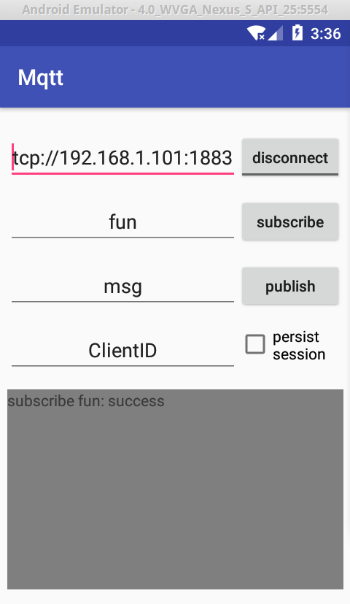
3.3 源码
 package com.example.tt.mqtt;

 import android.app.NotificationManager;
 import android.app.PendingIntent;
 import android.content.Context;
 import android.content.Intent;
 import android.os.Bundle;
 import android.support.v4.app.TaskStackBuilder;
 import android.support.v7.app.AppCompatActivity;
 import android.support.v7.app.NotificationCompat;
 import android.util.Log;
 import android.view.View;
 import android.widget.Button;
 import android.widget.CheckBox;
 import android.widget.CompoundButton;
 import android.widget.EditText;
 import android.widget.TextView;
 import android.widget.ToggleButton;

 import org.fusesource.hawtbuf.Buffer;
 import org.fusesource.hawtbuf.UTF8Buffer;
 import org.fusesource.mqtt.client.BlockingConnection;
 import org.fusesource.mqtt.client.Callback;
 import org.fusesource.mqtt.client.CallbackConnection;
 import org.fusesource.mqtt.client.Listener;
 import org.fusesource.mqtt.client.MQTT;
 import org.fusesource.mqtt.client.Message;
 import org.fusesource.mqtt.client.QoS;
 import org.fusesource.mqtt.client.Topic;

 import java.net.URISyntaxException;

 public class MainActivity extends AppCompatActivity implements View.OnClickListener,CompoundButton.OnCheckedChangeListener {

     final static String TAG = "MQTTClient";

     //UI
     ToggleButton    btnConnect;
     Button          btnPublish, btnSubscribe;
     EditText        edtServer,edtMessage,edtTopic,edtClientID;
     TextView        received;
     CheckBox        cbxPersist;

     //MQTT
     final static String clientId    = "android";
     final ;
     final static String host        = "192.168.1.101";
     final static String user        = "guest";
     final ;
     final static String password    = "admin";

     MQTT                mqtt                ;
     Listener            listener            ;
     CallbackConnection  callbackConnection  ;
     Callback<Void>      connectCallback     ;
     Callback<byte[]>    subscribeCallback   ;
     Callback<Void>      publishCallback     ;
     Callback<Void>      disconnectCallback  ;

     {
         connectCallback = new Callback<Void>(){

             @Override
             public void onSuccess(Void value) {
                 Log.d(TAG, "connectCallback : onSuccess");
                 received.post(new Runnable() {
                     @Override
                     public void run() {
                         received.setText("connectCallback success");
                     }
                 });

             }
             @Override
             public void onFailure(Throwable value) {
                 value.printStackTrace();
                 Log.d(TAG, "connectCallback : failure");
                 received.post(new Runnable() {
                     @Override
                     public void run() {
                         received.setText("connectCallback failure");
                     }
                 });
                 System.exit(-);
             }
         };
         disconnectCallback = new Callback<Void>(){

             public void onSuccess(Void value) {
                 received.post(new Runnable() {
                     @Override
                     public void run() {
                         received.setText("disconnect success");
                     }
                 });
             }
             public void onFailure(Throwable e) {
                 received.post(new Runnable() {
                     @Override
                     public void run() {
                         received.setText("disconnect failure");
                     }
                 });
             }
         };

         listener = new Listener() {

             @Override
             public void onConnected() {
                 Log.d(TAG, "listener onConnected");
                 received.post(new Runnable() {
                     @Override
                     public void run() {
                         received.setText("listener onConnected");
                     }
                 });
             }

             @Override
             public void onDisconnected() {
                 Log.d(TAG, "listener onDisconnected");
                 received.post(new Runnable() {
                     @Override
                     public void run() {
                         received.setText("listener onDisconnected");
                     }
                 });
             }

             @Override
             public void onPublish(final UTF8Buffer topic, Buffer msg, Runnable ack) {
                 final String body = msg.utf8().toString();
                 Log.d(TAG, "onPublish: " + body);
                 received.post(new Runnable() {
                     @Override
                     public void run() {
                         makeNotification(topic.toString(),body);
                         received.append("\nreceived : " + body);
                     }
                 });
             }

             @Override
             public void onFailure(Throwable value) {
                 Log.d(TAG, "listener failure");
                 received.post(new Runnable() {
                     @Override
                     public void run() {
                         received.setText("listener failure");
                     }
                 });
             }
         };

         subscribeCallback = new Callback<byte[]>() {

             public void onSuccess(byte[] qoses) {
                 Log.d(TAG, "subscribe : success");

                 received.post(new Runnable() {
                     @Override
                     public void run() {
                         received.setText("subscribe " + edtTopic.getText().toString() + ": success");
                     }
                 });
             }
             public void onFailure(Throwable value) {
                 value.printStackTrace();
                 Log.d(TAG, "subscribe : failure");
                 received.post(new Runnable() {
                     @Override
                     public void run() {
                         received.setText("subscribe " + edtTopic.getText().toString() + ": failure");
                     }
                 });
                 System.exit(-);
             }
         };
         publishCallback = new Callback<Void>() {
             @Override
             public void onSuccess(Void value) {
                 Log.d(TAG, "onSuccess: ");
             }

             @Override
             public void onFailure(Throwable value) {
                 Log.d(TAG, "onFailure: ");
             }
         };
     }

     void connect(){
         callbackConnection.connect(connectCallback);
     }

     void disconnect(){
         callbackConnection.disconnect(disconnectCallback);
     }

     void subscribe(){

         String topicName = edtTopic.getText().toString().trim();

         Topic topics[] = new Topic[]{new Topic(topicName,QoS.AT_LEAST_ONCE)};

         callbackConnection.subscribe(topics,subscribeCallback);

     }

     void publish(){

         String data = edtMessage.getText().toString();

         String topicName = edtTopic.getText().toString().trim();

         callbackConnection.publish(topicName,data.getBytes(),QoS.AT_LEAST_ONCE,false,publishCallback);

     }

     void initMqtt(){

         mqtt = new MQTT();
         try {
             mqtt.setHost(host, port);
             mqtt.setUserName(user);
             mqtt.setPassword(password);
             mqtt.setKeepAlive(keepAlive);
             mqtt.getClientId();
             callbackConnection = mqtt.callbackConnection();
             callbackConnection.listener(listener);

         } catch (URISyntaxException e) {
             e.printStackTrace();
             Log.e(TAG,"-=-=-=-=-=-=------------====\n initMqtt exception : " + e.getMessage());
         }
     }

     @Override
     protected void onCreate(Bundle savedInstanceState) {
         super.onCreate(savedInstanceState);
         setContentView(R.layout.activity_main);

         received    = (TextView)    findViewById(R.id.txt_received);
         btnSubscribe= (Button)      findViewById(R.id.btn_subscribe);
         btnConnect  = (ToggleButton)findViewById(R.id.btn_connect);
         btnPublish  = (Button)      findViewById(R.id.btn_publish);
         edtServer   = (EditText)    findViewById(R.id.edt_server);
         edtTopic    = (EditText)    findViewById(R.id.edt_topic);
         edtMessage  = (EditText)    findViewById(R.id.edt_message);
         edtClientID = (EditText)    findViewById(R.id.edt_clientID);
         cbxPersist  = (CheckBox)    findViewById(R.id.cbx_persist);

         btnConnect  .setOnClickListener(this);
         btnConnect  .setOnCheckedChangeListener(this);
         cbxPersist  .setOnCheckedChangeListener(this);
         btnSubscribe.setOnClickListener(this);
         btnPublish  .setOnClickListener(this);

         initMqtt();

     }
     void makeNotification(final String title,final String content){

         NotificationCompat.Builder mBuilder = new NotificationCompat.Builder(this);
         mBuilder.setSmallIcon(R.drawable.mail_3_small);//must
         mBuilder.setContentTitle(title);
         mBuilder.setContentText(content);
         // Creates an explicit intent for an Activity in your app
         Intent resultIntent = new Intent(this, MainActivity.class);

         // The stack builder object will contain an artificial back stack for the
         // started Activity.
         // This ensures that navigating backward from the Activity leads out of
         // your app to the Home screen.
         TaskStackBuilder stackBuilder = TaskStackBuilder.create(this);
         // Adds the back stack for the Intent (but not the Intent itself)
         stackBuilder.addParentStack(MainActivity.class);
         // Adds the Intent that starts the Activity to the top of the stack
         stackBuilder.addNextIntent(resultIntent);
         PendingIntent resultPendingIntent = stackBuilder.getPendingIntent(,PendingIntent.FLAG_UPDATE_CURRENT);
         mBuilder.setContentIntent(resultPendingIntent);
         NotificationManager mNotificationManager =
                 (NotificationManager) getSystemService(Context.NOTIFICATION_SERVICE);

         // mNotificationId is a unique integer your app uses to identify the
         // notification. For example, to cancel the notification, you can pass its ID
         // number to NotificationManager.cancel().
         mNotificationManager.notify(R.string.app_name, mBuilder.build());
     }

     void blocking(){
         BlockingConnection connection = mqtt.blockingConnection();
         try {
             connection.connect();
             //publish
             connection.publish("foo", "Hello".getBytes(), QoS.AT_LEAST_ONCE, false);

             //subscribe
             Topic[] topics = {new Topic("foo", QoS.AT_LEAST_ONCE)};
             byte[] qoses = connection.subscribe(topics);

             //receive message
             Message message = connection.receive();
             System.out.println(message.getTopic());
             byte[] payload = message.getPayload();
             // process the message then:
             message.ack();

             //disconnect
             connection.disconnect();
         } catch (Exception e) {
             e.printStackTrace();
         }
     }

     @Override
     public void onClick(View view) {
         switch (view.getId()){
             case R.id.btn_publish   :   publish();      break;
             case R.id.btn_subscribe :   subscribe();    break;
         }

     }

     @Override
     public void onCheckedChanged(CompoundButton compoundButton, boolean b) {
         switch (compoundButton.getId()){
             case R.id.btn_connect:
                 if (!b){
                     connect();
                 }else{
                     disconnect();
                 }
                 break;
             case R.id.cbx_persist:
                 if (mqtt != null) {
                     mqtt.setClientId(edtClientID.getText().toString().trim());
                     mqtt.setCleanSession(!b);
                 }
                 break;
         }
     }

 }
3.4 完整下载地址
https://git.oschina.net/xi/mqtt-client-demo.git
4.MQTT 常用方法介绍
| setClientId |
Use to set the client Id of the session. This is what an MQTT server uses to identify a session where The id must be 23 characters or less. Defaults to auto generated id (based on your socket address, port and timestamp). 每个客户端id不要相同 指定id后,才可以调用setCleanSession,持久保存订阅的会话,哪个客户端订阅了哪个主题就保存在某个会话中。 |
| setCleanSession | Set to false if you want the MQTT server to persist topic subscriptions and ack positions across client sessions. Defaults to true.
设置false时,服务端将不清除会话,这样就可以持久保存订阅关系。 |
| setKeepAlive |
Configures the Keep Alive timer in seconds. Defines the maximum time interval between messages received from a client. It enables the server to detect that the network connection to a client has dropped, without having to wait for the long TCP/IP timeout. 设置保活时间,单位是秒,默认为tpc连接时间。 |
| setUserName | Sets the user name used to authenticate against the server.
设置服务端验证的用户名 |
| setPassword | Sets the password used to authenticate against the server.
设置验证用户的密码 |
| setWillTopic |
If set the server will publish the client's Will message to the specified topics if the client has an unexpected disconnection. 当客户端异常断开时,服务器按这里指定的主题发意愿消息。 |
| setWillMessage | The Will message to send. Defaults to a zero length message.
意愿消息 |
| setWillQos | Sets the quality of service to use for the Will message. Defaults to QoS.AT_MOST_ONCE.
意愿消息的QoS |
| setWillRetain | Set to true if you want the Will to be published with the retain option. |
| setVersion | Set to "3.1.1" to use MQTT version 3.1.1. Otherwise defaults to the 3.1 protocol version.
设置MQTT协议版本 |
采用MQTT协议实现android消息推送(4)选fusesource-mqtt-client为客户端的更多相关文章
- 采用MQTT协议实现android消息推送(2)MQTT服务端与客户端软件对比、android客户端示列表
1.服务端软件对比 https://github.com/mqtt/mqtt.github.io/wiki/servers 名称(点名进官网) 特性 简介 收费 支持的客户端语言 IBM MQ 完整的 ...
- 采用MQTT协议实现android消息推送(1)MQTT 协议简介
1.资料 mqtt官网 http://mqtt.org/ 服务端程序列表 https://github.com/mqtt/mqtt.github.io/wiki/servers 客户端库列表 http ...
- 采用MQTT协议实现android消息推送(3)选ActiveMQ当服务端
官网: http://activemq.apache.org/ 1.简介 强壮.快速.客户端支持多种语言的mqtt服务端软件. 2.特性 MQTT v3.1.AMQP v1.0.Stomp .Open ...
- Android消息推送(二)--基于MQTT协议实现的推送功能
国内的Android设备,不能稳定的使用Google GCM(Google Cloud Messageing)消息推送服务. 1. 国内的Android设备,基本上从操作系统底层开始就去掉了Googl ...
- Android消息推送完美方案[转]
转自 Android消息推送完美方案 推送功能在手机应用开发中越来越重要,已经成为手机开发的必须.在Android应用开发中,由于众所周知的原因,Android消息推送我们不得不大费周折.本文就是用来 ...
- Android消息推送完美方案
转自:http://bbs.hiapk.com/thread-4652657-1-1.html 推送功能在手机应用开发中越来越重要,已经成为手机开发的必须.在Android应用开发中,由于众所周知的原 ...
- Android消息推送完美解决方案全析
推送功能在手机应用开发中越来越重要,已经成为手机开发的必须.在Android应用开发中,由于众所周知的原因,Android消息推送我们不得不大费周折.本文就是用来和大家共同探讨一种Android消息推 ...
- 使用GCM服务(Google Cloud Messaging)实现Android消息推送
最近在网上查了关于很多Android消息推送的资料,其中主要有四种方法. 1) 使用GCM服务(Google Cloud Messaging) 2) 使用XMPP协议(Openfire + Spark ...
- Android消息推送的服务端
2.Android消息推送 MQTT服务器采用mosquito http://mosquitto.org/ PHP管理包采用phpmqttclient:https://github.com/toku ...
随机推荐
- js实现在表格中删除和添加一行
<!DOCTYPE html><html> <head> <title> new document </title> <meta ht ...
- HDU 4803 Poor Warehouse Keeper(贪心)
题目链接 题意 :屏幕可以显示两个值,一个是数量x,一个是总价y.有两种操作,一种是加一次总价,变成x,1+y:一种是加一个数量,这要的话总价也会相应加上一个的价钱,变成x+1,y+y/x.总价显示的 ...
- POJ - 2109 Power of Cryptography(高精度log+二分)
Current work in cryptography involves (among other things) large prime numbers and computing powers ...
- RecyclerView添加两种布局
简介: 本篇博客主要介绍如何在RecyclerView中添加两种布局 思路:主要重写Recyclerview.Adapter中的一些方法 1.public int getItemViewType(in ...
- Graphic 完成文字缩放
思路:将文字生成图片,再加载此图片伸缩至需要大小. 首先要获取文字的实际大小.宽度高度,再通过图片缩放就OK了 public static void DrawText() { Font f = , F ...
- ajaxfileupload 跨域 (二级域名) 可行办法
ajaxfileupload 跨二级域名 如 aa.fei.com 到 bb.fei.com 是可行的. 1.首先在html页面 ajaxfileupload上方加入 document.domain= ...
- Linux虚拟机安装 nginx (nginx1.9.9)
1.安装基础环境包(如果已安装,可更新) yum -y :自动选择y yum -y install openssl* yum -y install libjpeg libjpeg-devel libp ...
- js面对对象的几种方式
1.对象的字面量 var obj = {} 2.创建实例对象 var obj = new Object(); 3.构造函数模式 function fn(){}, new fn(); ...
- c++11时间相关库(chrono)
以下整理自:https://www.2cto.com/kf/201404/290706.html chrono 库主要包含了三种类型:时间间隔 Duration.时钟 Clocks 和时间点 Time ...
- 51nod1258 序列求和 V4(伯努利数+多项式求逆)
题面 传送门 题解 不知道伯努利数是什么的可以先去看看这篇文章 多项式求逆预处理伯努利数就行 因为这里模数感人,所以得用\(MTT\) //minamoto #include<bits/stdc ...