
HarmonyOS NEXT开发实战教程—搜索页
今天忙里偷闲,分享一个搜索页实现过程,先上效果图:
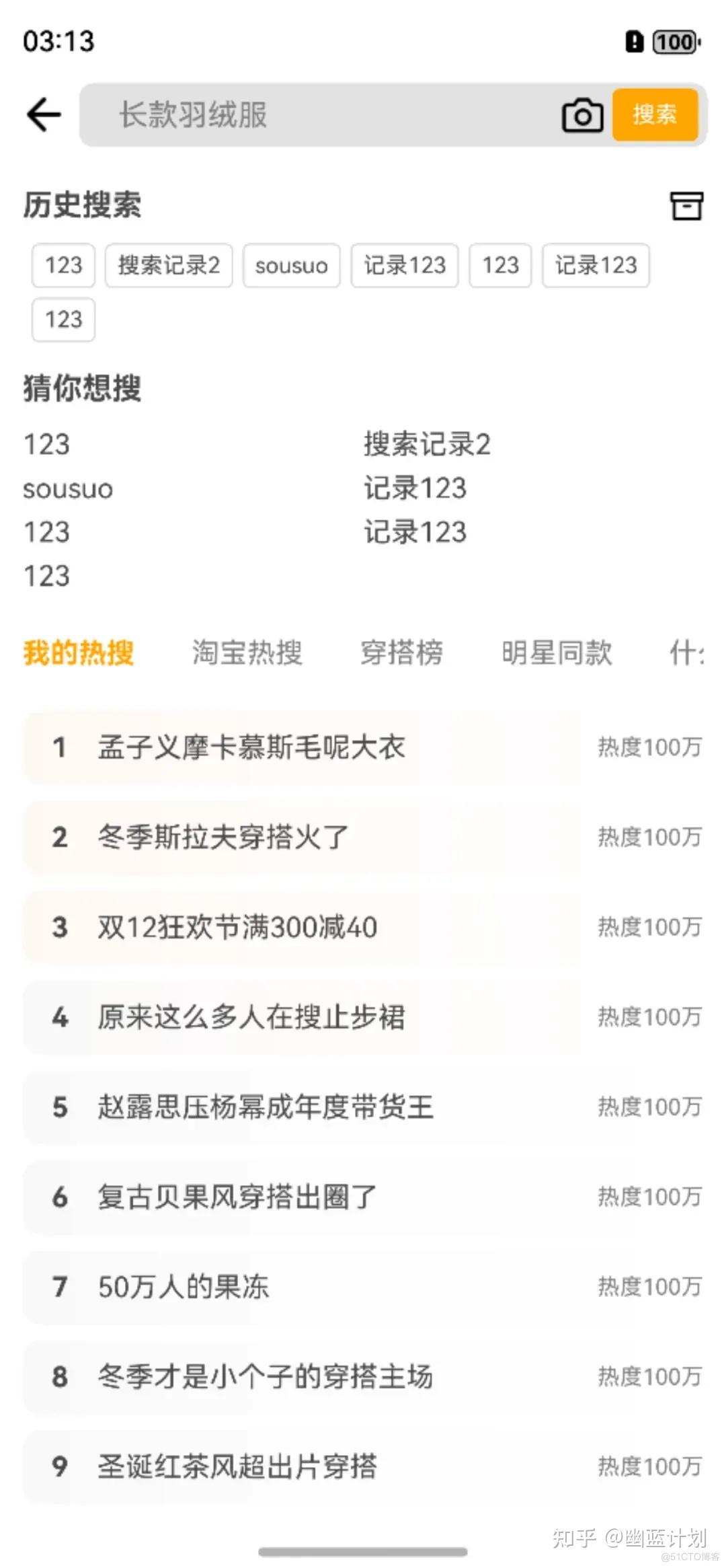
界面部分比较简单,大体分为导航栏、历史搜索、猜你想搜和热搜榜几个部分,历史搜索采用用户首选项进行存储数据。
导航栏部分相关代码如下:
Flex({direction:FlexDirection.Row,wrap:FlexWrap.NoWrap,alignItems:ItemAlign.Center}){

    Image($r('app.media.back'))

    .width(30)

    .height(30)

    .objectFit(ImageFit.Contain)

    Flex({direction:FlexDirection.Row,wrap:FlexWrap.NoWrap,alignItems:ItemAlign.Center}){

    TextInput({placeholder:'长款羽绒服',text:this.searchText})

        .width('100%')

        .placeholderColor(Color.Gray)

        .fontSize(14)

        .backgroundColor('rgb(226,226,226)')

        .enterKeyType(EnterKeyType.Search)

        .onChange((str)=>{

            this.searchText = str

        })

        .onSubmit(()=>{

            this.saveHistory(this.searchText)

            this.searchText = ''

        })

    Image($r('app.media.scan'))

    .width(22)

    .height(22)

    .margin({left:5})

    .constraintSize({minWidth:22})

    .objectFit(ImageFit.Contain)

    Text('搜索')

    .width(60)

    .height(28)

    .backgroundColor(Color.Orange)

    .borderRadius(4)

    .fontColor(Color.White)

    .textAlign(TextAlign.Center)

    .fontSize(12)

    .margin({left:5})

}

.padding({left:5,right:5})

.width('100%')

.height(34)

.backgroundColor('rgb(226,226,226)')

.borderRadius(8)

.margin({left:5})}

.padding({left:10,right:10})

.width('100%')

.backgroundColor(Color.White).height(45)
历史搜索部分采用Flex布局实现:
Flex({direction:FlexDirection.Row,wrap:FlexWrap.Wrap}){

    ForEach(this.hisList,(str:string,index)=>{

        Text(str)

            .fontColor('#4a4a4a')

            .fontSize(12)

            .padding({left:6,right:6,top:4,bottom:4})

            .borderWidth(1)

            .borderColor('rgb(216,216,216)')

            .borderStyle(BorderStyle.Solid)

            .margin({left:5,top:5})

            .textAlign(TextAlign.Center)

            .borderRadius(4)

})}
猜你想搜部分,同样使用Flex布局:
Flex({direction:FlexDirection.Row,wrap:FlexWrap.Wrap}){

    ForEach(this.guessList,(str:string,index)=>{

        Text(str)

         .fontColor('#4a4a4a')

        .fontSize(15)

        .margin({top:6})

        .width('50%')

})}热搜榜部分使用一个Scroll和一个Swiper实现联动效果:
Column(){

    Scroll(this.scrollController){

        Row({space:30}){

            ForEach(this.hotTitleList,(str:string,index)=>{

                Text(str)

                .fontSize(15)

                .fontColor(this.hotIndex == index?Color.Orange:Color.Gray)

                .fontWeight(this.hotIndex == index?FontWeight.Bold:FontWeight.Normal)

                .onClick(()=>{

                    this.hotIndex = index

                    this.swiperController.changeIndex(this.hotIndex,true)

                })

    })

    }

    .height(45)

    .alignItems(VerticalAlign.Center)  }

    .scrollable(ScrollDirection.Horizontal)

    .scrollBar(BarState.Off)  .width('100%')

    Swiper(this.swiperController){

        ForEach(this.hotTitleList,(str:string,index)=>{

            Column(){

                ForEach(this.hotContentList,(str:string,index)=>{

                    Row(){

                        Row(){

                            Text((index+1).toString())

                                .fontSize(15)

                                .fontColor('#4a4a4a')

                                 .fontWeight(FontWeight.Bold)

                                 .width(40)

                                 .textAlign(TextAlign.Center)

                              Text(str)

                                   .fontSize(15)

                                  .fontColor('#4a4a4a')            }

                              Text('热度100万')

                                .fontSize(12)

                                .fontColor(Color.Gray)

        }

        .width('100%')

        .height(40)

        .justifyContent(FlexAlign.SpaceBetween)

        .alignItems(VerticalAlign.Center)

        .borderRadius(10)

        .margin({top:8})

        .linearGradient({            angle: 90,            colors: [[index<3?0xfff8f3:0xf9f9f9, 0.0], [index<4?0xfffbfa:0xfcfcfc, 0.4], [0xffffff, 1.0]]          })        })

}

.width('100%')

.alignItems(HorizontalAlign.Start)

 })  }

.vertical(false)

.indicator(false)

.loop(false)

.onAnimationEnd((index: number, extraInfo: SwiperAnimationEvent) => {    this.hotIndex = index

console.info("index: " + index)

console.info("current offset: " + extraInfo.currentOffset)

const xOffset: number = this.scrollController.currentOffset().xOffset;    this.scrollController.scrollTo({ xOffset: index*70, yOffset: 0 })

})}
HarmonyOS NEXT开发实战教程—搜索页的更多相关文章
- Swift游戏开发实战教程(霸内部信息大学)
Swift游戏开发实战教程(大学霸内部资料) 试读下载地址:http://pan.baidu.com/s/1sj7DvQH 介绍:本教程是国内第一本Swift游戏开发专向资料. 本教程具体解说记忆配对 ...
- asp.net mvc+jquery easyui开发实战教程之网站后台管理系统开发4- 后台模板html页面创建
上一篇教程<asp.net mvc+jquery easyui开发实战教程之网站后台管理系统开发3-登录模块开发>完成了本项目的登录模块,登录后就需要进入后台管理首页了,需要准备一个后台模 ...
- asp.net mvc+jquery easyui开发实战教程之网站后台管理系统开发2-Model层建立
上篇(asp.net mvc+jquery easyui开发实战教程之网站后台管理系统开发1-准备工作)文章讲解了开发过程中的准备工作,主要创建了项目数据库及项目,本文主要讲解项目M层的实现,M层这里 ...
- 微信小程序-云开发实战教程
微信小程序-云开发实战教程 云函数,云存储,云数据库,云调用 https://developers.weixin.qq.com/miniprogram/dev/wxcloud/basis/gettin ...
- HBuilder开发App教程06-首页
实战 前面几节基本是一些概念的普及, 正如前面提到的,本教程会以滴石作为范例进行解说, 有兴趣的能够先行下载体验一下.或者下载源代码研究下. 新建项目 打开HBuilder,在项目管理器中右键--新建 ...
- Python开发实战教程(8)-向网页提交获取数据
来这里找志同道合的小伙伴!↑↑↑ Python应用现在如火如荼,应用范围很广.因其效率高开发迅速的优势,快速进入编程语言排行榜前几名.本系列文章致力于可以全面系统的介绍Python语言开发知识和相关知 ...
- React Native Android原生模块开发实战|教程|心得|怎样创建React Native Android原生模块
尊重版权,未经授权不得转载 本文出自:贾鹏辉的技术博客(http://blog.csdn.net/fengyuzhengfan/article/details/54691503) 告诉大家一个好消息. ...
- asp.net mvc+jquery easyui开发实战教程之网站后台管理系统开发3-登录模块开发
进行本文之前需要在数据库用户表里面增加一条用户数据,直接手动添加即可,未安全考虑密码一定要使用Md5加密后的,这里提供666666的Md5密文为(c831b04de153469d),本文完成登录模块的 ...
- asp.net mvc+jquery easyui开发实战教程之网站后台管理系统开发1-准备工作
/****** Object: 新闻表 Script Date: 2017/9/2 星期六 15:11:12 ******/ SET ANSI_NULLS ON GO SET QUOTED_IDENT ...
- php扩展开发实战教程(1)
我的开发环境: Ubuntu16.04 apt方式安装的php5.6, apache,mysql等 由于我的本机用的是apt方式安装的php,所以我这里从头开始用最精简的方式,编译安装一个php5.4 ...
随机推荐
- 使用nvm管理node.js版本,方便vue2,vue3开发
在Vue项目开发过程中,我们常常会遇到同时维护Vue2和Vue3项目的情况.由于不同版本的Vue对Node.js 版本的要求有所差异,这就使得Node.js 版本管理成为了一个关键问题.NVM(Nod ...
- Trae初体验
前情 自从AI IDE面世以来,网络上到处流传程序员要失业了,小白也能轻松完成程序开发了,某某0基础靠AI上架了苹果应用,平时工作也有偶尔用用AI工具的我,都觉得这些都是标题党文章不予理会的,直到看到 ...
- 幻兽帕鲁/Palworld/支持网络联机 v0.1.5.1
游戏介绍 在广阔的世界中收集神奇的生物"帕鲁",派他们进行战斗.建造.做农活,工业生产等,这是一款支持多人游戏模式的全新开放世界生存制作游戏. 注意事项 先启动STEAM客户端,在 ...
- IDEA - 文件上方的文档注释如何自定义
1.在设置中打开文件和代码模板,根据描述中的参考信息进行自定义配置 File > Settings > Editor > File and Code Templates 2.配置完成 ...
- 大数据之路Week08_day02 (Flume架构介绍和安装)
Flume架构介绍和安装 写在前面在学习一门新的技术之前,我们得知道了解这个东西有什么用?我们可以使用它来做些什么呢?简单来说,flume是大数据日志分析中不能缺少的一个组件,既可以使用在流处理中,也 ...
- nginx 禁止直接访问目录或文件
前言 Nginx 默认是不允许列出整个目录的. 如需此功能,打开 nginx.conf 文件或你要启用目录浏览虚拟主机的配置文件,在 location server 或 http 段中加入 autoi ...
- MFC中AfxBeginThread、AfxEndThread、GetExitCodeThread的配合使用(工作者线程)
//线程入口函数(全局) UINT MyThreadProc(LPVOID pParam) { //在需要添加返回值的地方 if (...) { AfxEndThread(0); return 0; ...
- 使用PowerPoint优雅地更改证件照底色
使用PowerPoint优雅地更改证件照底色 首先我们打开一张空白的演示文稿,并将要修改的证件照进行粘贴.(图片来自窝窝摄影,侵删) 选中图片,点击 格式,再点击 删除背景. 点击标记要保留的区域,对 ...
- wait、notify、notifyAll的理解与使用
基础知识 Java 中,可以通过配合调用 Object 对象的 wait() 方法和 notify() 方法或 notifyAll() 方法来实现线程间的通信. 在线程中调用 wait() 方法,将阻 ...
- DeepSeek引发的AI发展路径思考
DeepSeek引发的AI发展路径思考 参考文章来源于科技导报 ,作者李国杰院士 | 哈工大 DeepSeek 技术前沿与应用讲座 1. DeepSeek 的科技突破 7 天之内 DeepSeek 的 ...