
Typora实现双击图片放大 Mac
前置条件
- Typora
- LightBox: github下载
添加LightBox拓展
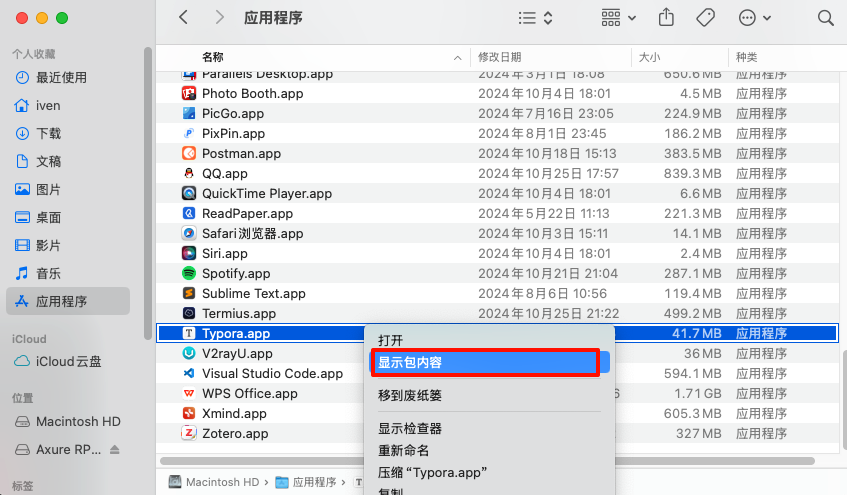
打开应用程序,找到typora,右键选择“显示包内容”。
解压lightbox2代码,将dist目录下的css,images,js三个文件夹拷贝到目录/Applications/Typora.app/Contents/Resources/TypeMark/extend/lightbox2,如果没有/extend/lightbox2文件夹则自己新建。
修改js文件
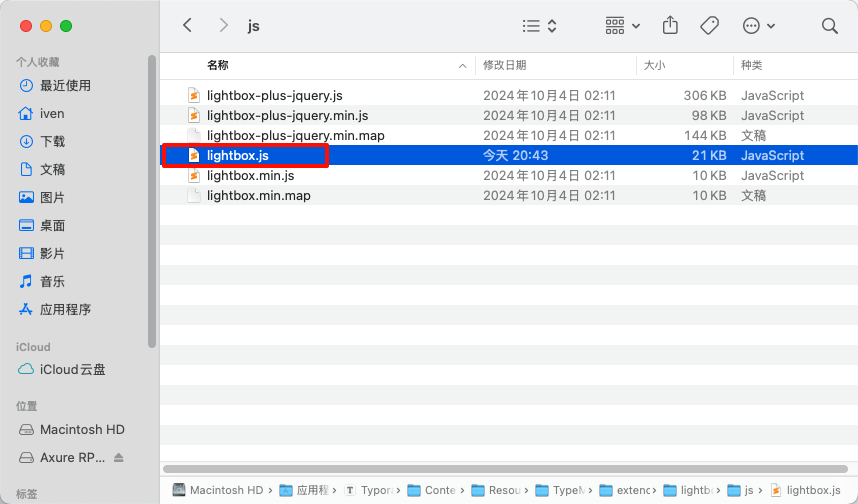
修改/Applications/Typora.app/Contents/Resources/TypeMark/extend/lightbox2/js/lightbox.js文件,替换为如下内容。
重启typora,就能够实现双机图片放大,滚轮滑动放大和双击关闭功能。
// Uses Node, AMD or browser globals to create a module.

(function (root, factory) {

  if (typeof define === 'function' && define.amd) {

    // AMD. Register as an anonymous module.

    define(['jquery'], factory);

  } else if (typeof exports === 'object') {

    // Node. Does not work with strict CommonJS, but

    // only CommonJS-like environments that support module.exports,

    // like Node.

    module.exports = factory(require('jquery'));

  } else {

    // Browser globals (root is window)

    root.lightbox = factory(root.jQuery);

  }

}(this, function ($) {

  function Lightbox(options) {

    this.album = [];

    this.currentImageIndex = void 0;

    this.init();

    // options

    this.options = $.extend({}, this.constructor.defaults);

    this.option(options);

  }

  // Descriptions of all options available on the demo site:

  // http://lokeshdhakar.com/projects/lightbox2/index.html#options

  Lightbox.defaults = {

    albumLabel: 'Image %1 of %2',

    alwaysShowNavOnTouchDevices: false,

    fadeDuration: 0,

    fitImagesInViewport: true,

    imageFadeDuration: 0,

    // maxWidth: 800,

    // maxHeight: 600,

    positionFromTop: 0,

    resizeDuration: 0,

    showImageNumberLabel: true,

    wrapAround: false,

    disableScrolling: false,

    /*

    Sanitize Title

    If the caption data is trusted, for example you are hardcoding it in, then leave this to false.

    This will free you to add html tags, such as links, in the caption.

    If the caption data is user submitted or from some other untrusted source, then set this to true

    to prevent xss and other injection attacks.

     */

    sanitizeTitle: false

  };

  Lightbox.prototype.option = function (options) {

    $.extend(this.options, options);

  };

  Lightbox.prototype.imageCountLabel = function (currentImageNum, totalImages) {

    return this.options.albumLabel.replace(/%1/g, currentImageNum).replace(/%2/g, totalImages);

  };

  Lightbox.prototype.init = function () {

    var self = this;

    // Both enable and build methods require the body tag to be in the DOM.

    $(document).ready(function () {

      self.enable();

      self.build();

    });

  };

  // Loop through anchors and areamaps looking for either data-lightbox attributes or rel attributes

  // that contain 'lightbox'. When these are clicked, start lightbox.

  Lightbox.prototype.enable = function () {

    var self = this;

    $('body').on('click', 'a[rel^=lightbox], area[rel^=lightbox], a[data-lightbox], area[data-lightbox]', function (event) {

      self.start($(event.currentTarget));

      return false;

    });

    //为img绑定双击事件,但要排除本就是双击放大展示的图片

    $('body').on('dblclick', "img:not([class='lb-image'])", function (event) {

      self.start($(event.currentTarget));

      self.$image.css("zoom", "100%")

      return false;

    });

  };

  // Build html for the lightbox and the overlay.

  // Attach event handlers to the new DOM elements. click click click

  Lightbox.prototype.build = function () {

    if ($('#lightbox').length > 0) {

      return;

    }

    var self = this;

    // The two root notes generated, #lightboxOverlay and #lightbox are given

    // tabindex attrs so they are focusable. We attach our keyboard event

    // listeners to these two elements, and not the document. Clicking anywhere

    // while Lightbox is opened will keep the focus on or inside one of these

    // two elements.

    //

    // We do this so we can prevent propogation of the Esc keypress when

    // Lightbox is open. This prevents it from intefering with other components

    // on the page below.

    //

    // Github issue: https://github.com/lokesh/lightbox2/issues/663

    $('<div id="lightboxOverlay" tabindex="-1" class="lightboxOverlay"></div><div id="lightbox" tabindex="-1" class="lightbox"><div class="lb-outerContainer"><div class="lb-container"><img class="lb-image" src="data:image/gif;base64,R0lGODlhAQABAIAAAP///wAAACH5BAEAAAAALAAAAAABAAEAAAICRAEAOw==" alt=""/><div class="lb-nav"><a class="lb-prev" aria-label="Previous image" href="" ></a><a class="lb-next" aria-label="Next image" href="" ></a></div><div class="lb-loader"><a class="lb-cancel"></a></div></div></div><div class="lb-dataContainer"><div class="lb-data"><div class="lb-details"><span class="lb-caption"></span><span class="lb-number"></span></div><div class="lb-closeContainer"><a class="lb-close"></a></div></div></div></div>').appendTo($('body'));

    // Cache jQuery objects

    this.$lightbox = $('#lightbox');

    this.$overlay = $('#lightboxOverlay');

    this.$outerContainer = this.$lightbox.find('.lb-outerContainer');

    this.$container = this.$lightbox.find('.lb-container');

    this.$image = this.$lightbox.find('.lb-image');

    this.$nav = this.$lightbox.find('.lb-nav');

    // Store css values for future lookup

    this.containerPadding = {

      top: parseInt(this.$container.css('padding-top'), 10),

      right: parseInt(this.$container.css('padding-right'), 10),

      bottom: parseInt(this.$container.css('padding-bottom'), 10),

      left: parseInt(this.$container.css('padding-left'), 10)

    };

    this.imageBorderWidth = {

      top: parseInt(this.$image.css('border-top-width'), 10),

      right: parseInt(this.$image.css('border-right-width'), 10),

      bottom: parseInt(this.$image.css('border-bottom-width'), 10),

      left: parseInt(this.$image.css('border-left-width'), 10)

    };

    // Attach event handlers to the newly minted DOM elements

    this.$overlay.hide().on('click', function () {

      self.end();

      return false;

    });

    this.$lightbox.hide().on('click', function (event) {

      if ($(event.target).attr('id') === 'lightbox') {

        self.end();

      }

    });

    this.$outerContainer.on('click', function (event) {

      if ($(event.target).attr('id') === 'lightbox') {

        self.end();

      }

      return false;

    });

    this.$lightbox.find('.lb-prev').on('click', function () {

      if (self.currentImageIndex === 0) {

        self.changeImage(self.album.length - 1);

      } else {

        self.changeImage(self.currentImageIndex - 1);

      }

      return false;

    });

    this.$lightbox.find('.lb-next').on('click', function () {

      if (self.currentImageIndex === self.album.length - 1) {

        self.changeImage(0);

      } else {

        self.changeImage(self.currentImageIndex + 1);

      }

      return false;

    });

    /*

      Show context menu for image on right-click

      There is a div containing the navigation that spans the entire image and lives above of it. If

      you right-click, you are right clicking this div and not the image. This prevents users from

      saving the image or using other context menu actions with the image.

      To fix this, when we detect the right mouse button is pressed down, but not yet clicked, we

      set pointer-events to none on the nav div. This is so that the upcoming right-click event on

      the next mouseup will bubble down to the image. Once the right-click/contextmenu event occurs

      we set the pointer events back to auto for the nav div so it can capture hover and left-click

      events as usual.

     */

    this.$nav.on('mousedown', function (event) {

      if (event.which === 3) {

        self.$nav.css('pointer-events', 'none');

        self.$lightbox.one('contextmenu', function () {

          setTimeout(function () {

            this.$nav.css('pointer-events', 'auto');

          }.bind(self), 0);

        });

      }

    });

    this.$container.on('mousewheel', function (event) {

      event.delta = (event.originalEvent.wheelDelta) ? event.originalEvent.wheelDelta / 120 : -(event.originalEvent.detail || 0) / 3;

      var zoom = self.$image.css("zoom")

      zoom = zoom ? zoom * 100 : 100;

      zoom += event.delta * 10;

      if (zoom > 0)

        self.$image.css("zoom", zoom + "%")

      console.log(self.$image.width(), self.$image.height())

      imageWidth = self.$image.width()

      imageHeight = self.$image.height()

      imageWidth = imageWidth * zoom * 0.01

      imageHeight = imageHeight * zoom * 0.01

      self.sizeContainer(imageWidth, imageHeight);

      return false;

    });

    //给放大的图片另外绑定双击关闭事件

    this.$container.on('dblclick', function (event) {

      self.end();

      return false;

    });

    this.$lightbox.find('.lb-loader, .lb-close').on('click', function () {

      self.end();

      return false;

    });

  };

  // Show overlay and lightbox. If the image is part of a set, add siblings to album array.

  Lightbox.prototype.start = function ($link) {

    var self = this;

    var $window = $(window);

    $window.on('resize', $.proxy(this.sizeOverlay, this));

    this.sizeOverlay();

    this.album = [];

    var imageNumber = 0;

    function addToAlbum($link) {

      self.album.push({

        alt: $link.attr('data-alt') || $link.attr('alt'),

        link: $link.attr('href') || $link.attr('src'),

        title: $link.attr('data-title') || $link.attr('title')

      });

    }

    // Support both data-lightbox attribute and rel attribute implementations

    var dataLightboxValue = $link.attr('data-lightbox');

    var $links;

    if (dataLightboxValue) {

      $links = $($link.prop('tagName') + '[data-lightbox="' + dataLightboxValue + '"]');

      for (var i = 0; i < $links.length; i = ++i) {

        addToAlbum($($links[i]));

        if ($links[i] === $link[0]) {

          imageNumber = i;

        }

      }

    } else {

      // if ($link.attr('rel') === 'lightbox') {

      // If image is not part of a set

      // addToAlbum($link);

      // } else {

      // // If image is part of a set

      // $links = $($link.prop('tagName') + '[rel="' + $link.attr('rel') + '"]');

      // for (var j = 0; j < $links.length; j = ++j) {

      //   addToAlbum($($links[j]));

      //   if ($links[j] === $link[0]) {

      //     imageNumber = j;

      //   }

      // }

      addToAlbum($link);

      // }

    }

    // Position Lightbox

    var top = $window.scrollTop() + this.options.positionFromTop;

    var left = $window.scrollLeft();

    this.$lightbox.css({

      top: top + 'px',

      left: left + 'px'

    }).fadeIn(this.options.fadeDuration);

    // Disable scrolling of the page while open

    if (this.options.disableScrolling) {

      $('body').addClass('lb-disable-scrolling');

    }

    this.changeImage(imageNumber);

  };

  // Hide most UI elements in preparation for the animated resizing of the lightbox.

  Lightbox.prototype.changeImage = function (imageNumber) {

    var self = this;

    var filename = this.album[imageNumber].link;

    var filetype = filename.split('.').slice(-1)[0];

    var $image = this.$lightbox.find('.lb-image');

    // Disable keyboard nav during transitions

    this.disableKeyboardNav();

    // Show loading state

    this.$overlay.fadeIn(this.options.fadeDuration);

    $('.lb-loader').fadeIn('slow');

    this.$lightbox.find('.lb-image, .lb-nav, .lb-prev, .lb-next, .lb-dataContainer, .lb-numbers, .lb-caption').hide();

    this.$outerContainer.addClass('animating');

    // When image to show is preloaded, we send the width and height to sizeContainer()

    var preloader = new Image();

    preloader.onload = function () {

      var $preloader;

      var imageHeight;

      var imageWidth;

      var maxImageHeight;

      var maxImageWidth;

      var windowHeight;

      var windowWidth;

      $image.attr({

        'alt': self.album[imageNumber].alt,

        'src': filename

      });

      $preloader = $(preloader);

      $image.width(preloader.width);

      $image.height(preloader.height);

      windowWidth = $(window).width();

      windowHeight = $(window).height();

      // Calculate the max image dimensions for the current viewport.

      // Take into account the border around the image and an additional 10px gutter on each side.

      maxImageWidth = windowWidth - self.containerPadding.left - self.containerPadding.right - self.imageBorderWidth.left - self.imageBorderWidth.right - 20;

      maxImageHeight = windowHeight - self.containerPadding.top - self.containerPadding.bottom - self.imageBorderWidth.top - self.imageBorderWidth.bottom - self.options.positionFromTop - 70;

      /*

      Since many SVGs have small intrinsic dimensions, but they support scaling

      up without quality loss because of their vector format, max out their

      size.

      */

      if (filetype === 'svg') {

        $image.width(maxImageWidth);

        $image.height(maxImageHeight);

      }

      // Fit image inside the viewport.

      if (self.options.fitImagesInViewport) {

        // Check if image size is larger then maxWidth|maxHeight in settings

        if (self.options.maxWidth && self.options.maxWidth < maxImageWidth) {

          maxImageWidth = self.options.maxWidth;

        }

        if (self.options.maxHeight && self.options.maxHeight < maxImageHeight) {

          maxImageHeight = self.options.maxHeight;

        }

      } else {

        maxImageWidth = self.options.maxWidth || preloader.width || maxImageWidth;

        maxImageHeight = self.options.maxHeight || preloader.height || maxImageHeight;

      }

      // Is the current image's width or height is greater than the maxImageWidth or maxImageHeight

      // option than we need to size down while maintaining the aspect ratio.

      if ((preloader.width > maxImageWidth) || (preloader.height > maxImageHeight)) {

        if ((preloader.width / maxImageWidth) > (preloader.height / maxImageHeight)) {

          imageWidth = maxImageWidth;

          imageHeight = parseInt(preloader.height / (preloader.width / imageWidth), 10);

          $image.width(imageWidth);

          $image.height(imageHeight);

        } else {

          imageHeight = maxImageHeight;

          imageWidth = parseInt(preloader.width / (preloader.height / imageHeight), 10);

          $image.width(imageWidth);

          $image.height(imageHeight);

        }

      }

      self.sizeContainer($image.width(), $image.height());

    };

    // Preload image before showing

    preloader.src = this.album[imageNumber].link;

    this.currentImageIndex = imageNumber;

  };

  // Stretch overlay to fit the viewport

  Lightbox.prototype.sizeOverlay = function () {

    var self = this;

    /*

    We use a setTimeout 0 to pause JS execution and let the rendering catch-up.

    Why do this? If the `disableScrolling` option is set to true, a class is added to the body

    tag that disables scrolling and hides the scrollbar. We want to make sure the scrollbar is

    hidden before we measure the document width, as the presence of the scrollbar will affect the

    number.

    */

    setTimeout(function () {

      self.$overlay

        .width($(document).width())

        .height($(document).height());

    }, 0);

  };

  // Animate the size of the lightbox to fit the image we are showing

  // This method also shows the the image.

  Lightbox.prototype.sizeContainer = function (imageWidth, imageHeight) {

    var self = this;

    var oldWidth = this.$outerContainer.outerWidth();

    var oldHeight = this.$outerContainer.outerHeight();

    var newWidth = imageWidth + this.containerPadding.left + this.containerPadding.right + this.imageBorderWidth.left + this.imageBorderWidth.right;

    var newHeight = imageHeight + this.containerPadding.top + this.containerPadding.bottom + this.imageBorderWidth.top + this.imageBorderWidth.bottom;

    //最大不超过屏幕宽高,若超过,滚动条出现

    windowWidth = $(window).width();

    windowHeight = $(window).height();

    if (newWidth > windowWidth) {

      newWidth = windowWidth

    }

    if (newHeight + self.$lightbox.find('.lb-dataContainer').height() > windowHeight) {

      newHeight = windowHeight - self.$lightbox.find('.lb-dataContainer').height() * 2

    }

    function postResize() {

      self.$lightbox.find('.lb-dataContainer').width(newWidth);

      self.$lightbox.find('.lb-prevLink').height(newHeight);

      self.$lightbox.find('.lb-nextLink').height(newHeight);

      // Set focus on one of the two root nodes so keyboard events are captured.

      self.$overlay.focus();

      self.showImage();

    }

    if (oldWidth !== newWidth || oldHeight !== newHeight) {

      this.$outerContainer.animate({

        width: newWidth,

        height: newHeight

      }, this.options.resizeDuration, 'swing', function () {

        postResize();

      });

    } else {

      postResize();

    }

  };

  // Display the image and its details and begin preload neighboring images.

  Lightbox.prototype.showImage = function () {

    this.$lightbox.find('.lb-loader').stop(true).hide();

    this.$lightbox.find('.lb-image').fadeIn(this.options.imageFadeDuration);

    this.updateNav();

    this.updateDetails();

    this.preloadNeighboringImages();

    this.enableKeyboardNav();

  };

  // Display previous and next navigation if appropriate.

  Lightbox.prototype.updateNav = function () {

    // Check to see if the browser supports touch events. If so, we take the conservative approach

    // and assume that mouse hover events are not supported and always show prev/next navigation

    // arrows in image sets.

    var alwaysShowNav = false;

    try {

      document.createEvent('TouchEvent');

      alwaysShowNav = (this.options.alwaysShowNavOnTouchDevices) ? true : false;

    } catch (e) { }

    this.$lightbox.find('.lb-nav').show();

    if (this.album.length > 1) {

      if (this.options.wrapAround) {

        if (alwaysShowNav) {

          this.$lightbox.find('.lb-prev, .lb-next').css('opacity', '1');

        }

        this.$lightbox.find('.lb-prev, .lb-next').show();

      } else {

        if (this.currentImageIndex > 0) {

          this.$lightbox.find('.lb-prev').show();

          if (alwaysShowNav) {

            this.$lightbox.find('.lb-prev').css('opacity', '1');

          }

        }

        if (this.currentImageIndex < this.album.length - 1) {

          this.$lightbox.find('.lb-next').show();

          if (alwaysShowNav) {

            this.$lightbox.find('.lb-next').css('opacity', '1');

          }

        }

      }

    }

  };

  // Display caption, image number, and closing button.

  Lightbox.prototype.updateDetails = function () {

    var self = this;

    // Enable anchor clicks in the injected caption html.

    // Thanks Nate Wright for the fix. @https://github.com/NateWr

    if (typeof this.album[this.currentImageIndex].title !== 'undefined' &&

      this.album[this.currentImageIndex].title !== '') {

      var $caption = this.$lightbox.find('.lb-caption');

      if (this.options.sanitizeTitle) {

        $caption.text(this.album[this.currentImageIndex].title);

      } else {

        $caption.html(this.album[this.currentImageIndex].title);

      }

      $caption.fadeIn('fast');

    }

    if (this.album.length > 1 && this.options.showImageNumberLabel) {

      var labelText = this.imageCountLabel(this.currentImageIndex + 1, this.album.length);

      this.$lightbox.find('.lb-number').text(labelText).fadeIn('fast');

    } else {

      this.$lightbox.find('.lb-number').hide();

    }

    this.$outerContainer.removeClass('animating');

    this.$lightbox.find('.lb-dataContainer').fadeIn(this.options.resizeDuration, function () {

      return self.sizeOverlay();

    });

  };

  // Preload previous and next images in set.

  Lightbox.prototype.preloadNeighboringImages = function () {

    if (this.album.length > this.currentImageIndex + 1) {

      var preloadNext = new Image();

      preloadNext.src = this.album[this.currentImageIndex + 1].link;

    }

    if (this.currentImageIndex > 0) {

      var preloadPrev = new Image();

      preloadPrev.src = this.album[this.currentImageIndex - 1].link;

    }

  };

  Lightbox.prototype.enableKeyboardNav = function () {

    this.$lightbox.on('keyup.keyboard', $.proxy(this.keyboardAction, this));

    this.$overlay.on('keyup.keyboard', $.proxy(this.keyboardAction, this));

  };

  Lightbox.prototype.disableKeyboardNav = function () {

    this.$lightbox.off('.keyboard');

    this.$overlay.off('.keyboard');

  };

  Lightbox.prototype.keyboardAction = function (event) {

    var KEYCODE_ESC = 27;

    var KEYCODE_LEFTARROW = 37;

    var KEYCODE_RIGHTARROW = 39;

    var keycode = event.keyCode;

    if (keycode === KEYCODE_ESC) {

      // Prevent bubbling so as to not affect other components on the page.

      event.stopPropagation();

      this.end();

    } else if (keycode === KEYCODE_LEFTARROW) {

      if (this.currentImageIndex !== 0) {

        this.changeImage(this.currentImageIndex - 1);

      } else if (this.options.wrapAround && this.album.length > 1) {

        this.changeImage(this.album.length - 1);

      }

    } else if (keycode === KEYCODE_RIGHTARROW) {

      if (this.currentImageIndex !== this.album.length - 1) {

        this.changeImage(this.currentImageIndex + 1);

      } else if (this.options.wrapAround && this.album.length > 1) {

        this.changeImage(0);

      }

    }

  };

  // Closing time. :-(

  Lightbox.prototype.end = function () {

    this.disableKeyboardNav();

    $(window).off('resize', this.sizeOverlay);

    this.$lightbox.fadeOut(this.options.fadeDuration);

    this.$overlay.fadeOut(this.options.fadeDuration);

    if (this.options.disableScrolling) {

      $('body').removeClass('lb-disable-scrolling');

    }

  };

  return new Lightbox();

}));
Typora实现双击图片放大 Mac的更多相关文章
- Typora配置双击图片放大功能
在Typora中,默认没有点击图片放大功能,本文就教大家如何配置该功能. 我的环境版本 Typora版本:0.11.13 LightBox版本:2.11.3 下载LightBox 可以从Github下 ...
- Android 高仿微信朋友圈动态, 支持双击手势放大并滑动查看图片。
转载请注明出处:http://blog.csdn.net/sk719887916/article/details/40348873 作者skay: 最近参与了开发一款旅行APP,其中包含实时聊天和动态 ...
- ScrollView双击图片定点放大
直接先说原理吧--原理:利用了scrollview的回调函数(如下)以及scrollview自己内部的一些缩放规则(其实我也还没弄清楚具体scrollview干了什么事),只是知道了它可以怎么做-_- ...
- jQuery实现网站图片放大效果
实现效果:当鼠标指向商品图片时,图片会自动放大. <!DOCTYPE html> <html> <head> <meta charset="UTF- ...
- 认识图片放大工具PhotoZoom的菜单栏
使用PhotoZoom能够对数码图片无损放大,备受设计师和业内人员的青睐,它的出现时一场技术的革新,新颖的技术,简单的界面,优化的算法,使得它可以对图片进行放大而没有锯齿,不会失真.本文为您一起来认识 ...
- android 双击图片变大,缩放功能
package com.example.administrator.myapplicationphotochange; /** * Created by Administrator on 2016/8 ...
- [UWP] 解决FlipView图片放大的诡异bug
想要实现图片的放大缩小可以通过在Image外面套一个ScrollViewer,然后设置ScrollViewer的ZoomMode="Enabled" <FlipView It ...
- (JS+CSS)实现图片放大效果
代码很简单,在这里就不过多阐述,先上示例图: 实现过程: html部分代码很简单 <div id="outer"> <p>点击图片</p> &l ...
- jQuery Lightbox图片放大预览
简介:jQuery Lightbox图片放大预览代码是一款可以在用户点击页面中的小图片时,将该图片的高清版本以Lightbox的方式放大显示在页面的中间,提高用户的体验度. 效果展示 http://h ...
- 网页mp3语音展示,点击图片放大,点击图片跳转链接,调表格
查看mp3语音 <td class="value"><embed src="${sounds.soundName}" type="a ...
随机推荐
- 简简单单教你如何用C语言实现获取当前所有可用网口!
一.获取本机所有可用网卡名 原理: 在 Linux 系统中,/proc 目录是一个位于内存中的伪文件系统. /proc目录是内核提供给我们的查询中心,通过查询该目录下的文件内容,可以获取到有关系统硬件 ...
- Web端OA办公后台管理系统(使用AxureRP设计)思路与效果分享
本期带来一套OA办公后台管理系统(办公一体化)的设计分享.本次的作品设计,使用AxureRP软件. 一套实用的后台OA系统,一定是功能强大.能覆盖常用功能的.本次分享的系统,包含组织.员工管理.考勤. ...
- AI驱动的PlantUML:快速生成专业级UML图表
**对于程序员来说,编写验收文档中的各种UML图是最让人头疼的事情之一,相信各位读者对此深有体会.** 本文将探讨如何利用AI驱动的PlantUML来快速生成专业级别的UML图表,从而减轻这一负担. ...
- AWS EC2 实例类型命名规则
AWS EC2(Elastic Compute Cloud)实例类型的命名规则反映了实例的性能特征.用途和硬件配置.这些实例类型的名称由几个组件构成,每个组件都提供了关于该实例类型特定方面的信息.理解 ...
- 关于 Splay 树
前置芝士 $\LARGE {关于二叉搜索树及平衡树无聊的一大串子定义}$ 二叉搜索树(BST树) 定义 二叉搜索树是一种二叉树的树形数据结构,其定义如下: 空树是二叉搜索树. 若二叉搜索树的左子树不为 ...
- JavaScript – Sort
前言 排序是很常见的需求. 虽然看似简单, 但其实暗藏杀机. 一不小心就会搞出 Bug 哦. 这篇就来聊聊 JS 的排序. 参考 原生JS数组sort()排序方法内部原理探究 值的比较 js中的loc ...
- CSS – W3Schools 学习笔记 (2)
CSS Combinators Link to W3Schools body p = body 里的所有 p descendant body > p = body first child lay ...
- Naive UI 2.38.1
https://www.naiveui.com/zh-CN/os-theme/docs/i18n 配置字体 Naive UI 可以和 vfonts 配合,你可以简单的引入 vfonts 中的字体,包含 ...
- 使用Navicat Premium 将数据库导入、导出方法
数据库导出 1.双击要导出的数据库,右键选转储SQL文件-,选择要保存的文件夹. 2.点击开始后,开始导出. 数据库导入 1.新建数据库,数据库的名字必须和导入的数据库文件一致. 2.在新建的数据库右 ...
- 利用csv文件信息,将图片名信息保存到csv文件当中
我们可以利用train.csv文件信息, 再结合给定的文件路径(path)信息,可以将给定字目录下的图片名信息整合到scv文件当中. train.csv文件格式: 图片名信息: 代码如下: from ...