
SpringBoot系列之actuator监控管理极速入门与实践
@
SpringBoot官方提供了spring-boot-starter-actuator场景启动器用于系统的监控管理,可以通过HTTP,JMX,SSH协议来进行操作,自动得到审计、健康及指标信息等
环境准备:
- JDK 1.8
- SpringBoot2.2.1
- Maven 3.2+
- 开发工具
- IntelliJ IDEA
- smartGit
创建一个SpringBoot Initialize项目,详情可以参考我之前博客:SpringBoot系列之快速创建项目教程
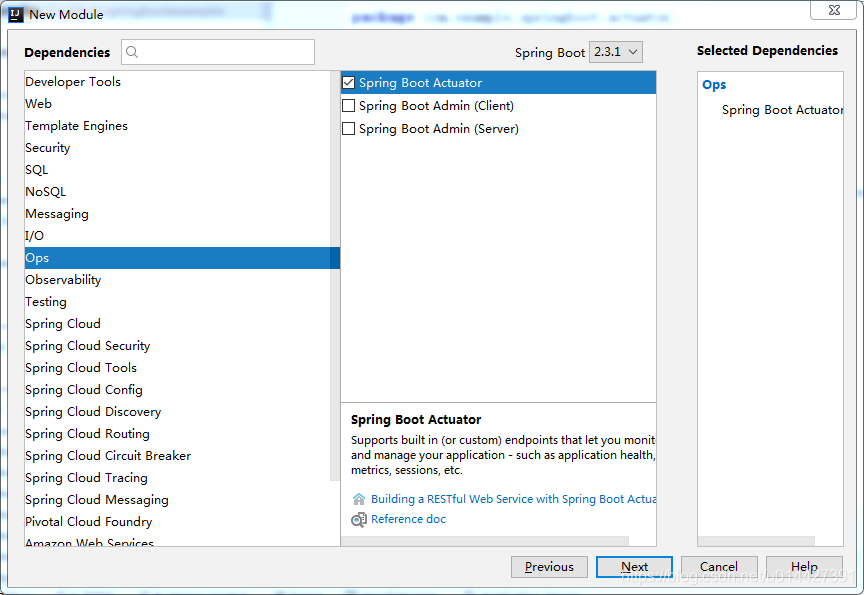
要将执行器添加到基于Maven的项目中,请检查添加以下“ Starter”依赖项:
<dependencies>

    <dependency>

        <groupId>org.springframework.boot</groupId>

        <artifactId>spring-boot-starter-actuator</artifactId>

    </dependency>

</dependencies>
项目启动成功后,如果没设置context-path,项目会自动加入/actuator作为前缀,大部分端点是默认启动的,不过要通过web浏览器方式访问的只有health、info端点
可以通过配置修改默认前缀
management.endpoints.web.base-path=/actuator
通用的端点(http、Jms、ssh方式都能访问):
| ID | 描述 | 默认启用 |
|---|---|---|
auditevents |
暴露当前应用程序的审计事件信息。 | 是 |
beans |
显示应用程序中所有 Spring bean 的完整列表。 | 是 |
caches |
暴露可用的缓存。 | 是 |
conditions |
显示在配置和自动配置类上评估的条件以及它们匹配或不匹配的原因。 | 是 |
configprops |
显示所有 @ConfigurationProperties 的校对清单。 |
是 |
env |
暴露 Spring ConfigurableEnvironment 中的属性。 |
是 |
flyway |
显示已应用的 Flyway 数据库迁移。 | 是 |
health |
显示应用程序健康信息 | 是 |
httptrace |
显示 HTTP 追踪信息(默认情况下,最后 100 个 HTTP 请求/响应交换)。 | 是 |
info |
显示应用程序信息。 | 是 |
integrationgraph |
显示 Spring Integration 图。 | 是 |
loggers |
显示和修改应用程序中日志记录器的配置。 | 是 |
liquibase |
显示已应用的 Liquibase 数据库迁移。 | 是 |
metrics |
显示当前应用程序的指标度量信息。 | 是 |
mappings |
显示所有 @RequestMapping 路径的整理清单。 |
是 |
scheduledtasks |
显示应用程序中的调度任务。 | 是 |
sessions |
允许从 Spring Session 支持的会话存储中检索和删除用户会话。当使用 Spring Session 的响应式 Web 应用程序支持时不可用。 | 是 |
shutdown |
正常关闭应用程序。POST请求方式 | 否 |
threaddump |
执行线程 dump。 | 是 |
GET方式调用health端点,返回json信息
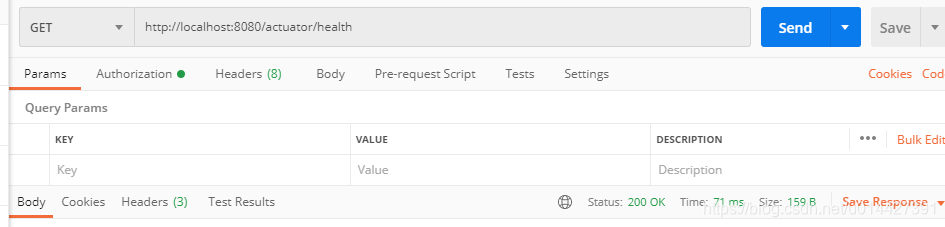
Web 应用程序(Spring MVC、Spring WebFlux 或 Jersey),则可以使用以下附加端点,这个应该是2.x版本才加上的
| ID | 描述 | 默认启用 |
|---|---|---|
heapdump |
返回一个 hprof 堆 dump 文件。 |
是 |
jolokia |
通过 HTTP 暴露 JMX bean(当 Jolokia 在 classpath 上时,不适用于 WebFlux)。 | 是 |
logfile |
返回日志文件的内容(如果已设置 logging.file 或 logging.path 属性)。支持使用 HTTP Range 头来检索部分日志文件的内容。 |
是 |
prometheus |
以可以由 Prometheus 服务器抓取的格式暴露指标。 | 是 |
启用端点,修改配置,语法management.endpoint.[端点名称].enabled=true
management.endpoint.shutdown.enabled=true
下表显示了内置端点和默认暴露情况,以JMX、WEB(Http)做对比:
| ID | JMX | Web |
|---|---|---|
auditevents |
是 | 否 |
beans |
是 | 否 |
caches |
是 | 否 |
conditions |
是 | 否 |
configprops |
是 | 否 |
env |
是 | 否 |
flyway |
是 | 否 |
health |
是 | 是 |
heapdump |
N/A | 否 |
httptrace |
是 | 否 |
info |
是 | 是 |
integrationgraph |
是 | 否 |
jolokia |
N/A | 否 |
logfile |
N/A | 否 |
loggers |
是 | 否 |
liquibase |
是 | 否 |
metrics |
是 | 否 |
mappings |
是 | 否 |
prometheus |
N/A | 否 |
scheduledtasks |
是 | 否 |
sessions |
是 | 否 |
shutdown |
是 | 否 |
threaddump |
是 | 否 |
要更改暴露的端点,请使用以下特定的 include 和 exclude 属性:
| 属性 | 默认 |
|---|---|
management.endpoints.jmx.exposure.exclude |
|
management.endpoints.jmx.exposure.include |
* |
management.endpoints.web.exposure.exclude |
|
management.endpoints.web.exposure.include |
info, health |
include 属性列出了暴露的端点的 ID。exclude 属性列出了不应暴露的端点的 ID。exclude 属性优先于 include 属性。
例子:
关闭jmx访问所有端点的权限,只让其能访问health、info
management.endpoints.jmx.exposure.include=health,info
启用web访问所有端点,除env之外的权限
management.endpoints.web.exposure.include=*

management.endpoints.web.exposure.exclude=env
注意
* 在 YAML 中具有特殊含义,因此如果要包含(或排除)所有端点,请务必添加引号,如下所示:
management:

  endpoints:

    web:

      exposure:

        include: "*"
自定义InfoContributor
package com.example.springboot.actuator.actuate.health;

import java.util.Collections;

import org.springframework.boot.actuate.info.Info;

import org.springframework.boot.actuate.info.InfoContributor;

import org.springframework.stereotype.Component;

@Component

public class ExampleInfoContributor implements InfoContributor {

    @Override

    public void contribute(Info.Builder builder) {

        builder.withDetail("example",

                Collections.singletonMap("key", "value"));

    }

}
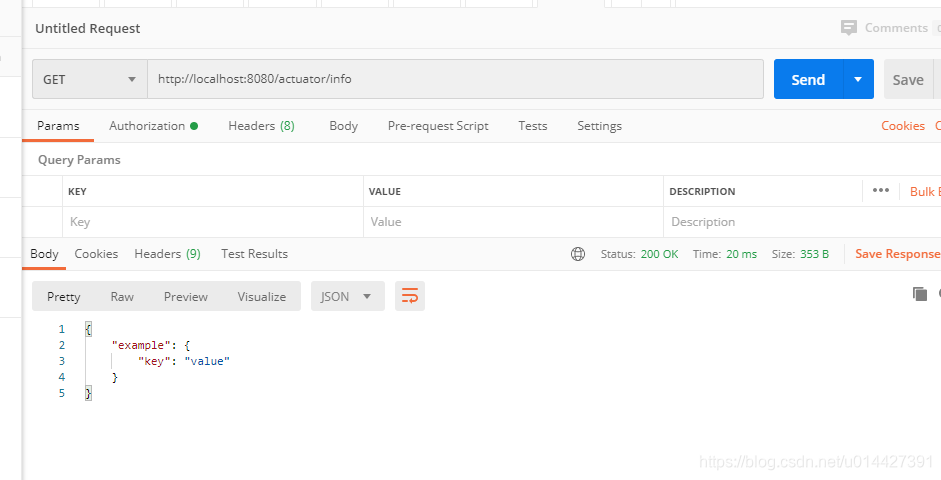
可以在浏览器或者postman调用:
跨域支持配置
management.endpoints.web.cors.allowed-origins=http://localhost

management.endpoints.web.cors.allowed-methods=GET,POST
定置端点:
management.endpoint.info.enabled=true

management.endpoint.info.cache.time-to-live=10s
ok,actuator的知识点比较多,详情请参考官方文档,本博客参考官方文档,做了简单记录,仅仅作为入门参考手册
代码例子下载:code download
SpringBoot系列之actuator监控管理极速入门与实践的更多相关文章
- SpringCloud系列之分布式配置中心极速入门与实践
SpringCloud系列之分布式配置中心极速入门与实践 @ 目录 1.分布式配置中心简介 2.什么是SpringCloud Config? 3.例子实验环境准备 4.Config Server代码实 ...
- SpringBoot集成Actuator监控管理
1.说明 本文详细介绍Spring Boot集成Actuator监控管理的方法, 基于已经创建好的Spring Boot工程, 然后引入Actuator依赖, 介绍监控管理相关功能的使用. Sprin ...
- SpringBoot系列——admin服务监控
前言 springboot项目部署起来后,如何实时监控项目的运行状况呢?本文记录使用springboot-admin对服务进行监控. springboot-admin介绍:https://codece ...
- Spring Security系列之极速入门与实践教程
@ 目录 1. Spring Security 2. 实验环境准备 3. 日志级别修改 4. 配置用户名/密码 5. 数据库方式校验 6. 不拦截静态资源 7. 自定义登录页面 8. Remember ...
- Springboot 系列(一)Spring Boot 入门篇
注意:本 Spring Boot 系列文章基于 Spring Boot 版本 v2.1.1.RELEASE 进行学习分析,版本不同可能会有细微差别. 前言 由于 J2EE 的开发变得笨重,繁多的配置, ...
- SpringBoot简单整合Actuator监控
pom依赖 <dependency> <groupId>org.springframework.boot</groupId> <artifactId>s ...
- SpringBoot系列之从入门到精通系列教程
对应SpringBoot系列博客专栏,例子代码,本博客不定时更新 Spring框架:作为JavaEE框架领域的一款重要的开源框架,在企业应用开发中有着很重要的作用,同时Spring框架及其子框架很多, ...
- SpringBoot要点之使用Actuator监控
Actuator是Springboot提供的用来对应用系统进行自省和监控的功能模块,借助于Actuator开发者可以很方便地对应用系统某些监控指标进行查看.统计等. 在pom文件中加入spring-b ...
- Spring Boot整合actuator实现监控管理
Spring Boot使用actuator监控管理 1.在pom文件中导入相关的依赖 <dependency> <groupId>org.springframework.boo ...
- SpringBoot系列: SpringBoot Web项目中使用Shiro
注意点有:1. 不要启用 spring-boot-devtools, 如果启用 devtools 后, 不管是热启动还是手工重启, devtools总是试图重新恢复之前的session数据, 很有可能 ...
随机推荐
- C#数据结构之Tree
using System; using System.Collections.Generic; using System.Linq; using System.Text; using System.T ...
- 红杉AI闭门会:AI 不再卖工具,而是卖收益
AI创业失败,经验教训分享可私聊... 近来,AI圈最值得关注的应该是在旧金山召开的红杉资本AI峰会. 敏感的同学会清楚,钱在哪里,哪里就有发展,如果能迎合资本市场,那就有可能活得很好,所以我们今天就 ...
- 自定义localStorage监听事件
一.问题 在项目开发过程中,发现有很多时候进行localStorage.setItem()操作设置本地存储后,页面必须刷新才能够获取到存储数据,而有些时候本地缓存更新后,页面无法通过再次刷新以获取本地 ...
- 写Leetcode 对业务代码是帮助的
业务中遇到的表结构以及场景如下: id name pid 1 A 0 2 A 1 3 A 2 4 B 0 5 B 4 6 B 5 7 C 0 8 D 7 9 E 8 是一个层级结构,名字可能相同,也可 ...
- F-47(copy 邓大顾)
*&---------------------------------------------------------------------* *& F-47过账 *&--- ...
- Solon Expression Language (SnEL):轻量高效的Java表达式引擎
一.SnEL 是什么? Solon Expression Language(简称SnEL)是 Solon 生态体系中的轻量级表达式引擎,专为Java开发者设计.它采用独特的"求值表达式&qu ...
- 从零开发Vim-like编辑器(02)探讨编辑器对文本的解析与呈现设计思路
本文同步发布在我的个人博客:https://zhen.wang 前言 前一篇文章作为开篇,只是介绍了Ratatui的相关使用,引出了一些概念.从本文开始,我们正式进入咱们的Vim-like编辑器的开发 ...
- AI应用实战课学习总结(7)聚类算法分析实战
大家好,我是Edison. 最近入坑黄佳老师的<AI应用实战课>,记录下我的学习之旅,也算是总结回顾. 今天是我们的第7站,一起了解下聚类算法基本概念 以及 通过聚类算法辅助用户画像的案例 ...
- C# 列表项下拉窗口宽度自适应
/// <summary> /// 列表项下拉窗口宽度自适应 /// </summary> /// <param name="comboBox"> ...
- asp.net mvc 获取请求服务器信息
HttpContext.Current.Request.ServerVariables["REMOTE_ADDR"] /// <summary> /// ...