
iOS 用CALayer实现动画
与动画有关的几个类的继承关系
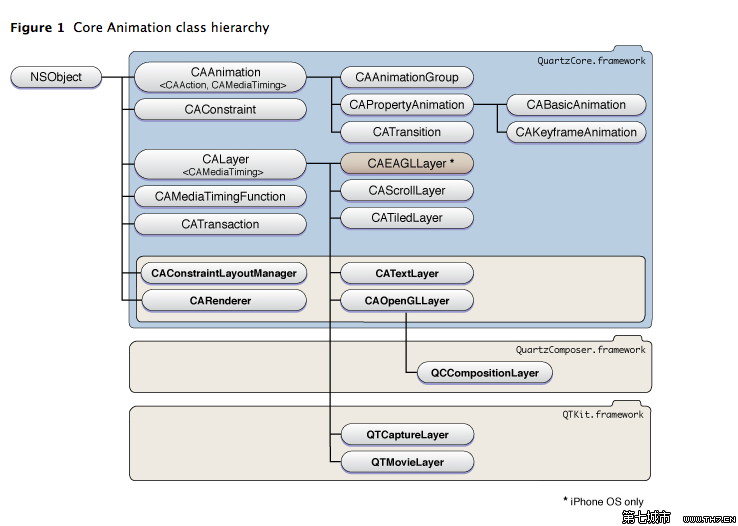
涉及到动画的类主要有6个,看一下它们的基本用途:
1. CAAnimation
动画基类
2. CAAnimationGroup
组合多个动画
3. CAPropertyAnimation
CAPropertyAnimation is an abstract subclass of CAAnimation for creating animations that manipulate the value of layer properties. The property is specified using a key path that is relative to the layer using the animation.
就如它的名字,CAPropertyAnimation是针对layer的某个property来进行动画的,比如position等。
4. CATransition
The CATransition class implements transition animations for a layer. You can specify the transition effect from a set of predefined transitions or by providing a custom CIFilter instance.
CATransition能够为层提供移出以及移入屏幕的效果,有了这个,就可以省去复杂的编码了,不过只提供了有限的几种动画。其实它的效果,都可以用自己写的动画代码实现。
5. CABasicAnimation
CABasicAnimation provides basic, single-keyframe animation capabilities for a layer property. You create an instance of CABasicAnimation using the inherited animationWithKeyPath: method, specifying the key path of the property to be animated in the render tree.
这个animationWithKeyPath: method是CAPropertyAnimation中的方法,在这个子类中,仅仅多了3个属性(fromValue,toValue,byValue),以便使创建CAPropertyAnimation更简单。
6. CAKeyframeAnimation
The CAKeyframeAnimation class provides keyframe animation capabilities for a layer object. You create an CAKeyframeAnimation object using the inherited animationWithKeyPath: method, specifying the key path of the property that you want to animate on the layer. You can then specify the keyframe values to use to control the timing and animation behavior.
CABasicAnimation是一个最多只能有两个(?不是一个)关键帧的动画,而CAKeyframeAnimation除了可含有多个关键帧,而且还可以修改每个关键帧的速度。什么叫做keyframe 动画呢?一个keyframe就相当于你指定了一组确定的数据,表明了frame的显示属性,CABasicAnimation其实只需要我们提供开始和结束时的显示属性,其他的显示帧都由系统自动生成,所以keyframe就2个,动画比较单一。而CAKeyframeAnimation不同,它有2种方法指定多个keyframe:一种是指定path属性,一种是指定values属性,注意If you specify a value for path property, any data in the values property is ignored.
这里有一篇关于CAKeyframeAnimation动画的文章,感谢作者!http://blog.csdn.net/huifeidexin_1/article/details/8504075
这里还有msdn中的关于关键帧动画的讲解,中文版!http://msdn.microsoft.com/zh-cn/library/cc189038(v=vs.95).aspx
今天在写程序时,想写一个图片绕着圆运动的动画,于是用了CAKeyframeAnimation,但是我初始化时用的是[CAKeyframeAnimation animation] 而不是[CAKeyframeAnimation animationWithKeyPath:@"position"],查了好久查出了问题,在这里总结一下。
第一个[CAKeyframeAnimation animation] 是CAAnimation的方法,而animationWithKeyPath是 CAPropertyAnimation的方法。这里的keypath 指的是 The key path of the property to be animated. 就是要被动画的属性的key path。如果你不明白什么是objective-c 的key path ,请查看objective-c 的kvc相关介绍。
再看一下CAKeyframeAnimation的path属性,这个属性是CAKeyframeAnimation自己的属性,不是继承来的,它的作用是For layer properties that contain a CGPoint data type, the path object you assign to this property defines the values for that property over the length of the animation. 就是说,如果你在[CAKeyframeAnimation animationWithKeyPath:@"position"]方法中用到了以CGPoint做类型的属性,比如CALayer的position属性,那么就可以用path值指定动画过程中的各个GCPoint值。
所以说,如果仅仅使用[CAKeyframeAnimation animation],并不指定CAPropertyAnimation的keyPath,那么所返回的animation对象就不知道如何利用path的值来产生动画,自然就不可能动了。当然如果你在[CAKeyframeAnimation animation]得到动画后,利用animation.keyPath = @"position"; 指定了keyPath,那么程序也是正确的。
总结,如果使用CAKeyframeAnimation,或CABasicAnimation 那么对keyPath的赋值是必须的!
除了使用CAAnimation类和子类外,还可以使用CATransaction,它的特点是:可以同时对多个layer的属性进行动画。
1.禁止CALayer的动画效果
When you change the property of a layer, Core Animation usually creates an implicit transaction object to animate the change. If you do not want to animate the change, you can disable implicit animations by creating an explicit transaction and setting itskCATransactionDisableActions property to true.
简单的说,就是对CALayer的属性做修改,系统默认是会有动画效果的,如果不想使用动画效果,需要使用下面的代码:
[CATransaction begin];

[CATransaction setValue:(id)kCFBooleanTrue

                 forKey:kCATransactionDisableActions];

[aLayer removeFromSuperlayer];

[CATransaction commit];
2.使用CATransaction的优点
One of the main reasons to use transactions is that within the confines of an explicit transaction, you can change the duration, timing function, and other parameters. You can also assign a completion block to the entire transaction so that your app can be notified when the group of animations finishes.
就是能更改layer动画默认属性,添加完成后的监听。比如,以下代码更改了动画的执行时间:
[CATransaction begin];

[CATransaction setValue:[NSNumber numberWithFloat:10.0f]

                 forKey:kCATransactionAnimationDuration];

// Perform the animations

[CATransaction commit];
使用CAAnimation和CATransaction的区别在哪里?
首先,CATransaction可以同时对多个layer的属性进行动画。
另外,我们看看layer中的函数 - (void)addAnimation:(CAAnimation *)anim forKey:(NSString *)key,它的描述是 Add the specified animation object to the layer’s render tree.
由此,我们可以看出,使用animation方式添加动画,是在layer的render tree 中添加动画,没有改动layer tree 和 representation tree( representation tree 不会被更改??好像会更改),表现就是:动画过完成后,layer又回到了原始的位置;而如果通过CATransaction实现动画,就会更改layer tree。
这里还有一篇好文章,感谢作者!http://blog.sina.com.cn/s/blog_7c45221901014ezr.html
iOS 用CALayer实现动画的更多相关文章
- [iOS Animation]-CALayer 显示动画
显式动画 如果想让事情变得顺利,只有靠自己 -- 夏尔·纪尧姆 上一章介绍了隐式动画的概念.隐式动画是在iOS平台创建动态用户界面的一种直接方式,也是UIKit动画机制的基础,不过它并不能涵盖所有的动 ...
- iOS:CALayer核心动画层
CALayer:核心动画层 简介: Core Animation 是跨平台的,支持iOS环境和Mac OS X环境 学习核心动画之前,需要先理解CALayer,因为核心动画操作的对象不是UIView, ...
- [iOS Animation]-CALayer 定时器动画
定时器的动画 我可以指导你,但是你必须按照我说的做. -- 骇客帝国 在第10章“缓冲”中,我们研究了CAMediaTimingFunction,它是一个通过控制动画缓冲来模拟物理效果例如加速或者减速 ...
- iOS:CALayer核心动画层上绘图
在CALayer上绘图: •要在CALayer上绘图,有两种方法: 1.创建一个CALayer的子类,然后覆盖drawInContext:方法,可以使用Quartz2D API在其中进行绘图 2.设置 ...
- IOS开发系列 --- 核心动画
原始地址:http://www.cnblogs.com/kenshincui/p/3972100.html 概览 在iOS中随处都可以看到绚丽的动画效果,实现这些动画的过程并不复杂,今天将带大家一窥i ...
- [iOS Animation]-CALayer 视觉效果
视觉效果 嗯,圆和椭圆还不错,但如果是带圆角的矩形呢? 我们现在能做到那样了么? 史蒂芬·乔布斯 我们在第三章『图层几何学』中讨论了图层的frame,第二章『寄宿图』则讨论了图层的寄宿图.但是图层不仅 ...
- iOS开发之核心动画(Core Animation)
1.概述 Core Animation是一组非常强大的动画处理API,使用它能做出非常炫丽的动画效果,而且往往是事半功倍,使用它需要先添加QuartzCore.framework和引入对应的框架< ...
- iOS CAReplicatorLayer 实现脉冲动画效果
iOS CAReplicatorLayer 实现脉冲动画效果 效果图 脉冲数量.速度.半径.透明度.渐变颜色.方向等都可以设置.可以用于地图标注(Annotation).按钮长按动画效果(例如录音按钮 ...
- iOS - Core Animation 核心动画
1.UIView 动画 具体讲解见 iOS - UIView 动画 2.UIImageView 动画 具体讲解见 iOS - UIImageView 动画 3.CADisplayLink 定时器 具体 ...
随机推荐
- [Asp.net mvc]实体更新异常:存储区更新、插入或删除语句影响到了意外的行数(0)。实体在加载后可能被修改或删除。
学习asp.net mvc 时在更新实体进行SaveChanges()的时候出现了异常,异常如下: “/”应用程序中的服务器错误. 存储区更新.插入或删除语句影响到了意外的行数(0).实体在加载后可能 ...
- 【CodeForces 626E】Simple Skewness
题意 给出n个数的集合,求一个 (平均数-中位数)最大 (偏度最大)的子集,输出子集元素个数和各个元素(任意顺序). 分析 因为是子集,所以不一定是连续的序列.然后我们有下面几个结论. 1.最大偏度一 ...
- Android4.4中不能发送SD卡就绪广播
当在Android上进行图片的扫描功能开发时一般会使用:sendBroadcast(new Intent(Intent.ACTION_MEDIA_MOUNTED, Uri.parse(“file:// ...
- POJ2286 The Rotation Game
Description The rotation game uses a # shaped board, which can hold 24 pieces of square blocks (see ...
- jquery中的prop和attr比较区别
近期和一同事争执prop和attr的区别,也查了很多,同事说它只是特性和固有属性的区别,但是我也查到了一些其他的,故此,来总结一下吧! 1.固有属性和特别属性 对于HTML元素本身就带有的固有属性,在 ...
- Tomcat Server Configuration Automation Reinforcement
目录 . 引言 . 黑客针对WEB Server会有那些攻击面 . 针对Tomcat Server可以做的安全加固 . Managing Security Realms with JMX . 实现对T ...
- 新建maven项目
1.新建maven project 注意:勾上create a new simple project 2.填写相关信息, Grounp id为大项目名字,Artifact id为小项目的名字.注意:P ...
- Latex 笔记
A source file is made up of text, formulas, and instructions (commands) to $\LaTeX.$ Commands start ...
- 自动打包iOS项目
基于Lexrus的博文iOS-makefile,本文对自动打包涉及到的操作步骤以及理论基础进行了适当的补充. 请在阅读本文前先阅读<iOS makefile>.文章地址:http: ...
- BC68(HD5606) 并查集+求集合元素
tree Accepts: 143 Submissions: 807 Time Limit: 2000/1000 MS (Java/Others) Memory Limit: 65536/65 ...