
Win7 32bit + Matlab2013b +Visual Studio 2010联合编程配置
Matlab编译器使用mbuild命令可以直接将C/C++源代码编译为独立运行程序,在这些源代码中可以使用Matlab提供的接口来调用Matlab数学库函数。
虽然生成的可执行程序可以脱离Matlab环境运行,但是它需要Matlab C/C++数学库文件或者图形库文件的支持才能运行。但如果C/C++源代码完全是按传统C/C++源代码语法规则编写,没有包含Matlab数学库和图形库的调用,则不仅可以独立与Matlab环境,也不需要那两个库函数的支持。
1. MATLAB 环境配置:
>> mbuild -setup
a default compiler. For a list of supported compilers, see
http://www.mathworks.com/support/compilers/R2011b/win32.html
Please choose your compiler for building standalone MATLAB applications:
Would you like mbuild to locate installed compilers [y]/n? y
(注:若是第一次mbuild -setup,选n,再在给出的的选项中选择2010 compiler,要注意安装路径是否相符)
[1] Microsoft Software Development Kit (SDK) 7.1
[2] Microsoft Visual C++ 6.0
[3] Microsoft Visual C++ 2008 SP1
[4] Microsoft Visual C++ 2010
[5] Microsoft Visual C++ 2012
[0] None
Compiler: 4
E:\Program Files\VS2010. Do you want to use this compiler [y]/n? y
Please verify your choices:
Compiler: Microsoft Visual C++ 2010
Location: E:\Program Files\VS2010
Are these correct [y]/n? y
Warning: Applications/components generated using Microsoft Visual C++
2010 require that the Microsoft Visual Studio 2010 run-time
libraries be available on the computer used for deployment.
To redistribute your applications/components, be sure that the
deployment machine has these run-time libraries.
****************************************************************************
Trying to update options file: C:\Users\Yanlu\AppData\Roaming\MathWorks\MATLAB\R2013a\compopts.bat
From template: E:\PROGRA~1\MATLAB~1\bin\win32\mbuildopts\msvc100compp.bat
Done . . .
>> mex – setup
以类似的方法配置编译器。Matlab 的配置完成.
a default compiler. For a list of supported compilers, see
http://www.mathworks.com/support/compilers/R2011b/win32.html
Please choose your compiler for building MEX-files:
Would you like mex to locate installed compilers [y]/n? y
Select a compiler:
[1] Lcc-win32 C 2.4.1 in D:\PROGRA~1\MATLAB\R2011b\sys\lcc
[2] Microsoft Visual C++ 2010 in D:\Program Files\Microsoft Visual Studio 10.0
[3] Microsoft Visual C++ 2008 SP1 in E:\Program Files\Microsoft Visual Studio 9.0
[0] None
Compiler: 2
Compiler: Microsoft Visual C++ 2010
Location: E:\Program Files\VS2010
Are these correct [y]/n? y
Warning: MEX-files generated using Microsoft Visual C++ 2010 require
that Microsoft Visual Studio 2010 run-time libraries be
available on the computer they are run on.
If you plan to redistribute your MEX-files to other MATLAB
users, be sure that they have the run-time libraries.
***************************************************************************
Trying to update options file: C:\Users\Yanlu\AppData\Roaming\MathWorks\MATLAB\R2013a\mexopts.bat
From template: E:\PROGRA~1\MATLAB~1\bin\win32\mexopts\msvc100opts.bat
Done . . .
**************************************************************************
Warning: The MATLAB C and Fortran API has changed to support MATLAB
variables with more than 2^32-1 elements. In the near future
you will be required to update your code to utilize the new
API. You can find more information about this at:
http://www.mathworks.com/help/matlab/matlab_external/upgrading-mex-files-to-use-64-bit-api.html
Building with the -largeArrayDims option enables the new API.
**************************************************************************
2.转化BoostImage.m文件
mcc -W cpplib:BoostImage -T link:lib BoostImage -d F:\zhangying\xieyulin\MatlabToC\
注:在此的m文件function最好对应end,否则容易出现 Error using mcc的错误。(但我碰到有个m文件仍不能转化成功,不知什么原因)
其中,mcc是Matlab提供的编译命令,对于这一点,Matlab的帮助说明如下:
-W lib:string link:lib其中-W是控制编译之后的封装格式,cpplib,是指编译成C++的lib,cpplib冒号后面是指编译的库的名字,
-T表示目标,link:lib表示要连接到一个库文件的目标,目标的名字是后面的BoostImage,即你写的m函数的名字。
运行完之后,你的目录下面,将会出现以下一些文件:
BoostImage.cpp
BoostImage.exp
BoostImage.dll
BoostImage.exports
BoostImage.h
BoostImage.lib
mccExcludedFiles.log
readme.txt
具体每一个文件的意思,请查帮助,这里只说其中很有用的几个:
BoostImage.dll是编译好的动态库,BoostImage这个函数封装在里面,BoostImage.h是对应的头文件,在C里面调用这个函数的时候,需要include这个头文件在这个头文件的最后,你可以看到下面的内容:
extern LIB_BoostImage_CPP_API void MW_CALL_CONV BoostImage(int nargout, mwArray& output_im, const mwArray& input_im, const mwArray& Mboost);
这就是BoostImage的C函数的声明。nargout表示输出变量的个数,a,b,c就是对应了m函数的几个变量。
注意,a,b,c三个变量的类型是mwArray,这是Matlab提供的一个特殊的变量类型(在7.0的版本,编译之后,变量类型是mxArray)。mwArray是一个类,具体可以查帮助。
2.系统环境设置
我的电脑->属性->高级->环境变量->用户变量->PATH中添加路径:D:\Program Files\MATLAB\R2011b\bin\win32,重启生效。
3.VS2010环境配置
新建一个win32 控制台应用程序,命名为MatlabTest.
右键MatlabTest解决方案->properties->VC++ Derections
(1)在“Executable Directions”项目栏,添加:D:\Program Files\MATLAB\R2011b\bin\win32(注意:当前的Mathlab安装在D:\Program Files下面)
(2)在“include Directions”项目栏,添加:D:\Program Files\MATLAB\R2011b\extern\include
(3)在“Library Directions”项目栏,添加:D:\Program Files\MATLAB\R2011b\extern\lib\win32\microsoft
上述环境只需要配置一次。
另参考:
在此暂时先测试了VS2010调用matlab现有函数的功能:
// MatlabTest.cpp : Defines the entry point for the console application.

//

#include "stdafx.h"

#include <stdlib.h>

#include <stdio.h>

#include <string.h>

#include "engine.h"

#include "matrix.h"

#pragma comment(lib,"libeng.lib")

#pragma comment(lib,"libmx.lib")

int main()

{

    Engine *ep;

    int i , j ;

    //show how to open MATLAB engine

    //for remote ones:

    //engOpen( ADDRESS OF REMOTE SYSTEM ) ;

    if (!(ep = engOpen("\0"))){

        fprintf(stderr, "\nCan't start MATLAB engine\n");

        return EXIT_FAILURE;

    }

    //show how to create matrix

    mxArray *Y = mxCreateDoubleMatrix( ,  , mxREAL) ;


    //show how to put data in matrix

    double tmp[] = {1.0 , 2.0 , 3.0} ;

    memcpy(mxGetPr(Y) , tmp , sizeof(tmp)) ;

    //show how to put variables in the Engine

    engPutVariable(ep , "Y" , Y) ;

    //show how to execute commands in MATLAB

    engEvalString(ep, "X = ones(5,1) * Y");


    //show how to get variables from the Engine

    mxArray *X = engGetVariable(ep , "X") ;


    //show how to manipulate dimensions

    int dims[] ;

    int ndims ;

    ndims = mxGetNumberOfDimensions(X) ;

    printf("total number of dimensions is %d\n" , ndims) ;

    memcpy(dims , mxGetDimensions(X) , ndims * sizeof(int)) ;

    for ( i =  ; i < ndims ; i ++ ){

        printf("dimension %d : %d\n" , i , dims[i]) ;

    }

    printf("\n") ;

    //show how the data is stored in the memory

    double *p = (double*)mxGetData(X) ;

    for ( i =  ; i < dims[] ; i ++ ){

        for ( j =  ; j < dims[] ; j ++ ){

            printf("%8.2f" , p[j * dims[] + i]) ;

        }

        printf("\n") ;

    }

    //---important, to release resources

    mxDestroyArray(X) ;

    mxDestroyArray(Y) ;

    //show how to hide and unhide MATLAB command window

    printf("type RETURN to hide the MATLAB command window...\n") ;

    getchar() ;

    engSetVisible(ep , false) ;

    printf("type RETURN to unhide the MATLAB command window...\n") ;

    getchar() ;

    engSetVisible(ep , true) ;

    printf("type RETURN to END this program...\n") ;

    getchar() ;

    //remembering to close it is important .

    //but if you are debugging your programs ,

    //annotate the following line will save you a lot of time ,

    //for you needn't to restart the Engine .

    engClose(ep) ;


    //when your work is accomplished , type "exit" in MATLAB command window

    return EXIT_SUCCESS;

}
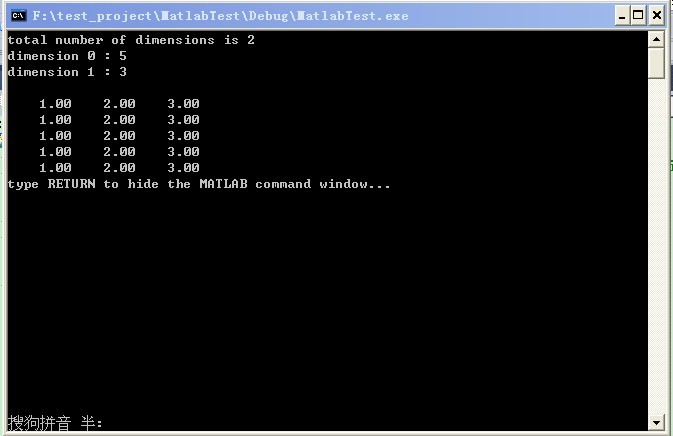
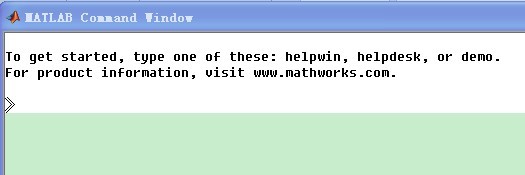
若出现如下问题:
error C2371: 'char16_t' : redefinition; different basic types
在混合编程中,也许会出现如下错误:
—————————————————————————————————————————————————
C:Microsoft Visual Studio 10.0VCINCLUDEyvals.h(576) : error C2371: 'char16_t' : redefinition; different basic types
C:Matlabr2010aexternincludematrix.h(330) : see declaration of 'char16_t'
—————————————————————————————————————————————————
原因是VS2010中的yvals.h添加了char16_t的定义,而Matlab的matrix.h也包含对char16_t的定义,所以同时包含这两个头文件的话,会导致重复定义char16_t的错误。
解决方案:
参考:http://maciejgryka.com/bits/2011/09/char16_t-conflict-while-mexing-with-vs2010/
完全没有必要修改这两个头文件(以防修改之后,会在将来导致一些问题),只需要在包含matrix.h之前包含yvals.h即可。例如:
#include <yvals.h>
#if (_MSC_VER >= 1600)
#define __STDC_UTF_16__
#endif
#include "mex.h"
注:mex.h 包含matrix.h。这就要求我们必须知道所包含的头文件是否包含matrix.h。
Win7 32bit + Matlab2013b +Visual Studio 2010联合编程配置的更多相关文章
- visual studio 2010 C#编程时 没有.NET framework 2.0目标框架的解决办法
解决办法是安装Framework .NET 3.5 Sp1 因为visual studio 2010是依赖.NET Framework 3.5 Sp1来识别其它版本的.NEt framework的. ...
- Win7 64 安装Visual Studio 2010和SQL Server 2008 R2
1. 在MSDN,我告诉你下载安装文件,VS 2010 不论32位还是64位都是同一个文件,cn_visual_studio_2010_ultimate_x86_dvd_532347.iso.SQL下 ...
- Visual Studio 2010多线程编程
随着处理数据量的逐渐增大,串行单核的程序,犹如残灯缺月,无法满足运用需求.大规模集群的出现,解决了这一技术难题.本文旨在探讨如何使用多CPU并行编程,关于CUDA的并行前面文章已有讲述.本文结构分为三 ...
- WIN7环境下CUDA7.5的安装、配置和测试(Visual Studio 2010)
以下基于"WIN7(64位)+Visual Studio 2010+CUDA7.5". 系统:WIN7,64位 开发平台:Visual Studio 2010 显卡:NVIDIA ...
- GDAL Configure in Visual Studio 2010 for Win7/ GDAL+VisualStudio2010 Win7 配置
配置环境: OS:Win& *86 Ultimate Edition(EN) VS:Visual Studio 2010(EN) Step1: GDAL源码下载:http://www.gisi ...
- [内核编程] visual studio 2010配置驱动开发环境
visual studio 2010 配置驱动开发环境 ** 工具/材料 VS2010.WDK开发包 ** 配置过程 以下将讲述VS2010驱动开发环境的配置过程,至于必要软件的安装过程这里不再赘述 ...
- [转]Visual Studio 2010 中安装Qt 5.1
截至目前(2013年7月12日)为止,Qt 的最高版本为Qt5.1,在该版本中已经将Qt Creator与Qt Lib集成在一个文件夹中,因此安装的时候较为方便,只需安装一个即可.因为Qt具有超强的可 ...
- 《转》Visual Studio 2010 终极定制安装精简方法
打开VS2010安装目录下的 Setup 文件夹,找到 baseline.dat 文件和 vs_setup.pdi 文件还有一个 locdata.ini 文件,是对应的. 这些都是文本文件,用记事本就 ...
- 转:Remote debugging with Visual Studio 2010
Original URL http://www.codeproject.com/Articles/146838/Remote-debugging-with-Visual-Studio-2010 you ...
随机推荐
- 2015年9月10-11日,杨学明老师《IPD DRY RUN》专题培训在武汉某上市企业成功举办!
2015-9-10~11日,杨学明老师为武汉著名的光通信企业某上市公司实施了为期两天的“IPD DRY RUN”,开班前,该公司三个项目团队的负责人先后发言,烽火PMO部门领导和公开研发部网管系统的领 ...
- python通过ip获取地址
# -*- coding: utf-8 -*- url = "http://ip.taobao.com/service/getIpInfo.php?ip=" #查找IP地址 def ...
- Python操作memcached及redis
Memcached Memcached 是一个高性能的分布式内存对象缓存系统,用于动态Web应用以减轻数据库负载.它通过在内存中缓存数据和对象来减少读取数据库的次数,从而提高动态.数据库驱动网站的速度 ...
- JS 将字符串转换成日期类型
将字符串形式的日期转换成日期对象 var strTime="2011-04-16"; //字符串日期格式 var date= new Date(Date.par ...
- php乱码
1:php 编码是utf-8 但是接口需要是gbk 这么办?? $message = "你的微点管理地址为:".$shortUrl." [请保存信息]"; // ...
- 使用java 程序创建格式为utf-8文件的方法(写入和读取json文件)
使用java 程序创建格式为utf-8文件的方法: try{ File file=new File("C:/11.jsp"); ...
- [转]一个文件上传的jquery插件
http://www.jb51.net/article/51547.htm 这篇文章主要介绍了使用ajaxfileupload.js实现ajax上传文件php版,需要的朋友可以参考下 无论是P ...
- JavaScript中for..in循环陷阱介绍
for...in循环中的循环计数器是字符串,而不是数字它包含当前属性的名称或当前数组元素的索引,下面有个不错的示例大家可以参考下 大家都知道在JavaScript中提供了两种方式迭代对象: (1) ...
- lucene join解决父子关系索引
http://www.cnblogs.com/LBSer/p/4417074.html 1 背景 以商家(Poi)维度来展示各种服务(比如团购(deal).直连)正变得越来越流行(图1a), 比如目前 ...
- java-一个小练习
输出自己的姓名: public class test01 { public static void main(String[] args) { System.out.println(" # ...