
Chart系列(二):数据绑定
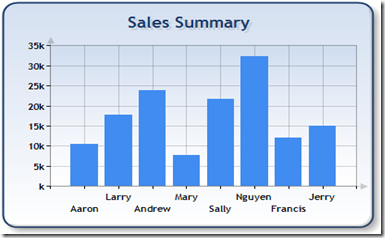
1.绑定到OleDbDataReader:
// Define the database query

string mySelectQuery="SELECT Name, Sales FROM REPS;";

// 。。。。。。
// Create a database reader

OleDbDataReader myReader = myCommand.ExecuteReader(CommandBehavior.CloseConnection);

// Since the reader implements and IEnumerable, pass the reader directly into

// the DataBindTable method with the name of the Column to be used as the XValue

Chart1.DataBindTable(myReader, "Name");
2.绑定DataSource
// Define the database query

string mySelectQuery="SELECT * FROM REPS;";

// Create a database connection object using the connection string

OleDbConnection myConnection = new OleDbConnection(myConnectionString);

// Create a database command on the connection using query

OleDbCommand myCommand = new OleDbCommand(mySelectQuery, myConnection);

myConnection.Open();
// set chart data source - the data source must implement IEnumerable

chart1.DataSource = myCommand.ExecuteReader(CommandBehavior.CloseConnection);


// Set series members names for the X and Y values

chart1.Series["Series 1"].XValueMember = "Name";

chart1.Series["Series 1"].YValueMembers = "Sales";

// Data bind to the selected data source

chart1.DataBind();

3.绑定Y值
// Create a database reader

OleDbDataReader myReader = myCommand.ExecuteReader(CommandBehavior.CloseConnection);

// Since the reader implements and IEnumerable, pass the reader directly into

// the DataBind method with the name of the Column selected in the query

chart1.Series["Default"].Points.DataBindY(myReader, "GrossSales");

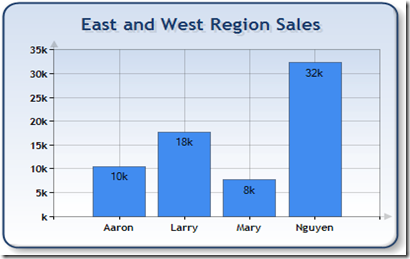
4.绑定X和Y
// Create a database reader

OleDbDataReader myReader = myCommand.ExecuteReader(CommandBehavior.CloseConnection);

// Since the reader implements IEnumerable, pass the reader directly into

//   the DataBind method with the name of the Column selected in the query

chart1.Series["Default"].Points.DataBindXY(myReader, "Name", myReader, "Sales");
Chart系列(二):数据绑定的更多相关文章
- WPF入门教程系列二十三——DataGrid示例(三)
DataGrid的选择模式 默认情况下,DataGrid 的选择模式为“全行选择”,并且可以同时选择多行(如下图所示),我们可以通过SelectionMode 和SelectionUnit 属性来修改 ...
- [知识库分享系列] 二、.NET(ASP.NET)
最近时间又有了新的想法,当我用新的眼光在整理一些很老的知识库时,发现很多东西都已经过时,或者是很基础很零碎的知识点.如果分享出去大家不看倒好,更担心的是会误人子弟,但为了保证此系列的完整,还是选择分享 ...
- highcharts 结合phantomjs纯后台生成图片系列二之php2
上篇文章中介绍了phantomjs的使用场景,方法. 本篇文章详细介绍使用php,highcharts 结合phantomjs纯后台生成图片.包含一步步详细的php代码 一.highcharts 结合 ...
- highcharts 结合phantomjs纯后台生成图片系列二之php
上篇文章中介绍了phantomjs的使用场景,方法.本篇文章详细介绍使用php,highcharts 结合phantomjs纯后台生成图片. 一.准备: 下载phantomjs解析插件,从 highc ...
- 前端构建大法 Gulp 系列 (二):为什么选择gulp
系列目录 前端构建大法 Gulp 系列 (一):为什么需要前端构建 前端构建大法 Gulp 系列 (二):为什么选择gulp 前端构建大法 Gulp 系列 (三):gulp的4个API 让你成为gul ...
- Web 开发人员和设计师必读文章推荐【系列二十九】
<Web 前端开发精华文章推荐>2014年第8期(总第29期)和大家见面了.梦想天空博客关注 前端开发 技术,分享各类能够提升网站用户体验的优秀 jQuery 插件,展示前沿的 HTML5 ...
- Web 前端开发人员和设计师必读文章推荐【系列二十八】
<Web 前端开发精华文章推荐>2014年第7期(总第28期)和大家见面了.梦想天空博客关注 前端开发 技术,分享各类能够提升网站用户体验的优秀 jQuery 插件,展示前沿的 HTML5 ...
- Web 开发精华文章集锦(jQuery、HTML5、CSS3)【系列二十七】
<Web 前端开发精华文章推荐>2014年第6期(总第27期)和大家见面了.梦想天空博客关注 前端开发 技术,分享各类能够提升网站用户体验的优秀 jQuery 插件,展示前沿的 HTML5 ...
- Web 前端开发人员和设计师必读精华文章【系列二十六】
<Web 前端开发精华文章推荐>2014年第5期(总第26期)和大家见面了.梦想天空博客关注 前端开发 技术,分享各类能够提升网站用户体验的优秀 jQuery 插件,展示前沿的 HTML5 ...
- Web 前端开发精华文章推荐(HTML5、CSS3、jQuery)【系列二十三】
<Web 前端开发精华文章推荐>2014年第2期(总第23期)和大家见面了.梦想天空博客关注 前端开发 技术,分享各类能够提升网站用户体验的优秀 jQuery 插件,展示前沿的 HTML5 ...
随机推荐
- 翻译:非常详细易懂的法线贴图(Normal Mapping)
翻译:非常详细易懂的法线贴图(Normal Mapping) 本文翻译自: Shaders » Lesson 6: Normal Mapping 作者: Matt DesLauriers 译者: Fr ...
- sqlmap如何修改线程
找到settings.py文件,具体在\lib\core\目录下找到 # Maximum number of threads (avoiding connection issues and/or Do ...
- STL之list容器用法
List 容器 list是C++标准模版库(STL,Standard Template Library)中的部分内容.实际上,list容器就是一个双向链表,可以高效地进行插入删除元素. 使用list容 ...
- 第一次学习QT
跟着大神学:http://www.cnblogs.com/tornadomeet/archive/2012/06/25/2561007.html
- HDU 1713 最小公倍数与最大公约数的问题 相遇周期
欢迎参加——BestCoder周年纪念赛(高质量题目+多重奖励) 相遇周期 Time Limit: 1000/1000 MS (Java/Others) Memory Limit: 32768/ ...
- 初中数学题归纳w
刷完了一张代数 P1 计算 $\left( \frac{1}{1}-\frac{1}{2}+\frac{1}{3}-\frac{1}{4}+...+\frac{1}{2011}- \frac{1}{2 ...
- VIM中的折叠命令
参考:http://blog.csdn.net/bruce0532/article/details/8497284 za:在折叠与展开间自由转换 zf:创建折叠 示例:zf 3j #本行及以下3 ...
- 【转】Mybatis/Ibatis,数据库操作的返回值
该问题,我百度了下,根本没发现什么有价值的文章:还是看源代码(详见最后附录)中的注释,最有效了!insert,返回值是:新插入行的主键(primary key):需要包含<selectKey&g ...
- CStringUtf8ToUnicode
CString CStringUtf8ToUnicode( CString Utf8 ) { int wLen = 0; CString strUnicode; LPSTR pBufChar = NU ...
- Java for LeetCode 075 Sort Colors
Given an array with n objects colored red, white or blue, sort them so that objects of the same colo ...