
php 使用zendstudio 生成webservice文件 wsdl
首先新建一个项目
在项目中新建下面这些文件
php类文件 test.php
<?php

class test {

    public function __construct()

    {

    }

    public function add($name,$age)

    {

        $result = array('REV'=>false);

        $result['REV'] = true;

        $result['DATA'] = 1;

        $result = json_encode($result);

        return $result;

    }

    public function del($id)

    {

        $result = false;

        return $result;

    }

    public function getlist($type)

    {

        $result = array(

            array('name'=>'张三','age'=>18),

            array('name'=>'李四','age'=>20),

            array('name'=>'jms','age'=>10),

            array('name'=>'jk陈','age'=>8),

        );

        $result = json_encode($result);

        return $result;

    }

}

?>
使用zendstudio生成wsdl文件
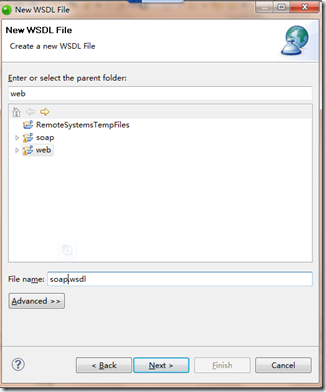
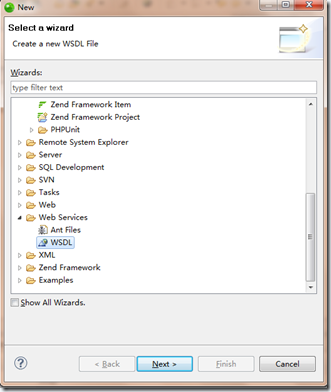
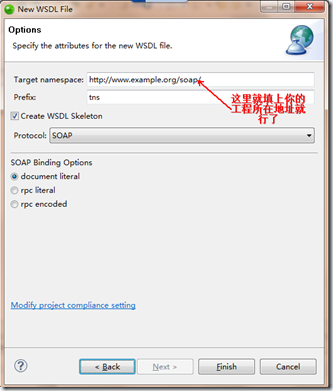
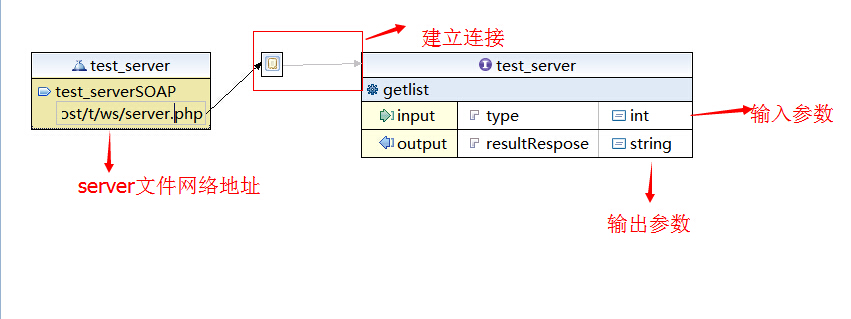
生成的文件格式如下
<?xml version="1.0" encoding="UTF-8" standalone="no"?>

<wsdl:definitions xmlns:soap="http://schemas.xmlsoap.org/wsdl/soap/" xmlns:tns="http://localhost/t/ws" xmlns:wsdl="http://schemas.xmlsoap.org/wsdl/" xmlns:xsd="http://www.w3.org/2001/XMLSchema" name="test_server" targetNamespace="http://localhost/t/ws">

  <wsdl:types>

    <xsd:schema targetNamespace="http://localhost/t/ws">

      <xsd:element name="getlist">

        <xsd:complexType>

          <xsd:sequence>

            <xsd:element name="in" type="xsd:string"/>

          </xsd:sequence>

        </xsd:complexType>

      </xsd:element>

      <xsd:element name="getlistResponse">

        <xsd:complexType>

          <xsd:sequence>

            <xsd:element name="out" type="xsd:string"/>

          </xsd:sequence>

        </xsd:complexType>

      </xsd:element>

    </xsd:schema>

  </wsdl:types>

  <wsdl:message name="getlistRequest">

    <wsdl:part name="type" type="xsd:int"/>

  </wsdl:message>

  <wsdl:message name="getlistResponse">

    <wsdl:part name="resultRespose" type="xsd:string"/>

  </wsdl:message>

  <wsdl:portType name="test_server">

    <wsdl:operation name="getlist">

      <wsdl:input message="tns:getlistRequest"/>

      <wsdl:output message="tns:getlistResponse"/>

    </wsdl:operation>

  </wsdl:portType>

  <wsdl:binding name="test_serverSOAP" type="tns:test_server">

      <soap:binding style="document"

          transport="http://schemas.xmlsoap.org/soap/http" />

      <wsdl:operation name="getlist">

          <soap:operation

              soapAction="http://localhost/t/ws/NewOperation" />

          <wsdl:input>

              <soap:body use="literal" />

          </wsdl:input>

          <wsdl:output>

              <soap:body use="literal" />

          </wsdl:output>

      </wsdl:operation>

  </wsdl:binding>

  <wsdl:service name="test_server">

    <wsdl:port binding="tns:test_serverSOAP" name="test_serverSOAP">

      <soap:address location="http://localhost/t/ws/server.php"/>

    </wsdl:port>

  </wsdl:service>

</wsdl:definitions>
调用server的文件 server.php
<?php

ini_set("soap.wsdl_cache_enabled", "0");  //测试时打开防止soap缓存

include("test.php");

$Server=new SoapServer('test_server.wsdl');   //SoapServer

$Server->setClass("test");

$Server->handle();

?>
测试调用webserver wsdl的文件
<?php

ini_set("soap.wsdl_cache_enabled", "0");

//$url = 'http://localhost/t/ws/test_server.wsdl';

$url = 'http://localhost/t/ws/server.php?wsdl';    //两种url都可以

$client = new SoapClient($url);

$params = array('type'=>1);

$res = $client->__soapCall('getlist',array('parameters'=>$params));

var_dump($res);

?>
返回数据:
string(119) "[{"name":"\u5f20\u4e09","age":18},{"name":"\u674e\u56db","age":20},{"name":"jms","age":10},{"name":"jk\u9648","age":8}]"
调用成功
php 使用zendstudio 生成webservice文件 wsdl的更多相关文章
- C# 调用WebService的3种方式 :直接调用、根据wsdl生成webservice的.cs文件及生成dll调用、动态调用
1.直接调用 已知webservice路径,则可以直接 添加服务引用--高级--添加web引用 直接输入webservice URL.这个比较常见也很简单 即有完整的webservice文件目录如下图 ...
- 根据wsdl文件生成webservice 的.cs文件 及 生成dll C#调用
Visual Studio 2013->Visual Studio Tools->VS2013 开发人员命令提示 命令行输入 wsdl E:\WS.wsdl /out ...
- C#根据WSDL文件生成WebService服务端代码
转自:http://www.cnblogs.com/liyi93/archive/2012/01/30/2332320.html 虽然现在已经进入了.NET FrameWork 4.0的时代,WebS ...
- 根据wsdl文件,Java工程自动生成webservice客户端调用
根据wsdl文件,Java工程自动生成webservice客户端调用 1,工具:带有webservice插件的myeclips 2,步骤: (1),新建一个Java工程:relationship (2 ...
- 根据wsdl文件,soupUI生成webservice客户端代码
根据wsdl文件,soupUI生成webservice客户端代码 功能介绍: 对于面向WebServie接口开发时,当我们已经获取到WSDL文件后,可以使用soapUI工具生成对应的客户端和服务端代码 ...
- 根据wsdl文件,Web工程自动生成webservice客户端调用
根据wsdl文件,Web工程自动生成webservice客户端调用 1,工具:带有webservice插件的eclips 2,步骤: (1),新建一个Web工程:WSDLTest (2),浏览器访问W ...
- 根据wsdl文件生成WebService客户端代码
有时候在项目中,一个项目可能有好几个公司在做.系统之间难免会出现互相调用接口的现象,这时候有一种办法就是使用webService.本篇文章将介绍如何将对接系统提供的WebService接口,根据对方提 ...
- 解析利用wsdl.exe生成webservice代理类的详解
利用wsdl.exe生成webservice代理类:根据提供的wsdl生成webservice代理类1.开始->程序->Visual Studio 2005 命令提示2.输入如下红色标记部 ...
- So easy Webservice 5.WSDL 文件说明
WSDL – WebService Description Language – Web服务描述语言 通过XML形式说明服务在什么地方-地址. 通过XML形式说明服务提供什么样的方法 – 如何调用. ...
随机推荐
- Bootstrap3生成响应式的特价商品展示布局
在线演示 本地下载 在线前端调试地址,大家可以在线自己调试. 在线调试唯一地址:http://www.gbtags.com/gb/debug/fa35e396-0a04-4b73-9bfc-c6334 ...
- paip.输入法编程--英文ati化By音标原理与中文atiEn处理流程 python 代码为例
paip.输入法编程--英文ati化By音标原理与中文atiEn处理流程 python 代码为例 #---目标 1. en vs enPHati 2.en vs enPhAtiSmp 3.cn vs ...
- paip.函数方法回调机制跟java php python c++的实现
paip.函数方法回调机制跟java php python c++的实现 作者Attilax 艾龙, EMAIL:1466519819@qq.com 来源:attilax的专栏 地址:http:// ...
- mysql高级排序&高级匹配查询示例
在大多数应用场景下,我们使用mysql进行查询时只会用到'=', '>' , '<' , in, like 等常用的方法,看起来,大多数情况下,已经足以应付我们的小型应用了.不过,在一些特 ...
- Maven学习总结(八)——使用Maven构建多模块项目
在平时的Javaweb项目开发中为了便于后期的维护,我们一般会进行分层开发,最常见的就是分为domain(域模型层).dao(数据库访问层).service(业务逻辑层).web(表现层),这样分层之 ...
- 关于多线程与CRITICAL_SECTION的使用
CRITICAL_SECTION 只能针对多线程进行锁定,在同一个线程中,是可以进入很多次的. 同一线程可以多次进入临界区. 在测试程序(多线程同时访问CADOAccess类的对象)中,辅助线程不论是 ...
- Unity3D编程学习分享
学习地址:http://www.ixueyun.com/lessons/detail-lessonId-692.html 一.课程概述: 以前大部分3D游戏出现在pc和ps.XBox等专业游戏主机上, ...
- 从此爱上iOS Autolayout
转:从此爱上iOS Autolayout 这篇不是autolayout教程,只是autolayout动员文章和经验之谈,在本文第五节友情链接和推荐中,我将附上足够大家熟练使用autolayout的教程 ...
- solr python客户端 - solrpy
solrPy 基础使用: 1)与solr建立连接 import solr s = solr.Solr('http://host:ip/solr/collectionName') 2)查询 r = s. ...
- AT&T汇编语言——工具及程序组成
1.开发工具 在汇编语言中,用到的工具主要用下面几个: 汇编器.连接器.调试器.编译器 由于我在这里的是AT&T汇编语言.所以工具下也都是gnu下的那些. 1.1 汇编器(as) 汇编器有非常 ...