
CreateProcessAsUser,C#写的windows服务弹框提示消息或者启动子进程
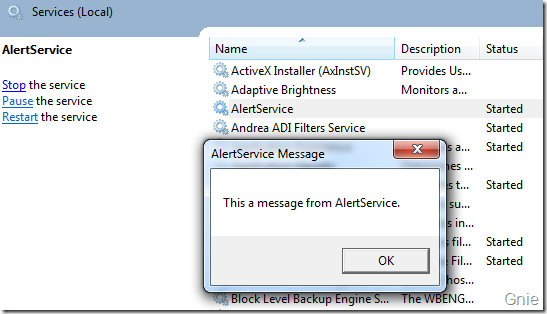
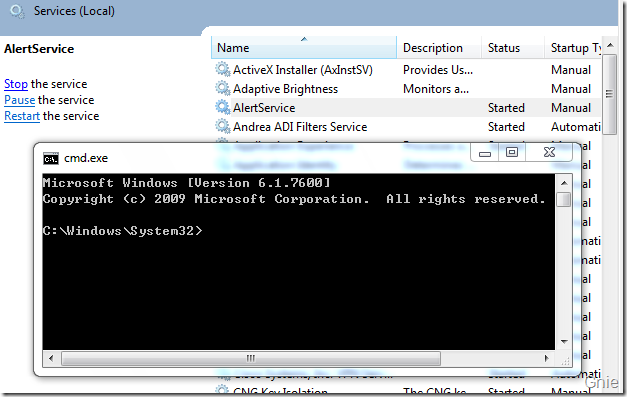
服务(Service)对于大家来说一定不会陌生,它是Windows 操作系统重要的组成部分。我们可以把服务想像成一种特殊的应用程序,它随系统的“开启~关闭”而“开始~停止”其工作内容,在这期间无需任何用户参与。Windows 服务在后台执行着各种各样任务,支持着我们日常的桌面操作。有时候可能需要服务与用户进行信息或界面交互操作,这种方式在XP 时代是没有问题的,但自从Vista 开始你会发现这种方式似乎已不起作用。
现在有个需求需要服务程序弹框提示和启动包含复杂UI的桌面程序,"穿透Session 0 隔离"这篇文章已经写得很好了,看了之后非常有帮助,但是在最后启动了cmd之后发现就只能启动cmd,启动其他类型的程序都会报错。仔细看了评论发现还是没有解决,只是照着抄了一遍,发现不仔细看还是不是自己的东西(知识)啊。
原文链接:
最后修改了一下程序,解决了问题。跟原博主李敬然写的稍微有点区别。我的是抄的msdn的代码。总之就是 CreateProcessAsUser 函数的申明和调用有些区别。
using System;

using System.Collections.Generic;

using System.Linq;

using System.Text;

using System.Runtime.InteropServices;

using System.Security.Principal;

namespace WindowsService1

{

    public class WinAPI_Interop

    {

        public static IntPtr WTS_CURRENT_SERVER_HANDLE = IntPtr.Zero;

        /// <summary>

        /// 服务程序执行消息提示,前台MessageBox.Show

        /// </summary>

        /// <param name="message">消息内容</param>

        /// <param name="title">标题</param>

        public static void ShowServiceMessage(string message, string title)

        {

            int resp = ;

            WTSSendMessage(WTS_CURRENT_SERVER_HANDLE, WTSGetActiveConsoleSessionId(), title, title.Length, message, message.Length, , , out resp, false);

        }

        [DllImport("kernel32.dll", SetLastError = true)]

        public static extern int WTSGetActiveConsoleSessionId();

        [DllImport("wtsapi32.dll", SetLastError = true)]

        public static extern bool WTSSendMessage(IntPtr hServer, int SessionId, String pTitle, int TitleLength, String pMessage, int MessageLength,int Style, int Timeout, out int pResponse, bool bWait);

        #region P/Invoke WTS APIs

        private enum WTS_CONNECTSTATE_CLASS

        {

            WTSActive,

            WTSConnected,

            WTSConnectQuery,

            WTSShadow,

            WTSDisconnected,

            WTSIdle,

            WTSListen,

            WTSReset,

            WTSDown,

            WTSInit

        }

        [StructLayout(LayoutKind.Sequential, CharSet = CharSet.Auto)]

        private struct WTS_SESSION_INFO

        {

            public UInt32 SessionID;

            public string pWinStationName;

            public WTS_CONNECTSTATE_CLASS State;

        }

        [DllImport("WTSAPI32.DLL", SetLastError = true, CharSet = CharSet.Auto)]

        static extern bool WTSEnumerateSessions(

            IntPtr hServer,

            [MarshalAs(UnmanagedType.U4)] UInt32 Reserved,

            [MarshalAs(UnmanagedType.U4)] UInt32 Version,

            ref IntPtr ppSessionInfo,

            [MarshalAs(UnmanagedType.U4)] ref UInt32 pSessionInfoCount

            );

        [DllImport("WTSAPI32.DLL", SetLastError = true, CharSet = CharSet.Auto)]

        static extern void WTSFreeMemory(IntPtr pMemory);

        [DllImport("WTSAPI32.DLL", SetLastError = true, CharSet = CharSet.Auto)]

        static extern bool WTSQueryUserToken(UInt32 sessionId, out IntPtr Token);

        #endregion

        #region P/Invoke CreateProcessAsUser

        /// <summary>

        /// Struct, Enum and P/Invoke Declarations for CreateProcessAsUser.

        /// </summary>

        ///

        [StructLayout(LayoutKind.Sequential, CharSet = CharSet.Auto)]

        struct STARTUPINFO

        {

            public Int32 cb;

            public string lpReserved;

            public string lpDesktop;

            public string lpTitle;

            public Int32 dwX;

            public Int32 dwY;

            public Int32 dwXSize;

            public Int32 dwYSize;

            public Int32 dwXCountChars;

            public Int32 dwYCountChars;

            public Int32 dwFillAttribute;

            public Int32 dwFlags;

            public Int16 wShowWindow;

            public Int16 cbReserved2;

            public IntPtr lpReserved2;

            public IntPtr hStdInput;

            public IntPtr hStdOutput;

            public IntPtr hStdError;

        }

        [StructLayout(LayoutKind.Sequential, CharSet = CharSet.Auto)]

        struct PROCESS_INFORMATION

        {

            public IntPtr hProcess;

            public IntPtr hThread;

            public int dwProcessId;

            public int dwThreadId;

        }

        /// <summary>

        /// 以当前登录的windows用户(角色权限)运行指定程序进程

        /// </summary>

        /// <param name="hToken"></param>

        /// <param name="lpApplicationName">指定程序(全路径)</param>

        /// <param name="lpCommandLine">参数</param>

        /// <param name="lpProcessAttributes">进程属性</param>

        /// <param name="lpThreadAttributes">线程属性</param>

        /// <param name="bInheritHandles"></param>

        /// <param name="dwCreationFlags"></param>

        /// <param name="lpEnvironment"></param>

        /// <param name="lpCurrentDirectory"></param>

        /// <param name="lpStartupInfo">程序启动属性</param>

        /// <param name="lpProcessInformation">最后返回的进程信息</param>

        /// <returns>是否调用成功</returns>

        [DllImport("ADVAPI32.DLL", SetLastError = true, CharSet = CharSet.Auto)]

        static extern bool CreateProcessAsUser(IntPtr hToken,string lpApplicationName,string lpCommandLine,IntPtr lpProcessAttributes,IntPtr lpThreadAttributes,

                                                      bool bInheritHandles,uint dwCreationFlags,string lpEnvironment,string lpCurrentDirectory,

                                                      ref STARTUPINFO lpStartupInfo,out PROCESS_INFORMATION lpProcessInformation);

        [DllImport("KERNEL32.DLL", SetLastError = true, CharSet = CharSet.Auto)]

        static extern bool CloseHandle(IntPtr hHandle);

        #endregion

        /// <summary>

        /// 以当前登录系统的用户角色权限启动指定的进程

        /// </summary>

        /// <param name="ChildProcName">指定的进程(全路径)</param>

        public static void CreateProcess(string ChildProcName)

        {

            IntPtr ppSessionInfo = IntPtr.Zero;

            UInt32 SessionCount = ;

            if (WTSEnumerateSessions(

                                    (IntPtr)WTS_CURRENT_SERVER_HANDLE,  // Current RD Session Host Server handle would be zero.

                                    ,  // This reserved parameter must be zero.

                                    ,  // The version of the enumeration request must be 1.

                                    ref ppSessionInfo, // This would point to an array of session info.

                                    ref SessionCount  // This would indicate the length of the above array.

                                    ))

            {

                for (int nCount = ; nCount < SessionCount; nCount++)

                {

                    WTS_SESSION_INFO tSessionInfo = (WTS_SESSION_INFO)Marshal.PtrToStructure(ppSessionInfo + nCount * Marshal.SizeOf(typeof(WTS_SESSION_INFO)), typeof(WTS_SESSION_INFO));

                    if (WTS_CONNECTSTATE_CLASS.WTSActive == tSessionInfo.State)

                    {

                        IntPtr hToken = IntPtr.Zero;

                        if (WTSQueryUserToken(tSessionInfo.SessionID, out hToken))

                        {

                            PROCESS_INFORMATION tProcessInfo;

                            STARTUPINFO tStartUpInfo = new STARTUPINFO();

                            tStartUpInfo.cb = Marshal.SizeOf(typeof(STARTUPINFO));

                            bool ChildProcStarted = CreateProcessAsUser(

                                                                        hToken,             // Token of the logged-on user.

                                                                        ChildProcName,      // Name of the process to be started.

                                                                        null,               // Any command line arguments to be passed.

                                                                        IntPtr.Zero,        // Default Process' attributes.

                                                                        IntPtr.Zero,        // Default Thread's attributes.

                                                                        false,              // Does NOT inherit parent's handles.

                                                                        ,                  // No any specific creation flag.

                                                                        null,               // Default environment path.

                                                                        null,               // Default current directory.

                                                                        ref tStartUpInfo,   // Process Startup Info.

                                                                        out tProcessInfo    // Process information to be returned.

                                                     );

                            if (ChildProcStarted)

                            {

                                CloseHandle(tProcessInfo.hThread);

                                CloseHandle(tProcessInfo.hProcess);

                            }

                            else

                            {

                                ShowServiceMessage("CreateProcessAsUser失败", "CreateProcess");

                            }

                            CloseHandle(hToken);

                            break;

                        }

                    }

                }

                WTSFreeMemory(ppSessionInfo);

            }

        }

    }

}
调用:
using System;

using System.Collections.Generic;

using System.ComponentModel;

using System.Data;

using System.Diagnostics;

using System.Linq;

using System.ServiceProcess;

using System.Text;

using System.Windows.Forms;

namespace WindowsService1

{

    public partial class AlertService : ServiceBase

    {

        public AlertService()

        {

            InitializeComponent();

        }

        protected override void OnStart(string[] args)

        {

            //Interop.ShowMessageBox("This a message from AlertService.","AlertService Message");

            WinAPI_Interop.CreateProcess(@"E:\work\box\GreenlandBox\BinFiles\ClientBin\BufferBox.exe");

            //Interop.CreateProcess("cmd.exe", @"C:\Windows\System32\");

        }

        protected override void OnStop()

        {

        }

    }

}
CreateProcessAsUser,C#写的windows服务弹框提示消息或者启动子进程的更多相关文章
- Windows服务弹出MessageBox对话框
Windows服务弹出MessageBox对话框 自从Windows升级到Vista版本后,系统服务就不在允许弹出那些惨绝人寰的MessageBox了(至于为什么不让弹出,原理有点小复杂,我也不是很门 ...
- Dynamics CRM2016 关闭错误报告弹框提示
在之前的版本中错误报告的弹框提示是可以在隐私首选项中设置关闭的,如下图所示 但是在2016中这个设置没了 有人说在右上角的选项中设置,但那个只能是设置个人的无法修改系统级别的.在系统中找了半天还是没有 ...
- 解决IE弹框提示“是否停止运行此脚本”问题
有少数情况因为js处理内容较多,系统计算标红和刷新页面较慢,IE可能会弹框提示“是否停止运行此脚本”,若想要继续,点击“否”即可.并同时按照下面的设置更改一下注册表,即可解决弹框问题. http:// ...
- Windows服务调试状态下用Console启动
最近一直在用服务,发现服务也没有那么难调试. Windows服务调试状态下用Console启动:步骤分两步 第一步改Program,启动代码 static class Program { /// &l ...
- Eric6中编译窗体时,弹出提示:无法启动pyuic5的解决方案
用 Eric6 与 PyQt5 结合,非常方便的实现界面与逻辑分离,满足python的极速GUI编程,不需要在界面上花很多时间. 这是一对GUI开发完美的组合! Eric6中设计窗体时,弹出提示:‘无 ...
- (转)C# Windows服务 弹出消息提醒框
出处:http://blog.csdn.net/donghui6116773/article/details/53467069 服务(Service)对于大家来说一定不会陌生,它是Windows 操作 ...
- 仿写confirm和alert弹框
在工作中,我们常常会遇到原生的样式感觉比较丑,又和我们做的项目风格不搭.于是就有了仿写原生一些组件的念头,今天我就带大家仿写一下confirm和alert样式都可以自己修改. 有些的不好的地方请指出来 ...
- 如何优雅的写一个Vue 的弹框
写Vue或者是react 都会遇见弹框的问题.也尝试了多种办法来写弹框,一直都不太满意,今天特地看了一下 Element UI 的源码,模仿着写了一个简易版. 大概有一下几个问题: 1.弹框的层级问题 ...
- 写一个Windows服务
做了两个和Windows服务有关的项目了,最开始的时候没做过,不懂,现在明白了许多.需要注意的是,如果不想登录什么的,最后在添加安装程序的那里选择那个字长的右键属性,把启动方式改为local syst ...
随机推荐
- 访问IIS元数据库失败解决方法
问题:访问元数据失败 详细信息 访问 IIS 元数据库失败. 说明: 执行当前 Web 请求期间,出现未处理的异常.请检查堆栈跟踪信息,以了解有关该错误以及代码中导致错误的出处的详细信息. 异常详细信 ...
- 易出错的C语言题目之一:宏定义与预处理
1.写出下列代码的运行结果: #include<stdio.h> #include<string.h> #define STRCPY(a,b) strcpy(a##_p,#b) ...
- CSS3 圆角制作的消息提示图标
CSS3 圆角制作的消息提示图标,如果你想知道它是如何被开发的,请点击连接查看.http://www.gbtags.com/gb/rtreplayerpreview/142.htm
- fir.im Weekly - 如果让你重新做一款APP
设想下:如果让你重新做一款 APP ,你会用到哪些开发.设计等资源和工具? 本期的 Weekly 为大家分享了最近不错的 APP 开发资源,大部分是关于 iOS 开发. Android 开发.UI设计 ...
- Jenkins + GitHub + fir-cli 一行命令从源码到fir.im
上周简书作者宣X_x 分享了一篇文章--用Jenkins+GitHub+Xcode+fir搭了一个持续集成环境,整个记录见(传送门). _______ 其实fir.im为我们提供了一个更简单的方式: ...
- C#:通过Visual Studio项目预生成命令获取SVN版本号
之前有一个winfrom项目,想要通过获取SVN版本号作为程序的内部编译版本号.网上也有各种方法,但没有一篇行得通的方法.于是我经过一系列研究,得出了一些经验,特总结成一篇博客. 方法一:通过SVN命 ...
- Leetcode 198 House Robber 动态规划
题意是强盗能隔个马抢马,看如何获得的价值最高 动态规划题需要考虑状态,阶段,还有状态转移,这个可以参考<动态规划经典教程>,网上有的下的,里面有大量的经典题目讲解 dp[i]表示到第i匹马 ...
- JavaScript 语句 if else
顺序.分支和循环语句 if(判断条件) { 满足条件要执行的语句 } else { 不满足条件时执行的语句 } 格式一:if(){} 表示如果括号内的值是true,那就执行花括号中的内容, ...
- MS SQL SERVER索引优化相关查询
查找缺失索引 -- ============================================= -- Description: 查询当前数据库中缺失的索引,知道你进行优化的 ...
- Android webView打不开网页的解决办法
在我们开发过程中,有可能会遇到webview有些网页打不开的问题.这可能是设置的不对,下面就是解决办法. 进行如下设置吧,大多数情况都能解决! displayWebview.getSettings() ...