
如何优雅的写一个Vue 的弹框
写Vue或者是react 都会遇见弹框的问题。也尝试了多种办法来写弹框,一直都不太满意,今天特地看了一下 Element UI 的源码,模仿着写了一个简易版。
大概有一下几个问题:
1、弹框的层级问题,如果在嵌套的组件里面使用了弹框,可能会出现弹框的层级不够高
2、弹框的函数调用方式
首先第一点:弹框的层级
如果将弹框放置在最外层,body下面。就不会有层级问题。
第二点:弹框的函数调用
首先我们可以思考,将组件的实例拿到,然而初学的时候好像只有 通过 refs 能拿到组件的对象,然后调用显示隐藏
其实我们可以通过 VUE.extend 这个函数,对组件进行初始化,然后可以拿到 组件对象
对于 Vue.extend 不太清楚的,建议自己去百度学习一下。
下面给出弹框的代码: alert.vue 文件下面
<template>

    <div class="_alert" v-show="visible">

        <div class="wind-alert">

	        <div class="wind-alert-bg"></div>

	        <div class="wind-alert-dialog animate-scale">

	          <div class="wind-alert-title">{{title}}</div>

	          <div class="wind-alert-content">{{content}}</div>

	          <div class="wind-alert-btn" @click="close">{{btn}}</div>

	        </div>

	    </div>

    </div>

</template>

<script>

export default {

    name:"rule_alert",

     data() {

	    return {

            title: '提示',

            content:  '',

            btn:  '确定',

            visible:false

        }

    },

    methods: {

        close() {

            this.visible = false;

           this._promise &&  this._promise.resolve()

        }

    },

    watch: {

        '$route' () {

            this.close();

        }

    }

}

</script>

<style>

.wind-alert-dialog {

    top: 30%;

    width: 80%;

    left: 50%;

    opacity: 1;

    position: fixed;

    margin-left: -40%;

    font-size: 14px;

    text-align: center;

    font-family: 'Microsoft Yahei';

    background: #FFFFFF;

    border-radius: 8px;

    z-index: 999999999;

    box-sizing: content-box;

}

.wind-alert-bg {

    top: 0;

    left: 0;

    width: 100%;

    height: 100%;

    opacity: 0.3;

    display: block;

    position: fixed;

    z-index: 999999998;

    background-color: #000000;

}

.wind-alert-title {

    font-size: 17px;

    padding: 20px 5px 0;

}

.wind-alert-content {

    padding: 5px 15px 20px 15px;

    border-bottom: 1px solid #ededed;

}

.wind-alert-btn {

    color: #0582cd;

    font-size: 15px;

    line-height: 40px;

    font-weight: bold;

}

.animate-scale {

    animation-name: scale;

    animation-duration: 0.375s;

}

@keyframes scale {

    0%{

        transform: scale(0);

    }

    100% {

        transform: scale(1);

    }

}

</style>
接下来,就是将这个组件,进行初始化,并且注入一些自己的方法和属性
这个地方的注入,是一个公共的方法,后面可以引入其他类型的弹框,比如 comfirm 类型的
新建 plugin.js
import Alert from "@/components/alert";

import Vue from "vue";

//原始组件

var components = {

    Alert:Alert

}

var instance = {}; //缓存组件的实例

var Ruler = {};  //组件的集合

var body  =  document.body || document.documentElement;

var root = document.createElement("div");

body.appendChild(root);

//初始化构造vue组件,并且注入自己的代码

const initComponents = function(type,options){

    options  =  options || {};

    type = type || '';

    if(components[type]){

        if(!instance[type]){

            //避免重复的初始化

            var div = document.createElement('div');

            root.appendChild(div);

            const MessageBoxConstructor = Vue.extend(components[type]);

            instance[type]  = new MessageBoxConstructor({

                el: div

            });

        }

        var ins = instance[type];

        //复制属性

        for(var i in options){

            ins[i] = options[i];

        }

        Vue.nextTick(()=>{

            ins.visible = true;

        })

        return new Promise(function(resolve,reject){

            //注入当前的 promise

            ins._promise = {

                resolve,

                reject

            };

        }).finally(()=>{

            //ins.visible = false;

            //可以在这里监听,不管结果如何,最后执行一段代码

        });

    }else{

        return Promise.reject("组件不存在");

    };

}

//开始注册组件

var Ruler = {};  //组件的集合

//主动关闭某个组件弹窗  type 组件类型名称, methods  false  取消关闭, true 确认关闭

Ruler.closeComponents = function (type,methods) {

    if(instance[type] && instance[type]._promise){

        if(methods){

          instance[type]._promise.resolve();

        }else{

          instance[type]._promise.reject();

        }

      instance[type].visible = false;

    }

}

//对弹出组件的初始化处理

function popupHandle(i,options){

  if(typeof options == "string"){

    options  = {

      msg: options

    }

  }

  return  initComponents(i,options);

}

for(var i in components){

  Ruler[i] = popupHandle.bind(components[i],i);

}

export default{

    install(Vue){

       Vue.prototype.$Ruler = Ruler;

    }

}
接下来就是在 main.js 里面引入了:
import plugin from "@/plugin/plugin";

Vue.use(plugin);
然后在任意的地方使用
this.$Ruler.Alert("这是一个提示").then((ret)=>{

          console.log("then",ret);

      }).catch((e)=>{

          console.log("catch",e);

      });
注意: Vue.extend 初始化的组件,其内部 this.$router 是 undefined ,还有 this.$store 也是,可以直接import 后使用,
也可以 在组件里面 导入 router 之后,和data 平级,写一个router,,,,这样,组件在传入 Vue.extend的时候,就能够访问到 this.$router 了
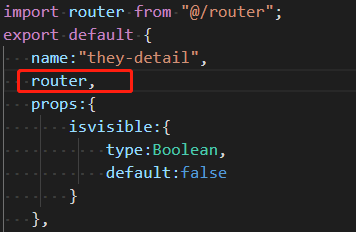
或者在 Vue.extend 以后 new 的时候加入 router ,如:
instance[type]  = new MessageBoxConstructor({

    el: div,

	router:router

});
其原理在于: Vue.extend 函数,返回的一个继承了 Vue 的子类。
也就是说
new MessageBoxConstructor 的时候,等同于 new Vue
如何优雅的写一个Vue 的弹框的更多相关文章
- 【jQuery学习】写一个简单的弹框页面,火狐浏览器有弹框,但IE8没有弹框的原因?
我也是刚学习jQuery,就从官网上下载了jQuery的包,版本是3.2.1 代码 如下: <!DOCTYPE html> <html> <head> <me ...
- 写一个vue组件
写一个vue组件 我下面写的是以.vue结尾的单文件组件的写法,是基于webpack构建的项目.如果还不知道怎么用webpack构建一个vue的工程的,可以移步到vue-cli. 一个完整的vue组件 ...
- 写一个Vue loading 插件
什么是vue插件? 从功能上说,插件是为Vue添加全局功能的一种机制,比如给Vue添加一个全局组件,全局指令等: 从代码结构上说,插件就是一个必须拥有install方法的对象,这个方法的接收的第一个参 ...
- 面试题:你能写一个Vue的双向数据绑定吗?
在目前的前端面试中,vue的双向数据绑定已经成为了一个非常容易考到的点,即使不能当场写出来,至少也要能说出原理.本篇文章中我将会仿照vue写一个双向数据绑定的实例,名字就叫myVue吧.结合注释,希望 ...
- vue中超简单的方法实现点击一个按钮出现弹框,点击弹框外关闭弹框
效果图展示: View层 <template> <div> <div class="mask" v-if="showModal" ...
- 仿写confirm和alert弹框
在工作中,我们常常会遇到原生的样式感觉比较丑,又和我们做的项目风格不搭.于是就有了仿写原生一些组件的念头,今天我就带大家仿写一下confirm和alert样式都可以自己修改. 有些的不好的地方请指出来 ...
- vue定时器+弹框 跳到登陆页面
1.做一个请求拦截,并弹框提示几秒后,跳转到登陆首页或是点击确定之后直接跳转拦截用了this.$axios.interceptors.response页面上的弹框组件用了vux的组件vux地址:htt ...
- CreateProcessAsUser,C#写的windows服务弹框提示消息或者启动子进程
服务(Service)对于大家来说一定不会陌生,它是Windows 操作系统重要的组成部分.我们可以把服务想像成一种特殊的应用程序,它随系统的“开启-关闭”而“开始-停止”其工作内容,在这期间无需任何 ...
- vue自定义弹框
vue 全局自定义简单弹框 https://www.jianshu.com/p/1307329aa09e https://www.cnblogs.com/crazycode2/p/7907905.ht ...
随机推荐
- mysql配置主从复制
1.原理: MySQL之间数据复制的基础是二进制日志文件(binary log file).一台MySQL数据库一旦启用二进制日志后,其作为master,它的数据库中所有操作都会以“事件”的方式记录在 ...
- logrotate命令
logrotate是个十分有用的工具,它可以自动对日志进行截断(或轮循).压缩以及删除旧的日志文件,例如,你可以设置logrotate,让/var/log/foo日志文件每30天轮循,并删除超过6个月 ...
- web存储中cookie、session区别
http协议是一种无状态的协议,浏览器对服务器的每一次请求都是独立的.为了使得web能够产生一些动态信息,就需要保存”状态”,而cookie和session机制就是为了解决http协议无状态而产生.c ...
- Codeforces 1110D. Jongmah 动态规划
原文链接https://www.cnblogs.com/zhouzhendong/p/CF1110D.html 题意 给定 n 个数,每一个数都是在 [1,m] 里的整数. 从中取出形如 {x,x,x ...
- C# 堆栈(Stack)和队列(Queue)
一.什么是堆?(Heap) 堆是无序的,是一片不连续的内存域,由用户自己来控制和释放,如果用户自己不释放的话,当内存达到一定的特定值时,通过垃圾回收器(GC)来回收. 是程序运行期 ...
- CodeForces - 1013C C - Photo of The Sky 贪心
题目链接: https://vjudge.net/problem/1735276/origin 题目大意与思路: 题目的基本意思就是求一个矩形的最小面积. 这个可以用最大最小值, 将他们分为X和Y组. ...
- SpringCloud教程 | 第五篇: 路由网关(zuul)(Finchley版本)
在微服务架构中,需要几个基础的服务治理组件,包括服务注册与发现.服务消费.负载均衡.断路器.智能路由.配置管理等,由这几个基础组件相互协作,共同组建了一个简单的微服务系统.一个简答的微服务系统如下图: ...
- 潭州课堂25班:Ph201805201 tornado 项目 第十二课 项目部署(课堂笔记)
运行多个Tornado实例 网页响应不是特别的计算密集型处理 多个实例充分利用 CPU 多端口怎么处理 Linux 常见应用服务配置模式 nginx 和 supervisord:采用主配置文件 + 项 ...
- (转)RBAC权限模型——项目实战
一.前言 权限一句话来理解就是对资源的控制,对web应用来说就是对url的控制,关于权限可以毫不客气的说几乎每个系统都会包含,只不过不同系统关于权限的应用复杂程序不一样而已,现在我们在用的权限模型基本 ...
- CSS3_边框 border 详解_一个 div 的阴阳图
(面试题) 怎么样通过 CSS 画一个三角形: 1. 元素的 width 和 height 设置为 0 2. 边框 足够大 3. 需要的三角形的部分, border-top-color 设置为 ...