
Debug BLE application with nRF Sniffer+wireshark
1. Introduction
The nRF Bluetooth® Smart Sniffer is a tool for debugging Bluetooth low energy (BLE) applications. The sniffer can pick up (sniff) every packet between a selected peripheral and the central device it is communicating with, even when the link is encrypted. When developing a BLE solution, knowing what happens over-the-air between devices can help you isolate, debug and troubleshoot any potential issues.
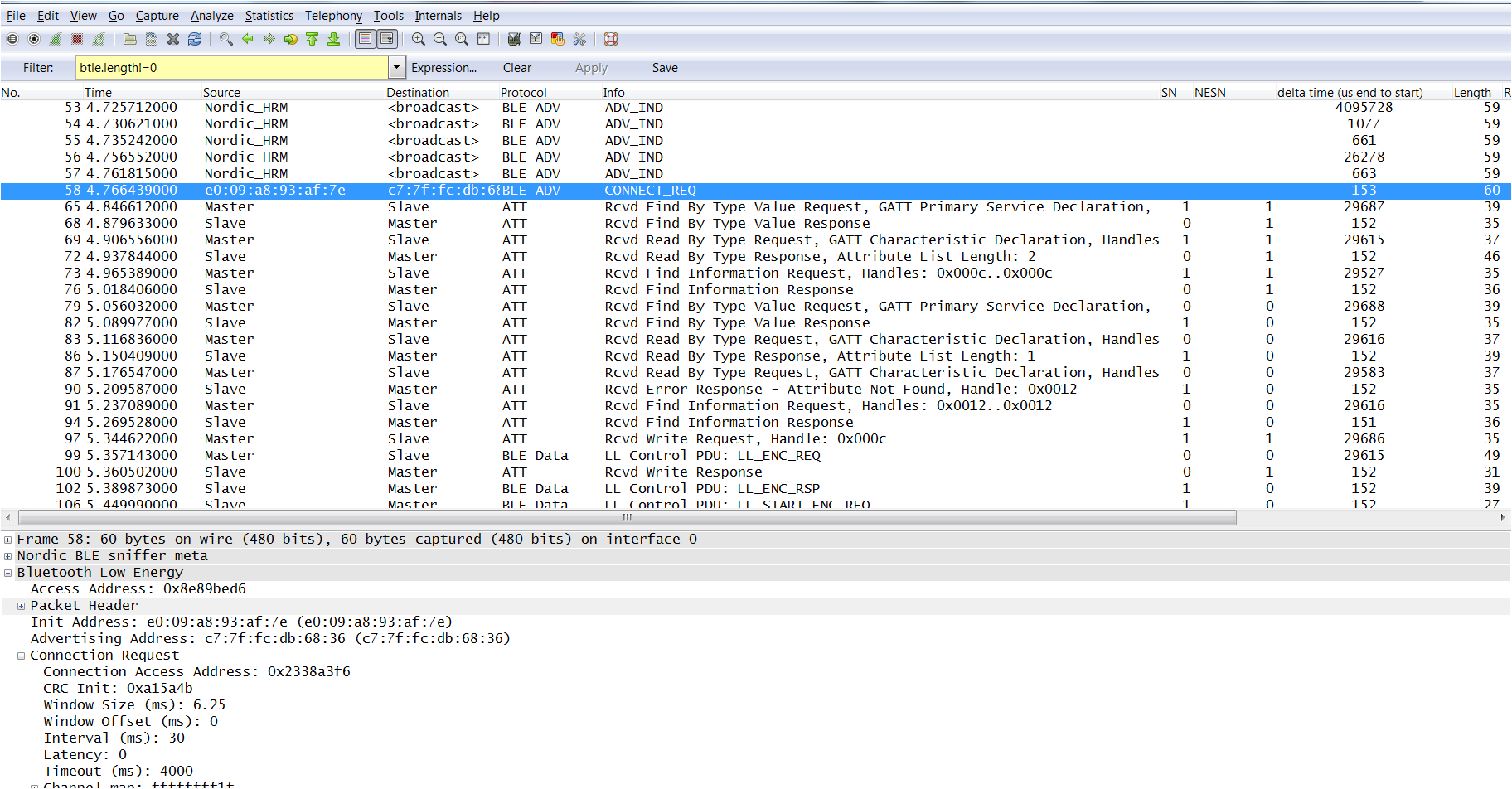
nRFSniffer trace on Wireshark showing a advertising packets, and the connection established by an iPhone.
2. What you need to get started
Hardware
- An PCA10000 dongle or a nRF51 Evaluation board
- A PC computer running Windows 7 or later
How to set up the hardware
- Connect the hardware to a USB port.
- Place the hardware (PCA10000) close to the Peripheral and Central device.
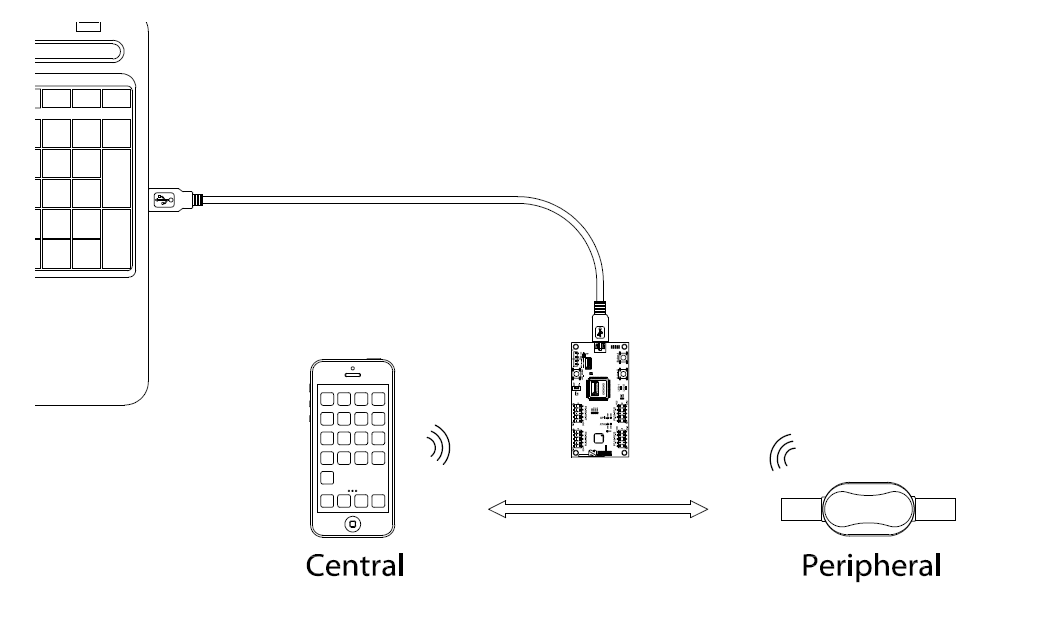
Hardware setup, if you don’t have the USB extension cable, you can just plug the PCA10000 dongle directly into the USB port, make sure the PCA10000 is in the range of no more than 50 cm to the peripheral and the central.
Software
Download and unzip the following materials:
- nRF tools from www.nordicsemi.com. Download here: /media/uploads/nemovn/nrftools_6_0_0_installer.exe
- ble-sniffer_win_1.0.1_1111_Sniffer.exe found in ble-sniffer_<os>_<version>_Sniffer.zip. Download here: /media/uploads/nemovn/ble-sniffer_win_1.0.1.zip
- Wireshark from wireshark.org.
Download 64-bit version here: /media/uploads/nemovn/wireshark-win64-1.10.9.exe .
Download 32-bit version here: /media/uploads/nemovn/wireshark-win32-1.10.9.exe
Wireshark v1.10 is recommended. The latest Wireshark version, v1.12, may not be fully compatible with the current sniffer software.
3. Flashing the sniffer firmware
- Run ble-sniffer_win_1.0.1_1111_Sniffer.exe from the unziped nRF Sniffer folder.
- nRF Sniffer console interface will appear and search for the sniffer COM Port.
- Press Ctrl+R to start programming
- If you have more than 1 Segger Jlink device you may need to select the correct PCA10000’s SEGGER serial number
- If the sniffer firmware has been installed properly, you should see this interface:
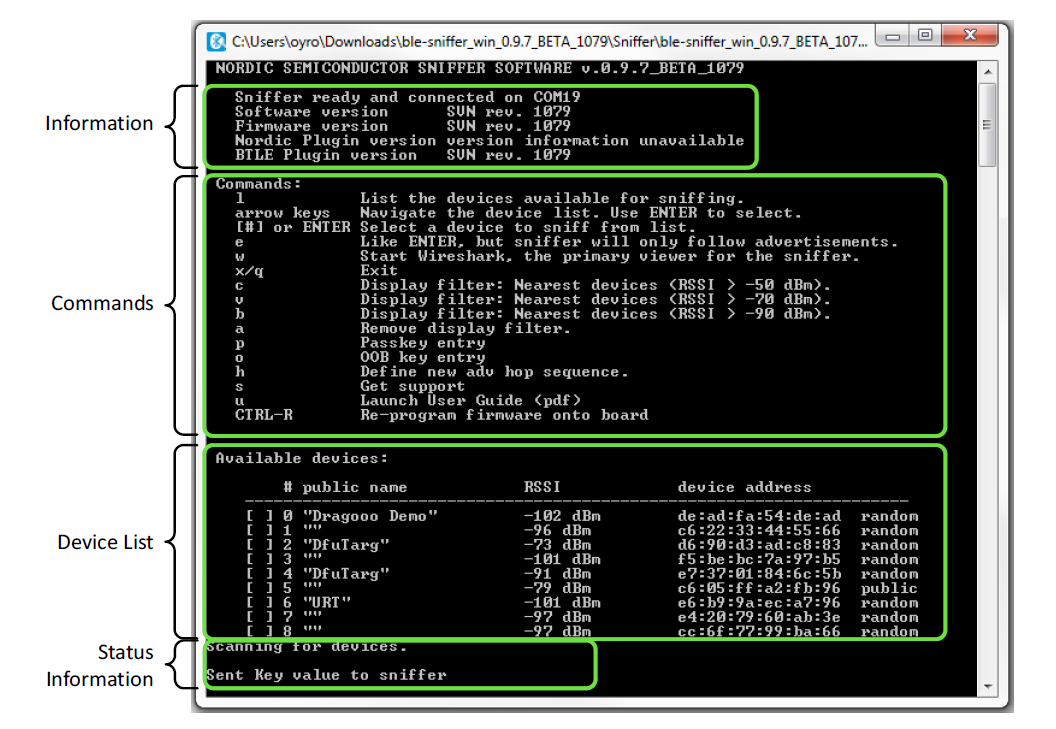
nRFSniffer console showing devices that advertising in the range of the nRF Sniffer
4. Using the sniffer
Once you have the Sniffer console running, the software should automatically find the hardware COM port (you only have to flash the firmware once) and start reporting advertisements and listing nearby devices. If things aren't working as they should, reset the hardware (unplug-wait 5seconds – plugin again) and refresh the device list by typing L or restart the Sniffer program.
Note: If the sniffer console keep searching the COM port when you already pluged the PCA10000 dongle in and already flashed the firmware, you can try to unplug and plug the hardware back again after 5 seconds.
The Sniffer may not manage to pick up all connect requests and will not always pick up on a connection. In such cases, you need to reconnect.
If the sniffer works properly, you can start tracking a connection and debugging by first start with listing the adverting devices by pressing L. Then select the peripheral you want to track by pressing the index number or use up and down arrow buttons and press enter to select. After that you can start wireshark to display the captured packages by pressing “W” and you are ready for shooting trouble.

For more detail on how to use wireshark and analyze the BTLE packets please have a look at chapter 4 in the nRFSniffer user guide included in the zip folder or download here: /media/uploads/nemovn/ble-sniffer_win_1.2_user_guide.pdf
Note: One very useful filter you should try is btle.length!=0 to filter out all empty packet and make it easier to spot meaningful information.
Debug BLE application with nRF Sniffer+wireshark的更多相关文章
- Tomcat debug 模式, Application一直reload,导致内存溢出
在server.xml配置文件中,将reloable改为false.
- Bluefruit LE Sniffer - Bluetooth Low Energy (BLE 4.0) - nRF51822 驱动安装及使用
BLE Sniffer https://www.adafruit.com/product/2269 Bluefruit LE Sniffer - Bluetooth Low Energy (BLE 4 ...
- Debug your ASP.NET Application while Hosted on IIS
转摘:http://www.codeproject.com/Articles/37182/Debug-your-ASP-NET-Application-while-Hosted-on-IIS This ...
- 物联网安全拔“牙”实战——低功耗蓝牙(BLE)初探
物联网安全拔“牙”实战——低功耗蓝牙(BLE)初探 唐朝实验室 · 2015/10/30 10:22 Author: FengGou 0x00 目录 0x00 目录 0x01 前言 0x02 BLE概 ...
- 蓝牙BLE实用教程
蓝牙BLE实用教程 Bluetooth BLE 欢迎使用 小书匠(xiaoshujiang)编辑器,您可以通过 设置 里的修改模板来改变新建文章的内容. 1.蓝牙BLE常见问答 Q: Smart Re ...
- 蓝牙BLE实用教程(转载)
欢迎使用 小书匠(xiaoshujiang)编辑器,您可以通过 设置 里的修改模板来改变新建文章的内容. 1.蓝牙BLE常见问答 Q: Smart Ready 和 Smart 以及传统蓝牙之间是什么关 ...
- Cisco IOS debug command reference Command A through D
debug aaa accounting through debug auto-config debug aaa accounting : to display information on acco ...
- Top Things to Consider When Troubleshooting Complex Application Issues
http://blogs.msdn.com/b/debuggingtoolbox/archive/2011/10/03/top-things-to-consider-when-troubleshoot ...
- eclipse中debug
在需要测试的代码行左侧行号列上双击,生成断点 ,再次双击可以取消断点 如图: 然后右键,选择Debug As-Java Application,(注意,不是选择Run As) 开始调试java ...
随机推荐
- CRC-16/XMODE X16+X12+X5+1 C#、C和java环境下实现
private byte[] CRC(byte[] x, int len) //CRC校验函数 { ]; UInt16 crc = ; byte da; ; UInt16[] yu = { 0x000 ...
- poj 1611 The Suspects 并查集
The Suspects Time Limit: 1000MS Memory Limit: 20000K Total Submissions: 30522 Accepted: 14836 De ...
- Javac早期(编译期)
从Sun Javac的代码来看,编译过程大致可以分为3个过程: 解析与填充符号表过程. 插入式注解处理器的注解处理过程. 分析与字节码生成过程. Javac编译动作的入口是com.sun.tools. ...
- javascript的window.onload()方法和jQuery的$(document).ready()的对比
jQuery中$(document).ready()的作用类似于传统JavaScript中的window.onload方法,不过与window.onload方法还是有区别的. 1.执行时间 windo ...
- HDU2824 The Euler function(欧拉函数)
题目求φ(a)+φ(a+1)+...+φ(b-1)+φ(b). 用欧拉筛选法O(n)计算出n以内的φ值,存个前缀和即可. φ(p)=p-1(p是质数),小于这个质数且与其互质的个数就是p-1: φ(p ...
- CocoaPods 安装的第三方删除
CocoaPods 第三方删除 我们使用CocoaPods非常高效地将一些第三方类库导入到我们的项目中,难免会出现一些错误,这时应怎么删除它呢?以下方法会帮你解决这个问题 打开Build Phases ...
- 【BZOJ】1040: [ZJOI2008]骑士(环套树dp)
http://www.lydsy.com/JudgeOnline/problem.php?id=1040 简直不能再神的题orz. 蒟蒻即使蒟蒻,完全不会. 一开始看到数据n<=1000000就 ...
- 彻底卸载oracle数据库
有时候因为各种各样的原因,我们不得不重装Oracle,但按照一般的操作,很多朋友用了oracle的删除,然后,你会发现重新安装时,点了下一步安装界面就消失了.事实证明,万能的重启也是解决不了问题的.往 ...
- AspNetPager常用属性及一些样式(本文摘自网络,作者:x123jing)
AlwaysShow 总是显示分页控件,即使要分页的数据只有一页 AlwaysShowFirsLastPageNumbr 是否总是显示第一页和最后一页数字页索引按钮 BackImageUrl 面板的背 ...
- OpenCV 2.4.11 VS2012 Configuration
Add in the system Path: C:\opencv\build\x86\vc11\bin; Project->Project Property->Configuration ...