
Oracle学习笔记四
一、PL/SQL编程
游标(光标Cursor)
为什么使用游标
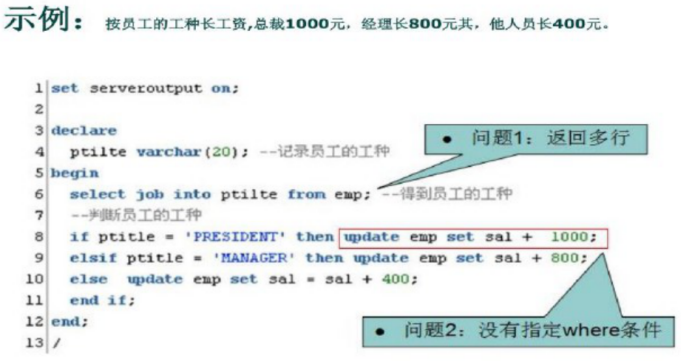
在写java程序中有集合的概念,那么在pl/sq中也会用到多条记录,这时候我们就要用到游标,游标可以存储查询返回的多条数据。
语法:
CURSOR 游标名 [(参数名数据类型,参数名数据类型…,] IS SELECT语句;
例如:
cursor c1 is select ename from emp;
游标的使用步骤:
打开游标: open c1;(打开游标执行查询)
取一行游标的值: fetch c1 into job:(取一行到变量中)
关闭游标: close c1;(关闭游标释放资源)
游标的结束方式: exit when c1%notfound
注意:上面的pjob必须与emp表中的job列类型一致
定义:
pjob emp. empjob%type;
范例1:使用游标方式输出emp表中的员工编号和姓名
declare

  cursor pc is

    select * from emp;

  pemp emp%rowtype;

begin

  open pc;

  loop

    fetch pc into pemp;

  exit when pc%notfound;

    dbms_output.put_line(pemp.empno II’  ‘II pemp.ename);

  end loop;

  close pc;

end;
范例2:写一段PL/SQL程序,为部门号为10的员工涨工资
declare

  cursor pc(dno myemp.deptno% type) is

  select empno from myemp where deptno = dno;

  pno myemp.empno%type;

begin

  open pc(20);

  loop

    fetch pc into pno

  exit when pc%notfound;

  update myemp t set t.sal = t.sal + 1000 where t.empno = pno;

  end loop;

close pc;
●例外
异常是程序设计语言提供的一种功能,用来增强程序的健壮性和容错性。
系统定义异常
no_data_found(没有找到数据)
too_many_rows( (select.into语句匹配多个行)
zero_ divide(被零除)
value_error(算术或转换错误)
timeout_on_resource(在等待资源时发生超时)
范例1:写出被0除的异常的psq程序
declare

  pnum number

begin

  pnum:=1/0;

exception

  when zero_divide then

    dbms_ output.put_line('被0除');

  when value_error then

    dbms_ output.put_line('数值转换错误');

  when others then


    dbms_ output.put_line('其他错误');

end:
用户也可以自定义异常,在声明中来定义异常
DECLARE

  My_job char(10);

  v_sal emp.sal%type;

  No_data exception;

  cursor cl is select distinct job from emp order by job;
如果遇到异常我们要抛出 raise no_data;
范例2:查询部门编号是50的员工
declare

  no_emp_found exception;

  cursor pemp is

    select t.ename from emp t where t.deptno = 50;

  pename emp.ename% type;

begin

  open pemp;

  fetch pemp into pename;

    if pemp%notfound then

      raise no_emp_found;

    end if;

  close pemp;


exception

  when no_emp_found then

  dbms_output.put_line(’没有找到员工');

  when others then

  dbms_output.put_line(’其他错误’);

end:
二、存储过程
存储过程( Stored procedure)是在大型数据库系统中,一组为了完成特定功能的SQL句集,经编译后存储在数据库中,用户通过指定存储过程的名字并给出参数(如果该存储过程带有参数)来执行它。存储过程是数据库中的一个重要对象,任何一个设计良好的数据库应用程序都应该用到存储过程
创建存储过程语法:
create [or replace] PROCEDURE过程名 [(参数名in/out数据类型])

AS

begin

  PLSQL子程序体;

End:
或者
create [ or replace ] PROCEDURE过程名 [(参数名in/out数据类型)]

is

begin

  PLSQL子程序体

End过程名;
范例1:给指定的员工涨100工资,并打印出涨前和涨后的工资
分析:我们需要使用带有参数的存储过程
create or replace procedure addSall(eno in number) is

  pemp myempo%rowtype

begin

  select * into pemp from myemp where empno =eno;

  update myemp set sal = sal + 100 where empno =eno;

  dbms_ output.put_line('涨工资前’||pemp.sal||'涨工资后’||(pemp.sa1+100));

end addSall;
调用:
begin

  --Call the procedure

  addSall(eno=> 7902);

commit;

end:
三、存储函数
create or replace function函数名 (Name in type, Name out type,…) return数据类型 is 结果变量 数据类型

begin

return(结果变量);

end[函数名];
存储过程和存储函数的区别:
一般来讲,过程和函数的区别在于函数可以有一个返回值,而过程没有返回值;
但过程和函数都可以通过out指定一个或多个输出参数。我们可以利用out参数,在过程和函数中实现返回多个值。
范例:使用存储函数来查询指定员工的年薪
create or replace function empincome(eno in emp.empno%type)

return number is

psal emp.sal%type;

pcomm emp.comm%type;

begin

  select t.sal into psal from emp t where t.empno = eno;

  return psal * 12 + nvl(pcomm, 0);

end;
使用存储过程来替换上面的例子
create or replace procedure empincomep(eno in emp. empno%type,

income out number) is

psal emp.sal%type;

pcomm emp.comm%type;

begin

  select t.sal, t.comm into psal, pcomm from emp t where t.empno = eno;

  income := psal*12 + nvl(pcomm,0);

end empincomep;
调用:
declare

  income number;

begin

  empincomep(7369,income);

  dbms_output.put_line(income);

end:
四、触发器
数据库触发器是一个与表相关联的、存储的PL/SQL程序。每当一个特定的数据操作语句( insert, update, delete)在指定的表上发出时, Oracle自动地执行触发器中定义的语句序列。
4.1 触发器的作用
1.数据确认
示例:员工涨后的工资不能少于涨前的工资
2.实施复杂的安全性检查
示例:禁止在非工作时间插入新员工
3.做审计,跟踪表上所做的数据操作等
4.数据的备份和同步
4.2 触发器的类型
√语句级触发器
在指定的操作语句操作之前或之后执行一次,不管这条语句影响了多少行。
√行级触发器( FOR EACH ROW)
触发语句作用的每一条记录都被触发。在行级触发器中使用old和new伪记录变量,识别值的状态
CREATE[ or REPLACE] TRIGGER触发器名

{BEFORE I AFTER}

{DELETE| NSERT| UPDATE [OF列名]}

ON表名

[ FOR EACH ROW [WHEN条件)]]

declare

......

PLSQL块

end 触发器名
范例:插入员工后打印一句话“一个新员工插入成功”
create or replace trigger testTrigger

after insert on person

declare

--local variables here

begin

  dbms_output.put_line('一个员工被插入');

end testTrigger;
范例:不能在休息时间插入员工
create or replace trigger validInsertPerson

before insert on person

declare

  weekend varchar2(10)i

begin

  select to_char (sysdate, 'day') into weekend from dual;

    if weekend in(‘星期一’) then

      raise_application_error(-20001,’不能在非法时间插入员工’);

    end if;

end validInsertPerson:
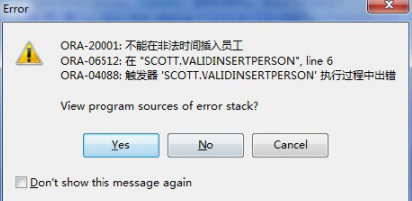
当执行插入时会报错
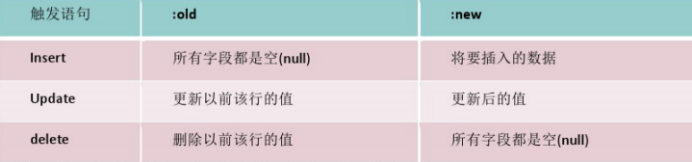
在触发器中触发语句与伪记录变量的值
范例:判断员工涨工资之后的工资的值一定要大于涨工资之前的工资
create or replace trigger addsal4p

before update of sal on myemp

for each row

begin

  if :old.sal >= :new.sal then

    raise_application_error(-20002,'涨前的工资不能大于涨后的工’);

  end if;

end;
调用
update myemp t set t.sal = t.sal - 1 ;
4.3 触发器的实际应用
需求:使用序列,触发器来模拟mysq中自增效果
4.3.1 创建序列
1、建立表
create table user

(id number(6) not null,

name varchar2(30) not null primary key)
2 建立序列 SEQUENCE
create sequence user_seq:
4.3.2 创建自增的触发器
分析:创建一个基于该表的 before insert触发器,在触发器中使用刚建的 SEQUENCE
create or replace trigger user_trigger

before insert on user

for each row

begin

  select user_seq.nextval into :new. id from sys.dual;

end;
4.3.3 测试效果
insert into user(name) values( ‘Kevin1’);

commit;

insert into user(name) values( ‘Kevin2’);

commit;
五、Java程序调用存储过程
5.1 Java连接Oracle的jar包
在Java项目中导入连接Oracle数据库所需要的jar包。
5.2 数据库连接字符串
String driver = "Oracle.jdbc.OracleDriver";

String url  = "jdbc:oracle:thin:@10.131.68.66:1521:orcl ";

String username = "scott";

String password = "admin";
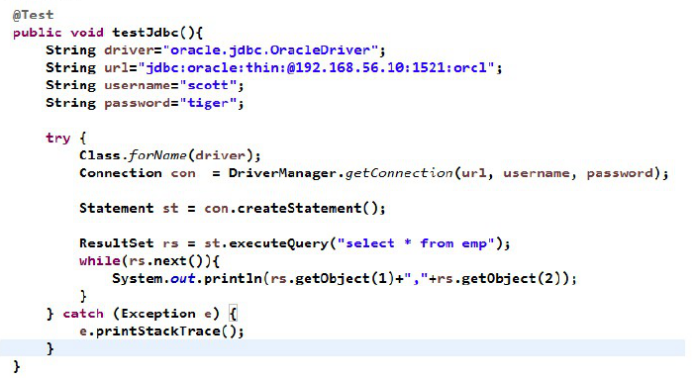
测试代码:
5.3 实现过程的调用
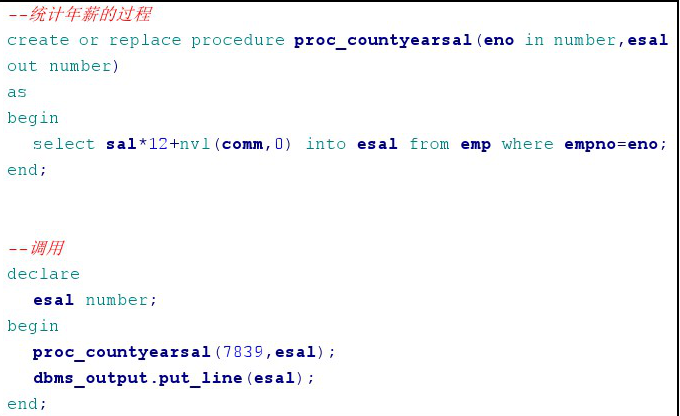
5.3.1 过程定义
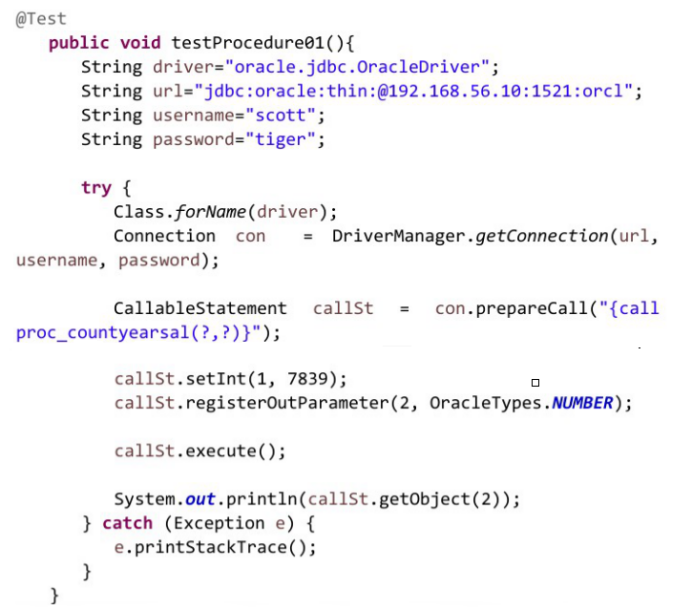
5.3.2 过程调用
5.4 游标引用的Java测试
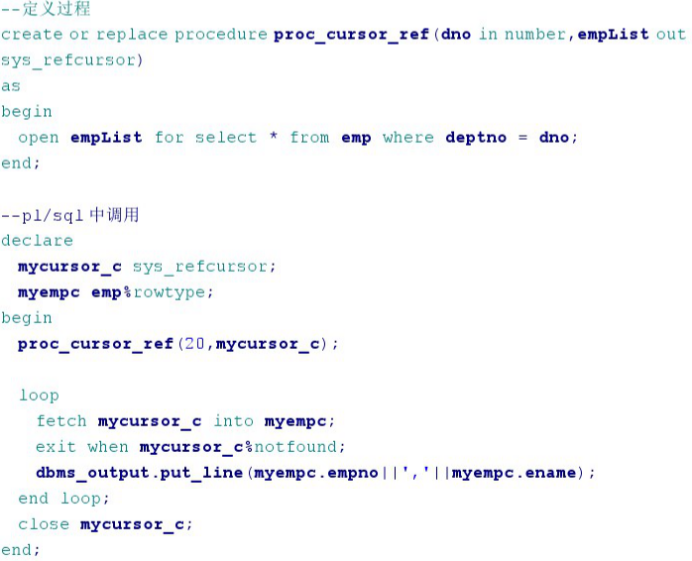
5.4.1 定义游标,并返回引用型游标
5.4.2 Java代码调用游标类型的out参数

Oracle学习笔记四的更多相关文章
- oracle 学习笔记(四)
1. SQL(高级查询) 1.1. 子查询 1.1.1. 子查询在WHERE子句中 在SELECT查询中,在WHERE查询条件中的限制条件不是一个确定的值,而是来自于另外一个查询的结果.为了给查询提供 ...
- Oracle学习笔记四 SQL命令(二):SQL操作语言类别
SQL分为下列语言类别 1.数据定义语言(DDL) Create.Alter.Drop 2.数据操纵语言(DML) Insert.Select.Delete.Update 3.事务控制语言(TCL) ...
- Oracle学习笔记(四)
六.约束 1.约束的作用 定义规则:什么数据可以输入,什么不可以 确保完整性:数据的精确性和可靠性 2.Oracle五个重要的约束: 非空约束.主键约束.外键约束.检查约束.唯一约束. (1)非空约束 ...
- Oracle学习笔记三 SQL命令
SQL简介 SQL 支持下列类别的命令: 1.数据定义语言(DDL) 2.数据操纵语言(DML) 3.事务控制语言(TCL) 4.数据控制语言(DCL)
- C#可扩展编程之MEF学习笔记(四):见证奇迹的时刻
前面三篇讲了MEF的基础和基本到导入导出方法,下面就是见证MEF真正魅力所在的时刻.如果没有看过前面的文章,请到我的博客首页查看. 前面我们都是在一个项目中写了一个类来测试的,但实际开发中,我们往往要 ...
- IOS学习笔记(四)之UITextField和UITextView控件学习
IOS学习笔记(四)之UITextField和UITextView控件学习(博客地址:http://blog.csdn.net/developer_jiangqq) Author:hmjiangqq ...
- java之jvm学习笔记四(安全管理器)
java之jvm学习笔记四(安全管理器) 前面已经简述了java的安全模型的两个组成部分(类装载器,class文件校验器),接下来学习的是java安全模型的另外一个重要组成部分安全管理器. 安全管理器 ...
- Learning ROS for Robotics Programming Second Edition学习笔记(四) indigo devices
中文译著已经出版,详情请参考:http://blog.csdn.net/ZhangRelay/article/category/6506865 Learning ROS for Robotics Pr ...
- oracle学习笔记第一天
oracle学习笔记第一天 --oracle学习的第一天 --一.几个基础的关键字 1.select select (挑选) 挑选出显示的--列--(可以多列,用“,”隔开,*表示所有列),为一条 ...
随机推荐
- BZOJ 3864
dp of dp 我就是来贴个代码 #include<bits/stdc++.h> using namespace std; #define rep(i,a,b) for(int i=(a ...
- [jzoj]3468.【NOIP2013模拟联考7】OSU!(osu)
Link https://jzoj.net/senior/#main/show/3468 Description osu 是一款群众喜闻乐见的休闲软件. 我们可以把osu的规则简化与改编成以下的样子: ...
- 使用mongo获取文章
先在命令行中输入mongo,进入mongo,然后 show dbs # 从结果中发现有cmb_demo_23_hacker use cmb_demo_23_hacker db.all_in_one.f ...
- laravel-elasticsearch 全文搜索设置
1.首先安装 jave环境 jdk 下载地址 ,我用的是最新版本的,有时版本要跟elasticsearch对应 2.安装elasticsearch 下载地址 3.安装Laravel scout 全文搜 ...
- Spring框架中<constructor-arg>与<property>理解
配置文件的根元素是beans,每个组件使用bean元素来定义,bean元素可以有许多属性,其中有两个是必须的:id和class.id表示组件的默认名称,class表示组件的类型. 依赖注入的方式: ...
- RabbitMQ 集群原理和完善
一.RabbitMQ集群方案的原理 RabbitMQ这款消息队列中间件产品本身是基于Erlang编写,Erlang语言天生具备分布式特性(通过同步Erlang集群各节点的magic cookie来实现 ...
- 反爬虫:利用ASP.NET MVC的Filter和缓存(入坑出坑)
背景介绍: 为了平衡社区成员的贡献和索取,一起帮引入了帮帮币.当用户积分(帮帮点)达到一定数额之后,就会“掉落”一定数量的“帮帮币”.为了增加趣味性,帮帮币“掉落”之后所有用户都可以“捡取”,谁先捡到 ...
- java中级或者高级面试题分享
一. 基础知识: 1)集合类:List和Set比较,各自的子类比较(ArrayList,Vector,LinkedList:HashSet,TreeSet): 2)HashMap的底层实现,之后会问C ...
- JVM,Tomcat与OSGi类加载机制比较
首先一个思维导图来看下Tomcat的类加载机制和JVM类加载机制的过程 类加载 在JVM中并不是一次性把所有的文件都加载到,而是一步一步的,按照需要来加载. 比如JVM启动时,会通过不同的类加载器加载 ...
- bilibili源码泄漏后,程序员们从代码里扒出来的彩蛋
昨天bilibili又上热搜了,被某人在github上开了个账号,传了份整个后端代码到github,这是被人扒光了衣服看个精光啊. 这件事情,作为程序员的我们除了调侃和fork的同时,想一想,造成这个 ...