
ASP.NET Core快速入门学习笔记(第2章:配置管理)
课程链接:http://video.jessetalk.cn/course/explore
良心课程,大家一起来学习哈!
任务9:配置介绍
- 命令行配置
- Json文件配置
- 从配置文件文本到c#对象实例的映射 - Options 与 Bind
- 配置文件热更新
- 框架设计:Configuration
任务10:命令行配置
新建一个项目CommandLineSample--控制台应用(.NET Core)
依赖性右键--管理NuGet程序包--下载microsoft.aspnetcore.all
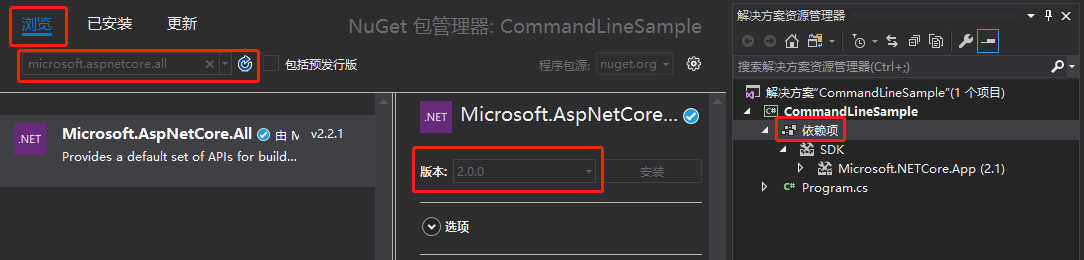
传入参数
using System;
using Microsoft.Extensions.Configuration;

namespace CommandLineSample
{
    class Program
    {
        static void Main(string[] args)
        {
            var builder = new ConfigurationBuilder()
                .AddCommandLine(args);

            var configuration = builder.Build();

            Console.WriteLine($"name: {configuration ["name"]}");
            Console.WriteLine($"age: {configuration["age"]}");

            Console.ReadLine();
        }
    }
}
需要通过项目右键--调试--输入参数:name=mingsonzheng age=18
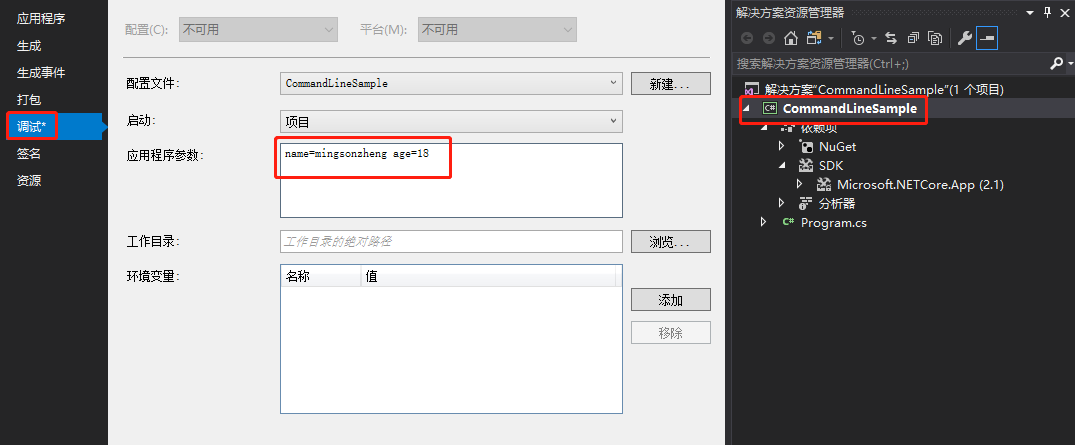
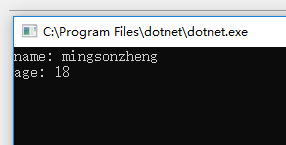
启动项目,得到结果:

默认参数
using System;
using System.Collections.Generic;
using Microsoft.Extensions.Configuration;

namespace CommandLineSample
{
    class Program
    {
        static void Main(string[] args)
        {
            var settings = new Dictionary<string, string>
            {
                {"name", "mingsonzheng" },
                {"age", "18" }
            };

            var builder = new ConfigurationBuilder()
                .AddInMemoryCollection(settings)
                .AddCommandLine(args);

            var configuration = builder.Build();

            Console.WriteLine($"name: {configuration ["name"]}");
            Console.WriteLine($"age: {configuration["age"]}");

            Console.ReadLine();
        }
    }
}
清空应用程序参数

启动项目
通过PowerShell运行程序,默认参数与传入参数
PS C:\WINDOWS\system32> d:
PS D:\> cd D:\jessetalk\CommandLineSample\CommandLineSample\bin\Debug\netcoreapp2.1
PS D:\jessetalk\CommandLineSample\CommandLineSample\bin\Debug\netcoreapp2.1> dir

    目录: D:\jessetalk\CommandLineSample\CommandLineSample\bin\Debug\netcoreapp2.1

Mode                LastWriteTime         Length Name
----                -------------         ------ ----
-a----       2019-01-23     23:54         244607 CommandLineSample.deps.json
-a----       2019-01-24      0:01           5632 CommandLineSample.dll
-a----       2019-01-24      0:01            604 CommandLineSample.pdb
-a----       2019-01-23     23:54            240 CommandLineSample.runtimeconfig.dev.json
-a----       2019-01-23     23:54            154 CommandLineSample.runtimeconfig.json

PS D:\jessetalk\CommandLineSample\CommandLineSample\bin\Debug\netcoreapp2.1> dotnet CommandLineSample.dll
name: mingsonzheng
age: 18

PS D:\jessetalk\CommandLineSample\CommandLineSample\bin\Debug\netcoreapp2.1> dotnet CommandLineSample.dll name=jim age=22
name: jim
age: 22
任务11:Json文件配置
新建一个项目JsonComfigSample--控制台应用(.NET Core)
依赖性右键--管理NuGet程序包--下载microsoft.aspnetcore.all
添加Json文件:项目右键--添加新建项class.json
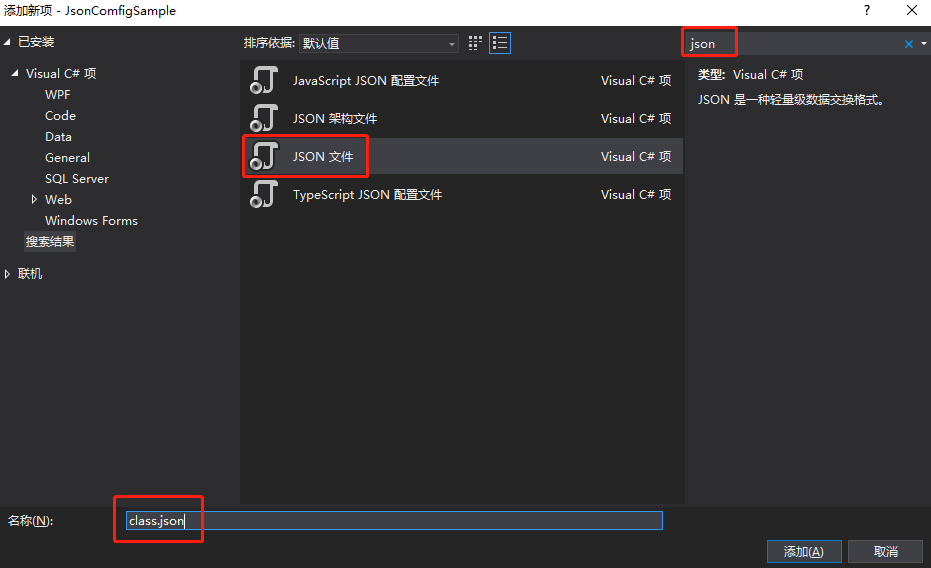
{
  "ClassNo": "1",
  "ClassDesc": "ASP.NET Core 101",

  "Students": [
    {
      "name": "mingsonzheng",
      "age": "18"
    },
    {
      "name": "jim",
      "age": "28"
    },
    {
      "name": "tom",
      "age": "38"
    }
  ]
}
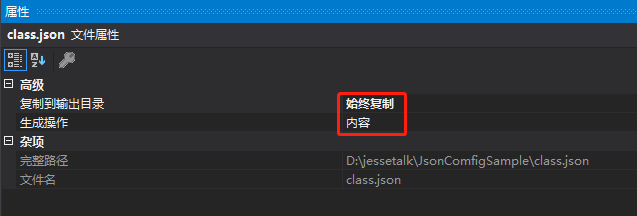
由于class.json不在bin\Debug目录下,所以默认不会被编译,需要修改它的属性,文件右键属性
using System;
using Microsoft.Extensions.Configuration;

namespace JsonComfigSample
{
    class Program
    {
        static void Main(string[] args)
        {
            var builder = new ConfigurationBuilder()
                .AddJsonFile("class.json");

            Console.ReadLine();
        }
    }
}
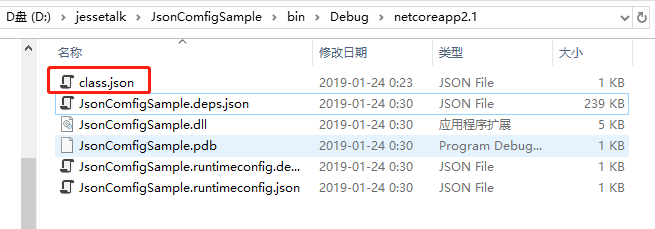
启动项目,可以看到class.json被复制到bin\Debug目录,这样dll就可以读取到class.json文件
读取json文件
using System;
using Microsoft.Extensions.Configuration;

namespace JsonComfigSample
{
    class Program
    {
        static void Main(string[] args)
        {
            var builder = new ConfigurationBuilder()
                .AddJsonFile("class.json");

            // 调用Build之前请确保拷贝的class.json文件没有格式错误
            var configuration = builder.Build();

            Console.WriteLine($"ClassNo: { configuration["ClassNo"]}");
            Console.WriteLine($"ClassDesc: { configuration["ClassDesc"]}");

            Console.WriteLine("Students");

            Console.Write(configuration["Students:0:name"]);
            Console.WriteLine(configuration["Students:0:age"]);

            Console.Write(configuration["Students:1:name"]);
            Console.WriteLine(configuration["Students:1:age"]);

            Console.Write(configuration["Students:2:name"]);
            Console.WriteLine(configuration["Students:2:age"]);

            Console.ReadLine();
        }
    }
}
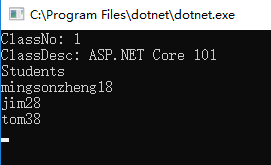
启动项目
任务12:Bind读取配置到C#实例
新建一个ASP.NET Core Web 应用程序OptionsBindSample,直接选择 空,确定
在Startup.cs中通过依赖注入添加configuration
public IConfiguration Configuration { get; set; }

public Startup(IConfiguration configuration)
{
    Configuration = configuration;
}
项目右键,新建项,添加一个类Class.cs
using System;
using System.Collections.Generic;
using System.Linq;
using System.Threading.Tasks;

namespace OptionsBindSample
{
    public class Class
    {
        public int ClassNo { get; set; }

        public string ClassDesc { get; set; }

        public List<Student> Students { get; set; }

    }

    public class Student
    {
        public string Name { get; set; }

        public string Age { get; set; }
    }
}
项目右键,新建项,添加一个Json文件appsettings.json
为什么取名appsettings.json呢?
因为Program.cs中的CreateDefaultBuilder默认读取一个名为appsettings.json的Json文件并把它的内容添加到配置文件
拷贝前面的内容到appsettings.json
{
  "ClassNo": "1",
  "ClassDesc": "ASP.NET Core 101",

  "Students": [
      {
        "name": "mingsonzheng",
        "age": "18"
      },
      {
        "name": "jim",
        "age": "28"
      },
      {
        "name": "tom",
        "age": "38"
      }
  ]
}
在Startup.cs中通过Bind读取配置
app.Run(async (context) =>
{
    var myClass = new Class();
    Configuration.Bind(myClass);// Bind读取配置

    await context.Response.WriteAsync($"ClassNo: { myClass.ClassNo}");
    await context.Response.WriteAsync($"ClassDesc: { myClass.ClassDesc}");
    await context.Response.WriteAsync($" {myClass.Students.Count } Students");
});
完整Startup.cs
using System;
using System.Collections.Generic;
using System.Linq;
using System.Threading.Tasks;
using Microsoft.AspNetCore.Builder;
using Microsoft.AspNetCore.Hosting;
using Microsoft.AspNetCore.Http;
using Microsoft.Extensions.Configuration;
using Microsoft.Extensions.DependencyInjection;

namespace OptionsBindSample
{
    public class Startup
    {

        public IConfiguration Configuration { get; set; }

        // 通过依赖注入添加configuration
        public Startup(IConfiguration configuration)
        {
            Configuration = configuration;
        }

        // This method gets called by the runtime. Use this method to add services to the container.
        // For more information on how to configure your application, visit https://go.microsoft.com/fwlink/?LinkID=398940
        public void ConfigureServices(IServiceCollection services)
        {
        }

        // This method gets called by the runtime. Use this method to configure the HTTP request pipeline.
        public void Configure(IApplicationBuilder app, IHostingEnvironment env)
        {
            if (env.IsDevelopment())
            {
                app.UseDeveloperExceptionPage();
            }

            app.Run(async (context) =>
            {
                var myClass = new Class();
                Configuration.Bind(myClass);// Bind读取配置

                await context.Response.WriteAsync($"ClassNo: { myClass.ClassNo}");
                await context.Response.WriteAsync($"ClassDesc: { myClass.ClassDesc}");
                await context.Response.WriteAsync($" {myClass.Students.Count } Students");
            });
        }
    }
}
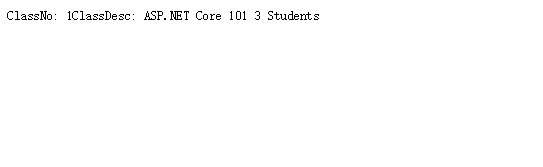
启动项目
任务13:在Core Mvc中使用Options
在项目OptionsBindSample新建三个文件夹目录如下
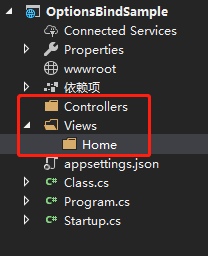
在Controllers文件夹右键,添加一个控制器,默认,HomeController
在Home文件夹右键,添加一个视图,默认,Index
在Startup.cs中注释掉这一段代码,不然会把整个管道提交,只输出这一段
//app.Run(async (context) =>
//{
//    var myClass = new Class();
//    Configuration.Bind(myClass);// Bind读取配置

//    await context.Response.WriteAsync($"ClassNo: { myClass.ClassNo}");
//    await context.Response.WriteAsync($"ClassDesc: { myClass.ClassDesc}");
//    await context.Response.WriteAsync($" {myClass.Students.Count } Students");
//});
依赖注入配置添加MVC
services.AddMvc();使用默认路由
app.UseMvcWithDefaultRoute();HomeController中通过IOptions方式依赖注入
using System;
using System.Collections.Generic;
using System.Linq;
using System.Threading.Tasks;
using Microsoft.AspNetCore.Mvc;
using Microsoft.Extensions.Options;

namespace OptionsBindSample.Controllers
{
    public class HomeController : Controller
    {
        private readonly Class _myClass;

        // 通过IOptions方式依赖注入
        public HomeController(IOptions<Class> classAccesser)
        {
            _myClass = classAccesser.Value;
        }

        public IActionResult Index()
        {
            return View(_myClass);
        }
    }
}
在Index中定义模型,输出
@model OptionsBindSample.Class
@{
    ViewData["Title"] = "Index";
}

<h2>Index</h2>
<h4>Class No: @Model.ClassNo</h4>
<h4>Class Desc: @Model.ClassDesc</h4>
<h3>
    Students:
</h3>
<div>
    @foreach (var student in Model.Students)
    {
        <span>Name: @student.Name</span>
        <span>Age: @student.Age</span>
    }
</div>
注册Class,可以通过Configuration读取到option
services.Configure<Class>(Configuration);Startup.cs完整代码
using System;
using System.Collections.Generic;
using System.Linq;
using System.Threading.Tasks;
using Microsoft.AspNetCore.Builder;
using Microsoft.AspNetCore.Hosting;
using Microsoft.AspNetCore.Http;
using Microsoft.Extensions.Configuration;
using Microsoft.Extensions.DependencyInjection;

namespace OptionsBindSample
{
    public class Startup
    {

        public IConfiguration Configuration { get; set; }

        // 通过依赖注入添加configuration
        public Startup(IConfiguration configuration)
        {
            Configuration = configuration;
        }

        // This method gets called by the runtime. Use this method to add services to the container.
        // For more information on how to configure your application, visit https://go.microsoft.com/fwlink/?LinkID=398940
        public void ConfigureServices(IServiceCollection services)
        {
            // 注册Class,可以通过Configuration读取到option
            services.Configure<Class>(Configuration);
            // 依赖注入配置添加MVC
            services.AddMvc();
        }

        // This method gets called by the runtime. Use this method to configure the HTTP request pipeline.
        public void Configure(IApplicationBuilder app, IHostingEnvironment env)
        {
            if (env.IsDevelopment())
            {
                app.UseDeveloperExceptionPage();
            }

            // 使用默认路由
            app.UseMvcWithDefaultRoute();

            //app.Run(async (context) =>
            //{
            //    var myClass = new Class();
            //    Configuration.Bind(myClass);// Bind读取配置

            //    await context.Response.WriteAsync($"ClassNo: { myClass.ClassNo}");
            //    await context.Response.WriteAsync($"ClassDesc: { myClass.ClassDesc}");
            //    await context.Response.WriteAsync($" {myClass.Students.Count } Students");
            //});
        }
    }
}
启动项目
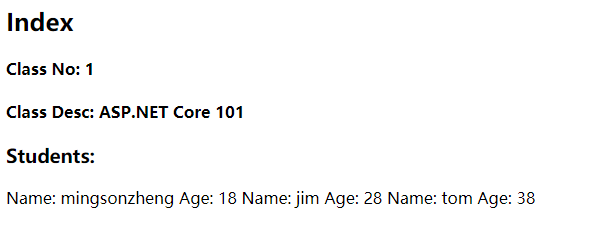
如果仅仅在视图中使用options的话,HomeController的代码有点多余,可以直接在视图中注入
Index
@using Microsoft.Extensions.Options;
@inject IOptions<OptionsBindSample.Class> ClassAccesser
@{
    ViewData["Title"] = "Index";
}

<h2>Index</h2>
<h4>Class No: @ClassAccesser.Value.ClassNo</h4>
<h4>Class Desc: @ClassAccesser.Value.ClassDesc</h4>
<h3>
    Students:
</h3>
<div>
    @foreach (var student in ClassAccesser.Value.Students)
    {
        <span>Name: @student.Name</span>
        <span>Age: @student.Age</span>
    }
</div>
HomeController
using System;
using System.Collections.Generic;
using System.Linq;
using System.Threading.Tasks;
using Microsoft.AspNetCore.Mvc;
using Microsoft.Extensions.Options;

namespace OptionsBindSample.Controllers
{
    public class HomeController : Controller
    {
        public IActionResult Index()
        {
            return View();
        }
    }
}
启动项目可以得到同样结果
任务14:配置的热更新
ASP.NET修改web.config后站点会自动重启实现热更新
ASP.NET Core不同,实现如下:
将Index的这一行
@inject IOptions<OptionsBindSample.Class> ClassAccesser修改为
@inject IOptionsSnapshot<OptionsBindSample.Class> ClassAccesser启动项目
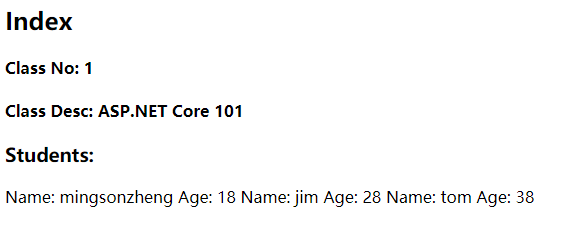
修改appsettings的ClassNo为222,保存
"ClassNo": "222",刷新网页
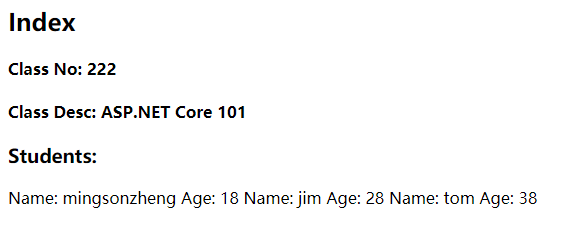
实现原理
对比控制台程序JsonComfigSample的Program读取配置文件
            // 第二个参数表示文件不存在时是否抛异常
            // 第三个参数表示配置文件更新的时候是否重新加载
            var builder = new ConfigurationBuilder()
                .AddJsonFile("class.json",false,true);
而在ASP.NET Core程序OptionsBindSample在Program中的CreateDefaultBuilder的源码实现了
        public static IWebHostBuilder CreateWebHostBuilder(string[] args) =>
            WebHost.CreateDefaultBuilder(args)
                .UseStartup<Startup>();
WebHost源码:
https://github.com/aspnet/MetaPackages/blob/master/src/Microsoft.AspNetCore/WebHost.cs
源码里面实现热更新(165行)
config.AddJsonFile("appsettings.json", optional: true, reloadOnChange: true)
      .AddJsonFile($"appsettings.{env.EnvironmentName}.json", optional: true, reloadOnChange: true);
由于它是WebHostBuilder的一个扩展函数,所以可以覆盖该方法
public static IWebHostBuilder CreateWebHostBuilder(string[] args) =>
    WebHost.CreateDefaultBuilder(args)
        // 如果业务场景不需要一个线程一直关注配置文件变更,可以关闭热更新
        .ConfigureAppConfiguration(config => { config.AddJsonFile("appsettings.json", false, false); })
        .UseStartup<Startup>();
启动项目,修改配置文件,保存,刷新网页,内容不会热更新
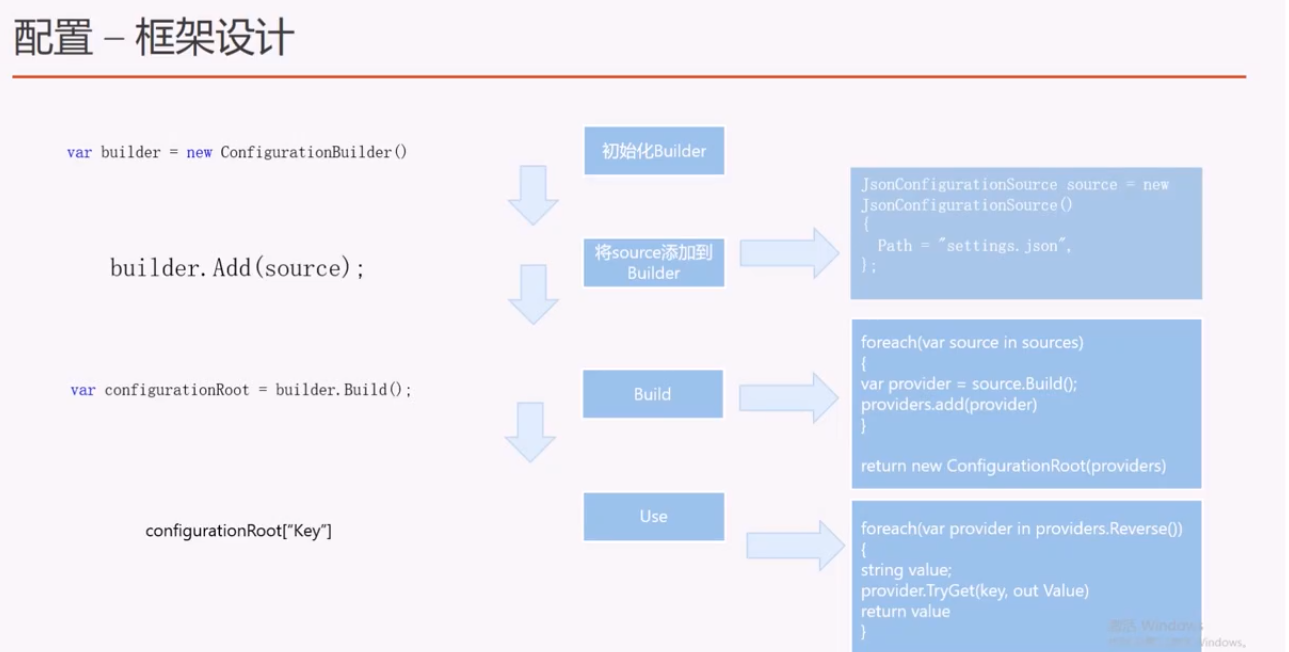
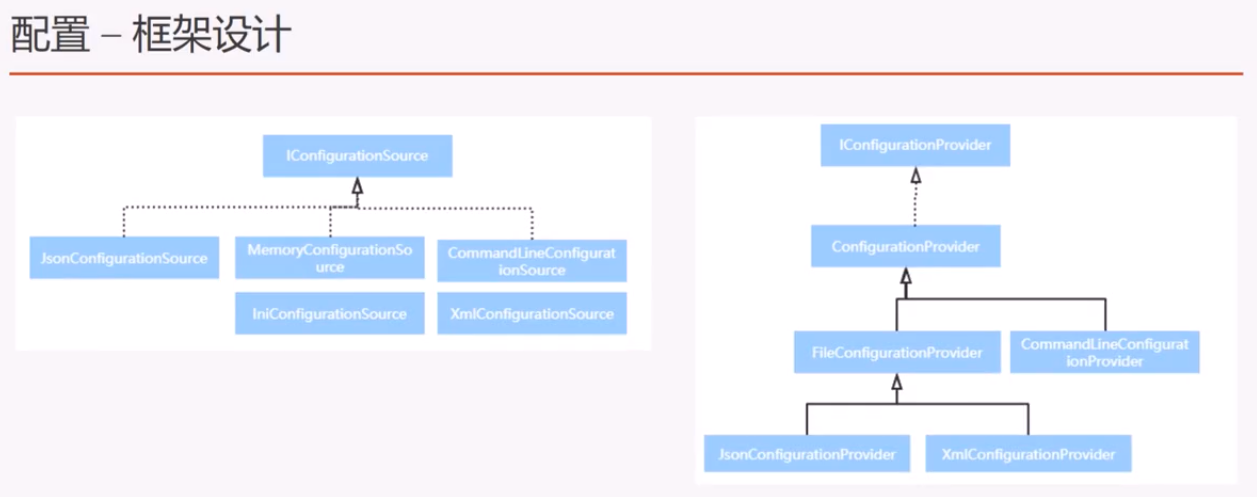
任务15:配置框架设计浅析

本作品采用知识共享署名-非商业性使用-相同方式共享 4.0 国际许可协议进行许可。
欢迎转载、使用、重新发布,但务必保留文章署名 郑子铭 (包含链接: http://www.cnblogs.com/MingsonZheng/ ),不得用于商业目的,基于本文修改后的作品务必以相同的许可发布。
如有任何疑问,请与我联系 (MingsonZheng@outlook.com) 。
ASP.NET Core快速入门学习笔记(第2章:配置管理)的更多相关文章
- ASP.NET Core快速入门--学习笔记系列文章索引目录
课程链接:http://video.jessetalk.cn/course/explore 良心课程,大家一起来学习哈! 抓住国庆假期的尾巴完成了此系列课程的学习笔记输出! ASP.NET Core快 ...
- ASP.NET Core快速入门学习笔记(第3章:依赖注入)
课程链接:http://video.jessetalk.cn/course/explore 良心课程,大家一起来学习哈! 任务16:介绍 1.依赖注入概念详解 从UML和软件建模来理解 从单元测试来理 ...
- ASP.NET Core快速入门学习笔记(第1章:介绍与引入)
课程链接:http://video.jessetalk.cn/course/explore 良心课程,大家一起来学习哈! 任务1:课程介绍 任务2:环境安装 下载地址:https://dotnet.m ...
- 【笔记目录2】【jessetalk 】ASP.NET Core快速入门_学习笔记汇总
当前标签: ASP.NET Core快速入门 共2页: 上一页 1 2 任务27:Middleware管道介绍 GASA 2019-02-12 20:07 阅读:15 评论:0 任务26:dotne ...
- 【笔记目录1】【jessetalk 】ASP.NET Core快速入门_学习笔记汇总
当前标签: ASP.NET Core快速入门 共2页: 1 2 下一页 任务50:Identity MVC:DbContextSeed初始化 GASA 2019-03-02 14:09 阅读:16 ...
- ASP.NET Core Web开发学习笔记-1介绍篇
ASP.NET Core Web开发学习笔记-1介绍篇 给大家说声报歉,从2012年个人情感破裂的那一天,本人的51CTO,CnBlogs,Csdn,QQ,Weboo就再也没有更新过.踏实的生活(曾辞 ...
- 一起学ASP.NET Core 2.0学习笔记(二): ef core2.0 及mysql provider 、Fluent API相关配置及迁移
不得不说微软的技术迭代还是很快的,上了微软的船就得跟着她走下去,前文一起学ASP.NET Core 2.0学习笔记(一): CentOS下 .net core2 sdk nginx.superviso ...
- 【原创】SpringBoot & SpringCloud 快速入门学习笔记(完整示例)
[原创]SpringBoot & SpringCloud 快速入门学习笔记(完整示例) 1月前在系统的学习SpringBoot和SpringCloud,同时整理了快速入门示例,方便能针对每个知 ...
- ASP.NET Core MVC 网站学习笔记
ASP.NET Core MVC 网站学习笔记 魏刘宏 2020 年 2 月 17 日 最近因为” 新冠” 疫情在家办公,学习了 ASP.NET Core MVC 网站的一些知识,记录如下. 一.新建 ...
随机推荐
- [Windows Hyper-V-Server]Enable or disable firewall rules under powershell / powershell下启用禁用防火墙规则
http://www.cryer.co.uk/brian/windows/hyper-v-server/help_computer_cannot_be_managed.htm Enable COM+ ...
- 移动端适配单位rem
0 写在前面 本周惊喜地发现,其他各个老师的软工班(罗杰老师班和欧阳老师班)的软工项目的alpha版本都已经发布了!(然而我们软工项目还没开始写代码…逃…) 十分好奇的我第一时间下载了一些他们的产品进 ...
- 分布式锁与实现(一)——基于Redis实现 【比较靠谱】
转: 分布式锁与实现(一)——基于Redis实现 概述 目前几乎很多大型网站及应用都是分布式部署的,分布式场景中的数据一致性问题一直是一个比较重要的话题.分布式的CAP理论告诉我们“任何一个分布式系统 ...
- Activity之间的跳转和数据传输
1.显式跳转 protected void onCreate(@Nullable Bundle savedInstanceState) { super.onCreate(savedInstanceSt ...
- DML、DDL、DCL的分别是什么
DML.DDL.DCL的分别是什么 一直以来,分不清这三者的简称代表什么,甚至在面试中遇到可能会张冠李戴.今天特意记录一下. 一.DML(data manipulation language) 数据操 ...
- python3 两层dict字典转置
python3; 两层字典 dict =(type, dict2) dict2 = (k_value, index) dictss = { 10: {3: 1, 4: 2, 5: 3, 6: 4, 7 ...
- 小程序 input type number 键盘没有小数点
在此备注一下: <input type="digit"> number:数字键盘(无小数点)idcard:数字键盘(无小数点.有个 X 键)digit:数字键盘(有小数 ...
- centos配置epel和remi源
来源:https://blog.csdn.net/zhang197093/article/details/52057898 CentOS 内置的yum命令安装非常的简单实用,能自动帮助我们解决依赖,但 ...
- C# 获取电脑配置信息
对于软件绑定电脑常用到的方法汇总 public class Computer { public string MyProperty { get; set; } /// <summary> ...
- (Linux)初探cmake .和make命令
cmake编译OpenCV工程 首先我们看到文件夹中有一cpp文件,CMakeLists.txt文件和一张图片 首先进行cmake .命令 接着进行make命令 . 然后就得到了可执行文件,也就是说可 ...