
flink Standalone Cluster
Requirements
Software Requirements
Flink runs on all UNIX-like environments, e.g. Linux, Mac OS X, and Cygwin (for Windows) and expects the cluster to consist of one master node and one or more worker nodes. Before you start to setup the system, make sure you have the following software installed on each node:
- Java 1.8.x or higher,
- ssh (sshd must be running to use the Flink scripts that manage remote components)
If your cluster does not fulfill these software requirements you will need to install/upgrade it.
Having passwordless SSH and the same directory structure on all your cluster nodes will allow you to use our scripts to control everything.
ssh免密登录:
在源机器执行
ssh-keygen //一路回车,生成公钥,位置~/.ssh/id_rsa.pub
ssh-copy-id -i ~/.ssh/id_rsa.pub root@目的机器 //将源机器生成的公钥拷贝到目的机器的~/.ssh/authorized_keys
或者 手动将源机器生成的公钥拷贝到目的机器的~/.ssh/authorized_keys。注意:不要有换行
完成!
JAVA_HOME Configuration
系统环境配置了JAVA_HOME即可,无需如下操作
Flink requires the JAVA_HOME environment variable to be set on the master and all worker nodes and point to the directory of your Java installation.
You can set this variable in conf/flink-conf.yaml via the env.java.home key.
Flink Setup
Go to the downloads page and get the ready-to-run package. Make sure to pick the Flink package matching your Hadoop version. If you don’t plan to use Hadoop, pick any version.
After downloading the latest release, copy the archive to your master node and extract it:
tar xzf flink-*.tgz

cd flink-*
Configuring Flink (不做任何设置,在单节点上直接运行bin/start-cluster.sh,可在单机启动单个jobmanager和单个taskmanager,方便debug代码)
After having extracted the system files, you need to configure Flink for the cluster by editing conf/flink-conf.yaml.
Set the jobmanager.rpc.address key to point to your master node. You should also define the maximum amount of main memory the JVM is allowed to allocate on each node by setting the jobmanager.heap.mb and taskmanager.heap.mb keys.
These values are given in MB. If some worker nodes have more main memory which you want to allocate to the Flink system you can overwrite the default value by setting the environment variable FLINK_TM_HEAP on those specific nodes.
Finally, you must provide a list of all nodes in your cluster which shall be used as worker nodes. Therefore, similar to the HDFS configuration, edit the file conf/slaves and enter the IP/host name of each worker node. Each worker node will later run a TaskManager.
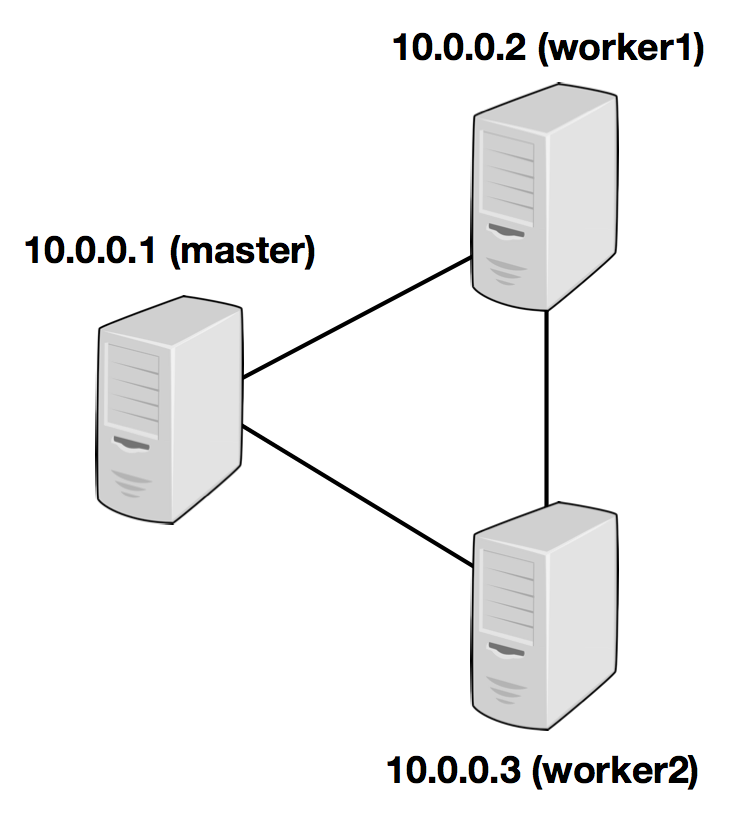
The following example illustrates the setup with three nodes (with IP addresses from 10.0.0.1 to 10.0.0.3 and hostnames master, worker1, worker2) and shows the contents of the configuration files (which need to be accessible at the same path on all machines):
jobmanager.rpc.address: 10.0.0.1
注意:需要在所有需要启动taskmanager的机器进行如上配置
/path/to/flink/conf/slaves
10.0.0.2

10.0.0.3
The Flink directory must be available on every worker under the same path. You can use a shared NFS directory, or copy the entire Flink directory to every worker node.
Please see the configuration page for details and additional configuration options.
In particular,
- the amount of available memory per JobManager (
jobmanager.heap.mb), - the amount of available memory per TaskManager (
taskmanager.heap.mb), - the number of available CPUs per machine (
taskmanager.numberOfTaskSlots), - the total number of CPUs in the cluster (
parallelism.default) and - the temporary directories (
taskmanager.tmp.dirs)
are very important configuration values.
Starting Flink
The following script starts a JobManager on the local node and connects via SSH to all worker nodes listed in the slaves file to start the TaskManager on each node. Now your Flink system is up and running. The JobManager running on the local node will now accept jobs at the configured RPC port.
Assuming that you are on the master node and inside the Flink directory:
bin/start-cluster.shTo stop Flink, there is also a stop-cluster.sh script.
Adding JobManager/TaskManager Instances to a Cluster
You can add both JobManager and TaskManager instances to your running cluster with the bin/jobmanager.sh and bin/taskmanager.shscripts.
Adding a JobManager
bin/jobmanager.sh ((start|start-foreground) cluster)|stop|stop-allAdding a TaskManager
bin/taskmanager.sh start|start-foreground|stop|stop-allMake sure to call these scripts on the hosts on which you want to start/stop the respective instance.
flink Standalone Cluster的更多相关文章
- flink初识及安装flink standalone集群
flink architecture 1.可以看出,flink可以运行在本地,也可以类似spark一样on yarn或者standalone模式(与spark standalone也很相似),此外fl ...
- Apache Spark源码走读之19 -- standalone cluster模式下资源的申请与释放
欢迎转载,转载请注明出处,徽沪一郎. 概要 本文主要讲述在standalone cluster部署模式下,Spark Application在整个运行期间,资源(主要是cpu core和内存)的申请与 ...
- Spark Standalone cluster try
Spark Standalone cluster node*-- stop firewalldsystemctl stop firewalldsystemctl disable firewalld-- ...
- flink部署操作-flink standalone集群安装部署
flink集群安装部署 standalone集群模式 必须依赖 必须的软件 JAVA_HOME配置 flink安装 配置flink 启动flink 添加Jobmanager/taskmanager 实 ...
- Spark运行模式_spark自带cluster manager的standalone cluster模式(集群)
这种运行模式和"Spark自带Cluster Manager的Standalone Client模式(集群)"还是有很大的区别的.使用如下命令执行应用程序(前提是已经启动了spar ...
- Flink standalone模式作业执行流程
宏观流程如下图: client端 生成StreamGraph env.addSource(new SocketTextStreamFunction(...)) .flatMap(new FlatMap ...
- 【转帖】两年Flink迁移之路:从standalone到on yarn,处理能力提升五倍
两年Flink迁移之路:从standalone到on yarn,处理能力提升五倍 https://segmentfault.com/a/1190000020209179 flink 1.7k 次阅读 ...
- Apache Flink 的迁移之路,2 年处理效果提升 5 倍
一.背景与痛点 在 2017 年上半年以前,TalkingData 的 App Analytics 和 Game Analytics 两个产品,流式框架使用的是自研的 td-etl-framework ...
- 重磅!解锁Apache Flink读写Apache Hudi新姿势
感谢阿里云 Blink 团队Danny Chan的投稿及完善Flink与Hudi集成工作. 1. 背景 Apache Hudi 是目前最流行的数据湖解决方案之一,Data Lake Analytics ...
随机推荐
- PHPExcel使用笔记
PHPExcel使用笔记 - 常见操作总结 最近做项目时,PHPExcel插件用得比较频繁,将其常见的操作总结一下- $objPHPExcel->getDefaultStyle()->ge ...
- Python读写文件你真的了解吗?
内容概述 Python文件操作 针对大文件如何操作 为什么不能修改文件? 你需要知道的基本知识 1. Python文件操作 这一部分内容不是重点,因为很简单网上很多,主要看看文件操作的步骤就可以了. ...
- 前端笔记之JavaScript(六)让人头疼的正则表达式
一.正则表达式 1.1正则概述和体验 正则表达式是被用来匹配字符串中的字符组合的模式,常用来做表单验证.在JavaScript中,正则表达式也是对象,是一种引用类型. 案例:正确输入一个电话号码,01 ...
- 基本 SQL 之增删改查(二)
上一篇文章中,我们介绍了 SQL 中最基本的 DML 语法,包括 insert 的插入数据.update 的更新数据.delete 的删除数据以及基本的查询语法,但大多比较简单不能解决我们日常项目中复 ...
- VisualStudio移动开发(C#、VB.NET)Smobiler开发平台——SliderView控件的使用方式
SliderView控件 一. 样式一 我们要实现上图中的效果,需要如下的操作: 从工具栏上的“Smobiler Components”拖动一个SliderView控件到窗体界面上 ...
- php 时间戳最大值
今天遇到一个bug,获取有效期值错误,在定位跟踪后发现有效期有值,如下: $expireDate = ; //2037-08-16 09:30:48 但是在该时间戳的基础上加上1 year后, $ex ...
- Oracle day05 建表_约束
表的创建 标准的建表语法 : CREATE TABLE [schema.] table (column datatype [DEFAULT expr], ... ); 使用子查询创建表的语法 CREA ...
- sprinbcloud学习之-Failed to bind properties under 'logging.level' to java.util.Map<java.lang.String>
日志报错,提示Failed to bind properties under 'logging.level' to java.util.Map<java.lang.String>, 原因为 ...
- 【大数据】了解Hadoop框架的基础知识
介绍 此Refcard提供了Apache Hadoop,这是最流行的软件框架,可使用简单的高级编程模型实现大型数据集的分布式存储和处理.我们将介绍Hadoop最重要的概念,描述其架构,指导您如何开始使 ...
- 微信小程序picker的坑
js文件: Companyarr: [{ id: '公司id1', companyname: "公司1的名字" }, { id: '公司id2', companyname: &qu ...