
Https 单向验证 双向验证
- 通讯原理
participant Client

    participant Server

    Client->>Server: 以明文传输数据,主要有客户端支持的SSL版本等客户端支持的加密信息

    Server-->>Server: 服务端选择加密方式

    Server-->>Client: 服务端给客户端返回SSL版本、随机数等信息

    Client->>Client: 校验服务端证书是否合法、产生随机数

    Client->>Server: 使用服务端随机数加密数据发给服务端

    Server-->>Server: 服务端使用私钥解密客户端数据

    Server-->>Client: 使用收到的随机数,加密数据,返回给客户端

    Client->>Client: 客户端使用公钥解密数据
- iOS客户端不验证证书
//适配HTTPS

    AFSecurityPolicy *securityPolicy = [AFSecurityPolicy policyWithPinningMode:AFSSLPinningModeNone];

    [securityPolicy setValidatesDomainName:NO];

    securityPolicy.allowInvalidCertificates = YES;

    manager.securityPolicy = securityPolicy;
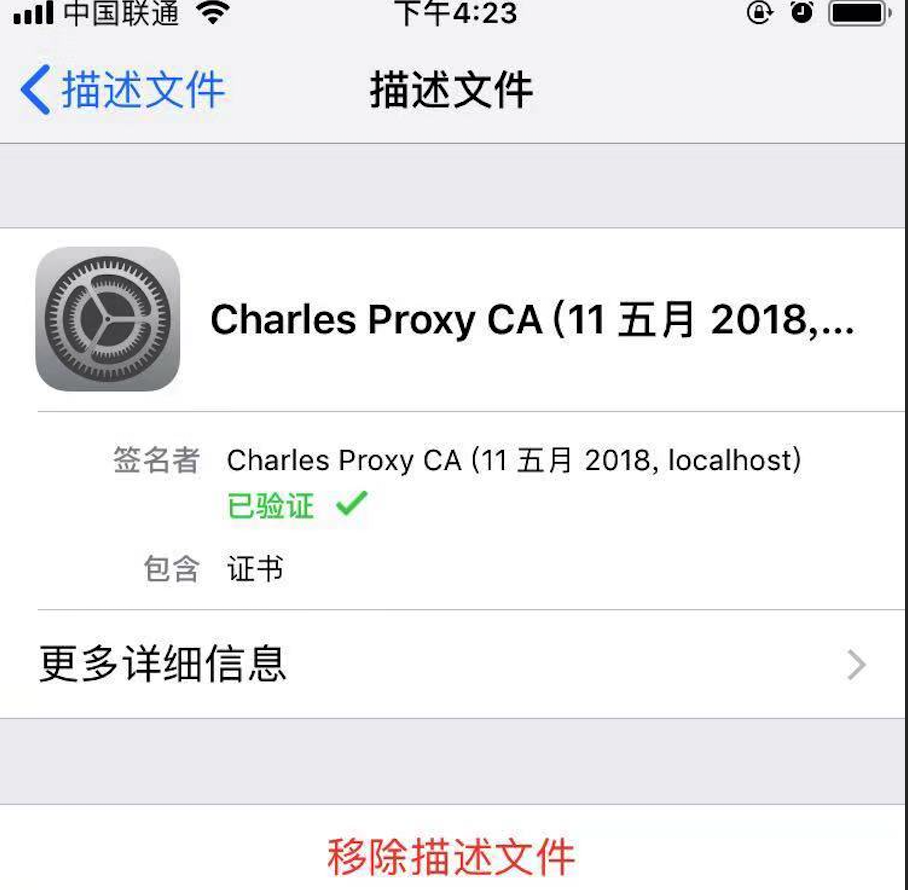
设置代理后进行Charles代理拦截,以下为详细信息:(保证客户端不验证证书,保证在iOS设备上信任Charles证书)
Client SSL handshake failed - Remote host closed connection during handshake

客户端SSL握手失败-握手期间远程主机关闭连接

You may need to configure your browser or application to trust the Charles Root Certificate. See SSL Proxying in the Help menu.

您可能需要配置浏览器或应用程序以信任Charles根证书。请参见“帮助”菜单中的“SSL代理”。


- AFN单项验证 客户端验证服务端证书
Https在建立Socket连接之前,需要进行握手。

1.客户端向服务端发送SSL协议版本号、加密算法种类、随机数等信息。

2.服务端给客户端返回SSL协议版本号、加密算法种类、随机数等信息,同时也返回服务器端的证书,即公钥证书

3.客户端使用服务端返回的信息验证服务器的合法性,包括:

证书是否过期

发型服务器证书的CA是否可靠

返回的公钥是否能正确解开返回证书中的数字签名

服务器证书上的域名是否和服务器的实际域名相匹配

验证通过后,将继续进行通信,否则,终止通信

4.客户端向服务端发送自己所能支持的对称加密方案,供服务器端进行选择

5.服务器端在客户端提供的加密方案中选择加密程度最高的加密方式。

6.服务器将选择好的加密方案通过明文方式返回给客户端

7.客户端接收到服务端返回的加密方式后,使用该加密方式生成产生随机码,用作通信过程中对称加密的密钥,使用服务端返回的公钥进行加密,将加密后的随机码发送至服务器

8.服务器收到客户端返回的加密信息后,使用自己的私钥进行解密,获取对称加密密钥。

9.在接下来的会话中,服务器和客户端将会使用该密码进行对称加密,保证通信过程中信息的安全。
- AFN 双向验证方案 增加了服务端对客户端的验证
- (void)POST:(NSString *)urlString

  Dictionary:(NSDictionary *)dic

    progress:(void (^)(NSProgress * _Nonnull))uploadProgress

     success:(void (^)(NSURLSessionDataTask * _Nonnull, id _Nullable))success

     failure:(void (^)(NSURLSessionDataTask * _Nullable, NSError * _Nonnull))failure

{

    AFHTTPSessionManager *manager = [AFHTTPSessionManager manager];

    //    设置超时时间

    [manager.requestSerializer willChangeValueForKey:@"timeoutInterval"];

    manager.requestSerializer.timeoutInterval = 30.f;

    [manager.requestSerializer didChangeValueForKey:@"timeoutInterval"];

    [manager.requestSerializer setValue:@"Content-Type" forHTTPHeaderField:@"application/json; charset=utf-8"];

    [manager setSecurityPolicy:[self customSecurityPolicy]];

    [self checkCredential:manager];

    NSData *data = [NSJSONSerialization dataWithJSONObject:dic options:NSJSONWritingPrettyPrinted error:nil];

    NSString *jsonString = [[NSString alloc]initWithData:data encoding:NSUTF8StringEncoding];

    [manager POST:urlString parameters:jsonString progress:uploadProgress success:success failure:failure];

}

- (AFSecurityPolicy*)customSecurityPolicy {

    AFSecurityPolicy *securityPolicy = [AFSecurityPolicy policyWithPinningMode:AFSSLPinningModeCertificate];

    //tomcat1(1)

    NSString * cerPath = [[NSBundle mainBundle] pathForResource:@"server" ofType:@"cer"];

    NSData *certData = [NSData dataWithContentsOfFile:cerPath];

    NSSet   *dataSet = [NSSet setWithArray:@[certData]];

    [securityPolicy setAllowInvalidCertificates:YES];

    [securityPolicy setPinnedCertificates:dataSet];

    [securityPolicy setValidatesDomainName:YES];

    return securityPolicy;

}

//校验证书

- (void)checkCredential:(AFURLSessionManager *)manager

{

    [manager setSessionDidBecomeInvalidBlock:^(NSURLSession * _Nonnull session, NSError * _Nonnull error) {

    }];

    __weak typeof(manager)weakManager = manager;

    [manager setSessionDidReceiveAuthenticationChallengeBlock:^NSURLSessionAuthChallengeDisposition(NSURLSession*session, NSURLAuthenticationChallenge *challenge, NSURLCredential *__autoreleasing*_credential) {

        NSURLSessionAuthChallengeDisposition disposition = NSURLSessionAuthChallengePerformDefaultHandling;

        __autoreleasing NSURLCredential *credential =nil;

        NSLog(@"authenticationMethod=%@",challenge.protectionSpace.authenticationMethod);

        //判断是核验客户端证书还是服务器证书

        if([challenge.protectionSpace.authenticationMethod isEqualToString:NSURLAuthenticationMethodServerTrust]) {

            // 基于客户端的安全策略来决定是否信任该服务器,不信任的话,也就没必要响应挑战

            if([weakManager.securityPolicy evaluateServerTrust:challenge.protectionSpace.serverTrust forDomain:challenge.protectionSpace.host]) {

                // 创建挑战证书(注:挑战方式为UseCredential和PerformDefaultHandling都需要新建挑战证书)

                NSLog(@"serverTrust=%@",challenge.protectionSpace.serverTrust);

                credential = [NSURLCredential credentialForTrust:challenge.protectionSpace.serverTrust];

                // 确定挑战的方式

                if (credential) {

                    //证书挑战  设计policy,none,则跑到这里

                    disposition = NSURLSessionAuthChallengeUseCredential;

                } else {

                    disposition = NSURLSessionAuthChallengePerformDefaultHandling;

                }

            } else {

                disposition = NSURLSessionAuthChallengeCancelAuthenticationChallenge;

            }

        } else {

            // client authentication

            SecIdentityRef identity = NULL;

            SecTrustRef trust = NULL;

            NSString *p12 = [[NSBundle mainBundle] pathForResource:@"app"ofType:@"p12"];

            NSFileManager *fileManager =[NSFileManager defaultManager];

            if(![fileManager fileExistsAtPath:p12])

            {

                NSLog(@"client.p12:not exist");

            }

            else

            {

                NSData *PKCS12Data = [NSData dataWithContentsOfFile:p12];

                if ([self extractIdentity:&identity andTrust:&trust fromPKCS12Data:PKCS12Data])

                {

                    SecCertificateRef certificate = NULL;

                    SecIdentityCopyCertificate(identity, &certificate);

                    const void*certs[] = {certificate};

                    CFArrayRef certArray =CFArrayCreate(kCFAllocatorDefault, certs,1,NULL);

                    credential =[NSURLCredential credentialWithIdentity:identity certificates:(__bridge  NSArray*)certArray persistence:NSURLCredentialPersistencePermanent];

                    disposition =NSURLSessionAuthChallengeUseCredential;

                }

            }

        }

        *_credential = credential;

        return disposition;

    }];

}

//读取p12文件中的密码

- (BOOL)extractIdentity:(SecIdentityRef*)outIdentity andTrust:(SecTrustRef *)outTrust fromPKCS12Data:(NSData *)inPKCS12Data {

    OSStatus securityError = errSecSuccess;

    //client certificate password

    NSDictionary *optionsDictionary = [NSDictionary dictionaryWithObject:@"123456"

                                                                 forKey:(__bridge id)kSecImportExportPassphrase];

    CFArrayRef items = CFArrayCreate(NULL, 0, 0, NULL);

    securityError = SecPKCS12Import((__bridge CFDataRef)inPKCS12Data,(__bridge CFDictionaryRef)optionsDictionary,&items);

    if(securityError == 0) {

        CFDictionaryRef myIdentityAndTrust =CFArrayGetValueAtIndex(items,0);

        const void*tempIdentity =NULL;

        tempIdentity= CFDictionaryGetValue (myIdentityAndTrust,kSecImportItemIdentity);

        *outIdentity = (SecIdentityRef)tempIdentity;

        const void*tempTrust =NULL;

        tempTrust = CFDictionaryGetValue(myIdentityAndTrust,kSecImportItemTrust);

        *outTrust = (SecTrustRef)tempTrust;

    } else {

        NSLog(@"Failedwith error code %d",(int)securityError);

        return NO;

    }

    return YES;

}
- 检查手机是否设置了代理 需要导入框架CFNetwork
然后,这个方法是mrc的:需要添加-fno-objc-arc的flag
- (BOOL) checkProxySetting {

    NSDictionary *proxySettings = (__bridge NSDictionary *)(CFNetworkCopySystemProxySettings());

    NSArray *proxies = (__bridge NSArray *)(CFNetworkCopyProxiesForURL((__bridge CFURLRef _Nonnull)([NSURL URLWithString:@"https://www.baidu.com"]), (__bridge CFDictionaryRef _Nonnull)(proxySettings)));

    NSLog(@"\n%@",proxies);

    NSDictionary *settings = proxies[0];

    NSLog(@"%@",[settings objectForKey:(NSString *)kCFProxyHostNameKey]);

    NSLog(@"%@",[settings objectForKey:(NSString *)kCFProxyPortNumberKey]);

    NSLog(@"%@",[settings objectForKey:(NSString *)kCFProxyTypeKey]);

    if ([[settings objectForKey:(NSString *)kCFProxyTypeKey] isEqualToString:@"kCFProxyTypeNone"])

    {

        NSLog(@"没设置代理");

        return NO;

    }

    else

    {

        NSLog(@"设置了代理");

        return YES;

    }

}
需要做防代理抓包的话做代理检测然后做响应处理或者进行证书验证就可以直接取消https请求
开发和生产阶段为了开发效率可以在代码中设置两个方案,通过DEBUG来设置是否进行证书验证方案以及防代理抓包方案
关于证书验证,服务端如果证书过期导致客户端原证书无法匹配的问题暂不做说明(app强制更新或者服务端下发等方案...)
参考文档
iOS自签名HTTPS证书单向校验方案
JAVA秒会技术之秒懂HTTPS 白话图解HTTPS原理
iOS移动端防止被抓包
Https 单向验证 双向验证的更多相关文章
- linux c++ curl https 请求并双向验证SSL证书
1.配置curl https请求需要提供 CA证书.客户端证书和客户端秘钥,这三个文件的pem格式. 分别对应 curl_easy_setopt() 函数的 下面三个参数: CURLOPT_CAINF ...
- iOS开发 - 用AFNetworking实现https单向验证,双向验证
https相关 自苹果宣布2017年1月1日开始强制使用https以来,htpps慢慢成为大家讨论的对象之一,不是说此前https没有出现,只是这一决策让得开发者始料未及,博主在15年的时候就做过ht ...
- 请给你的短信验证码接口加上SSL双向验证
序言 去年年底闲来几天,有位同事专门在网上找一些注册型的app和网站,研究其短信接口是否安全,半天下来找到30来家,一些短信接口由于分析难度原因,没有继续深入,但差不多挖掘到20来个,可以肆意被调用, ...
- HTTPS实战之单向验证和双向验证
转载自:https://mp.weixin.qq.com/s/UiGEzXoCn3F66NRz_T9crA 原创: 涛哥 coding涛 6月9日 作者对https 解释的入目三分啊 (全文太长,太懒 ...
- 使用HttpClient连接池进行https单双向验证
https单双向验证环境的搭建参见:http://www.cnblogs.com/YDDMAX/p/5368404.html 一.单向握手 示例程序: package com.ydd.study.he ...
- nginx配置ssl双向验证 nginx https ssl证书配置
1.安装nginx 参考<nginx安装>:http://www.ttlsa.com/nginx/nginx-install-on-linux/ 如果你想在单IP/服务器上配置多个http ...
- Java Https双向验证
CA: Certificate Authority,证书颁发机构 CA证书:证书颁发机构颁发的数字证书 参考资料 CA证书和TLS介绍 HTTPS原理和CA证书申请(满满的干货) 单向 / 双向认证 ...
- Https双向验证与Springboot整合测试-人来人往我只认你
1 简介 不知不觉Https相关的文章已经写了6篇了,本文将是这个专题的最后一篇,起码近期是最后一篇.前面6篇讲的全都是单向的Https验证,本文将重点介绍一下双向验证.有兴趣的同学可以了解一下之前的 ...
- linux:Nginx+https双向验证(数字安全证书)
本文由邓亚运提供 Nginx+https双向验证 说明: 要想实现nginx的https,nginx必须启用http_ssl模块:在编译时加上--with-http_ssl_module参数就ok.另 ...
随机推荐
- io模型---非阻塞模型
Linux下,可以通过设置socket使其变为non-blocking.当对一个non-blocking socket执行读操作时,流程是这个样子: 从图中可以看出,当用户进程发出read操作时,如果 ...
- Python3 tkinter基础 Spinbox 可输入 能调整的 从指定范围内选择参数的控件
Python : 3.7.0 OS : Ubuntu 18.04.1 LTS IDE : PyCharm 2018.2.4 Conda ...
- 【新特性】JDK11
随着JDK11正式发布,带来了许多新的特性.本文主要介绍JDK11的部分新特性和新的API. 一.Local Var 在Lambda表达式中,可以使用var关键字来标识变量,变量类型由编译器自行推断. ...
- 前后端分离之【接口文档管理及数据模拟工具docdoc与dochelper】
前后端分离的常见开发方式是: 后端:接收http请求->根据请求url及params处理对应业务逻辑->将处理结果序列化为json返回 前端:发起http请求并传递相关参数->获取返 ...
- gitlab-runner部署
Gitlab在线安装部署参考 一. 环境 系统 版本 备注 Centos 7_64 建议使用4GB RAM和4或8个CPU内核 二. 安装并配置必要的依赖项 a) 在centos ...
- 简单H5单页面真机调试
1.安装Node.js 这个没什么好说的,直接去官网下载安装就好了. Node.js官网:https://nodejs.org 2.安装http-server 直接在命令行中安装到全局(-g表示安装到 ...
- Error during generated code invocation: com.intellij.debugger.engine.evaluation.EvaluateException: Method threw 'java.lang.IllegalAccessError' exception.
场景描述: 再从该数据库中读取数据进行处理的时候,需要将某个字段加入到一个动态的map中,然后需要对该map进行filter过滤,在执行过滤方法的时候报错 Error during generated ...
- JSP介绍
1.JSP简介 JSP全名为Java Server Pages,中文名叫java服务器页面,其根本是一个简化的Servlet设计,它是由Sun Microsystems公司倡导.许多公司参与一起建立的 ...
- Write Sling Servlet using a resource type and selector
@SlingServlet( resourceTypes = "geometrixx/components/homepage", selectors = "data&qu ...
- 使用js如何设置、获取盒模型的宽和高
第一种: dom.style.width/height 这种方法只能获取使用内联样式的元素的宽和高. 第二种: dom.currentStyle.width/height 这种方法获取的是浏览器渲染以 ...