
ActiveMq 安装
系统是centos 6.5的
下载ActiveMq的包 下载地址 http://activemq.apache.org/download.html
我下载的是 apache-activemq-5.14.5-bin.tar.gz 版本
新建activemq目录将下载好的吧上传到这个目录里
解压
tar -zxf apache-activemq-5.14.5-bin.tar.gz
cd 到解压包里的bin目录下 启动

查看端口61616

如果用防火墙配置如下
- [# vi + /etc/sysconfig/iptables
- #添加下面两行
- -A INPUT -m state --state NEW -m tcp -p tcp --dport 8161 -j ACCEPT
- -A INPUT -m state --state NEW -m tcp -p tcp --dport 61616 -j ACCEPT
端口8161是访问的端口
如果没有直接ip:8161/admin 用户密码默认都是admin
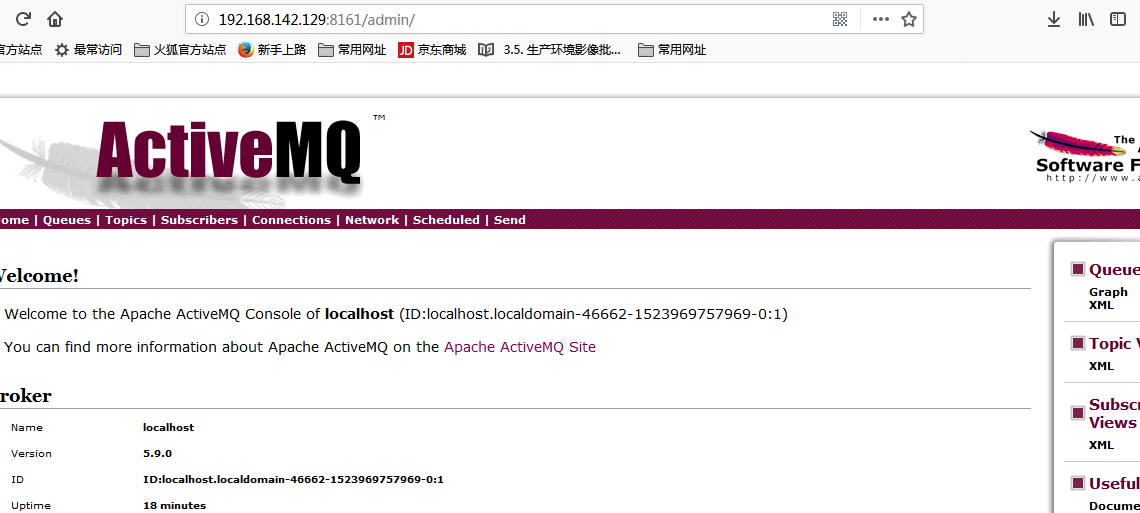
可以在配置文件中修改用户密码:
打开conf/jetty.xml
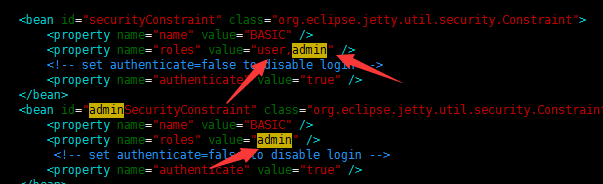
将property name为authenticate的属性value="false" 改为"true",高版本的已经默认为true了
控制台的登录用户名密码保存在conf/jetty-realm.properties文件中,内容如下

值得注意的是 用户名和密码的格式是:用户名 : 密码 ,角色名
.修改客户端连接密码
1.修改activemq.xml配置,需要新增一个插件,在<broker>节点里面<systemUsage>节点前面添加如下

<plugins>

   <simpleAuthenticationPlugin>

         <users>

              <authenticationUser username="${activemq.username}" password="${activemq.password}" groups="users,admins"/>

         </users>

   </simpleAuthenticationPlugin>

</plugins>
或者直接修改为(即直接将username和password赋值,所赋的值即为用户名和密码。如果使用这一种方式的话,下面的第二步则不需要了):
<plugins>

   <simpleAuthenticationPlugin>

         <users>

              <authenticationUser username="testUserName" password="testPassword" groups="users,admins"/>

         </users>

   </simpleAuthenticationPlugin>

</plugins>
2.用户名密码文件为:credentials.properties
## ---------------------------------------------------------------------------

## Licensed to the Apache Software Foundation (ASF) under one or more

## contributor license agreements. See the NOTICE file distributed with

## this work for additional information regarding copyright ownership.

## The ASF licenses this file to You under the Apache License, Version 2.0

## (the "License"); you may not use this file except in compliance with

## the License. You may obtain a copy of the License at

##

## http://www.apache.org/licenses/LICENSE-2.0

##

## Unless required by applicable law or agreed to in writing, software

## distributed under the License is distributed on an "AS IS" BASIS,

## WITHOUT WARRANTIES OR CONDITIONS OF ANY KIND, either express or implied.

## See the License for the specific language governing permissions and

## limitations under the License.

## ---------------------------------------------------------------------------

# Defines credentials that will be used by components (like web console) to access the broker

activemq.username=system    # 用户名

activemq.password=manager   # 密码

guest.password=password
ActiveMq 安装的更多相关文章
- Java JMS 程序基础 与 ActiveMQ 安装(一)
一 ActiveMQ安装 从Apache官网上下载 ActivieMQ的安装包 apache-activemq-5.9.1-bin.tar.gz, 并拷贝到linux的安装目录解压 # tar -zx ...
- ActiveMQ安装配置及使用 转发 https://www.cnblogs.com/hushaojun/p/6016709.html
ActiveMQ安装配置及使用 ActiveMQ介绍 ActiveMQ 是Apache出品,最流行的,能力强劲的开源消息总线.ActiveMQ 是一个完全支持JMS1.1和J2EE 1.4规范的 JM ...
- ActiveMQ安装配置及使用
ActiveMQ介绍 ActiveMQ 是Apache出品,最流行的,能力强劲的开源消息总线.ActiveMQ 是一个完全支持JMS1.1和J2EE 1.4规范的 JMS Provider实现,尽管J ...
- ActiveMQ安装与入门程序 & JMS的消息结构
1.Activemq安装 直接到官网下载:记住apache的官网是域名反过来,比如我们找activemq就是activemq.apache.org. 最新版本要求最低的JDK是8,所以最好在电脑装多个 ...
- activeMQ 安装及启动异常处理
一.环境: [root@centos_6 ~]# cat /etc/system-release CentOS release 6.5 (Final) [root@centos_6 ~]# uname ...
- Windows下ActiveMq安装与使用
一.activeMq安装与启动 Apache Active MQ的官网 :http://activemq.apache.org/ 下载地址: http://activemq.apache.org/ac ...
- linux下activemq安装与配置activemq-5.15.2
linux下activemq安装与配置 前提 配置好jdk环境 一.下载:apache-activemq-5.15.2-bin.tar.gz https://archive.apache.org/ ...
- springboot之activemq安装与实践
环境:腾讯云centos7 注意:activemq安装插件,可能会报错.本人是主机名的问题,所以修改了主机名. vim /etc/hosts vim /etc/hostname 修改这两个文件,并重启 ...
- 开源消息服务中间件ActiveMQ安装部署
1.下载ActiveMQ 去官方网站下载:http://activemq.apache.org/ 2.运行ActiveMQ 解压缩apache-activemq-5.5.1-bin.zip 启动Act ...
- ActiveMQ此例简单介绍基于docker的activemq安装与集群搭建
ActiveMQ拓展连接 此例简单介绍基于Docker的activemq安装与集群搭建 一 :安装 1.获取activemq镜像 docker pull webcenter/activemq 2.启动 ...
随机推荐
- Google Analytics电子商务篇(Universal版)
Google Analytics是一款用于统计分析网站流量.浏览行为,可用于衡量用户与您网站的互动情况的全新方式.最近刚接触不久,发现其功能真的十分强大,记录下电子商务配置方法.(新手,老鸟勿喷) G ...
- python--多线程多进程
一.进程 对于操作系统来说,一个任务就是一个进程(Process),比如打开一个浏览器就是启动一个浏览器进程,打开一个记事本就启动了一个记事本进程,打开两个记事本就启动了两个记事本进程.进程是很多资源 ...
- 小程序swiper 滑块视图容器
属性名 类型 默认值 说明 最低版本 indicator-dots Boolean false 是否显示面板指示点 indicator-color Color rgba(0, 0, 0, .3) 指示 ...
- 简单的jQuery hide()方法演示
<!DOCTYPE html><html><head><meta charset="utf-8"> <title>jQu ...
- 非root安装fastDFS及启动
引用https://www.cnblogs.com/zzw-zyba/p/10155781.html 非root安装部分 1.解包 [bdc@svr001 setup]$ tar -xvf lib ...
- 解读——angeltoken钱包
Angeltoken可不可靠,这是每一个会员都会考虑的问题.有风险意识很重要,但是,更重要的是,怎么才能规避风险,最大限度的安全投资呢? AngelToken值得我们每一个想要改变自己处境的平凡人,认 ...
- 洛谷1196【NOI2002】题解
题目描述 公元五八○一年,地球居民迁至金牛座α第二行星,在那里发表银河联邦创立宣言,同年改元为宇宙历元年,并开始向银河系深处拓展. 宇宙历七九九年,银河系的两大军事集团在巴米利恩星域爆发战争.泰山压顶 ...
- 《用Python写爬虫》学习笔记(一)
注:纯文本内容,代码独立另写,属于本人学习总结,无任何商业用途,在此分享,如有错误,还望指教. 1.为什么需要爬虫? 答:目前网络API未完全放开,所以需要网络爬虫知识. 2.爬虫的合法性? 答:爬虫 ...
- Django:同一个app支持多个数据库
我以我个人的Mynote工程说明,目的是要在backend这个app里面设置不同的model对应daysn和bear两个数据库进行操作 现在我们先简单对一个完全新建的django工程配置一个自动在my ...
- AJax提交表单数据到后台springmvc接收
第一种方法直接用serialize()方法 function insert(){ $.ajax({ type:"POST", url:"${pageContext.req ...