
mybatis与数据库访问相关的配置以及设计
mybatis与数据库访问相关的配置以及设计
mybatis不管如何NB,总是要与数据库进行打交道。通过提问的方式,逐步深入
- 我们常用的MyBatis配置中哪些是与数据库相关?
- 数据源配置:
         <environment id="development">

             <transactionManager type="JDBC"/>

             <dataSource type="POOLED">

                 <property name="driver" value="${driver}"/>

                 <property name="url" value="${url}"/>

                 <property name="username" value="${username}"/>

                 <property name="password" value="${password}"/>

             </dataSource>

         </environment>
看到这个配置文件,第一个直觉会想到由谁读取配置文件,谁有读取了配置信息?先忽略这个疑问,跳过。直接看下面的问题
1.配置数据源信息后,由谁来创建、管理数据源?
根据JDBC驱动中约束的接口,Connection需要DataSource中获取
如果自己设计,是否直接可以由工厂返回Connection?有什么好处,有什么坏处? //TODO
没看代码前:
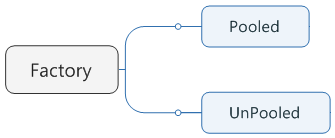
实际Mybatis设计,没有直接返回Connection,而返回了dataSource
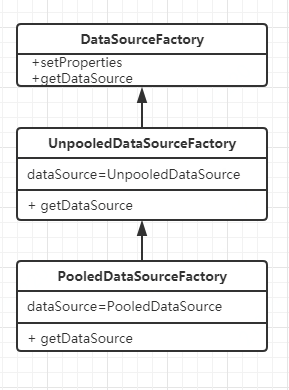
2.对于有连接池的数据源,和无连接池的数据源,我们自己会如何设计?
流程上的区别
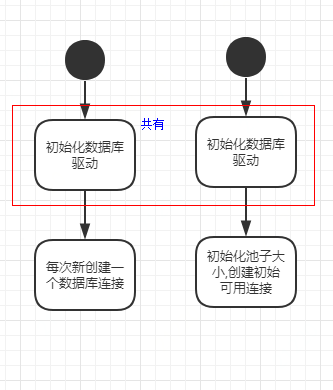
职责上区别
现在解开谜底:看实际Mybatis设计如何?
非池化类:
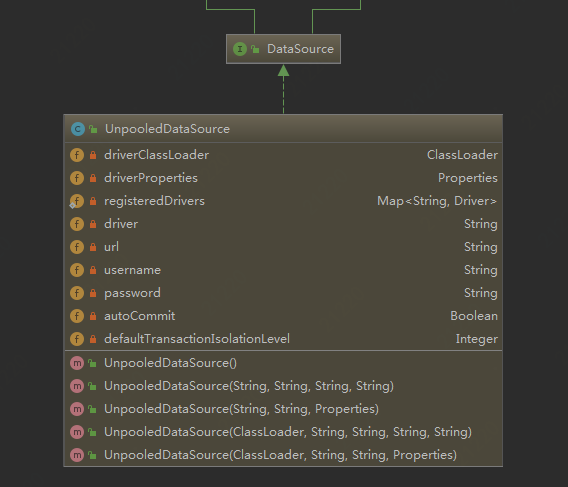
看下最关键的,获得数据库连接,和我们自己写的没啥区别。简单粗暴
  private Connection doGetConnection(Properties properties) throws SQLException {

    initializeDriver();

    Connection connection = DriverManager.getConnection(url, properties);

    configureConnection(connection);

    return connection;

  }
池化类:
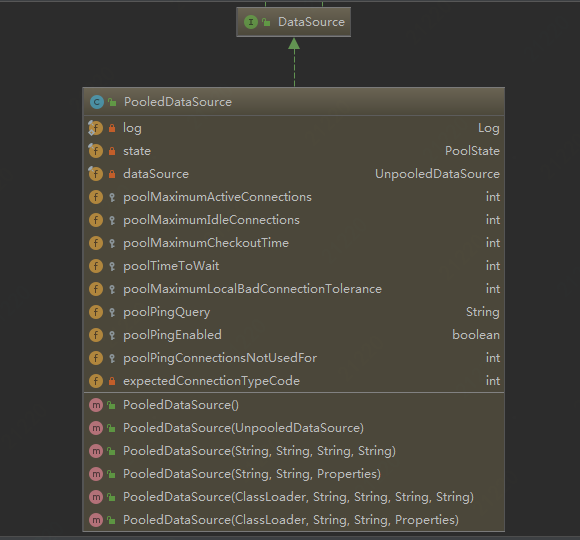
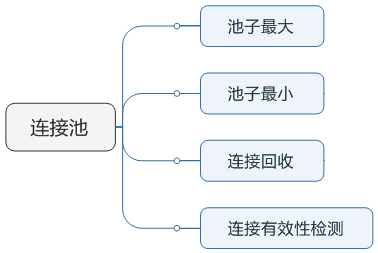
池化工作分配 :
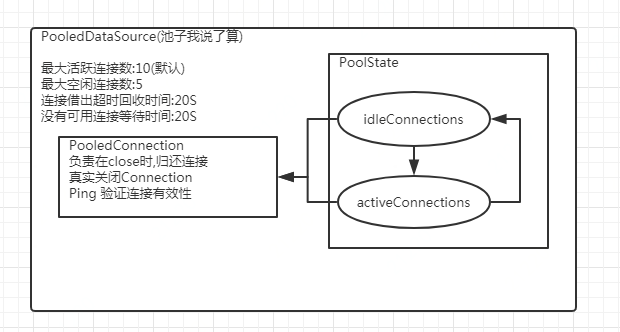
至此,MYBABTIS对于数据源的创建以及管理结束!看下代码,池化获得连接的代码
  @Override

  public Connection getConnection() throws SQLException {

    return popConnection(dataSource.getUsername(), dataSource.getPassword()).getProxyConnection();

  }
while (conn == null) { //够用就行,拿到一个就返回

      synchronized (state) {

          //只有有连接还回来,再走这里

        if (!state.idleConnections.isEmpty()) {

          // Pool has available connection

          conn = state.idleConnections.remove(0);

          if (log.isDebugEnabled()) {

            log.debug("Checked out connection " + conn.getRealHashCode() + " from pool.");

          }

        } else {

        //有两种可能:1种,都在使用中,池子没满,再新建

          // Pool does not have available connection

          if (state.activeConnections.size() < poolMaximumActiveConnections) {

            // Can create new connection

            //新建连接

            conn = new PooledConnection(dataSource.getConnection(), this);

            if (log.isDebugEnabled()) {

              log.debug("Created connection " + conn.getRealHashCode() + ".");

            }

          } else {

            // Cannot create new connection

            //找一个最老的,用的ArrayList,老的在ArrayList数组的前面

            PooledConnection oldestActiveConnection = state.activeConnections.get(0);

            long longestCheckoutTime = oldestActiveConnection.getCheckoutTime();

            //借出超时,不让他做了,直接rollback。。。暴力

            if (longestCheckoutTime > poolMaximumCheckoutTime) {

              // Can claim overdue connection

              state.claimedOverdueConnectionCount++;

              state.accumulatedCheckoutTimeOfOverdueConnections += longestCheckoutTime;

              state.accumulatedCheckoutTime += longestCheckoutTime;

              state.activeConnections.remove(oldestActiveConnection);

              if (!oldestActiveConnection.getRealConnection().getAutoCommit()) {

                try {

                  oldestActiveConnection.getRealConnection().rollback();

                } catch (SQLException e) {

                  /*

                     Just log a message for debug and continue to execute the following

                     statement like nothing happend.

                     Wrap the bad connection with a new PooledConnection, this will help

                     to not intterupt current executing thread and give current thread a

                     chance to join the next competion for another valid/good database

                     connection. At the end of this loop, bad {@link @conn} will be set as null.

                   */

                  log.debug("Bad connection. Could not roll back");

                }

              }

              //拿回来后,不再放到原有的PooledConnection,新建立一个。从新开始.老的REAL connection还被oldestActiveConnection引用,不会内存溢出?

              conn = new PooledConnection(oldestActiveConnection.getRealConnection(), this);

              conn.setCreatedTimestamp(oldestActiveConnection.getCreatedTimestamp());

              conn.setLastUsedTimestamp(oldestActiveConnection.getLastUsedTimestamp());

              oldestActiveConnection.invalidate();

              if (log.isDebugEnabled()) {

                log.debug("Claimed overdue connection " + conn.getRealHashCode() + ".");

              }

            } else {

              // Must wait

                //大家都在用着,你只能等着了。

              try {

                if (!countedWait) {

                  state.hadToWaitCount++;

                  countedWait = true;

                }

                if (log.isDebugEnabled()) {

                  log.debug("Waiting as long as " + poolTimeToWait + " milliseconds for connection.");

                }

                long wt = System.currentTimeMillis();

                state.wait(poolTimeToWait);

                state.accumulatedWaitTime += System.currentTimeMillis() - wt;

              } catch (InterruptedException e) {

                break;

              }

            }

          }

        }

        if (conn != null) {

          // ping to server and check the connection is valid or not

          if (conn.isValid()) {

            if (!conn.getRealConnection().getAutoCommit()) {

              conn.getRealConnection().rollback();

            }

            conn.setConnectionTypeCode(assembleConnectionTypeCode(dataSource.getUrl(), username, password));

            conn.setCheckoutTimestamp(System.currentTimeMillis());

            conn.setLastUsedTimestamp(System.currentTimeMillis());

            state.activeConnections.add(conn);

            state.requestCount++;

            state.accumulatedRequestTime += System.currentTimeMillis() - t;

          } else {

            if (log.isDebugEnabled()) {

              log.debug("A bad connection (" + conn.getRealHashCode() + ") was returned from the pool, getting another connection.");

            }

            state.badConnectionCount++;

            localBadConnectionCount++;

            conn = null;

            //如果累计有这些个链接失效了,则报个异常.

            if (localBadConnectionCount > (poolMaximumIdleConnections + poolMaximumLocalBadConnectionTolerance)) {

              if (log.isDebugEnabled()) {

                log.debug("PooledDataSource: Could not get a good connection to the database.");

              }

              throw new SQLException("PooledDataSource: Could not get a good connection to the database.");

            }

          }

        }

      }

    }
mybatis与数据库访问相关的配置以及设计的更多相关文章
- SpringBoot:4.SpringBoot整合Mybatis实现数据库访问
在公司项目开发中,使用Mybatis居多.在 SpringBoot:3.SpringBoot使用Spring-data-jpa实现数据库访问 中,这种jpa风格的把sql语句和java代码放到一起,总 ...
- mysql+spring+mybatis实现数据库读写分离[代码配置] .
场景:一个读数据源一个读写数据源. 原理:借助spring的[org.springframework.jdbc.datasource.lookup.AbstractRoutingDataSource] ...
- Spring Mvc和Mybatis的多数据库访问配置过程
Spring Mvc 加Mybatis的多数据库访问源配置访问过程如下: 在applicationContext.xml进行配置 <?xml version="1.0" en ...
- Spring+MyBatis实践—MyBatis数据库访问
关于spring整合mybatis的工程配置,已经在Spring+MyBatis实践—工程配置中全部详细列出.在此,记录一下几种通过MyBatis访问数据库的方式. 通过sqlSessionTempl ...
- 使用MyBatis搭建一个访问mysql数据库的简单示例
MyBatis是一个支持普通SQL查询,存储过程和高级映射的优秀持久层框架.MyBatis消除了几乎所有的JDBC代码和参数的手工设置以及对结果集的检索封装.MyBatis可以使用简单的XML或注解用 ...
- Spring+MyBatis双数据库配置
Spring+MyBatis双数据库配置 近期项目中遇到要调用其它数据库的情况.本来仅仅使用一个MySQL数据库.但随着项目内容越来越多,逻辑越来越复杂. 原来一个数据库已经不够用了,须要分库分表.所 ...
- Spring+Mybatis+Mysql搭建分布式数据库访问框架
一.前言 用Java开发企业应用软件, 经常会采用Spring+MyBatis+Mysql搭建数据库框架.如果数据量很大,一个MYSQL库存储数据访问效率很低,往往会采用分库存储管理的方式.本文讲述如 ...
- spring配置druid连接池和监控数据库访问性能
Druid连接池及监控在spring配置如下: <bean id="dataSource" class="com.alibaba.druid.pool.DruidD ...
- SpringBoot入门 (四) 数据库访问之JdbcTemplate
本文记录在SpringBoot中使用JdbcTemplate访问数据库. 一 JDBC回顾 最早是在上学时接触的使用JDBC访问数据库,主要有以下几个步骤: 1 加载驱动 Class.forName( ...
随机推荐
- EDF转TXT,EDF转mat,rec转TXT eeg
https://files.cnblogs.com/files/myohao/edfsample.zip
- zznuoj 1540 : 直线与圆
题目描述 给出一个圆的圆心坐标与圆的半径,和一条直线上的两点坐标,求这条直线与圆有多少个交点. 输入 输入3个实数x,y,r值分别表示圆心坐标与圆的半径,输入4个实数x1,y1,x2,y2表示直线上的 ...
- jsp的四个作用域page、request、session、application
1.简单说 page指当前页面.在一个jsp页面里有效 2.request 指从http请求到服务器处理结束,返回响应的整个过程.在这个过程中使用forward方式跳转多个jsp.在这些页面里你都可以 ...
- CentOS7.4部署Python3+Django+uWSGI+Nginx
CentOS7.4部署Python3+Django+uWSGI+Nginx http://www.showerlee.com/archives/2590
- VM克隆centos7虚拟机并配置网络
笔者这里有个配置好网络的centos7系统,下面将根据这个centos7克隆出一个centos7系统,并配置好网络 1.右键虚拟机克隆 2.选择创建完整克隆 3.克隆机的命名,点击完成 4.可看到这里 ...
- 查看那些进程使用了swap
https://blog.csdn.net/xiangliangyu/article/details/8213127$ sudo pacman -S iotop https://blog.longwi ...
- the status bar issue of react-native Modal on Android ( RN v0.57.0)
Problem: When use Modal in react-native, the status bar is not included if you make a full-screen ma ...
- Selenium3+python几种定位元素的方法
学习小结: 这里使用ChromeV73+web driver 2.46 #几种定位方式: #Autotest.py from selenium import webdriver from seleni ...
- Python练习七
1.写函数,检查传入字典的每一个value的长度,如果大于2,那么仅保留前两个长度的内容,并将新内容返回给调用者. def func(dic): for k in dic: if len(dic[k] ...
- win10 uwp 读取resw资源文件
ResourceContext resourceContext = ResourceContext.GetForViewIndependentUse(); ResourceMap resourceMa ...