
MyBatis框架
MyBatis是支持普通SQL查询,存储过程和高级映射的优秀持久层框架。MyBatis消除了几乎所有的JDBC代码和参数的手工设置以及对结果集的检索封装。MyBatis可以使用简单的xml或者注解用于配置和原始映射,将接口和java的POJO(Plain Old Java Objects,普通Java对象)映射成数据库中的记录。
JDBC –> dbutils(自动封装结果集) –>MyBatis –>Hinernate
简单环境搭建:JDBC Driver相关jar包和Mybatis.jar包。
1. SqlSessionFactory的构建:
SqlSessionFactory是整个MyBatis框架的核心,其对象实例可以通过SqlSessionFactoryBuilder来获得。创建方法:
1. 通过org.apache.ibatis.io.Resources. getResourceAsStream(“conf.xml”);或者TestMyBatis.class.getClassLoader().getResourceAsStream("conf.xml");或其他方式得到一个InputStream流,然后通过SqlSessionFactory factory=new SqlSessionFactoryBuilder().build(inputstream);来构建SqlSessionFactory。
3. SqlSession的创建:
SqlSession是以数据为背景的所有执行SQL操作的方法,可以使用SqlSession实例来直接执行已映射的SQL语句。
SqlSession session=factory.openSession();

String statement="com.mybatis.test.userMapper.getUser";

User user=session.selectOne(statement, 1);

session.close();
Conf.xml文件:
<?xml version="1.0" encoding="UTF-8" ?>

<!DOCTYPE configuration PUBLIC "-//mybatis.org//DTD Config 3.0//EN"

"http://mybatis.org/dtd/mybatis-3-config.dtd">

<configuration>

    <!--

      <environments default="development">

      <environments default="work">

     -->

    <environments default="development">

           <environment id="development">

               <!--

                transactionManager:在MyBatis中有两种事务管理类型[type=JDBC | MANAGED ]

                * JDBC -这个配置直接简单的使用了JDBC的提交和回滚设置。它依赖于从数据源得到的连接来管理事务范围。

                * MANAGED -这个配置几乎没有做什么,它从来不提交或回滚一个连接。而它会让容器来管理事务的整个生命周期。默认情况下它会关闭连接。如果在一些容器中并不希望这样,那么需要使用closeConnection属性设置为false:例如

                <transactionManager type="MANAGED">

                   <property name="closeConnection" value ="false"/>

                </transactionManager>

                -->

                  <transactionManager type="JDBC"/>

                     <dataSource type="POOLED">

                            <property name="driver" value="com.mysql.jdbc.Driver"/>

                            <property name="url" value="jdbc:mysql://localhost:3306/cdcol"/>

                            <property name="username" value="root"/>

                            <property name="password" value="x5uq4xWjTvUMH23H"/>

                     </dataSource>

           </environment>

    </environments>

    <mappers>

        <mapper resource="com/mybatis/test/userMapper.xml"/>

    </mappers>

</configuration>
userMapper.xml文件:
<?xml version="1.0" encoding="UTF-8"?>

<!DOCTYPE mapper PUBLIC "-//ibatis.apache.org//DTD Mapper 3.0//EN" "http://ibatis.apache.org/dtd/ibatis-3-mapper.dtd">

<mapper namespace="com.mybatis.test.userMapper">

    <select id="getUser" parameterType="int" resultType="com.mybatis.test.User">

        select * from users where id=#{id}

    </select>

    <insert id="addUser" parameterType="com.mybatis.test.User">

        insert into users(name,age) values(#{name},#{age})

    </insert>

    <delete id="deleteUser" parameterType="int">

        delete from users where id=#{id}

    </delete>

    <update id="updateUser" parameterType="com.mybatis.test.User">

        update users set name=#{name},age=#{age} where id=#{id}

    </update>

    <select id="getAllUsers" resultType="com.mybatis.test.User">

        select * from users

    </select>

</mapper>
CRUD代码:
SqlSession session=factory.openSession(true);//true表示自动提交

              //String statement="com.mybatis.test.userMapper.addUser";

              //int num=session.insert(statement, new User(-1,"fei5", 21));

              //String statement="com.mybatis.test.userMapper.updateUser";

              //int user= session.update(statement,new User(3,"feip", 21));

              //String statement="com.mybatis.test.userMapper.deleteUser";

              //int num=session.delete(statement, 4);
4.优化:
4.1 配置文件的优化:
新建db.properties文件:
driver=com.mysql.jdbc.Driver

url=jdbc:mysql://localhost:3306/mysql

username=root

password=x5uq4xWjTvUMH23H
然后在conf.xml文件中使用<propertyes resource= "db. properties"> 设置引用,并使用${key}的形式将对应的值引用进来。从而方便数据库的管理。
<dataSource type="POOLED">

                            <property name="driver" value="${driver}"/>

                            <property name="url" value="${url}"/>

                            <property name="username" value="${username}"/>

                            <property name="password" value="${password}"/>

</dataSource>
4.2 引用实体类引用的优化:
<typeAliases>

        <typeAlias type="com.mybatis.test.User" alias="_User"/>

        <package name="com.mybatis.test"/>

    </typeAliases>
<select id="getUser" parameterType="int" resultType="User">

        select * from users where id=#{id}

 </select>
可以使用以上的typeAlias别名或者package路径,typeAlias在mapper文件中可以直接使用alias="_User"中的_User,使用package可以直接使用User类名,进行简化。如:
4.3 字段名与实体属性名不相同时的冲突:
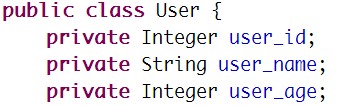
实体类中:

数据库中:

查询结果为:null
解决方法:
(1). 使用数据库别名语法:别名必须要与实体类中的属性名相同
Select id user_id,name user_name, age user_age from users where id=#{id}
(2). 别名配置:
<?xml version="1.0" encoding="UTF-8"?>

<!DOCTYPE mapper PUBLIC "-//ibatis.apache.org//DTD Mapper 3.0//EN" "http://ibatis.apache.org/dtd/ibatis-3-mapper.dtd">

<mapper namespace="com.mybatis.test2.userMapper">

   <select id="getUser" parameterType="int" resultMap="getUserT">

       select * from users where id=#{user_id}

   </select>

   <resultMap type="User" id="getUserT">

       <!--

                     id表示数据库表中的主键字段;

                     property表示实体类中的属性名;

                     column 表示数据表中对应的字段名。

        -->

       <id property="user_id" column="id"/>

       <result property="user_name" column="name"/>

       <result property="user_age" column="age"/>

   </resultMap>

</mapper>
5.一对一联表查询:
ALTER TABLE product ADD CONSTRAINT fk _id FOREIGN KEY(u_id) REFERENCES users(id)
方法一: 嵌套结果查询,使用嵌套结果映射来处理重复的联合结果的子集封装关联表查询的数据(去重复的数据)
Product.java:

User.java:
ProductMapper.xml:
<?xml version="1.0" encoding="UTF-8"?>

<!DOCTYPE mapper PUBLIC "-//ibatis.apache.org//DTD Mapper 3.0//EN" "http://ibatis.apache.org/dtd/ibatis-3-mapper.dtd">

<mapper namespace="com.mybatis.test3.ProductMapper">

   <select id="getProduct" parameterType="int" resultMap="getProductMap">

       SELECT * FROM users u, product p WHERE p.u_id=u.id AND p.p_id=#{id}

   </select>

   <resultMap type="Product" id="getProductMap">

       <id property="id" column="p_id"/>

       <result property="name" column="p_name"/>

       <result property="u_id" column="u_id"/>

       <association property="user" javaType="User">

           <id property="user_id" column="id"/>

           <result property="user_name" column="name"/>

           <result property="user_age" column="age"/>

       </association>

   </resultMap>

</mapper>
Product product=session.selectOne(statement,5);String statement = "com.mybatis.test3.ProductMapper.getProduct";

System.out.println(product);

session.close();
测试结果:
Product [name=Chanel, id=5, u_id=5, user=User [user_id=5, user_name=feit, user_age=21]]
方法二 :嵌套查询,通过执行另一个SQL映射语句来返回预期的复杂类型。
<?xml version="1.0" encoding="UTF-8"?>

<!DOCTYPE mapper PUBLIC "-//ibatis.apache.org//DTD Mapper 3.0//EN" "http://ibatis.apache.org/dtd/ibatis-3-mapper.dtd">

<mapper namespace="com.mybatis.test3.ProductMapper">

   <select id="getProduct2" resultMap="getProductMap2">

       SELECT * FROM product WHERE p_id=#{id}

   </select>

   <select id="getUser" parameterType="int" resultType="User">

       SELECT id user_id,name user_name,age user_age FROM users WHERE id=#{user_id}

   </select>

   <resultMap type="Product" id="getProductMap2">

       <id property="id" column="p_id"/>

       <result property="name" column="p_name"/>

       <result property="u_id" column="u_id"/>

       <!-- 通过select属性指向第二次select 的id,执行第二次查询,并通过column字段[外键]将第一次结果集中的user数据查询出来-->

       <association property="user" column="u_id" select="getUser">

       </association>

   </resultMap>

</mapper>
MyBatis框架的更多相关文章
- Mybatis框架的多对一关联关系(六)
一.一对多的关联映射 一对多关联查询多表数据 1接口 public interface IDeptDAO { //根据部门编号查询该部门单个查询 public Emp getEmpById(Integ ...
- Spring+SpringMvc+Mybatis框架集成搭建教程
一.背景 最近有很多同学由于没有过SSM(Spring+SpringMvc+Mybatis , 以下简称SSM)框架的搭建的经历,所以在自己搭建SSM框架集成的时候,出现了这样或者那样的问题,很是苦恼 ...
- Mybatis框架中实现双向一对多关系映射
学习过Hibernate框架的伙伴们很容易就能简单的配置各种映射关系(Hibernate框架的映射关系在我的blogs中也有详细的讲解),但是在Mybatis框架中我们又如何去实现 一对多的关系映射呢 ...
- Hibernate框架与Mybatis框架的对比
学习了Hibernate和Mybatis,但是一直不太清楚他们两者的区别的联系,今天在网上翻了翻,就做了一下总结,希望对大家有帮助! 原文:http://blog.csdn.net/firejuly/ ...
- 初识Mybatis框架,实现增删改查等操作(动态拼接和动态修改)
此第一次接触Mybatis框架确实是有点不适应,特别是刚从Hibernate框架转转型过来,那么为什么要使用Mybatis框架,Mybatis框架和Hibernate框架又有什么异同呢? 这个问题在我 ...
- Spring+MyBatis框架中sql语句的书写,数据集的传递以及多表关联查询
在很多Java EE项目中,Spring+MyBatis框架经常被用到,项目搭建在这里不再赘述,现在要将的是如何在项目中书写,增删改查的语句,如何操作数据库,以及后台如何获取数据,如何进行关联查询,以 ...
- SSM框架-----------SpringMVC+Spring+Mybatis框架整合详细教程
1.基本概念 1.1.Spring Spring是一个开源框架,Spring是于2003 年兴起的一个轻量级的Java 开发框架,由Rod Johnson 在其著作Expert One-On-One ...
- Spring3.0 与 MyBatis框架 整合小实例
本文将在Eclipse开发环境下,采用Spring MVC + Spring + MyBatis + Maven + Log4J 框架搭建一个Java web 项目. 1. 环境准备: 1.1 创建数 ...
- 手把手Maven搭建SpringMVC+Spring+MyBatis框架(超级详细版)
手把手Maven搭建SpringMVC+Spring+MyBatis框架(超级详细版) SSM(Spring+SpringMVC+Mybatis),目前较为主流的企业级架构方案.标准的MVC设计模式, ...
- 详解Java的MyBatis框架中SQL语句映射部分的编写
这篇文章主要介绍了Java的MyBatis框架中SQL语句映射部分的编写,文中分为resultMap和增删查改实现两个部分来讲解,需要的朋友可以参考下 1.resultMap SQL 映射XML 文件 ...
随机推荐
- jQuery实现表单验证
表单是网页的一个重要组成部分.本节做一个简单的表单提交网页然后利用jQuery实现表单的验证.后续的表单完善以及功能的完善会在以后的博客中给出. 效果图: 代码: <!DOCTYPE html ...
- MySQL错误: could not retrieve transation read-only status server
问题描述: java代码在开始事务后,先做了一个查询,再insert,此时会报: java.sql.SQLException: could not retrieve transati ...
- worker_pool的例子
鉴于poolboy的坑,pooler不支持r18,又有在知乎上看到大神推荐worker_pool这个进程池框架(工作者进程在创建时崩溃,worker_pool不受影响),所以研究了下,贴个小例子 my ...
- Makefile Shell 脚本;sed命令
1. 在Makefile中想使用shell脚本,需要添加"@"符号,例如: @if [ -d xxx ]; then \ //-d 判 ...
- iOS 图片拉伸 resizableImageWithCapInsets
UIImage *image = [[UIImage imageNamed:@"test.png"] resizableImageWithCapInsets:UIEdgeInse ...
- 证据对抗、证据链标准 z
证据链乃诉讼中应对证据冲突的法宝 大部分当事人知道“证据链”这一诉讼专用术语,但几乎所有当事人将“证据链”理解成了人证.书证.物证,鉴定结论等证据的组合,将“证据链”视为不同种类证据依次出击的“组 ...
- 里德九步审讯法 z
在现实生活中,警方审讯靠的不仅仅是自信和创造力(尽管这两点对审讯工作确有帮助)——审讯者还要在交际影响的心理战术方面接受过高水平训练. 让一个人认罪可不是件容易事,而警察有时能让无辜者承认 ...
- 拥抱 Android Studio 之四:Maven 仓库使用与私有仓库搭建
使用.创造和分享 笔者曾经不思量力的思考过『是什么推动了互联网技术的快速发展?』这种伟大的命题.结论是,除了摩尔定律之外,技术经验的快速积累和广泛分享,也是重要的原因. 有人戏称,『写 Java,首先 ...
- Vim 中截取部分内容保存到其他文件
最近无聊,突然想跟着玩玩天池数据挖掘,发现数据好大,想转换到mysql数据库,phpmyadmin import 导入时抱错! 数据文件大大! 于是乎,准备截取一小段到另外一个文件测试先,然后,发现了 ...
- Python & MapReduce
使用Python实现Hadoop MapReduce程序 原文请参考: http://blog.csdn.net/zhaoyl03/article/details/8657031/ 下面只是将mapp ...