
用PyAIML开发简单的对话机器人
AIML files are a subset of Extensible Mark-up Language (XML) that can store different text patterns in the form of tags. AIML was developed by the Alicebot free software community. AIML is mainly used to implement Chatbots, a natural language software agent in which a user can ask questions to the robot and it can give an intelligent reply.
The <aiml> tag: Each AIML code begins with this tag and is closed using the </aiml> tag. This tag also consists of attributes such as the version and encoding scheme of the file.
<aiml version="1.0.1" encoding="UTF-8">

...

</aiml>
The <category> tag: The basic knowledge blocks of AIML are called categories. Each category block consists of two sections. One is the user input in the form of a sentence and the other is a corresponding response to user input which comes from robot. The category tag is represented using the opening <category> tag and the closing tag is represented using the </category> tag. These categories must be inside the <aiml> and </aiml> tags. The category tags consist of two tags, namely, the <pattern> tag and the <template> tag. The input given by users is inside the <pattern> tag and the answers are in the <template> tag. For example, look at this following conversation:
User: How are you?
Robot: I am fine.
In this conversation, the user dialog will be in the <pattern> tag and the robot's response will be in the <template> tag. The following code shows the representation of the preceding dialogs in the AIML format:
<aiml version="1.0.1" encoding="UTF-8">

  <category>

    <pattern> HOW ARE YOU </pattern>

    <template> I AM FINE </template>

  </category>

</aiml>
We need to save this file in the .aiml or .xml format. For example, save the code with the name "sample.aiml".
Introduction to PyAIML
PyAIML is an open source Python AIML interpreter written completely in pure Python without using any third-party dependencies.
Installing PyAIML from source code:
https://github.com/DYFeng/pyaiml
$ sudo python setup.py install
Install the aiml package with pip:
pip install aiml
Loading a single AIML file from the command-line argument(载入单个aiml文件)
We can load a single AIML file using the following code:
#!/usr/bin/env python

import aiml

import sys

mybot = aiml.Kernel()

mybot.learn(sys.argv[1])

while True:

    print mybot.respond(raw_input("Enter input >"))
Execute the code using the following command:
python test.py sample.aiml
It will give you the following result:
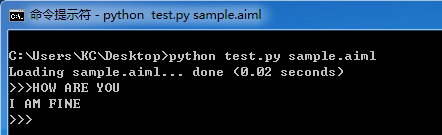
Loading AIML files into memory(载入多个aiml文件)
If you want to learn more than one AIML, it's better to use an XML file, for example, the startup.xml file can load all other AIML files.
<aiml version="1.0">

    <category>

        <pattern>LOAD AIML B</pattern>

        <template>

            <!-- Load standard AIML set -->

            <learn>*.aiml</learn>

        </template>

    </category>

</aiml>
The preceding XML file will learn all the AIML files when we call the LOAD AIML B pattern. The following code will load all the AIML files into memory:
#!/usr/bin/env python

import aiml

# Create a Kernel object.

mybot = aiml.Kernel()

# Learn startup.xml

mybot.learn('startup.xml')  # Change the current path to your aiml files path

# Calling load aiml b for loading all AIML files

mybot.respond('load aiml b')

# Enter the main input/output loop.

print "\nINTERACTIVE MODE (ctrl-c to exit)"

while True:

    print mybot.respond(raw_input("Enter input >"))
You will get the following output:

更多标签(以<random>标签为例。<li>标签 is the list can be used within the <random> and <condition> tag sets)
Its purpose is random selection of one of a set of list items.
<random>
<li>A</li>
<li>B</li>
<li>C</li>
</random>
Say one of A, B or C randomly.
<aiml version="1.0.1" encoding="UTF-8">

    <category>

        <pattern> WHO ARE YOU </pattern>

        <template>

            <random>

                <li> A </li>

                <li> B </li>

                <li> C </li>

                <li> D </li>

            </random>

        </template>

    </category>

</aiml>
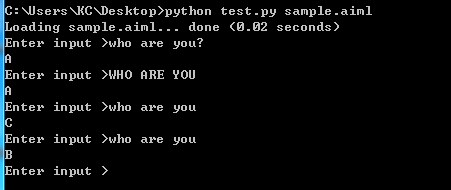
The <star index="n"/> tag indicates the input text fragment matching the "n" pattern '*'.
<star index="1"/> yields the first matching text fragment.
<star index="2"/> yields the second matching text fragment.
<star index="3"/> yields the third matching text fragment.
And so on....
The index="n" is optional, and if left off, the index value of "1" is assumed. The tag <star/> is equivilant to <star index="1"/>.
<aiml version="1.0.1" encoding="UTF-8">

    <category>

        <pattern> MY NAME IS * </pattern>

        <template>

            NICE TO MEET YOU <star/>

        </template>

    </category>

    <category>

        <pattern> MEET OUR GUEST * AND * </pattern>

        <template>

            NICE TO MEET YOU <star index="1"/> AND <star index="2"/>.

        </template>

    </category>

</aiml>

参考:
http://python.jobbole.com/82007/
http://www.jb51.net/article/78789.htm
http://www.alicebot.org/aiml.html
http://blog.csdn.net/aofengdaxia/article/details/18364365
用PyAIML开发简单的对话机器人的更多相关文章
- 手把手教你利用微软的Bot Framework,LUIS,QnA Maker做一个简单的对话机器人
最近由于要参加微软亚洲研究院的夏令营,需要利用微软的服务搭建一个对话Bot,以便对俱乐部的情况进行介绍,所以现学了几天,搭建了一个简单的对话Bot,期间参考了大量的资料,尤其是下面的这篇博客: htt ...
- python 全栈开发,Day129(玩具开机提示语,为多个玩具发送点播,聊天界面,app录音,app与服务器端文件传输,简单的对话)
一.玩具开机提示语 先下载github代码,下面的操作,都是基于这个版本来的! https://github.com/987334176/Intelligent_toy/archive/v1.2.zi ...
- 打造一个window桌面应用:在线聊天对话机器人
大家好,我是辰哥~~~ 本文目标:打造一个window桌面应用:在线聊天对话机器人. 今天辰哥教大家做一个在线聊天对话机器人桌面应用,已经打包成exe可执行文件,读者可以直接拿来使用, 先上演示图 聊 ...
- TensorFlow练习13: 制作一个简单的聊天机器人
现在很多卖货公司都使用聊天机器人充当客服人员,许多科技巨头也纷纷推出各自的聊天助手,如苹果Siri.Google Now.Amazon Alexa.微软小冰等等.前不久有一个视频比较了Google N ...
- python 全栈开发,Day123(图灵机器人,web录音实现自动化交互问答)
昨日内容回顾 . 百度ai开放平台 . AipSpeech技术,语言合成,语言识别 . Nlp技术,短文本相似度 . 实现一个简单的问答机器人 . 语言识别 ffmpeg (目前所有音乐,视频领域,这 ...
- HiLink & LiteOS & IoT芯片 让IoT开发简单高效
HiLink & LiteOS & IoT芯片让IoT开发简单高效 华为HiLink & LiteOS & IoT芯片使能三件套,让IoT开发更简单高效.下一代智能手机 ...
- 【Azure 机器人】微软Azure Bot 编辑器系列(1) : 创建一个天气对话机器人(The Bot Framework Composer tutorials)
欢迎来到微软机器人编辑器使用教程,从这里开始,创建一个简单的机器人. 在该系列文章中,每一篇都将通过添加更多的功能来构建机器人.当完成教程中的全部内容后,你将成功的创建一个天气机器人(Weather ...
- 从零开始学Python08作业思路:开发简单的FTP
一,作业要求 开发简单的FTP 1,用户登录 2,上传/下载文件 3,不同用户家目录不同 4,查看当前目录下文件 5,充分使用面向对象 二,程序文件清单 Folder目录:用户上传文件家目录 db目录 ...
- Python开发简单爬虫 - 慕课网
课程链接:Python开发简单爬虫 环境搭建: Eclipse+PyDev配置搭建Python开发环境 Python入门基础教程 用Eclipse编写Python程序 课程目录 第1章 课程介绍 ...
随机推荐
- 评playerc网友的"求比指定数大且最小的“不重复数”问题"
问题见:对Alexia(minmin)网友代码的评论及对“求比指定数大且最小的‘不重复数’问题”代码的改进 .算法:求比指定数大且最小的“不重复数”问题的高效实现 . playerc网友的代码如下(求 ...
- Windows系统文件受损的修复技巧
Windows2000/XP系统文件受损的修复技巧 意外重启.安装了不兼容的软件.恶意程序侵扰.误删文件……有太多种可能性会使我们的系统文件受损,而系统文件受损后最直接的表现就是系统不稳定.经常出现错 ...
- UIViewController卸载过程(ios6.0以后)
在ios6.0以后,废除了viewWillUnload方法和viewDidUnload方法. 在ios6以后,当收到didReceiveMemoryWarning消息调用之后,程序会自动调用didRe ...
- sql创建删除修改表的基本操作
1 建立表格 在建立好数据库以后,就可以根据储存资料的需求,使用SQL叙述建立所有需要的表格(table).建立表格的设定非常多,以建立"world.city"表格来说,它的叙述会 ...
- seo伪原创技术原理分析,php实现伪原创示例
seo伪原创技术原理分析,php实现伪原创示例 现在seo伪原创一般采用分词引擎以及动态同义词库,模拟百度(baidu),谷歌(google)等中文切词进行伪原创,生成后的伪原创文章更准确更贴近百度和 ...
- Virtualbox后台管理之VBoxManage
Virtualbox是提供了后台启动的.只是不是默认的. 查看有哪些虚拟机 VBoxManage list vms 查看虚拟的详细信息 VBoxManage list vms --long 查看运行着 ...
- Linux I2C工具查看配置I2C设备【转】
转自:http://blog.chinaunix.net/uid-26895763-id-3478882.html 在處理音訊相關的問題時,我通常會找個方法來讀寫codec中register的值.幸好 ...
- 【Pro ASP.NET MVC 3 Framework】.学习笔记.7.SportsStore:购物车
3 创建购物车 每个商品旁边都要显示Add to cart按钮.点击按钮后,会显示客户已经选中的商品的摘要,包括总金额.在购物车里,用户可以点击继续购物按钮返回product目录.也可以点击Check ...
- linux打开文件数量的查看方法
linux打开文件数量的查看方法 linux打开文件数量的查看方法在网上查到两种查看linux打开文件数量的查看方法,但结果不相同,linux查看文件打开数量是以那个文件或命令为标准呢? 搜索过关于u ...
- javascript || and &&
<!DOCTYPE html PUBLIC "-//W3C//DTD XHTML 1.0 Transitional//EN" "http://www.w3.org/ ...