
iOS ZBarSDK的基本使用:扫描
1.首先使用Cocoapods导入库 ZBarSDK
2.敲代码:
ViewController.h
//

//  ViewController.h

//  erweima

//

//  Created by shaoting on 15/12/16.

//  Copyright © 2015年 9elephas. All rights reserved.

//

#import <UIKit/UIKit.h>

#import "ZBarSDK.h"

@interface ViewController : UIViewController<ZBarReaderDelegate>

@end
ViewController.m
//

//  ViewController.m

//  erweima

//

//  Created by shaoting on 15/12/16.

//  Copyright © 2015年 9elephas. All rights reserved.

//

#import "ViewController.h"

#define ScreenFrame [[UIScreen mainScreen]bounds]

@interface ViewController ()

@end

@implementation ViewController

- (void)viewDidLoad {

    [super viewDidLoad];

    UIButton * btn = [UIButton buttonWithType:UIButtonTypeCustom];

    btn.frame = CGRectMake(0, 0, 50, 50);

    [btn setTitle:@"扫描" forState:UIControlStateNormal];

    btn.backgroundColor = [UIColor redColor];

    [btn addTarget:self action:@selector(erweima:) forControlEvents:UIControlEventTouchUpInside];

    [self.view addSubview:btn];

    // Do any additional setup after loading the view, typically from a nib.

}

-(void)erweima:(UIButton *)btn{

    ZBarReaderViewController * reader = [ZBarReaderViewController new];//初始化相机控制器

    reader.readerDelegate = self;

    reader.supportedOrientationsMask = ZBarOrientationMaskAll;//基本适配

    reader.showsHelpOnFail = YES;

    reader.scanCrop = CGRectMake(0, 0, 1, 1);

    ZBarImageScanner * scanner = reader.scanner;

    [scanner setSymbology:25 config:0 to:0];

    UIView * view = [[UIView alloc]initWithFrame:CGRectMake(0, 0, ScreenFrame.size.width, ScreenFrame.size.height)];

    reader.cameraOverlayView = view;

    [self presentViewController:reader animated:YES completion:^{

    }];

}

- (void) imagePickerController: (UIImagePickerController*) reader

 didFinishPickingMediaWithInfo: (NSDictionary*) info{

    id<NSFastEnumeration> results =

    [info objectForKey: ZBarReaderControllerResults];

    ZBarSymbol *symbol = nil;

    for(symbol in results)

        break;

    UIAlertView * alert = [[UIAlertView alloc]initWithTitle:@"消息" message:symbol.data delegate:nil cancelButtonTitle:@"OK" otherButtonTitles:@"OK1", nil];

        [alert show];

}

- (void)didReceiveMemoryWarning {

    [super didReceiveMemoryWarning];

    // Dispose of any resources that can be recreated.

}

@end
demo下载:http://download.csdn.net/detail/shaoting19910730/9426472
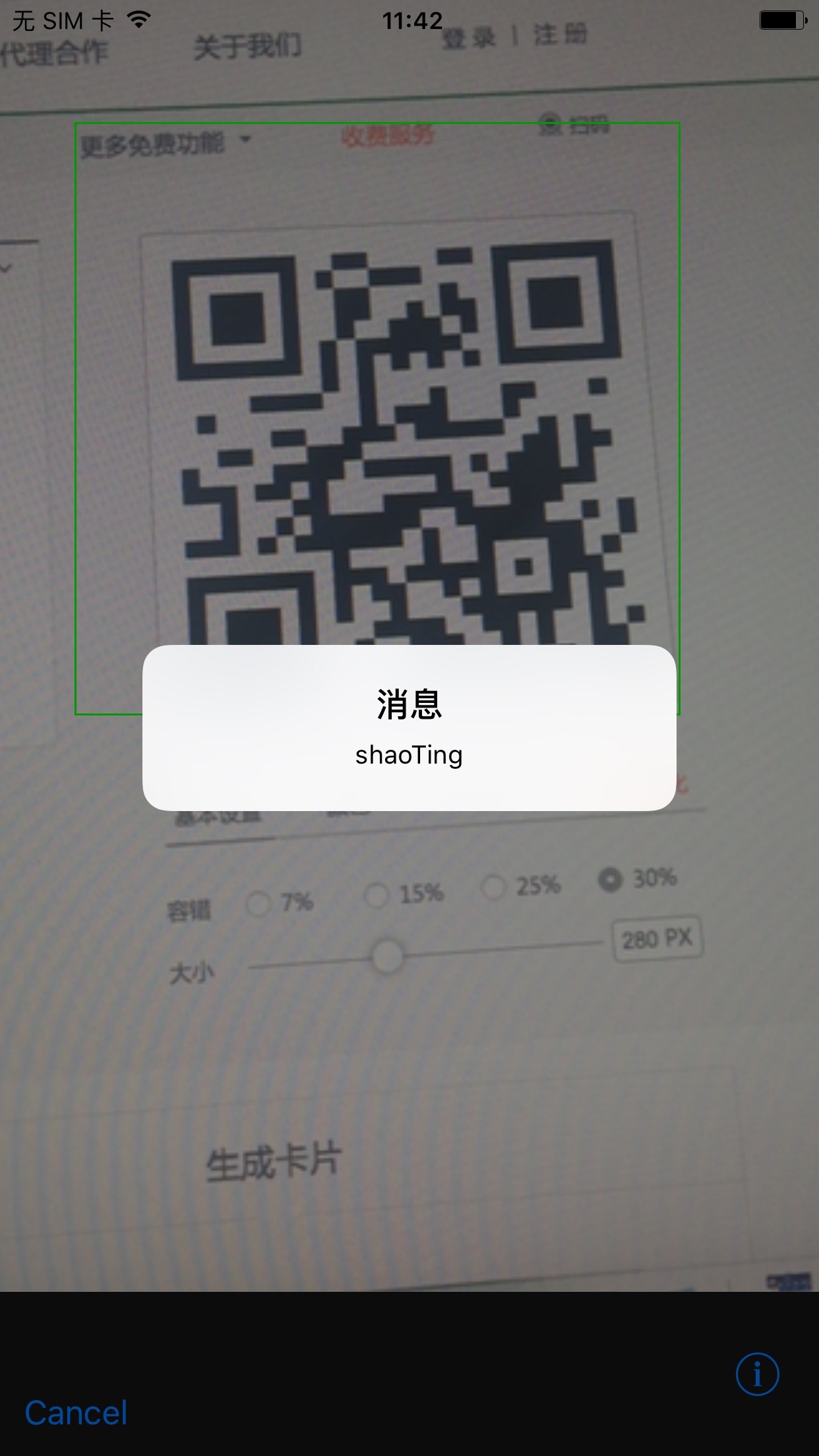
使用真机测试:

iOS ZBarSDK的基本使用:扫描的更多相关文章
- iOS开发-二维码扫描和应用跳转
iOS开发-二维码扫描和应用跳转 序言 前面我们已经调到过怎么制作二维码,在我们能够生成二维码之后,如何对二维码进行扫描呢? 在iOS7之前,大部分应用中使用的二维码扫描是第三方的扫描框架,例如Z ...
- 使用OClint进行iOS项目的静态代码扫描
使用OClint进行iOS项目的静态代码扫描 原文链接:http://blog.yourtion.com/static-code-analysis-ios-using-oclint.html 最近需要 ...
- iOS 原生二维码扫描和生成
代码地址如下:http://www.demodashi.com/demo/12551.html 一.效果预览: 功能描述:WSLNativeScanTool是在利用原生API的条件下封装的二维码扫描工 ...
- IOS 使用 ZbarSDK 二维码扫描
1. 下载SDK https://github.com/bmorton/ZBarSDK 2. 引用到项目中 3. 添加引用 4. AppDelegate中添加下面代码 5. 在需要使用扫描的con ...
- iOS 系统二维码扫描(可限制扫描区域)
使用 AVFoundation系统库来进行二维码扫描并且限制扫描二维码的范围.(因为默认的是全屏扫描) -(void)beginCode { //1.摄像头设备 AVCaptureDevice *de ...
- iOS 原生二维码扫描(可限制扫描区域)
篇文章的主要原因不是展示如何使用 AVFoundation 来进行二维码扫描,更主要的是限制扫描二维码的范围.(因为默认的是全屏扫描) 项目遇到扫描二维码的功能需求,这里我放弃了使用三方库,而采用了 ...
- 【转】 iOS 原生二维码扫描(可限制扫描区域)
在用 AVFoundation 完成扫码后,遇到2个问题: 1,如何限制扫描范围? 2.条形码如何扫描? 一位朋友的文章帮助了我,特地转来,可以帮到有需要的朋友. 原文:http://blog.csd ...
- iOS 原生二维码扫描,带扫描框和扫描过程动画
在代码中使用了相对布局框架Masonry 准备两张图片,一张是扫描边框,一张是扫描时的细线分别命名 scanFrame.png和scanLine.png并提前放入工程 导入相对布局头文件 #defin ...
- 扫描二维码判断移动设备(Android/ios),以及判断是否微信端扫描
<section class="download"> <a href="apk地址" class="android" st ...
随机推荐
- EasyUI tab常用
获取选中的tab的title var tab = $('#tab_Employee').tabs('getSelected'); var t=tab.panel('options').title; t ...
- 继承多态绕点 C#篇
最近在看博客的时候看到一块很绕的地方,有点类似于以前学习C语言是的i++,++i组合到一起使用的情况,很坑b的,绝对会比i++,++i这种情况更有用,虽然实际代码里面确实很少出现. 面对象像三大特点不 ...
- 使用JQuery的Ajax调用SOAP-XML Web Services(Call SOAP-XML Web Services With jQuery Ajax)(译+摘录)
假设有一个基于.Net的Web Service,其名称为SaveProduct POST /ProductService.asmx HTTP/1.1 Host: localhost Content-T ...
- 流控panabit的安装及配置
软件: 在panabit的下载页面上,没有最新的版本.刚开始就是从这个地方下载的,但是有一块网卡怎么也找不到.各种加载网卡驱动,最后失败. 之后,从其论坛中发现了最新的2013.05版本,将ISO刻盘 ...
- web开发-服务器Controller到前端中的数据传递
一, ajax方式 (一)controller中 1. 定义AjaxResponse类 成员有: status , message, data. 其中 status是成功或失败状态, message ...
- DQL查询语句内容整理
select * from t_hq_ryxx; select bianh,xingm from t_hq_ryxx; --为字段名定义别名 select bianh as 编号,xingm as 姓 ...
- pthreads 0.1.0 测试报告
1 可以说已经稳定了 2 发现一个算是技巧的东西吧:在线程之间传递的类的实例,要保证能正常工作,需要类本身extends Stackable,所有方法都弄成public--我原来了写了一个数据库操作类 ...
- 文件浏览器及数码相框 -2.3.1freetype_pc
例子 #include <stdio.h> #include <string.h> #include <math.h> #include <ft2build. ...
- linux下挂载硬盘,解决阿里云挂载后重启消失的问题
完整的阿里云挂载数据盘方法如下: 1.入手阿里云后查看有几块硬盘:(只显示概况,不显示分区情况) fdisk -l|grep Disk 2.查看硬盘分区 fdisk -l 如果有提示:disk /de ...
- 神奇的NOIP模拟赛 T2 LGTB 学分块
LGTB 学分块 LGTB 最近在学分块,但是他太菜了,分的块数量太多他就混乱了,所以只能分成3 块今天他得到了一个数组,他突然也想把它分块,他想知道,把这个数组分成3 块,块可以为空.假设3 块各自 ...