
JavaWeb项目中集成Swagger API文档
1.增加依赖
<dependency>

            <groupId>io.springfox</groupId>

            <artifactId>springfox-swagger2</artifactId>

            <version>2.7.0</version>

        </dependency>

        <dependency>

            <groupId>io.springfox</groupId>

            <artifactId>springfox-swagger-ui</artifactId>

            <version>2.7.0</version>

        </dependency>
2.配置类SwaggerConfig.java
package com.example.config;

import org.springframework.context.annotation.Bean;

import org.springframework.context.annotation.ComponentScan;

import org.springframework.context.annotation.Configuration;

import springfox.documentation.builders.ApiInfoBuilder;

import springfox.documentation.builders.RequestHandlerSelectors;

import springfox.documentation.service.ApiInfo;

import springfox.documentation.spi.DocumentationType;

import springfox.documentation.spring.web.plugins.Docket;

import springfox.documentation.swagger2.annotations.EnableSwagger2;

@Configuration

@EnableSwagger2

@ComponentScan(basePackages = { "com.example.demo" })

public class SwaggerConfig {

    ApiInfo apiInfo() {

        return new ApiInfoBuilder()

                .title("demo Web service APIs")

                .description("")

                .license("")

                .licenseUrl("")

                .termsOfServiceUrl("")

                .version("1.0.0")

                .build();

    }

    @Bean

    public Docket createRestApi() {

        return new Docket(DocumentationType.SWAGGER_2)

                .select()

                .apis(RequestHandlerSelectors.basePackage("com.example.demo"))

                .build()

                .apiInfo(apiInfo());

    }

}
3.启动类加 @EnableSwagger2 注解
package com.example;

import com.example.config.SupplyConfig;

import org.springframework.boot.SpringApplication;

import org.springframework.boot.autoconfigure.SpringBootApplication;

import org.springframework.boot.context.properties.EnableConfigurationProperties;

import springfox.documentation.swagger2.annotations.EnableSwagger2;

@SpringBootApplication

@EnableConfigurationProperties(SupplyConfig.class)

@EnableSwagger2

public class DemoApplication {

    public static void main(String[] args) {

        SpringApplication.run(DemoApplication.class, args);

    }

}
4.接口类加@Api及接口方法加@ApiOperation注解
package com.example.demo.controller;

import io.swagger.annotations.Api;

import io.swagger.annotations.ApiOperation;

import org.springframework.beans.factory.annotation.Autowired;

import org.springframework.web.bind.annotation.RequestMapping;

import org.springframework.web.bind.annotation.RequestMethod;

import org.springframework.web.bind.annotation.RestController;

@RestController

@RequestMapping("/greet")

@Api(value = "demo api")

public class HelloWorldController{

    @ApiOperation(value = "问好")

    @RequestMapping(value = "helloworld",method = RequestMethod.GET)

    public String sayHello() {

        return "hello world cc";

    }

}
5.访问swagger-ui
http://localhost:8080/swagger-ui.html (端口是spring-boot项目启动的端口),打开页面如下:
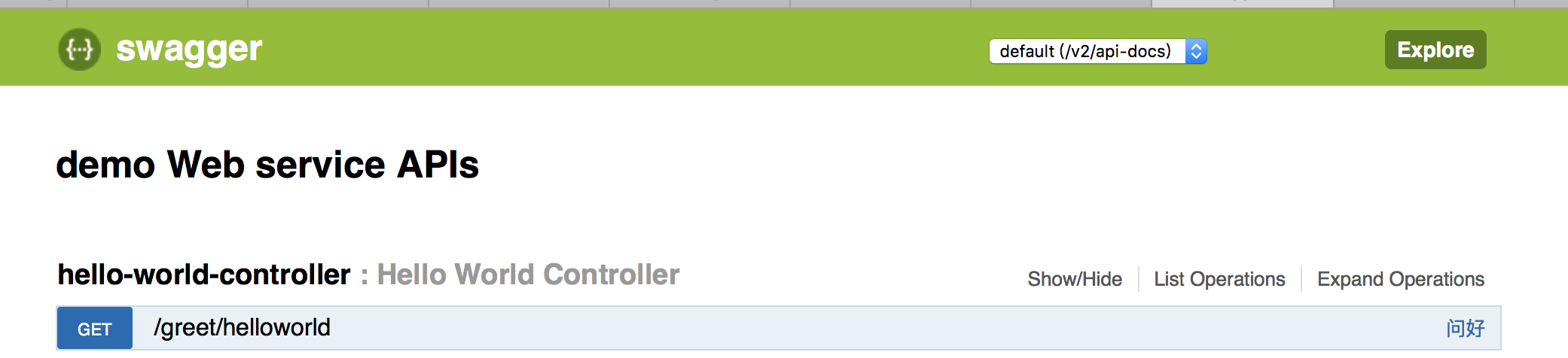
发送get请求:

JavaWeb项目中集成Swagger API文档的更多相关文章
- 使用Swagger2构建SpringMVC项目中的Restful API文档
使用Swagger自动生成API文档,不仅增加了项目的可维护性,还提高了API的透明度更利于快速测试等工作,便于更快地发现和解决问题. 本篇文章只记录整合过程,关于Security Configura ...
- 分享一个集成在项目中的REST APIs文档框架swagger
1 为什么是使用swagger? 1-1 当后台开发人员开发好接口,是不是还要重新书写一份接口文档提给前端人员,当然对于程序员最不喜欢的就是书写文档(当然文档是必须的,有利于项目的维护) 1-2 当后 ...
- Swagger API文档
Swagger API文档集中化注册管理 接口文档是前后端开发对接时很重要的一个组件.手动编写接口文档既费时,又存在文档不能随代码及时更新的问题,因此产生了像swagger这样的自动生成接口文档的 ...
- 添加swagger api文档到node服务
swagger,一款api测试工具,详细介绍参考官网:http://swagger.io/ ,这里主要记录下怎么将swagger api应用到我们的node服务中: 1.任意新建node api项目, ...
- 基于.NetCore3.1搭建项目系列 —— 使用Swagger导出文档 (番外篇)
前言 回顾之前的两篇Swagger做Api接口文档,我们大体上学会了如何在net core3.1的项目基础上,搭建一套自动生产API接口说明文档的框架. 本来在Swagger的基础上,前后端开发人员在 ...
- xadmin引入drf-yasg生成Swagger API文档
一.安装drf-yasg: 由于django-rest-swagger已经废弃了 所以引入了drf-yasg pip install drf-yasg 安装install drf-yasg库 http ...
- .Net Core3.0 WebApi 项目框架搭建 二:API 文档神器 Swagger
.Net Core3.0 WebApi 项目框架搭建:目录 为什么使用Swagger 随着互联网技术的发展,现在的网站架构基本都由原来的后端渲染,变成了:前端渲染.后端分离的形态,而且前端技术和后端技 ...
- Swagger API文档集中化注册管理
接口文档是前后端开发对接时很重要的一个组件.手动编写接口文档既费时,又存在文档不能随代码及时更新的问题,因此产生了像swagger这样的自动生成接口文档的框架.swagger文档一般是随项目代码生成与 ...
- swagger api 文档框架
<其他教程:https://www.cnblogs.com/FlyAway2013/p/7510279.html> 先看看swagger的生态使用图: 其中,红颜色的是swaggger官网 ...
随机推荐
- Java语言规范 第3章 词法
- 2018ccpc_hn
A. Easy h-index #include <iostream> #include <algorithm> #include <cstring> #inclu ...
- Jquery | 基础 | 事件的链式写法
$(".title").click(function () { $(this).addClass("curcol").next(".content&q ...
- EM算法(徐亦达)笔记
- StretchDIBits速度测试(COLORONCOLOR)
下面是一个测试程序,源码下载
- jQuery插件pagination.js源码解读
pagination的github地址:https://github.com/gbirke/jquery_pagination 公司用的是1.2的版本,所以我就读1.2的了. jQuery.fn.pa ...
- 我也质疑下petshop
很多人都研究过petshop,我开始认识分层架构也是从研究这个petshop开始的.但是我发现很多人一谈三层架构就是 petshop那一套东西.实体类,DAL,BLL那一套东西.首先我不 ...
- Java删除List指定元素
List<String> lists = new ArrayList<>(); list.add("123"); list.add("456&qu ...
- 不同版本的 Tomcat 设置用户名密码 的方法
Tomcat : tomcat根目录\conf\tomcat-users.xml,找到 <tomcat-users> 标签,在后面添加 <user username="ad ...
- Swift REPL入门介绍
Xcode 6.1 引入了一个新特性用来辅助Swift开发,即Read Eval Print Loop(“读取-求值-输出”循环,简称REPL).熟悉解释型语言的开发者将会对这个命令行环境感到舒适,而 ...