
使用Swagger2构建SpringMVC项目中的Restful API文档
使用Swagger自动生成API文档,不仅增加了项目的可维护性,还提高了API的透明度更利于快速测试等工作,便于更快地发现和解决问题。
本篇文章只记录整合过程,关于Security Configuration等其他特性这里就不展开讲了,感兴趣的可以通过以下链接了解更多。
参考文档:
https://howtodoinjava.com/swagger2/swagger-spring-mvc-rest-example/

http://www.baeldung.com/swagger-2-documentation-for-spring-rest-api

http://blog.didispace.com/springbootswagger2/
项目中各组件的版本情况:
spring.version=4.3.18.RELEASE

jackson.version=2.9.

swagger.version=2.7.
核心的pom配置(spring的省略):
<dependency>

    <groupId>io.springfox</groupId>

    <artifactId>springfox-swagger2</artifactId>

    <version>${swagger.version}</version>

</dependency>

<dependency>

    <groupId>io.springfox</groupId>

    <artifactId>springfox-swagger-ui</artifactId>

    <version>${swagger.version}</version>

</dependency>

<dependency>

    <groupId>com.fasterxml.jackson.core</groupId>

    <artifactId>jackson-databind</artifactId>

    <version>${jackson.version}</version>

</dependency>

<dependency>

    <groupId>com.fasterxml.jackson.core</groupId>

    <artifactId>jackson-core</artifactId>

    <version>${jackson.version}</version>

</dependency>

<dependency>

    <groupId>com.fasterxml.jackson.core</groupId>

    <artifactId>jackson-annotations</artifactId>

    <version>${jackson.version}</version>

</dependency>
编写Swagger的配置类:
tip:做了拦截处理的同学需要注意开放swagger的资源访问路径:/swagger-resources/*、/swagger-ui.html、/v2/api-docs、/webjars/*
@Configuration

@EnableSwagger2

@EnableWebMvc

@ComponentScan("springfox")

public class SwaggerConfig extends WebMvcConfigurerAdapter {

    @Bean

    public Docket createRestApi() {

        return new Docket(DocumentationType.SWAGGER_2)

                .select()

                .apis(RequestHandlerSelectors.withClassAnnotation(Api.class))

                .paths(PathSelectors.any())

                .build()

                .apiInfo(apiInfo());

    }

    private ApiInfo apiInfo() {

        return new ApiInfoBuilder()

                .title("REST API 描述文档")

                .description("REST API 描述文档")

                .version("1.0")

                .termsOfServiceUrl("http://localhost:9080/")

                .contact(new Contact("lichmama", "", ""))

                .license("Apache License 2.0")

                .licenseUrl("https://www.apache.org/licenses/LICENSE-2.0")

                .build();

    }

    @Override

    public void addResourceHandlers(ResourceHandlerRegistry registry) {

        registry.addResourceHandler("swagger-ui.html").addResourceLocations("classpath:/META-INF/resources/");

        registry.addResourceHandler("/webjars/**").addResourceLocations("classpath:/META-INF/resources/webjars/");

    }

}
在springmvc-servlet.xml中增加配置:
<bean class="com.lichmama.demo.core.swagger.SwaggerConfig" />
在RestController上使用Swagger的注解(其中ApiOperation和ApiImplicitParam尤为关键),用以自动生成文档:
@RestController

@RequestMapping("/config")

@Api(description = "配置管理接口")

@Slf4j

public class ConfigAction {

    @PostMapping("/set")

    @ApiOperation(value = "更改或新增配置信息")

    @ApiResponses(value = { @ApiResponse(code = 500, message = "系统错误"), @ApiResponse(code = 0, message = "成功") })

    @ApiImplicitParams({ @ApiImplicitParam(name = "key", value = "键", paramType = "form", dataType = "string"),

            @ApiImplicitParam(name = "value", value = "值", paramType = "form", dataType = "string") })

    public ActionMessage setConfig(String key, String value) {

        log.debug("key: {}, value: {}", key, value);

        ConfigUtil.setConfig(key, value);

        return ActionStatus.success();

    }

    @GetMapping("/get")

    @ApiOperation(value = "获取配置信息")

    @ApiImplicitParam(name = "key", value = "键", paramType = "query", dataType = "string")

    public Map<String, Object> getConfig(String key) {

        Object value = ConfigUtil.getConfig(key);

        log.debug("key: {}, value: {}", key, value);

        Map<String, Object> map = new HashMap<>();

        map.put(key, value);

        return map;

    }

}
启动项目,访问http://{host:port}/{project}/swagger-ui.html查看配置是否生效:
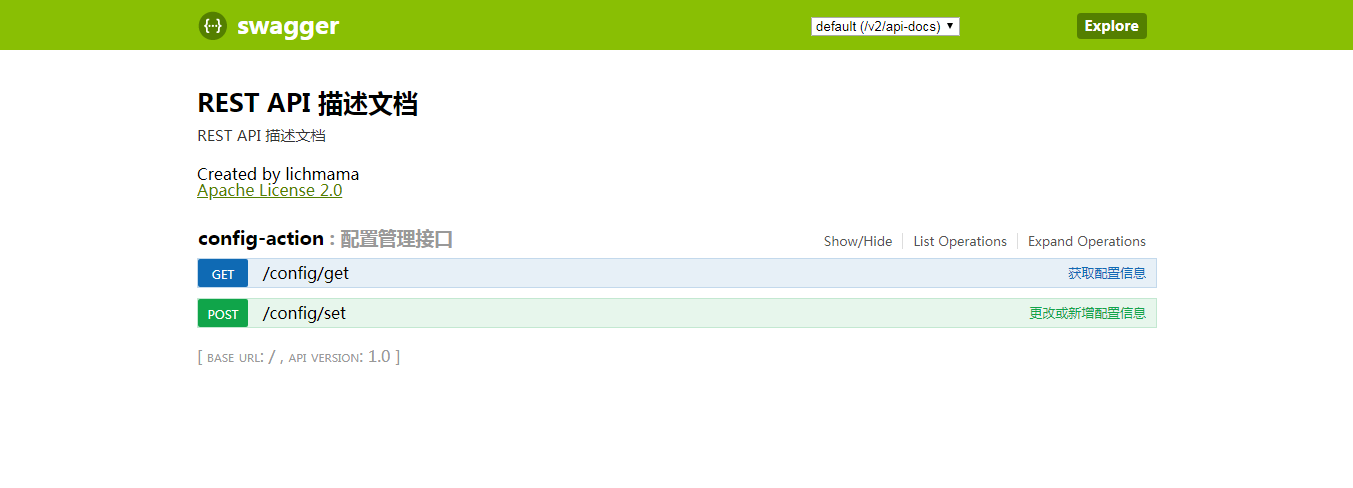
看上去没有问题,测试下:
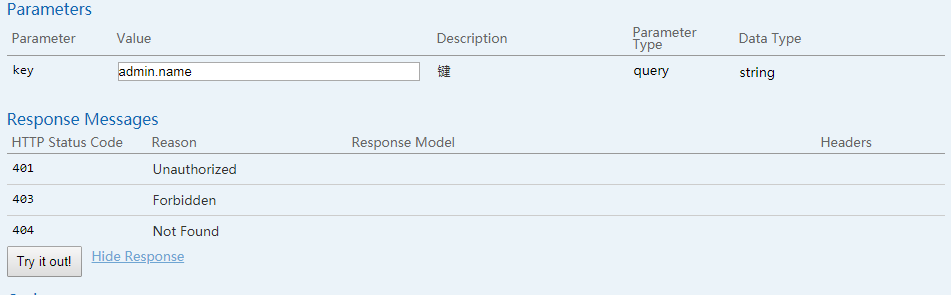

ps:网上关于swagger的文章配置上多数都有些问题,所以不能直接照搬使用。自己部署swagger时要根据实际项目来修改配置,比如spring、swagger的版本等。
使用Swagger2构建SpringMVC项目中的Restful API文档的更多相关文章
- JavaWeb项目中集成Swagger API文档
1.增加依赖 <dependency> <groupId>io.springfox</groupId> <artifactId>springfox-sw ...
- Spring Boot 中使用 Swagger2 构建强大的 RESTful API 文档
项目现状:由于前后端分离,没有很好的前后端合作工具. 由于接口众多,并且细节复杂(需要考虑不同的HTTP请求类型.HTTP头部信息.HTTP请求内容等),高质量地创建这份文档本身就是件非常吃力的事,下 ...
- Spring Boot中使用Swagger2构建强大的RESTful API文档
由于Spring Boot能够快速开发.便捷部署等特性,相信有很大一部分Spring Boot的用户会用来构建RESTful API.而我们构建RESTful API的目的通常都是由于多终端的原因,这 ...
- Spring Boot中使用Swagger2构建RESTful API文档
在开发rest api的时候,为了减少与其他团队平时开发期间的频繁沟通成本,传统做法我们会创建一份RESTful API文档来记录所有接口细节,然而这样的做法有以下几个问题: 1.由于接口众多,并且细 ...
- Spring Boot 入门系列(二十二)使用Swagger2构建 RESTful API文档
前面介绍了如何Spring Boot 快速打造Restful API 接口,也介绍了如何优雅的实现 Api 版本控制,不清楚的可以看我之前的文章:https://www.cnblogs.com/zha ...
- 使用Swagger2构建强大的RESTful API文档(1)(二十二)
由于Spring Boot能够快速开发.便捷部署等特性,相信有很大一部分Spring Boot的用户会用来构建RESTful API.而我们构建RESTful API的目的通常都是由于多终端的原因,这 ...
- springboot集成swagger2构建RESTful API文档
在开发过程中,有时候我们需要不停的测试接口,自测,或者交由测试测试接口,我们需要构建一个文档,都是单独写,太麻烦了,现在使用springboot集成swagger2来构建RESTful API文档,可 ...
- SpringBoot_06_使用Swagger2构建强大的RESTful API文档
二.参考资料 1.Spring Boot中使用Swagger2构建强大的RESTful API文档 2.
- Spring Boot教程(二十二)使用Swagger2构建强大的RESTful API文档(1)
由于Spring Boot能够快速开发.便捷部署等特性,相信有很大一部分Spring Boot的用户会用来构建RESTful API.而我们构建RESTful API的目的通常都是由于多终端的原因,这 ...
随机推荐
- Failed to instantiate [org.elasticsearch.client.transport.TransportClient]
Springboot 集成 ElasticSearch,springboot报错如下: Error starting ApplicationContext. To display the auto-c ...
- Git系列四之在本地服务器搭建gitlab仓库管理(centeros环境下)
1.Git仓库管理 现在本地已经创建了git仓库,又在gitlab上创建了一个git仓库,并且让这两个仓库进行远程同步,这样gitlab仓库既可以备份也可以与他人协作管理远程仓库以及根据需要推送或拉取 ...
- 前端学习:学习笔记(CSS部分)
前端学习:学习笔记(CSS部分) CSS的学习总结(图解) CSS的引入方式和书写规范 CSS的插入方式_内嵌样式 <!DOCTYPE html> <html> <hea ...
- java获取调用当前方法的方法名和行数
java获取调用当前方法的方法名和行数String className = Thread.currentThread().getStackTrace()[2].getClassName();//调用的 ...
- 2019-11-29-WPF-从触摸消息转触摸事件
原文:2019-11-29-WPF-从触摸消息转触摸事件 title author date CreateTime categories WPF 从触摸消息转触摸事件 lindexi 2019-11- ...
- vue基础之data
使用 调用data onLoad(option) { _self = this; _self.$data.xxxx = "te"; } 绑定节点 元素~~~~ <input ...
- JS 对象属性名排序
问题,对象属性名排序,如: var data = { A:[], D:[], B:{} } 调整为=> var data = { A:[], B:[], D:{} } 方法一: for,in,把 ...
- js计算两经纬度之间的距离
js如下: // 方法定义 lat,lng function GetDistance( lat1, lng1, lat2, lng2){ var radLat1 = lat1*Math.PI / ...
- Java NIO学习系列一:Buffer
前面三篇文章中分别总结了标准Java IO系统中的File.RandomAccessFile.I/O流系统,对于I/O系统从其继承体系入手,力求对类数量繁多的的I/O系统有一个清晰的认识,然后结合一些 ...
- Winform中设置ZedGraph的曲线为折线、点折线、散点图
场景 Winform中设置ZedGraph的曲线为散点图: https://blog.csdn.net/BADAO_LIUMANG_QIZHI/article/details/102465399 在上 ...