
How to reset your password in Ubuntu
There are many reasons you might want to reset a password:
- Someone gave you a computer with Ubuntu installed on it but not the password for the user account.
- You just installed Ubuntu and forgot what password you selected during the installation process.
- You have too many passwords in your life and can't keep track of them all.
Well, this tutorial will help you reset your Ubuntu user account password, regardless of what reason you have for resetting it.
First, you have to reboot into recovery mode.
If you have a single-boot (Ubuntu is the only operating system on your computer), to get the boot menu to show, you have to hold down the Shift key during bootup.
If you have a dual-boot (Ubuntu is installed next to Windows, another Linux operating system, or Mac OS X; and you choose at boot time which operating system to boot into), the boot menu should appear without the need to hold down the Shift key.

From the boot menu, select recovery mode, which is usually the second boot option.
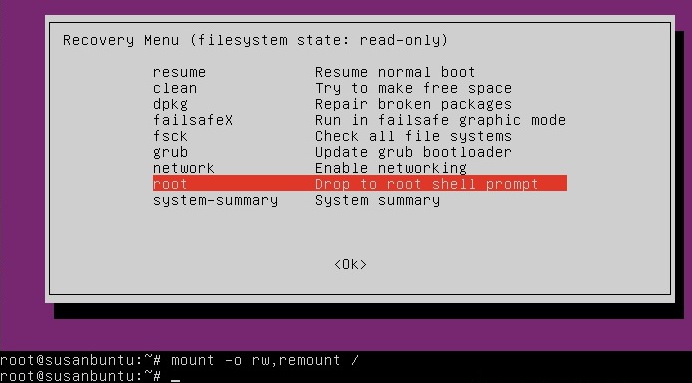
After you select recovery mode and wait for all the boot-up processes to finish, you'll be presented with a few options. In this case, you want the Drop to root shell prompt option so press the Down arrow to get to that option, and then press Enter to select it.
The root account is the ultimate administrator and can do anything to the Ubuntu installation (including erase it), so please be careful with what commands you enter in the root terminal.
In recent versions of Ubuntu, the filesystem is mounted as read-only, so you need to enter the follow command to get it to remount as read-write, which will allow you to make changes:

If you have forgotten your username as well, type
That's a lowercase L, by the way, not a capital i, in ls. You should then see a list of the users on your Ubuntu installation. In this case, I'm going to reset Susan Brownmiller's password.
To reset the password, type
where username is the username you want to reset. In this case, I want to reset Susan's password, so I type
You'll then be prompted for a new password. When you type the password you will get no visual response acknowledging your typing. Your password is still being accepted. Just type the password and hit Enter when you're done. You'll be prompted to retype the password. Do so and hit Enter again.
Now the password should be reset. Type
to return to the recovery menu.

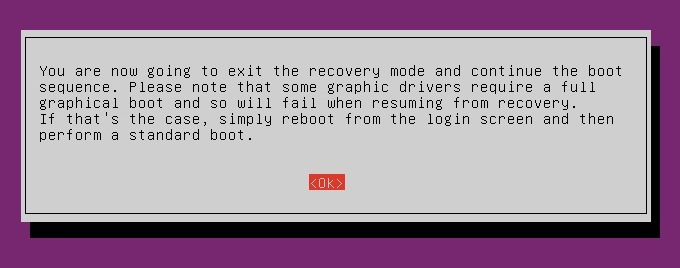
After you get back to the recovery menu, select resume normal boot, and use Ubuntu as you normally would—only this time, you actually know the password!
How to reset your password in Ubuntu的更多相关文章
- 【mysql】must reset your password using ALTER USER statement before executing this statement
问题描述: must reset your password using ALTER USER statement before executing this statement 登录centos服务 ...
- mysql5.7初始化密码报错 ERROR 1820 (HY000): You must reset your password using ALTER USER statement before
mysql初始化密码常见报错问题1,mysql5.6是密码为空直接进入数据库的,但是mysql5.7就需要初始密码 cat /var/log/mysqld.log | grep password1 2 ...
- You must reset your password using ALTER USER statement before executing this statement.
MySQL 5.7之后,刚初始化的MySQL实例要求先修改密码.否则会报错: mysql> create database test; ERROR 1820 (HY000): You must ...
- 第一次登录mysql,使用任何命令都报错ERROR 1820 (HY000): You must reset your password using ALTER USER statement before executing this statement.
问题: 使用临时密码登录成功后,使用任何myql命令,例如show databases;都提示下面的报错 ERROR 1820 (HY000): You must reset your passwor ...
- Proxmox Reset Root Password
http://c-nergy.be/blog/?p=1777 Step 1 – Boot your Proxmox VE machine. In the boot menu screen, you s ...
- MySQL用户密码过期登陆报错ERROR 1820 (HY000): You must reset your password using ALTER USER statement before executing this statement.
今天接到主从复制失败告警,查看MySQL,发现MySQL能够登陆但是执行命令报错, ERROR 1820 (HY000): You must reset your password using ALT ...
- MySQL root账户密码设为“root”后执行命令提示ERROR 1820 (HY000): You must reset your password using ALTER USER statement before executing this statement.
修改root账户密码为“root”后,提示ERROR 1820 (HY000): You must reset your password using ALTER USER statement bef ...
- MySQL:ERROR 1820 (HY000): You must reset your password using ALTER USER statement before executing this statement.
解决方法: 修改密码:alter user 'root'@'localhost' identified by '123456'; mysql> use mysql; ERROR 1820 (HY ...
- You must reset your password using ALTER USER
mac mysql error You must reset your password using ALTER USER statement before executing this statem ...
随机推荐
- ABP介绍
ABP是ASP.NET Boilerplate Project (ASP.NET样板项目)的简称. ABP 适用的场景:中小规模 WEB 应用开发,可直接使用 ABP 框架. 较大型项目可以在 ABP ...
- ajax提交数据服务端返回报错
报错如下: if response.get('X-Frame-Options') is not None:AttributeError: 'str' object has no attribute ' ...
- 【CF739B】Alyona and a tree(树上差分,二分,树形DP)
题意:给出一棵有根树,树上每个点.每条边都有一个权值. 现在给出“控制”的定义:对一个点u,设点v在其子树上,且dis(u,v)≤av,则称u控制v. 要求求出每个点控制了多少个点 n (1 ≤ n ...
- Why do I keep getting mixed tabs and spaces in a Visual Studio C# code window?[vs power tools issue transfered]
goto tools->option->power tools-> turn "use mixed tabs" option to off. you won`t ...
- gerrit 安装
http://blog.csdn.net/ljchlx/article/details/21988471
- ping探测在线主机
一.实验要求: 1.对于给定范围的ip地址进行主机在线测试 2.ping测试结果保存在/tmp/ping目录下以时间戳为文件名的文件里,以便后续查看 二.实验过程: #!/bin/env/ bash# ...
- LeetCode OJ——Subsets
http://oj.leetcode.com/problems/subsets/ 计算一个集合的子集,使用vector<vector<int> >,使用了进制的思想. #inc ...
- Chrome 浏览器如何完美实现滚动截图技巧
一.前言 我们平时在浏览网页时,想把碰到好的网页内容或者文章截屏保存,但是网页的长度常常会超出屏幕高度,一般的截屏功能只能截取显示在屏幕上的内容,那我们该如何方便快捷截取全部内容?今天就分享一个如何利 ...
- js-(19,999,999.00)
function price(n, precision) { let s = String(n), int = parseInt(n).toString(), pre = s.split('.')[1 ...
- OpenLayers3 动画
参考文章 openlayers3中三种动画实现