
Proxmox Reset Root Password
http://c-nergy.be/blog/?p=1777
Step 1 – Boot your Proxmox VE machine. In the boot menu screen, you select your boot option and instead of pressing enter to proceed, you simply press “e” on your keyboard.
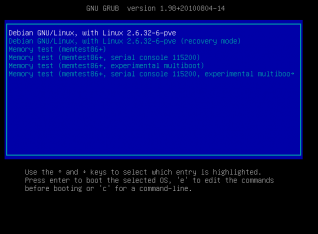
Click on the picture for better resolution
This will bring you to screen where you can edit the boot configuration file and modify the way the system will boot.
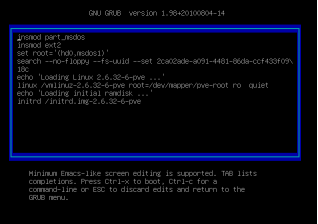
Click on the picture for better resolution
Step 2 - Append the following text at the end of the line starting with linux : init=/bin/sh
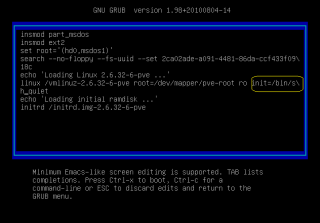
Click on the picture for better resolution
At this stage, simply press ctrl+x to boot your system.
Step 3 – Mount the filesystem
The system will boot in console mode. You will see something like this.
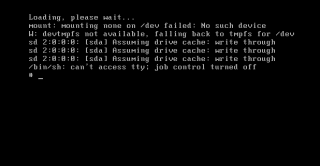
Click on the picture for better resolution
At the command line, you will have to type the following command : mount -o remount rw /
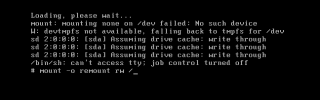
Click on the picture for better resolution
Step 4 – Reset the password for the root account.
We are almost done. In order to reset the password, you will have to digit the command passwd. You will be asked to enter your new password and confirm it.
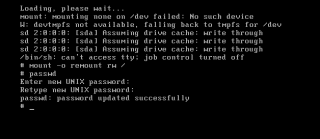
Click on the picture for better resolution
When it’s done, simply reboot your system and try to login using the newly resetted password. You should be able to login into your Proxmox VE system.
Final Notes
You might want to document this procedure in case you loose your password for the root account. The Proxmox VE 2.0 has a role based model administration that should help you minimize annoyance of loosing password. I’m assuming that with the role based models, organization will define more than one full administrative account in order to have a secondary account that could be used to recover or access the system in case of problem with the root account. We will see what future brings. 
That’s it for this post
Till next Time …See you
Proxmox Reset Root Password的更多相关文章
- Linux - Reset a MySQL root password
Use the following steps to reset a MySQL root password by using the command line interface. Stop the ...
- MySQL root账户密码设为“root”后执行命令提示ERROR 1820 (HY000): You must reset your password using ALTER USER statement before executing this statement.
修改root账户密码为“root”后,提示ERROR 1820 (HY000): You must reset your password using ALTER USER statement bef ...
- how to reset mac root password
Reset 10.5 Leopard & 10.6 Snow Leopard password Power on or restart your Mac. At the chime (or g ...
- windows下新安装的mysql修改root password问题
常用步骤: 1. 在my.ini中的mysqld下添加一行 skip-grant-tables 2.重启mysql后直接进入后,用SQL直接修改password列: C:\> net stop ...
- mysql forget root password
http://www.rackspace.com/knowledge_center/article/mysql-resetting-a-lost-mysql-root-password MySQL - ...
- mysql5.7初始化密码报错 ERROR 1820 (HY000): You must reset your password using ALTER USER statement before
mysql初始化密码常见报错问题1,mysql5.6是密码为空直接进入数据库的,但是mysql5.7就需要初始密码 cat /var/log/mysqld.log | grep password1 2 ...
- 【mysql】must reset your password using ALTER USER statement before executing this statement
问题描述: must reset your password using ALTER USER statement before executing this statement 登录centos服务 ...
- You must reset your password using ALTER USER statement before executing this statement.
MySQL 5.7之后,刚初始化的MySQL实例要求先修改密码.否则会报错: mysql> create database test; ERROR 1820 (HY000): You must ...
- 第一次登录mysql,使用任何命令都报错ERROR 1820 (HY000): You must reset your password using ALTER USER statement before executing this statement.
问题: 使用临时密码登录成功后,使用任何myql命令,例如show databases;都提示下面的报错 ERROR 1820 (HY000): You must reset your passwor ...
随机推荐
- Appium 1.6安装步骤
原来用的Appium1.5.3GUI版本,那为什么升级呢? 为了兼容最新版本的iOS10和Android7 Xcode8升级后,将不支持使用UIAutomation,而是改为使用XCUITest了,并 ...
- 求值器本质--eval&apply
最近跟着(How to Write a (Lisp) Interpreter (in Python))使用python实现了一个简易的scheme解释器.不得不说使用python这类动态语言实现不要太 ...
- 数据库类型空间效率探索(四)-tinyint与enum与set
mysql> select count(*) from userinfo;+----------+| count(*) |+----------+| 115597 |+----------+1 ...
- centos 6.5 DNS服务器 搭建
一.DNS 介绍 DNS(Domain Name System,域名系统),因特网上作为域名和IP地址相互映射的一个分布式数据库,DNS协议运行在UDP协议之上,使用端口号53(Domain), 95 ...
- Linux服务器安装配置Nginx服务器
Nginx("engine x")是一款是由俄罗斯的程序设计师Igor Sysoev所开发高性能的 Web和 反向代理 服务器,也是一个 IMAP/POP3/SMTP 代理服务 ...
- APP内的H5页面测试方法, 移动端的浏览器(例如UC浏览器)测试方法
前言: 用appium做UI自动化,测试APP里面的H5和测试手机浏览器打开的H5的操作流程上是有所区别的.比如要测试APP内嵌的H5需要先操作appium启动APP,然后通过context切到web ...
- 二叉树的深度优先遍历与广度优先遍历 [ C++ 实现 ]
深度优先搜索算法(Depth First Search),是搜索算法的一种.是沿着树的深度遍历树的节点,尽可能深的搜索树的分支. 当节点v的所有边都己被探寻过,搜索将回溯到发现节点v的那条边的起始节点 ...
- ios系统微信浏览器、safari浏览器中h5页面上拉下滑导致悬浮层脱离窗口的解决方法
一. 运行环境: iphone所有机型的qq浏览器,safari浏览器,微信内置浏览器(qq浏览器内核)等. 二. 异常现象: 1. 大幅度上下滑动h5页面,然后停止滑动,有时候会影响到页面滚动,如局 ...
- [剑指Offer]52-两个链表的第一个公共节点
题目链接 https://www.nowcoder.com/practice/6ab1d9a29e88450685099d45c9e31e46?tpId=13&tqId=11189&t ...
- VS项目属性配置问题
1 libcpmtd.lib(stdthrow.obj) : error LNK2001: 无法解析的外部符号 __CrtDbgReportW 运行库:多线程 (/MT) 2 MSVCRT.lib( ...