
How to reset your password in Ubuntu
There are many reasons you might want to reset a password:
- Someone gave you a computer with Ubuntu installed on it but not the password for the user account.
- You just installed Ubuntu and forgot what password you selected during the installation process.
- You have too many passwords in your life and can't keep track of them all.
Well, this tutorial will help you reset your Ubuntu user account password, regardless of what reason you have for resetting it.
First, you have to reboot into recovery mode.
If you have a single-boot (Ubuntu is the only operating system on your computer), to get the boot menu to show, you have to hold down the Shift key during bootup.
If you have a dual-boot (Ubuntu is installed next to Windows, another Linux operating system, or Mac OS X; and you choose at boot time which operating system to boot into), the boot menu should appear without the need to hold down the Shift key.

From the boot menu, select recovery mode, which is usually the second boot option.
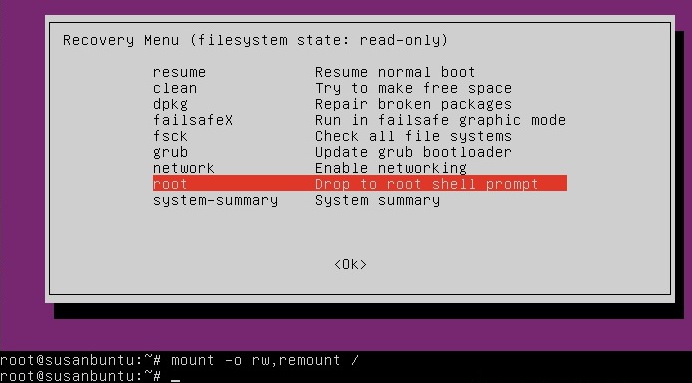
After you select recovery mode and wait for all the boot-up processes to finish, you'll be presented with a few options. In this case, you want the Drop to root shell prompt option so press the Down arrow to get to that option, and then press Enter to select it.
The root account is the ultimate administrator and can do anything to the Ubuntu installation (including erase it), so please be careful with what commands you enter in the root terminal.
In recent versions of Ubuntu, the filesystem is mounted as read-only, so you need to enter the follow command to get it to remount as read-write, which will allow you to make changes:

If you have forgotten your username as well, type
That's a lowercase L, by the way, not a capital i, in ls. You should then see a list of the users on your Ubuntu installation. In this case, I'm going to reset Susan Brownmiller's password.
To reset the password, type
where username is the username you want to reset. In this case, I want to reset Susan's password, so I type
You'll then be prompted for a new password. When you type the password you will get no visual response acknowledging your typing. Your password is still being accepted. Just type the password and hit Enter when you're done. You'll be prompted to retype the password. Do so and hit Enter again.
Now the password should be reset. Type
to return to the recovery menu.

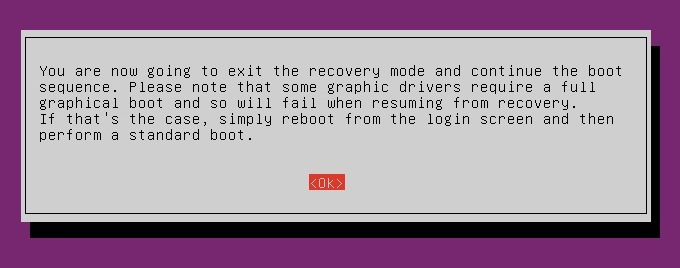
After you get back to the recovery menu, select resume normal boot, and use Ubuntu as you normally would—only this time, you actually know the password!
How to reset your password in Ubuntu的更多相关文章
- 【mysql】must reset your password using ALTER USER statement before executing this statement
问题描述: must reset your password using ALTER USER statement before executing this statement 登录centos服务 ...
- mysql5.7初始化密码报错 ERROR 1820 (HY000): You must reset your password using ALTER USER statement before
mysql初始化密码常见报错问题1,mysql5.6是密码为空直接进入数据库的,但是mysql5.7就需要初始密码 cat /var/log/mysqld.log | grep password1 2 ...
- You must reset your password using ALTER USER statement before executing this statement.
MySQL 5.7之后,刚初始化的MySQL实例要求先修改密码.否则会报错: mysql> create database test; ERROR 1820 (HY000): You must ...
- 第一次登录mysql,使用任何命令都报错ERROR 1820 (HY000): You must reset your password using ALTER USER statement before executing this statement.
问题: 使用临时密码登录成功后,使用任何myql命令,例如show databases;都提示下面的报错 ERROR 1820 (HY000): You must reset your passwor ...
- Proxmox Reset Root Password
http://c-nergy.be/blog/?p=1777 Step 1 – Boot your Proxmox VE machine. In the boot menu screen, you s ...
- MySQL用户密码过期登陆报错ERROR 1820 (HY000): You must reset your password using ALTER USER statement before executing this statement.
今天接到主从复制失败告警,查看MySQL,发现MySQL能够登陆但是执行命令报错, ERROR 1820 (HY000): You must reset your password using ALT ...
- MySQL root账户密码设为“root”后执行命令提示ERROR 1820 (HY000): You must reset your password using ALTER USER statement before executing this statement.
修改root账户密码为“root”后,提示ERROR 1820 (HY000): You must reset your password using ALTER USER statement bef ...
- MySQL:ERROR 1820 (HY000): You must reset your password using ALTER USER statement before executing this statement.
解决方法: 修改密码:alter user 'root'@'localhost' identified by '123456'; mysql> use mysql; ERROR 1820 (HY ...
- You must reset your password using ALTER USER
mac mysql error You must reset your password using ALTER USER statement before executing this statem ...
随机推荐
- 【转】UML中的几种关系详细解析
UML图中类之间的关系:依赖,泛化,关联,聚合,组合,实现 类与类图 1) 类(Class)封装了数据和行为,是面向对象的重要组成部分,它是具有相同属性.操作.关系的对象集合的总称. 2) 在系统中, ...
- jquery validate用法总结
jquery validate是本人用过的最好用的验证组件,但其文档写的真是不敢恭维,现将一些常见用法总结如下(持续更新). 1. js触发表单验证 //触发整个表单的验证 $('form').val ...
- 刷题总结——生产产品(vijo1243)
题目: 描述 在经过一段时间的经营后,dd_engi的OI商店不满足于从别的供货商那里购买产品放上货架,而要开始自己生产产品了!产品的生产需要M个步骤,每一个步骤都可以在N台机器中的任何一台完成,但生 ...
- nvm、node、npm安装以及pycharm配置eslint
nvm.node.npm之间的区别 1. nvm的官方叫法:nodejs版本管理工具. nvm相当于是家长,一个家长可以管理多个孩子. 也就是说:一个nvm可以管理很多node版本和npm版本. 2. ...
- 解决c#所有单线程单元(STA)线程都应使用泵式等待基元(如 CoWaitForMultipleHandles),并在运行时间很长的操作过程中定期发送消息。 转载
最近做一个后来程序,启动了事务后有一段操作业务,当运行一段时间后,出现这个异常 CLR 无法从 COM 上下文 0x1b1c38 转换为 COM 上下文 0x1b1da8,这种状态已持续 60 秒.拥 ...
- bzoj 1857 三分套三分
题目大意 在一个2维平面上有两条传送带,每一条传送带可以看成是一条线段.两条传送带分别为线段AB和线段CD.lxhgww在AB上的移动速度为P,在CD上的移动速度为Q,在平面上的移动速度R.现在lxh ...
- BZOJ 4077 Messenger
Messenger [问题描述] alice和bob各自在两条折线上行进,一个邮递员要从alice那拿一个包裹,并以直线移动到bob处,alice和bob.邮递员的速度均为1单位/s,问邮递员最少要走 ...
- 转 markdown编写规则、语法
http://www.jianshu.com/p/1e402922ee32/ Markdown——入门指南 字数2231 阅读307754 评论115 喜欢1350 转载请注明原作者,如果你觉得这篇文 ...
- 标准C程序设计七---65
Linux应用 编程深入 语言编程 标准C程序设计七---经典C11程序设计 以下内容为阅读: <标准C程序设计>(第7版) 作者 ...
- Sphinx的GEO距离搜索 [转载]
近项目用sphinx做地理搜索,可是结果总是不对,明明很近却搜不到 结果检查sphinx源文件: static inline double sphSqr ( double v ) { return v ...