
ue4 c++ anim notify
http://blog.csdn.net/or_7r_ccl/article/details/54564962
直接在sequence or montage中new个Event
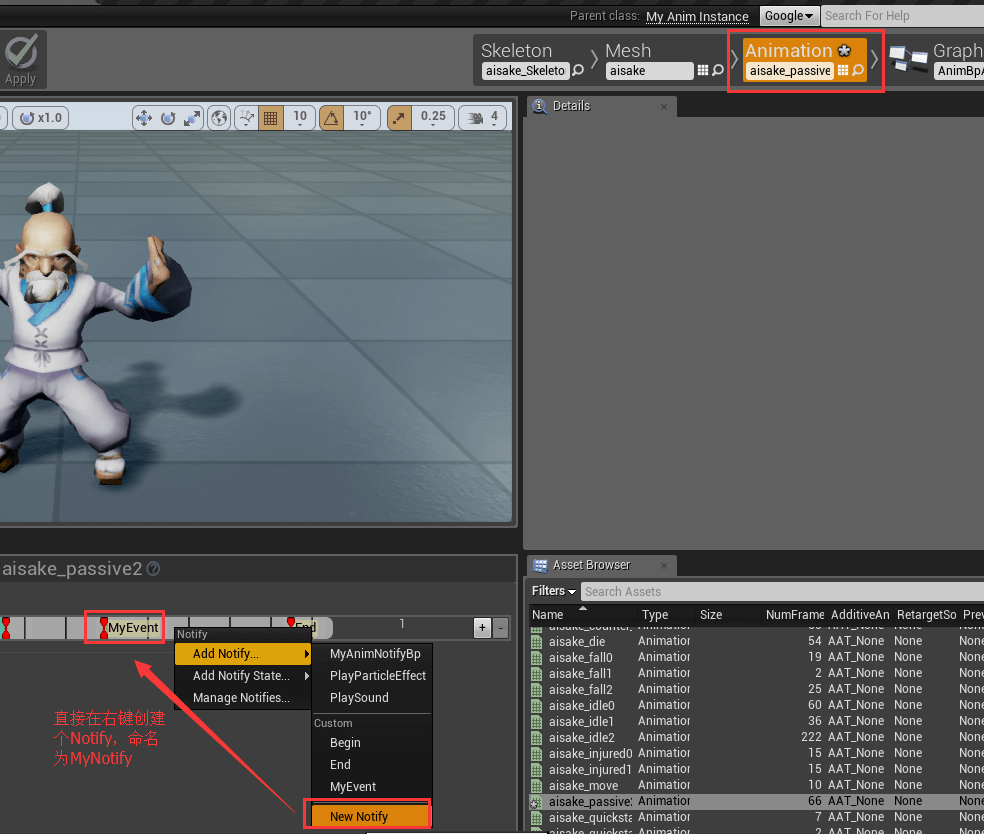
然后在graph中接收。
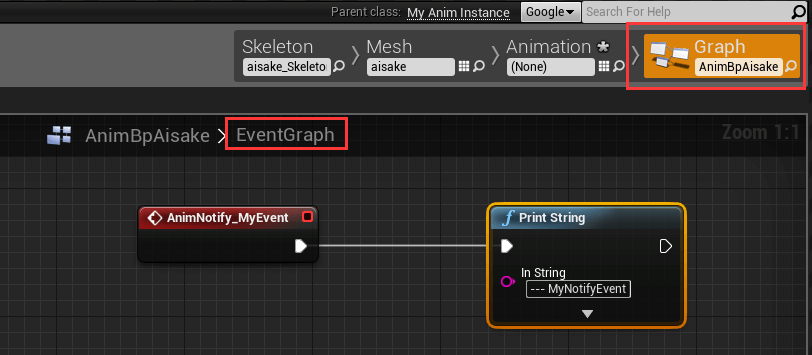
2、简单的通知(c++)
首先,animation bp必须是继承自定义的AnimInstance

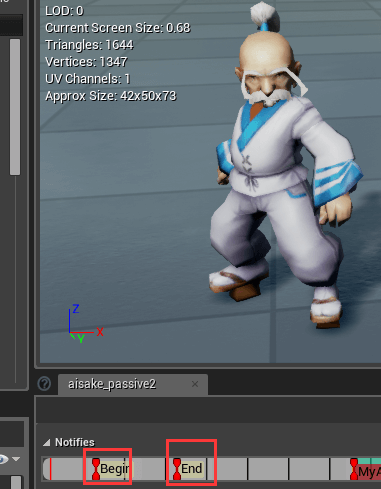
然后新建两个通知AnimNotify_Begin和AnimNotify_End
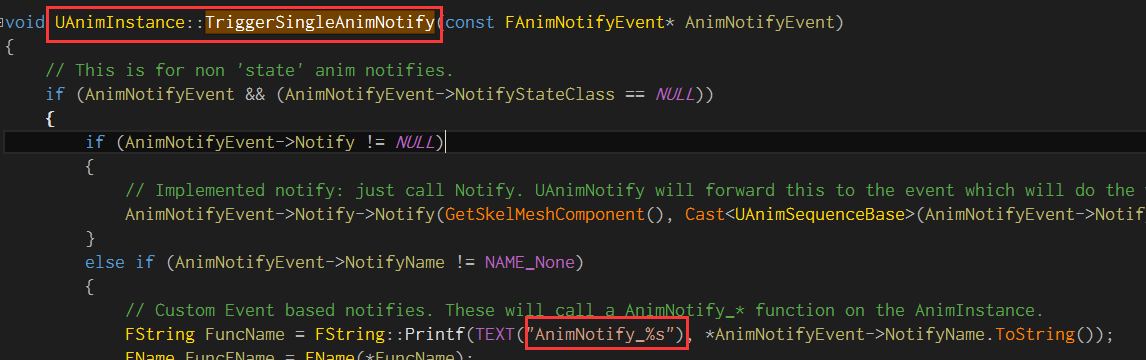
方法的命名规则必须是AnimNotify_XXX,因为引擎里的代码就是这样匹配的
完整代码
MyAnimInstance.h
#pragma once

#include "Animation/AnimInstance.h"

#include "MyAnimInstance.generated.h"

/**

 *

 */

UCLASS()

class MYSLATE_API UMyAnimInstance : public UAnimInstance

{

    GENERATED_BODY()

public:

    UMyAnimInstance();

    UFUNCTION(BlueprintCallable, Category = "MyAnim")

        bool IsMoving();

    UFUNCTION(BlueprintCallable, Category = "MyAnim")

        ACharacter* GetOwnerChar();

    UFUNCTION(BlueprintCallable, Category = "MyAnim")

        void AnimNotify_Begin(UAnimNotify* Notify);

    UFUNCTION(BlueprintCallable, Category = "MyAnim")

        void AnimNotify_End(UAnimNotify* Notify);

private:

    ACharacter* mOwnerChar;

};- 1
- 2
- 3
- 4
- 5
- 6
- 7
- 8
- 9
- 10
- 11
- 12
- 13
- 14
- 15
- 16
- 17
- 18
- 19
- 20
- 21
- 22
- 23
- 24
- 25
- 26
- 27
- 28
- 29
- 1
- 2
- 3
- 4
- 5
- 6
- 7
- 8
- 9
- 10
- 11
- 12
- 13
- 14
- 15
- 16
- 17
- 18
- 19
- 20
- 21
- 22
- 23
- 24
- 25
- 26
- 27
- 28
- 29
MyAnimInstance.cpp
#include "MySlate.h"

#include "MyAnimInstance.h"

#include "Engine.h"

#include "MyChar.h"

UMyAnimInstance::UMyAnimInstance()

{

    mOwnerChar = nullptr;

}

bool UMyAnimInstance::IsMoving()

{

    ACharacter* character = GetOwnerChar();

    if (!character)

        return false;

    float wallSpeed = FVector::DotProduct(character->GetVelocity(), character->GetActorRotation().Vector());

    return wallSpeed > 0.f ? true : false;

}

ACharacter* UMyAnimInstance::GetOwnerChar()

{

    if (!mOwnerChar)

    {

        APawn* owner = TryGetPawnOwner();

        mOwnerChar = owner ? Cast<ACharacter>(owner) : nullptr;

    }

    return mOwnerChar;

}

void UMyAnimInstance::AnimNotify_Begin(UAnimNotify * Notify)

{

    AMyChar* mychar = Cast<AMyChar>(GetOwnerChar());

    if (mychar)

    {

        FString str = FString::Printf(TEXT("--- AnimNotify_Begin - %d"), mychar->mHealth);

        GEngine->AddOnScreenDebugMessage(0, 5.0f, FColor::Green, str);

    }

}

void UMyAnimInstance::AnimNotify_End(UAnimNotify * Notify)

{

    FString str = FString::Printf(TEXT("--- AnimNotify_End"));

    GEngine->AddOnScreenDebugMessage(0, 5.0f, FColor::Yellow, str);

}- 1
- 2
- 3
- 4
- 5
- 6
- 7
- 8
- 9
- 10
- 11
- 12
- 13
- 14
- 15
- 16
- 17
- 18
- 19
- 20
- 21
- 22
- 23
- 24
- 25
- 26
- 27
- 28
- 29
- 30
- 31
- 32
- 33
- 34
- 35
- 36
- 37
- 38
- 39
- 40
- 41
- 42
- 43
- 44
- 45
- 1
- 2
- 3
- 4
- 5
- 6
- 7
- 8
- 9
- 10
- 11
- 12
- 13
- 14
- 15
- 16
- 17
- 18
- 19
- 20
- 21
- 22
- 23
- 24
- 25
- 26
- 27
- 28
- 29
- 30
- 31
- 32
- 33
- 34
- 35
- 36
- 37
- 38
- 39
- 40
- 41
- 42
- 43
- 44
- 45
蓝图中直接new一个notify就ok了,逻辑都在c++中做。
当然,你可以new个bp继承MyAnimInstance,然后动画蓝图再继承这个bp,这样扩展性好了。
3、单独起个AnimNotify类(blueprint,c++自己去转换)
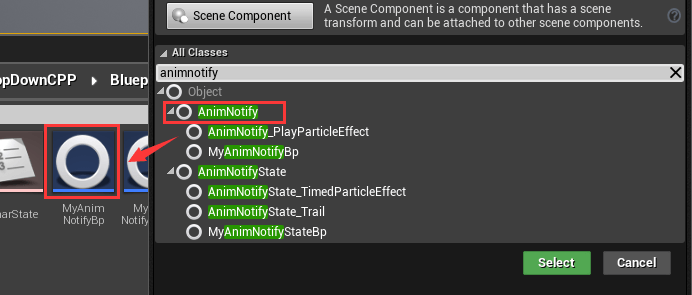
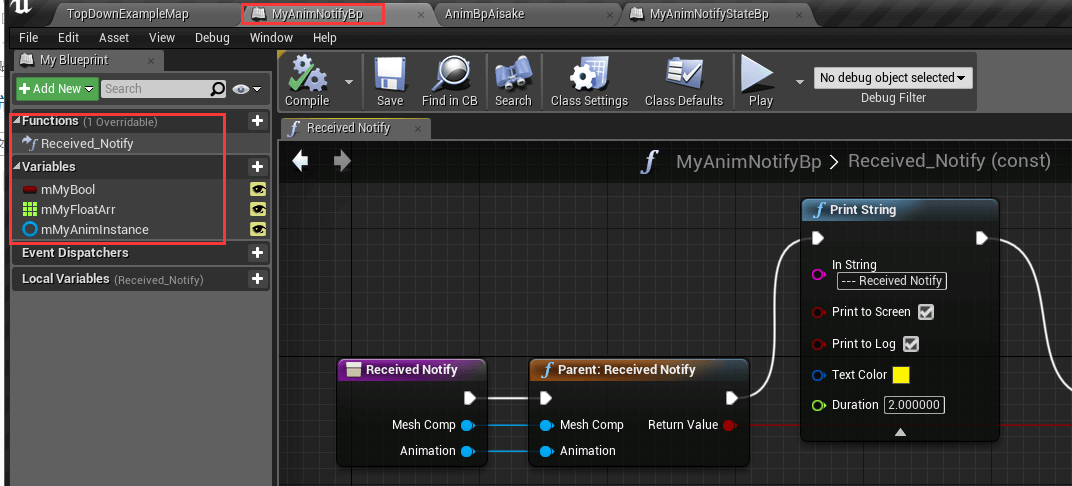
可以重写两个方法,和其一些变量
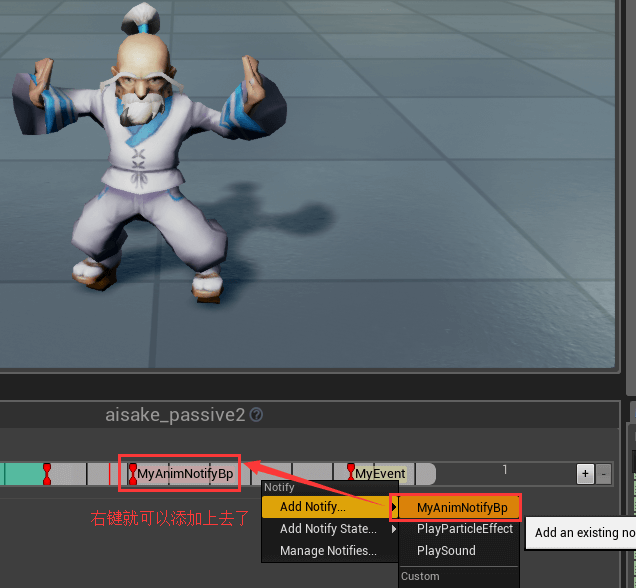
然后添加到animation sequence or montage中
4、(最灵活)单独起个AnimNotifyState类(blueprint,c++自己去转换)
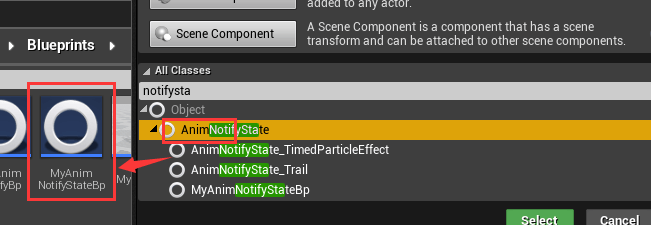
可以重写4个方法
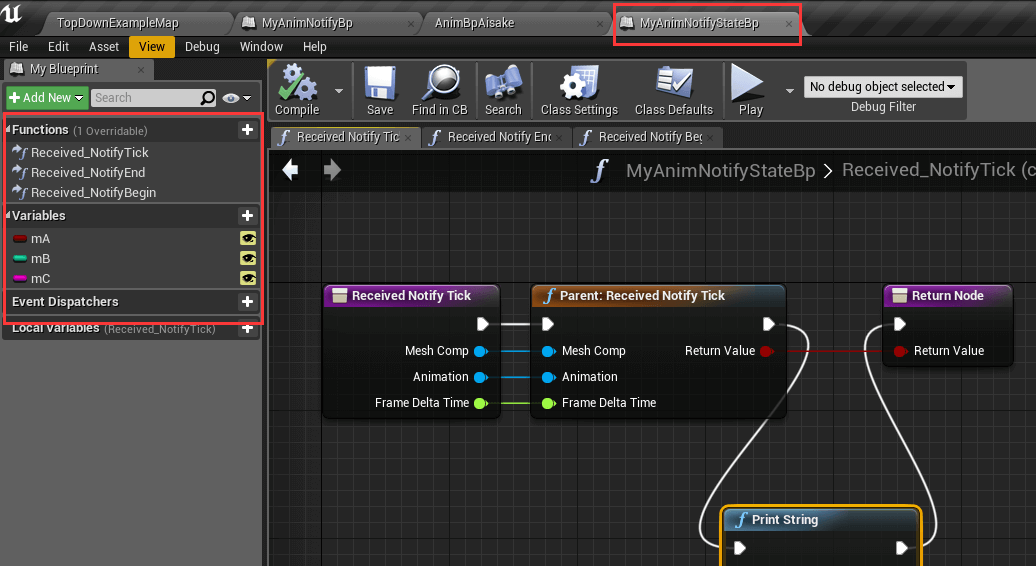
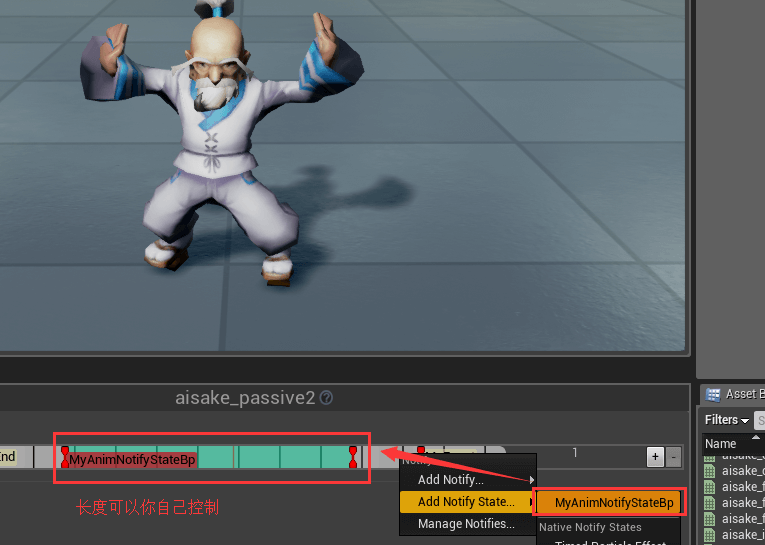
然后添加到animation sequence or montage中,可以控制通知长度,也就是tick
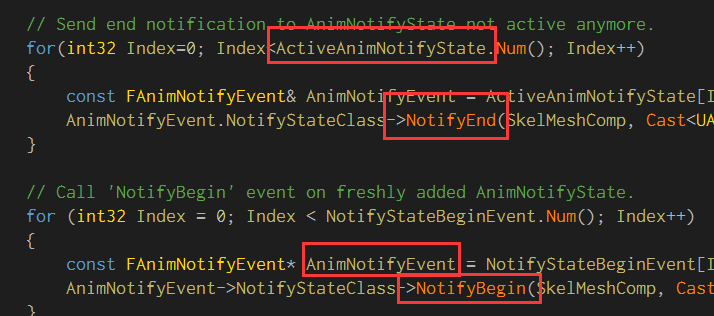
其实看下源码就可以知道,里面这些东西是怎么调用的
ue4 c++ anim notify的更多相关文章
- 张瀚荣:如何用UE4制作3D动作游戏
转自:http://www.gamelook.com.cn/2015/06/218267 GameLook报道/ 6月5日,2015年第三期GameLook开放日‧虚幻引擎专场活动在上海正式举行,此次 ...
- ue4粒子实现流血效果
---恢复内容开始--- 动作/射击游戏中,击中角色时常常伴随着血花效果,增强打击感的同时,也方便了玩家对命中与否的判断. 血液效果分两块,首先是受伤部位在受击瞬间产生血雾粒子,然后在身体.地面.墙面 ...
- Modeling -> Mixamo auto rigging -> UE4 retargeting
In general, there are 3 ways we can work with the Blender-UE4 pipeline: 1 Model character Export m ...
- UE4高级运动系统(Advanced Locomotion System V3)插件分析
Advanced Locomotion System V3是虚幻商城的一款第三方插件.它相比UE4的基础走跑跳表现,实现了更多动作游戏里常用的运动特性,虽然价格定价不菲,依然备受关注.笔者试用了这款插 ...
- Unreal Engine 4 系列教程 Part 7:音频教程
.katex { display: block; text-align: center; white-space: nowrap; } .katex-display > .katex > ...
- UE4开发神秘海域类游戏原型 初阶(二):动画资源的整合
前一篇已经确定神海类游戏原型的目标,首先要做的就是3C's(Character, Controls, Camera)的开发. UE4的3C's的程序部分开发主要也就是基于他的GamePlay Fr ...
- 游戏开发之UE4添加角色到场景中
接着上次继续学习,现在我们已经有了一个场景并且运行了,我们需要添加一个角色到场景中.要这样做,我们必须从UE4的GameFramework类继承它. 一. 创建一个从Character类继承的类 从基 ...
- ue4音效、动画结合实例
在游戏中,许多音效需要在动画恰当的时机出现,例如行走.奔跑,就需要恰好在足部落地瞬间播放. 而AnimNotify就能非常方便地处理此类问题. AnimNotify,顾名思义就是动画通知,能在特定的动 ...
- UE4的委托
UE中委托的使用很广泛,许多Event的触发都有对应的虚函数和委托,虚函数不用讲,只能在派生类中使用,而委托可以在别的类或者蓝图中使用,就应用范围而言,委托的使用更灵活.以AActor的 /** * ...
随机推荐
- 流畅python学习笔记第十八章:使用asyncio编写服务器
在这一章中,将使用asyncio写一个TCP服务器.这个服务器的作用是通过规范名称查找Unicode字符,来看下代码: import asyncio from charfinder import Un ...
- Light OJ 1005 - Rooks 数学题解
版权声明:本文作者靖心.靖空间地址:http://blog.csdn.net/kenden23/,未经本作者同意不得转载. https://blog.csdn.net/kenden23/article ...
- 开源Flex Air版免费激情美女视频聊天室,免费网络远程视频会议系统((Flex,Fms3联合打造))
开源Flex Air版免费激情美女视频聊天室,免费网络远程视频会议系统((Flex,Fms3联合打造)) Flex,Fms3系列文章导航 Flex,Fms3相关文章索引 本篇是视频聊天,会议开发实 ...
- ABAP HTTP POST
1.HTTP DATA: lo_http_client TYPE REF TO if_http_client, lv_service TYPE string, lv_result TYPE strin ...
- <raspberry pi > 用树莓派来听落网电台
树莓派放在抽屉里吃灰有半年多了,去年玩了1个月后就没怎么开整了,上个月没工作,刚好有点闲暇,就把树莓派翻出来折腾,刚好碰到落网改版了,想起以前在树莓派论坛看到有网友拿树莓派来听豆瓣电台,代码那时我都下 ...
- java 解析excle
jjava解析excle或者csv文件并导出到web界面: 创建ExcelShower.java package com.ssm.controller; import java.io.File; im ...
- javah生成带有包名的头文件
无包名情况 多数的demo都是基于这种条件,假设在目录jni/下有一个包含native方法的文件Hello.class.进入jni/目录,直接执行javah Hello,就可以在jni/目录下生成文件 ...
- oracle数据库如何备份一张表
--用户名:tms--创建表ts_dictionary的备份create table ts_dictionary_20160715 as select * from ts_dictionary; 补充 ...
- wordpress,cos-html-cache静态化后,点击数失效问题的解决方案
装了wordpress cos-html-cache 静态插件后,生成了静态文件,post-views等点击数插件就失效了, 找了一些,包括有个js版本的,需要用到post-views插件,我也不想装 ...
- python-unittest单元测试框架
可以理解为是已经帮我们封装好的东东,可以完成执行用例\预期与实际结果的对比等. import unittest 封装好的单元测试框架,可以直接使用 编写的测试类的继承unittest.TestCase ...