
OpenCV——PS滤镜 漩涡 vertex
// define head function

#ifndef PS_ALGORITHM_H_INCLUDED

#define PS_ALGORITHM_H_INCLUDED

#include <iostream>

#include <string>

#include "cv.h"

#include "highgui.h"

#include "cxmat.hpp"

#include "cxcore.hpp"

#include "math.h"

using namespace std;

using namespace cv;

void Show_Image(Mat&, const string &);

#endif // PS_ALGORITHM_H_INCLUDED

#include "PS_Algorithm.h"

#include <time.h>

using namespace std;

using namespace cv;

#define pi 3.1415926

int main()

{

    string Img_name("4.jpg");

    Mat Img;

    Img=imread(Img_name);

    Mat Img_out(Img.size(), CV_8UC3);

    Img.copyTo(Img_out);

    int width=Img.cols;

    int height=Img.rows;

    int N=70;

    Point Center(width/2, height/2);

    float radius,Dis,new_x,new_y;

    float p,q,x1,y1,x0,y0;

    float theta;

    for (int y=0; y<height; y++)

    {

        for (int x=0; x<width; x++)

        {

            y0=Center.y-y;

            x0=x-Center.x;

            Dis=x0*x0+y0*y0;

                theta=atan(y0/(x0+0.00001));

                if(x0<0) theta=theta+pi;

                radius=sqrt(Dis);

                theta=theta+radius/N;

                new_x=radius*cos(theta);

                new_y=radius*sin(theta);

                new_x=Center.x+new_x;

                new_y=Center.y-new_y;

                if(new_x<0)         new_x=0;

                if(new_x>=width-1)  new_x=width-2;

                if(new_y<0)         new_y=0;

                if(new_y>=height-1) new_y=height-2;

                x1=(int)new_x;

                y1=(int)new_y;

                p=new_x-x1;

                q=new_y-y1;

                for (int k=0; k<3; k++)

                {

                    Img_out.at<Vec3b>(y, x)[k]=(1-p)*(1-q)*Img.at<Vec3b>(y1, x1)[k]+

                                            (p)*(1-q)*Img.at<Vec3b>(y1,x1+1)[k]+

                                            (1-p)*(q)*Img.at<Vec3b>(y1+1,x1)[k]+

                                            (p)*(q)*Img.at<Vec3b>(y1+1,x1+1)[k];

                }

        }

    }

    Img_out=Img_out;

    Show_Image(Img_out, "out");

    imwrite("Out.jpg", Img_out);

    waitKey();

}

// define the show image

#include "PS_Algorithm.h"

#include <iostream>

#include <string>

using namespace std;

using namespace cv;

void Show_Image(Mat& Image, const string& str)

{

    namedWindow(str.c_str(),CV_WINDOW_AUTOSIZE);

    imshow(str.c_str(), Image);

}
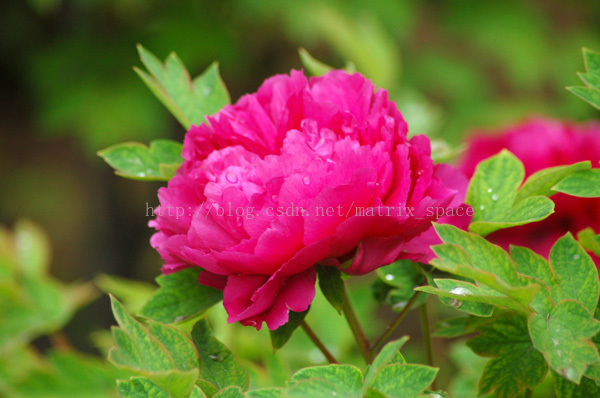
原图
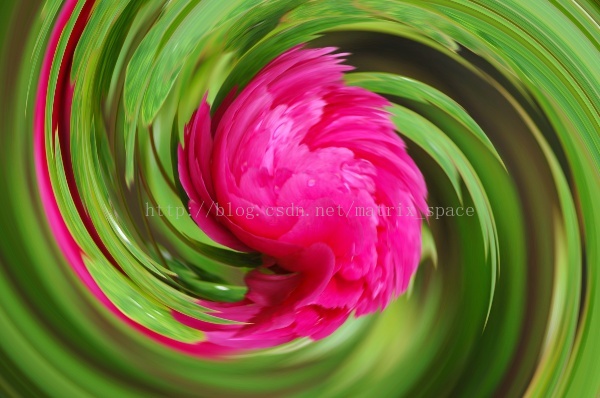
效果图
OpenCV——PS滤镜 漩涡 vertex的更多相关文章
- OpenCV——PS 滤镜, 浮雕效果
具体的算法原理可以参考: PS 滤镜, 浮雕效果 // define head function #ifndef PS_ALGORITHM_H_INCLUDED #define PS_ALGORITH ...
- OpenCV——PS 滤镜, 曝光过度
算法原理可以参考: PS 滤镜,曝光过度 #ifndef PS_ALGORITHM_H_INCLUDED #define PS_ALGORITHM_H_INCLUDED #include <io ...
- PS 滤镜——漩涡 vortex
%%% Vortex %%% 漩涡效果 clc; clear all; close all; addpath('E:\PhotoShop Algortihm\Image Processing\PS A ...
- OpenCV——PS滤镜,渐变映射
// define head function #ifndef PS_ALGORITHM_H_INCLUDED #define PS_ALGORITHM_H_INCLUDED #include < ...
- OpenCV——PS滤镜,毛玻璃特效
程序完成 "毛玻璃" 特效, 不过边缘没有处理,使得最终的图像有黑边. 不过,有了黑边,感觉效果也不错,所以这个bug 没有管. #ifndef PS_ALGORITHM_H_IN ...
- OpenCV——PS滤镜, 碎片特效
// define head function #ifndef PS_ALGORITHM_H_INCLUDED #define PS_ALGORITHM_H_INCLUDED #include < ...
- OpenCV——PS 滤镜算法之极坐标变换到平面坐标
// define head function #ifndef PS_ALGORITHM_H_INCLUDED #define PS_ALGORITHM_H_INCLUDED #include < ...
- OpenCV——PS 滤镜算法之平面坐标到极坐标的变换
// define head function #ifndef PS_ALGORITHM_H_INCLUDED #define PS_ALGORITHM_H_INCLUDED #include < ...
- OpenCV——PS滤镜之 波浪效果 wave
// define head function #ifndef PS_ALGORITHM_H_INCLUDED #define PS_ALGORITHM_H_INCLUDED #include < ...
随机推荐
- (四)DOM对象和jQuery对象
学习jQuery,需要搞清楚DOM对象和jQuery对象的关系与区别,因为两者的方法并不共用,如果搞不清楚对象类型就会导致调用错误的方法. DOM(Document Object Model)称为文档 ...
- web 表单方式上传文件方法(不用flash插件)
原理:使用表单的input type="file"标签,通过ajax提交表单请求,后台获取请求中的文件信息,进行文件保存操作 由于我测试用的做了一个上传文件和上传图片方法,所以我有 ...
- Flash威胁的不不过浏览器
Adobe为提升Flash的安全性.在最新版本号的Flash(18.0.0.209)增加了很多攻击缓解技术. 新的攻击缓解技术为: l <*>长度验证–添加长度cookie到Vector ...
- u-boot 学习系列 1 - SPL
u-boot这个东西从自我N年前使用到现在,变化好多,今天开始重新研究下,本系列的研究都是基于BeagleBoneBlack(bbb)开发板和 u-boot v201801版本的. SPL介绍 在源代 ...
- rtems 4.11 IRQ (arm,beagle)
arm IRQ入口在 cpukit/score/arm/arm_exec_interrupt.S 中,其中BSP最关心就是 bl bsp_interrupt_dispatch 这句,看看beagle ...
- Google论文BigTable拜读
这周少打点dota2,争取把这篇论文读懂并呈现出来,和大家一起分享. 先把论文搞懂,然后再看下和论文搭界的知识,比如hbase,Chubby和Paxos算法. Bigtable: A Distribu ...
- centOS下安装ejabberd
#centos (安装依赖项) sudo yum -y groupinstall "Development Tools"sudo yum -y install openssl op ...
- 扒一扒P2P风控的底牌(转)
互联网金融,这里面水就太深了,能当理财买的一般有两类,一个是货币基金,比如余额宝,这个大家已经十分清楚了,没什么风险, 但问题就是收益越来越低.实在是不过瘾了.而另外一种就是P2P理财了,收益很高,也 ...
- git连接到github(SSH无密码登陆)
[0]README 0.1)本文旨在尝试在linux环境下免密码连接到github,并进行push + pull projects in github by git commands. 0.1) 对s ...
- 基于imgAreaSelect的用户图像截取
前言:想到用户资料中一般有个图像自我截取的部分,为什么要截取呢,因为好看了.so,经过我各种百度,各种参考,终于打工搞成了,写下纪念纪念,让以后拿来就用也好. 一:想前端ui这东西,我就懒得说话了,哎 ...