
应用程序之Xib自定义Cell
- 效果展示
- 结构分析
- 代码实现
一、效果展示

二、结构分析
1⃣️首先我们让我们的控制器不再继承UIViewController,而是继承UITableViewController。这样就直接遵守了delegate协议、dataSource协议
2⃣️数据使用模型来加载
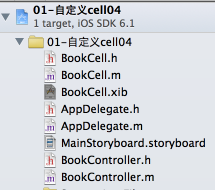
3⃣️自定义的Cell使用单独的类来管理
三、代码实现

//

//  BookController.m

//  01-自定义cell04

//

//  Created by apple on 14-4-9.

//  Copyright (c) 2014年 apple. All rights reserved.

//

#import "BookController.h"

#import "Book.h"

#import "BookCell.h"

@interface BookController ()

{

    NSMutableArray *books;

}

@end

@implementation BookController

- (id)initWithStyle:(UITableViewStyle)style

{

    self = [super initWithStyle:style];

    if (self) {

        // Custom initialization

    }

    return self;

}

- (void)viewDidLoad

{

    [super viewDidLoad];

    books = [NSMutableArray array];

    for (int i = ; i<; i++) {

        Book *b = [Book bookWithName:[NSString stringWithFormat:@"iOS开发%d", i] price:arc4random_uniform()/10.0 + ];

        [books addObject:b];

    }

}

- (void)didReceiveMemoryWarning

{

    [super didReceiveMemoryWarning];

    // Dispose of any resources that can be recreated.

}

- (NSInteger)tableView:(UITableView *)tableView numberOfRowsInSection:(NSInteger)section

{

    return books.count;

}

- (UITableViewCell *)tableView:(UITableView *)tableView cellForRowAtIndexPath:(NSIndexPath *)indexPath

{

    static NSString *CellIdentifier = @"Cell";

    //加载的cell就是xib对应的BookCell对象

    BookCell *cell = [tableView dequeueReusableCellWithIdentifier:CellIdentifier];

    if (cell == nil) {

        cell = [[[NSBundle mainBundle] loadNibNamed:@"BookCell" owner:nil options:nil] lastObject];

    }

    Book *book = books[indexPath.row];

    cell.nameLabel.text = book.name;

    cell.priceLable.text = [NSString stringWithFormat:@"¥%.1f", book.price];

    UIButton *collect = cell.collectBtn;

    [collect addTarget:self action:@selector(collectClick: event:) forControlEvents:UIControlEventTouchUpInside];

    return cell;

}

- (void)collectClick:(UIButton*)btn event:(UIEvent*)event

{

    //NSLog(@"----%@", event);

    UITableView *tableView = (UITableView *)self.view;

    // 获取所有的触摸点(UITouch对象,如果是单点触碰,就只有1个UITouch)

    NSSet *touches = [event allTouches];

    // 一个UITouch对象对应一根手指

    UITouch *touch = [touches anyObject];

    // 获取触摸点在UITableView上面的的位置

    CGPoint position = [touch locationInView:tableView];

    // 根据触摸位置 得到 对应的行号

    NSIndexPath *indexPath = [tableView indexPathForRowAtPoint:position];

    //NSLog(@"%d", indexPath.row);

    Book *book = books[indexPath.row];

    NSLog(@"%@", book.name);

}

#pragma mark - Table view delegate

- (CGFloat)tableView:(UITableView *)tableView heightForRowAtIndexPath:(NSIndexPath *)indexPath

{

    return ;

}

- (void)tableView:(UITableView *)tableView didSelectRowAtIndexPath:(NSIndexPath *)indexPath

{

    //取消选中蓝色

    [self.tableView deselectRowAtIndexPath:indexPath animated:YES];

}

@end
应用程序之Xib自定义Cell的更多相关文章
- IOS xib在tableview上的简单应用(通过xib自定义cell)
UITableView是一种常用的UI控件,在实际开发中,由于原生api的局限,自定义UITableViewCell十分重要,自定义cell可以通过代码,也可以通过xib. 这篇随笔介绍的是通过xib ...
- iOS深入学习(UITableView系列4:使用xib自定义cell)
可以通过继承UITableViewCell重新自定义cell,可以像下面一样通过代码来自定义cell,但是手写代码总是很浪费时间, ? 1 2 3 4 5 6 7 8 9 10 11 12 13 14 ...
- iOS 中使用 XIB 自定义cell 的两种方法 以及 编译出现常见 的错误 ++++(xcode6.0之后)
一. 注册cell 1.创建自定义cell并勾选 xib :(勾选xib就会自动生成与cell文件关联的xib) 2.在 tableViewController里注册自定义Cell (或者遵守tabl ...
- iOS 中使用 XIB 自定义cell的两种方法以及编译出现常见 的错误 (xcode6.0之后)
一. 注册cell 1.创建自定义cell并勾选 xib :(勾选xib就会自动生成与cell文件关联的xib) 2.在 tableViewController里注册自定义Cell (或者遵守tabl ...
- AJ学IOS(16)UI之XIB自定义Cell实现团购UI
AJ分享,必须精品 先看效果图 自定义Cell 本次主要是自定义Cell的学习 实现自定义Cell主要有三种方法:按照使用的频繁度排序: XIB > 纯代码 > StoryBoard XI ...
- xib自定义cell代码规范
// // MJTgCell.m // 01-团购 // // Created by apple on 14-4-1. // Copyright (c) 2014年 itcast. All r ...
- iOS回顾笔记(08) -- 自定义Cell的类型和创建步骤总结
iOS回顾笔记(08) -- 自定义Cell的类型和创建步骤总结 项目中我们常见的自定义cell主要分为两种 等高cell:如应用列表.功能列表 非等高cell:如微博列表.QQ聊天页面 下面对这 ...
- 自定义cell的一些知识
1.要往cell里面添加一个自定义的子控件,都是添加到cell的contentView,不是添加到cell里面. 2.通过xib自定义cell * 添加tableView * 加载团购数据 * 新建x ...
- 新手教程之使用Xib自定义UITableViewCell
新手教程之使用Xib自定义UITableViewCell 前言 首先:什么是UITableView?看图 其次:什么是cell? 然后:为什么要自定cell,UITableView不是自带的有cell ...
随机推荐
- linux系统——hosts文件修改
1. 关于/etc/host,主机名和IP配置文件 Hosts - The static table lookup for host name(主机名查询静态表) Linux 的/etc/hosts是 ...
- 分布式文件系统FastDFS集群部署
1.源码开放下载地址:https://github.com/happyfish100 早期源码开放下载地址:https://sourceforge.net/projects/fastdfs/files ...
- 【HDOJ5536】Chip Factory(Trie树)
题意:给定n个数字,第i个数字为a[i],求max((a[i]+a[j])^a[k]),其中i,j,k互不相同 n<=1000,0<=a[i]<=1e9 思路:队友写的,抱大腿 先对 ...
- ThickBox弹出框的使用方法
原文发布时间为:2009-08-22 -- 来源于本人的百度文章 [由搬家工具导入] 请访问:http://www.blueidea.com/articleimg/2007/12/5182/tickb ...
- A Wasserstein Distance[贪心/模拟]
链接:https://www.nowcoder.com/acm/contest/91/A来源:牛客网 最近对抗生成网络(GAN)很火,其中有一种变体WGAN,引入了一种新的距离来提高生成图片的质量.这 ...
- TensorFlow——Checkpoint为模型添加检查点
1.检查点 保存模型并不限于在训练模型后,在训练模型之中也需要保存,因为TensorFlow训练模型时难免会出现中断的情况,我们自然希望能够将训练得到的参数保存下来,否则下次又要重新训练. 这种在训练 ...
- GCJ——Minimum Scalar Product(2008 Round1 AA)
题意: 给定两组各n个数,可任意调整同一组数之中数字的顺序,求 sum xi*yi i=1..n的最小值. Small: n<=8 abs xy,yi<=1000 Large: n< ...
- Maven出现错误No plugin found for prefix 'jetty' in the current project and in the plugin groups的问题解决
只需在maven的setting.xml文件上加入如下节点: <pluginGroups> <pluginGroup>org.mortbay.jetty</pluginG ...
- js中高效拼接字符串
写在前面 面试的过程,很有可能面试到c#那种方式拼接字符串更高效,然后就会引申到js中的拼接方式.这也是我在面试中遇到的问题,当时,也真没比较过js中到底哪种方式更高效.然后,跟猜测一样,说了使用数组 ...
- Auto-Test 要点纪录(一)
1,select下拉框类型 使用工具可以看到html对应标签为<select>这类标签才是真正的下拉框类型就需要对应的方法,不能但看页面上的效果,有的做成了效果但其实不是select类型即 ...