
Loading CSS without blocking render
The principles behind these techniques aren't new. Filament group, for example, have published great content on loading CSS and fonts. I've written this article to document my thoughts and ideas for loading non-blocking resources.
The trick to triggering an asynchronous stylesheet download is to use a <link> element and set an invalid value for the media attribute (I'm using media="none", but any value will do). When a media query evaluates to false, the browser will still download the stylesheet, but it won't wait for the content to be available before rendering the page.
<link rel="stylesheet" href="css.css" media="none">Once the stylesheet has finished downloading the media attribute must be set to a valid value so the style rules will be applied to the document. The onload event is used to switch the media property to all:
<link rel="stylesheet" href="css.css" media="none" onload="if(media!='all')media='all'">This method of loading CSS will deliver useable content to visitors much quicker than the standard approach. Critical CSS can still be served with the usual blocking approach (or you can inline it for ultimate performance) and non-critical styles can be progressively downloaded and applied later in the parsing / rendering process.
This technique uses JavaScript, but you can cater for non-JavaScript browsers by wrapping the equivalent blocking <link> elements in a <noscript> element:
<link rel="stylesheet" href="css.css" media="none" onload="if(media!='all')media='all'">

<noscript><link rel="stylesheet" href="css.css"></noscript>
There is a side-effect to this technique. Once a non-blocking stylesheet has finished downloading the document will be repainted to reflect any new rules it defines. Injecting new styles into the page can trigger content reflows, but this is only really an issue for thefirst page load with an unprimed cache. As with all things related to performance, you'll need to make a judgement call on when the need to control a reflow outweighs the potential speed gain.
Using non-blocking CSS to load fonts
Fonts are an issue for first-paint performance, they are a blocking resource and can render text invisible while they download . Using the non-blocking link example above, it's possible to download a stylesheet containing font data in the background, unblocking the page render:
<link rel="stylesheet" href="main.css">

<link rel="stylesheet" href="font.css" media="none" onload="if(media!='all')media='all'">
font.css contains a base64 encoded WOFF version of the Merriweather font.
@font-face {

  font-family: Merriweather;

  font-style: normal;

  font-weight: 400;

  src: local('Merriweather'), url('data:application/x-font-woff;charset=utf-8;base64,...')

}
main.css contains all the rules required to style the site. Here's the font declaration:
body {

  font-family: Merriweather, "Lucida Grande", ...;

}
While the font is downloading, the first matching fallback font (Lucida Grande, in this case) is used to render the page content. Once the font stylesheet is applied,Merriweather will be used. I try to ensure the fallback shares similar layout characteristics to the preferred font, so that the inevitable reflow is as subtle as possible.
I'm testing blocking vs non-blocking using my Google Analytics Debugger site in Chrome over a simulated 3G connection. Local testing produces the following network graphs; notice the DOMContentLoaded event fires around 450ms earlier and assets begin downloading sooner when non-blocking is used:
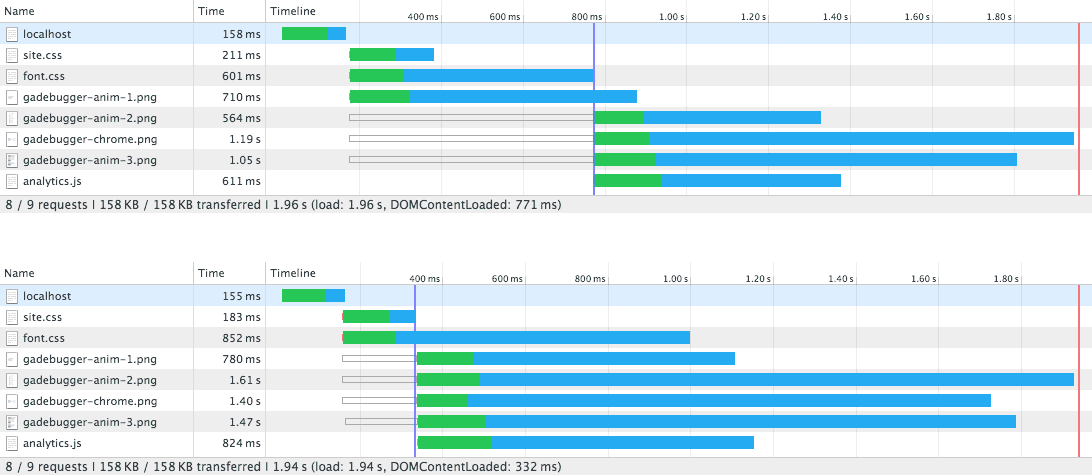 Simulated 3G network graph. Top shows blocking fonts. Bottom shows non-blocking fonts.
Deploying this to a test server and running webpagetest with 3G connection shaping produces the following timeline:
 3G timeline. Top shows blocking fonts. Bottom shows non-blocking fonts.
Both methods take 2.8 seconds to completely render the page, but the non-blocking method causes painting to being a second earlier than the normal blocking approach. Running the same test with the main stylesheet inlined shows a 0.7 second gain when non-blocking CSS is used to serve the font:
 3G timeline with main CSS inlined. Top shows blocking fonts. Bottom shows non-blocking fonts.
This technique does work well for fonts but I recommend keeping an eye on the new CSS Font Loading Module, which gives far greater control over font loading.
Summary
Loading fonts is one example of applying this non-blocking technique, but it could also be used for other purposes, such as separating JavaScript enhanced styles from core CSS.
I've started to experiment with the idea of breaking up CSS into scaffolding (core layout) and presentation (everything else), allowing vital page layout to block the page render and have the visual styles arrive later.
Thanks to Mathias Bynens for taking the time to share a shortened version of the <link>onload handler.
Loading CSS without blocking render的更多相关文章
- css skeleton loading & skeleton components
css skeleton loading css & :empty See the Pen Skeleton Screen with CSS by xgqfrms (@xgqfrms) on ...
- CSS Loading 特效
全页面遮罩效果loading css: .loading_shade { position: fixed; left:; top:; width: 100%; height: 100%; displa ...
- 2015年最佳的12个 CSS 开发工具推荐
CSS所能做的就是改变网页的布局.排版和调整字间距等,但编写 CSS 并不是一项容易的任务,当你接触新的 CSS3 属性及其各自的浏览器前缀的时候,你会发现很伤脑经.值得庆幸的是一些优秀的开发人员提供 ...
- Js判断CSS文件加载完毕的实例教程
要判断这个 CSS 文件是否加载完毕,各个浏览器的做法差异比较大,这次要说IE浏览器做的不错,我们可以直接通过onload方法来处理CSS加载完成以后的处理: 代码如下 复制代码 // 代码节选至se ...
- 加载框(loading)
一般在用户提交数据或者新加载页面时,请求服务器的过程,页面没有响应,但是用户并不知道,此时在发生什么.这时,就需要loading框给用户提示,增加用户体验. 1.引入loading.css. html ...
- 前端CSS规范整理_转载、、、
一.文件规范 1.文件均归档至约定的目录中. 具体要求通过豆瓣的CSS规范进行讲解: 所有的CSS分为两大类:通用类和业务类.通用的CSS文件,放在如下目录中: 基本样式库 /css/core 通用U ...
- 常用CSS优化总结——网络性能与语法性能建议
在前端面试中最常见的问题就是页面优化和缓存(貌似也是页面优化),被问了几次后心虚的不行,平然平时多少会用到一些,但突然问我,很难把自己知道的都说出来.页面优化明显不是一两句能够说完的,这两天总结了一下 ...
- css 常见时间轴的做法(————————————————时间轴——————————————————)
<!DOCTYPE html> <html> <head> <meta charset="UTF-8"> <title> ...
- Normalize.css 初识
一. 用来干嘛的 一个现代的.准备好了支持 HTML5 技术,并且要替代 CSS Reset 处理样式的理念. Normalize.css 使浏览器渲染所有元素更加一致,并且符合现代标准.它只是针对那 ...
随机推荐
- Android的配置界面PreferenceActivity
我想大家对于android的系统配置界面应该不会陌生吧,即便陌生,那么下面的界面应该似曾相识吧,假若还是不认识,那么也没有关系,我们这一节主要就是介绍并讲解android 中系统配置界面的使用,相信大 ...
- 使用Java辅助类(CountDownLatch、CyclicBarrier、Semaphore)并发编程
在java 1.5中,提供了一些非常有用的辅助类来帮助我们进行并发编程,比如CountDownLatch,CyclicBarrier和Semaphore,今天我们就来学习一下这三个辅助类的用法 一.C ...
- git 删除配置的远程地址
删除(origin 名称需根据你本地查询出来的想删除的名字, 查询命令为 git remote -v) git remote rm origin 添加(origin 名称可根据需要添加) git re ...
- python 函数初识和文件操作
文件操作 打开文件:文件句柄 = open('文件路径', '模式') 打开文件的模式 w #以写的方式打开 (不可读,不存在则创建,存在则删除内容) a #以追加的模式打开(可读, 不存在则创建 ...
- Java根据ip地址获取Mac地址,Java获取Mac地址
Java根据ip地址获取Mac地址,Java获取Mac地址 >>>>>>>>>>>>>>>>>&g ...
- 移动web前端小结(一)
这段时间做了几个移动项目的前端页面,姑且称之webapp.做这几个项目之前根本没接触过移动端的相关知识,以为和PC端页面没啥区别无非就是尺寸小一点罢了.上手以后发现问题颇多.下面从框架.相关知识点.遇 ...
- OPENQUERY
SELECT * FROM OPENQUERY(saql007,' SELECT col1,col2,col3 FROM dbname.shemaname.tablename WHERE (1=1 ...
- 集成支付宝报一堆warning: (arm64) /Users/scmbuild/workspace/standard-pay/.....警告问题解决办法亲测可行!
- OC - 15.NSURLSession与NSURLSessionTask
简介 NSURLSession也能完成网络请求 NSURLConnection在iOS9中不推荐使用,NSURLSession是iOS9中推荐使用的网络请求方式 NSURLSession需要与NSUR ...
- UITableView中容易忽略的知识点
1.取消余下的分割线 tableView.tableFooterView = UIView() 2.分割线顶格 override func viewDidLayoutSubviews() { self ...