
SpringMVC + Spring 3.2.14 + Hibernate 3.6.10 集成详解
注:此文档只说明简单的框架集成,各个框架的高级特性未涉及,刚刚接触框架的新人可能需要参考其他资料。
PS:本次练习所用jar包都能在此下载到:http://pan.baidu.com/s/1sjmgdYX
- 准备工作
开发环境:JDK 7u80、Eclipse 4.4 、Tomcat 7.0.63、MySQL 5.6
开发使用组件:Spring 3.2.14、Hibernate 3.6.10、common-logging 1.2、aopalliance.jar、aspectjweaver.jar、mysql-connector-java-5.1.35-bin.jar
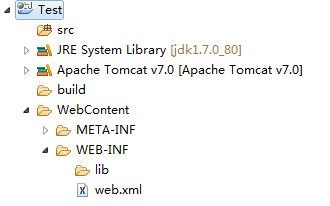
在Eclipse下创建动态web项目Test,创建过程中注意勾选web.xml的选项,如果不勾选,项目创建之后需要手动创建web.xml,创建完成后将其部署到Tomcat中,项目结构应该如下(Package Explorer下,看个人习惯):
- 配置Spring
将以下JAR包复制到lib文件夹下,不要问为什么是这些,想知道为什么可以把其他任意一个删掉看看启动项目报什么错。

在web.xml中配置Spring监听器,代码如下:
<listener>

    <listener-class>org.springframework.web.context.ContextLoaderListener</listener-class>

</listener>
创建applicationContext.xml,当前版本的Spring默认其位于WEB-INF下,不过大多数开发人员习惯还是将其放到src下,这里我们将其放在src下。之后向applicationContext.xml中添加bean相关声明,具体如下
<?xml version="1.0" encoding="UTF-8"?>

<beans xmlns="http://www.springframework.org/schema/beans"

    xmlns:xsi="http://www.w3.org/2001/XMLSchema-instance"

    xsi:schemaLocation="http://www.springframework.org/schema/beans

         http://www.springframework.org/schema/beans/spring-beans-3.2.xsd">

</beans>
web.xml中添加如下内容,用于自定义Spring配置文件的位置:
<context-param>

    <param-name>contextConfigLocation</param-name>

    <param-value>classpath:applicationContext.xml</param-value>

</context-param>
新建测试实体类User,路径暂定为com.test.entity,添加如下代码:
package com.test.entity;

public class User {

    private String id;

    private String username;

    private String password;

    public String getId() {

        return id;

    }

    public void setId(String id) {

        this.id = id;

    }

    public String getUsername() {

        return username;

    }

    public void setUsername(String username) {

        this.username = username;

    }

    public String getPassword() {

        return password;

    }

    public void setPassword(String password) {

        this.password = password;

    }

}
applicationContext.xml中添加如下定义(此处测试完成之后可以删除):
<bean id="user" class="com.test.entity.User">

    <property name="username" value="test" />

</bean>
新建Test类,暂定路径com.test.test,添加如下代码:
package com.test.test;

import org.springframework.context.support.FileSystemXmlApplicationContext;

import com.test.entity.User;

public class Test{

    @SuppressWarnings("resource")

    public static void main(String[] args) {

        FileSystemXmlApplicationContext ac =

                new FileSystemXmlApplicationContext("src\\applicationContext.xml");

        User user = (User) ac.getBean("user");

        System.out.println(user.getUsername());

    }

}
运行Test类查看结果,如果输出test则表示spring框架运行正常。
- 配置SpringMVC
添加SpringMVC所需JAR包:spring-webmvc-3.2.14.RELEASE.jar,在web.xml中添加SpringMVC前端控制器相关配置,SpringMVC的配置文件默认servlet配置名-servlet.xml(例如此处应该为springmvc-servlet.xml),位于WEB-INF下,这里我们将spring的配置文件与springmvc配置文件合并,所以我们需要在配置DispatcherServlet时说明配置文件的位置,配置如下:
    <servlet>

        <servlet-name>springmvc</servlet-name>

        <servlet-class>org.springframework.web.servlet.DispatcherServlet</servlet-class>

        <init-param>

            <param-name>contextConfigLocation</param-name>

            <param-value>classpath:applicationContext.xml</param-value>

        </init-param>

        <load-on-startup>1</load-on-startup>

    </servlet>

    <servlet-mapping>

        <servlet-name>springmvc</servlet-name>

        <url-pattern>*.do</url-pattern>

    </servlet-mapping>
配置springmvc扫描器,用于扫描springmvc注解,此处需要用到context标签, 所以需要添加context的文档声明,所有代码如下:
<?xml version="1.0" encoding="UTF-8"?>

<beans xmlns="http://www.springframework.org/schema/beans"

    xmlns:xsi="http://www.w3.org/2001/XMLSchema-instance"

    xmlns:context="http://www.springframework.org/schema/context"

    xsi:schemaLocation="http://www.springframework.org/schema/beans

         http://www.springframework.org/schema/beans/spring-beans-3.2.xsd

         http://www.springframework.org/schema/context

         http://www.springframework.org/schema/context/spring-context-3.2.xsd">

    <context:component-scan base-package="com.test" />

    <bean id="user" class="com.test.entity.User">

        <property name="username" value="test" />

    </bean>

</beans>
配置视图解析器,Controller层处理完请求之后会返回数据或者视图,所以我们需要先添加视图解析器,否则无法跳转回前台页面,代码如下:
    <bean class="org.springframework.web.servlet.view.InternalResourceViewResolver">

        <property name="suffix" value=".jsp"/>

    </bean>
- 测试SpringMVC
创建index.jsp,代码如下:
<%@ page language="java" contentType="text/html; charset=UTF-8" pageEncoding="UTF-8"%>

<!DOCTYPE html PUBLIC "-//W3C//DTD HTML 4.01 Transitional//EN" "http://www.w3.org/TR/html4/loose.dtd">

<html>

    <head>

        <meta http-equiv="Content-Type" content="text/html; charset=UTF-8">

        <title>test</title>

    </head>

    <body>

        <form action="${pageContext.request.contextPath }/user/test.do" method="post">

          <label>用户名:</label><input type="text" name="username" /><br>

          <label>密码:</label><input type="password" name="password" />

          <input type="submit" value="登录">

       </form>

    </body>

</html>
创建return.jsp,代码如下:
<%@ page language="java" contentType="text/html; charset=UTF-8" pageEncoding="UTF-8"%>

<!DOCTYPE html PUBLIC "-//W3C//DTD HTML 4.01 Transitional//EN" "http://www.w3.org/TR/html4/loose.dtd">

<html>

    <head>

        <meta http-equiv="Content-Type" content="text/html; charset=UTF-8">

        <title>test</title>

    </head>

    <body>

        ${user.username }:${user.password }

    </body>

</html>
创建UserController,暂定位于com.test.controller,用于接收前台请求,代码如下:
package com.test.controller;

import org.springframework.beans.factory.annotation.Autowired;

import org.springframework.stereotype.Controller;

import org.springframework.ui.ModelMap;

import org.springframework.web.bind.annotation.RequestMapping;

import com.test.entity.User;

import com.test.service.UserService;

@Controller

@RequestMapping("/user")

public class UserController {

    @Autowired

    private UserService userService;

    @RequestMapping("/test")

    public String test(User user,ModelMap model){

        System.out.println(user.getUsername());

        System.out.println(user.getPassword());

        model.addAttribute(user);

        return "/return";

    }

}
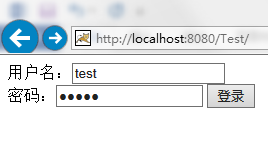
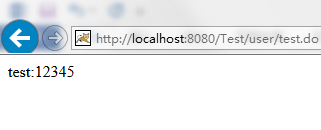
启动Tomcat后测试即可,正常情况下结果如下,说明框架已成功相应请求:
- 配置Hibernate集成
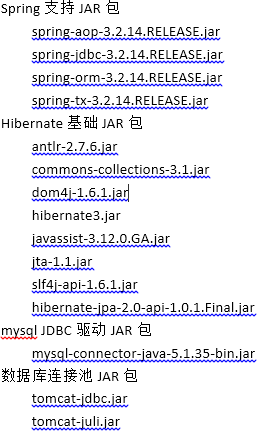
添加以下JAR包:
applicationContest.xml中添加Hibernate相关配置,hibernate的实体声明可以选择配置文件和注解两种方式,我个人比较倾向于配置文件方式,如下图所示:
    <bean id="dataSource" class="org.apache.tomcat.jdbc.pool.DataSource">

        <property name="url" value="jdbc:mysql://localhost:3306/test" />

        <property name="driverClassName" value="com.mysql.jdbc.Driver" />

        <property name="username" value="root" />

        <property name="password" value="root" />

    </bean>

    <bean id="sessionFactory" class="org.springframework.orm.hibernate3.LocalSessionFactoryBean">

        <property name="dataSource" ref="dataSource" />

        <property name="mappingLocations">

            <value>classpath*:/com/test/entity/*.cfg.xml</value>

        </property>

        <property name="hibernateProperties">

            <props>

                <prop key="hibernate.show_sql">true</prop>

            </props>

        </property>

    </bean>
由于Hibernate3必须在事务中处理数据访问,所以需要添加事务控制,个人倾向于使用aop方式,所以需要先添加tx和aop的文档配置,配置后文档声明部分代码如下:
<beans xmlns="http://www.springframework.org/schema/beans"

    xmlns:xsi="http://www.w3.org/2001/XMLSchema-instance"

    xmlns:context="http://www.springframework.org/schema/context"

    xmlns:tx="http://www.springframework.org/schema/tx"

    xmlns:aop="http://www.springframework.org/schema/aop"

    xsi:schemaLocation="http://www.springframework.org/schema/beans

         http://www.springframework.org/schema/beans/spring-beans-3.2.xsd

         http://www.springframework.org/schema/context

         http://www.springframework.org/schema/context/spring-context-3.2.xsd

         http://www.springframework.org/schema/tx

         http://www.springframework.org/schema/tx/spring-tx-3.2.xsd

         http://www.springframework.org/schema/aop

         http://www.springframework.org/schema/aop/spring-aop-3.2.xsd">
配置事务控制器,并通过aop将其织入到service切面进行事务控制,如下所示:
    <bean id="txManager" class="org.springframework.orm.hibernate3.HibernateTransactionManager">

        <property name="sessionFactory" ref="sessionFactory" />

    </bean>

    <tx:advice id="txAdvice" transaction-manager="txManager">

        <tx:attributes >

            <tx:method name="*" propagation="REQUIRED"/>

        </tx:attributes>

    </tx:advice>

    <aop:config>

        <aop:pointcut expression="execution(* com.test.service.*.*(..))" id="aopPointcut"/>

        <aop:advisor advice-ref="txAdvice" pointcut-ref="aopPointcut"/>

    </aop:config>
- 测试整体框架
Mysql中创建test_user表用于测试框架能否正常进行数据库的操作,此处我们测试在事务管理中进行保存操作,建表语句如下:
create table test_user (

    id varchar(36) primary key,

    username varchar(20) not null,

    password varchar(50) not null

);
创建Hibernate实体映射文件,内容如下:
<?xml version="1.0" encoding="UTF-8"?>

<!DOCTYPE hibernate-mapping PUBLIC

    "-//Hibernate/Hibernate Mapping DTD 3.0//EN"

    "http://www.hibernate.org/dtd/hibernate-mapping-3.0.dtd">

<hibernate-mapping>

    <class name="com.test.entity.User" table="test_user">

        <id name="id" type="java.lang.String" length="36">

            <column name="id" />

            <generator class="uuid" />

        </id>

        <property name="username" type="java.lang.String" length="10" >

            <column name="username" not-null="true" unique="true"/>

        </property>

        <property name="password" type="java.lang.String" length="32" >

            <column name="password" not-null="true" unique="true"/>

        </property>

    </class>

</hibernate-mapping>
创建UserDAO,暂定位于com.test.dao下,用于处理数据库操作,代码如下:
package com.test.dao;

import org.hibernate.SessionFactory;

import org.springframework.beans.factory.annotation.Autowired;

import org.springframework.stereotype.Repository;

import com.test.entity.User;

@Repository

public class UserDAO {

    @Autowired

    private SessionFactory sessionFactory;

    public String save(User user){

        return (String) sessionFactory.getCurrentSession().save(user);

    }

}
创建UserService,暂定位于com.test.service下,用于提供请求服务,代码如下:
package com.test.service;

import org.springframework.beans.factory.annotation.Autowired;

import org.springframework.stereotype.Service;

import com.test.dao.UserDAO;

import com.test.entity.User;

@Service

public class UserService {

    @Autowired

    private UserDAO userDAO;

    public String save(User user){

        return userDAO.save(user);

    }

}
修改UserController如下:
package com.test.controller;

import org.springframework.beans.factory.annotation.Autowired;

import org.springframework.stereotype.Controller;

import org.springframework.ui.ModelMap;

import org.springframework.web.bind.annotation.RequestMapping;

import com.test.entity.User;

import com.test.service.UserService;

@Controller

@RequestMapping("/user")

public class UserController {

    @Autowired

    private UserService userService;

    @RequestMapping("/test")

    public String test(User user,ModelMap model){

        userService.save(user);

        model.addAttribute(user);

        return "/return";

    }

}
至此项目内容应该如下图所示:
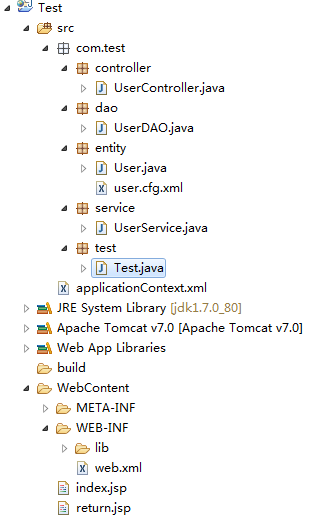
重启Tomcat后输入用户名和密码,点击按钮后查看数据库,正常结果为后台未报错且数据库有数据存入,如下图所示:
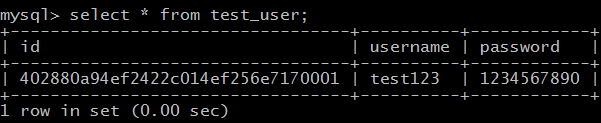
接下来我们测试下在出现异常的情况下能否正常回滚事务,修改Service代码如下:
package com.test.service;

import org.springframework.beans.factory.annotation.Autowired;

import org.springframework.stereotype.Service;

import com.test.dao.UserDAO;

import com.test.entity.User;

@Service

public class UserService {

    @Autowired

    private UserDAO userDAO;

    public String save(User user){

        userDAO.save(user);

        throw new RuntimeException("测试事务能否正常回滚!");

    }

}
重启Tomcat后测试框架能否正常回滚,正常情况下,后台会将自定义的异常抛出,而数据库中未出现第二条数据,框架集成到此结束,之后便可进行基于框架的开发工作了。
PS:各位有什么问题或者不同看法可以留言
SpringMVC + Spring 3.2.14 + Hibernate 3.6.10 集成详解的更多相关文章
- SpringMVC + Spring 3.2.14 + Hibernate 3.6.10
SpringMVC + Spring 3.2.14 + Hibernate 3.6.10 集成详解 注:此文档只说明简单的框架集成,各个框架的高级特性未涉及,刚刚接触框架的新人可能需要参考其他资料. ...
- Quartz学习——SSMM(Spring+SpringMVC+Mybatis+Mysql)和Quartz集成详解(四)
当任何时候觉你得难受了,其实你的大脑是在进化,当任何时候你觉得轻松,其实都在使用以前的坏习惯. 通过前面的学习,你可能大致了解了Quartz,本篇博文为你打开学习SSMM+Quartz的旅程!欢迎上车 ...
- Quartz学习——SSMM(Spring+SpringMVC+Mybatis+Mysql)和Quartz集成详解(转)
通过前面的学习,你可能大致了解了Quartz,本篇博文为你打开学习SSMM+Quartz的旅程!欢迎上车,开始美好的旅程! 本篇是在SSM框架基础上进行的. 参考文章: 1.Quartz学习——Qua ...
- (转) Quartz学习——SSMM(Spring+SpringMVC+Mybatis+Mysql)和Quartz集成详解(四)
http://blog.csdn.net/u010648555/article/details/60767633 当任何时候觉你得难受了,其实你的大脑是在进化,当任何时候你觉得轻松,其实都在使用以前的 ...
- Spring事务Transaction配置的五种注入方式详解
Spring事务Transaction配置的五种注入方式详解 前段时间对Spring的事务配置做了比较深入的研究,在此之间对Spring的事务配置虽说也配置过,但是一直没有一个清楚的认识.通过这次的学 ...
- 分享知识-快乐自己:Hibernate 中Criteria Query查询详解
1):Hibernate 中Criteria Query查询详解 当查询数据时,人们往往需要设置查询条件.在SQL或HQL语句中,查询条件常常放在where子句中. 此外,Hibernate还支持Cr ...
- Hibernate配置文件和映射文件详解
Hibernate是一个彻底的ORM(Object Relational Mapping,对象关系映射)开源框架. 我们先看一下官方文档所给出的,Hibernate 体系结构的高层视图: 其中PO=P ...
- S2SH框架集成详解(Struts 2.3.16 + Spring 3.2.6 + Hibernate 3.6.10)
近期集成了一次较新版本的s2sh,出现了不少问题,网上资料也是良莠不齐,有的甚至就是扯淡,简单的把jar包扔进去就以为是集成成功了,在这里整理一下详细的步骤,若哪位有什么不同看法,可以留言,欢迎批评改 ...
- spring+websocket综合(springMVC+spring+MyBatis这是SSM框架和websocket集成技术)
java-websocket该建筑是easy.儿童无用的框架可以在这里下载主线和个人教学好java-websocket计划: Apach Tomcat 8.0.3+MyEclipse+maven+JD ...
随机推荐
- hadoop 2.0--YARN
从2012年8月开始Apache Hadoop YARN(YARN = Yet Another Resource Negotiator)成了Apache Hadoop的一项子工程.自此Apache H ...
- mysql申请账户
INSERT INTO mysql.user set Host='%',user='alipay',password=password('alipay'),Select_priv='Y',Insert ...
- VS下面的编译错误-----转换到 COFF 期间失败: 文件无效或损坏
最近写了一个vs的小项目,然后编译的时候vs提示了"转换到 COFF 期间失败: 文件无效或损坏"的问题. 去网上搜索了一个解决方案.原作者的链接是:http://jingyan. ...
- webStorm中的混乱代码格式化
Mac上 command + alt + l windows上 control + alt + l
- 十六进制字符串转化为byte数组
工作上有这样的需求之前找了好多都不行,好不容易有个可以的赶紧留下来. 原址:http://blog.163.com/roadwalker@126/blog/static/113561841201013 ...
- Codeforces 731D Funny Game
Description Once upon a time Petya and Gena gathered after another programming competition and decid ...
- Occupy Cities
hdu4606:http://acm.hdu.edu.cn/showproblem.php?pid=4606 题意:在一个二维坐标系中,有n个城市,坐标给出来了,然后有p个士兵要去占领这n个城市,但是 ...
- lc面试准备:Power of Two
1 题目 Given an integer, write a function to determine if it is a power of two. 接口 boolean isPowerOfTw ...
- 关于java、Android中Math的一些用法
java.math.Math类常用的常量和方法: Math.PI 记录的圆周率Math.E记录e的常量Math.abs 求绝对值Math.sin 正弦函数 Math.asin 反正弦函数Math.co ...
- 公有云开启全面竞争时代——青云QingCloud
网界网本期[封面报道]公有云开启全面竞争时代 [CNW.com.cn 专稿] 险滩急流之后,公有云[注]服务市场的开拓者们终于看到了一片丰饶之海. 2013年,中国云计算[注]产业起步的第五年,公有云 ...