
5. repeater图片放大
当把鼠标放在一张小图片上时,图片会自动放大,离开时它变小。
我们在静态页面中可以用jQuery来操作。如下为html中的源码。
<!DOCTYPE html PUBLIC "-//W3C//DTD XHTML 1.0 Transitional//EN" "http://www.w3.org/TR/xhtml1/DTD/xhtml1-transitional.dtd">

<html xmlns="http://www.w3.org/1999/xhtml">

<head>

    <title></title>

    <script src="js/jquery-2.0.2.js" type="text/javascript"></script>

    <script type="text/javascript">

        $(function () {

            $("#table1 img").mouseover(function (e) {

            $(this).animate({ "width": "200", "height": 200 }, 1000);

            $("#table1 img").not(this).animate({ "width": "50", "height": "50" });

            });

            $("#table1 img").click(function (e) {

                $("#div img").attr("src", $(this).attr("src"));

                $("#div").css("display", "").css("left", e.pageX).css("top", e.pageY);

            });

        });

    </script>

</head>

<body>

<table id="table1" border="0" cellspacing="0" cellpadding="0"  >

    <tr>

        <td><img src="objsrc/imgs/1.jpg" width="50" height="50" /></td>

        <td><img src="objsrc/imgs/2.jpg" width="50" height="50" /></td>

        <td><img src="objsrc/imgs/3.jpg" width="50" height="50" /></td>

        <td><img src="objsrc/imgs/4.jpg" width="50" height="50" /></td>

        <td><img src="objsrc/imgs/5.jpg" width="50" height="50" /></td>

        <td><img src="objsrc/imgs/6.jpg" width="50" height="50" /></td>

    </tr>

</table>

<div id="div" style="display:none;position:absolute">

       <img src="" />

    </div>

</body>

</html>
截图:
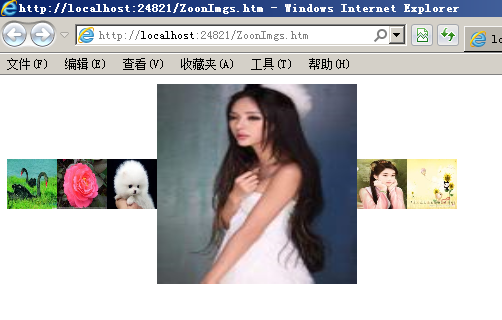
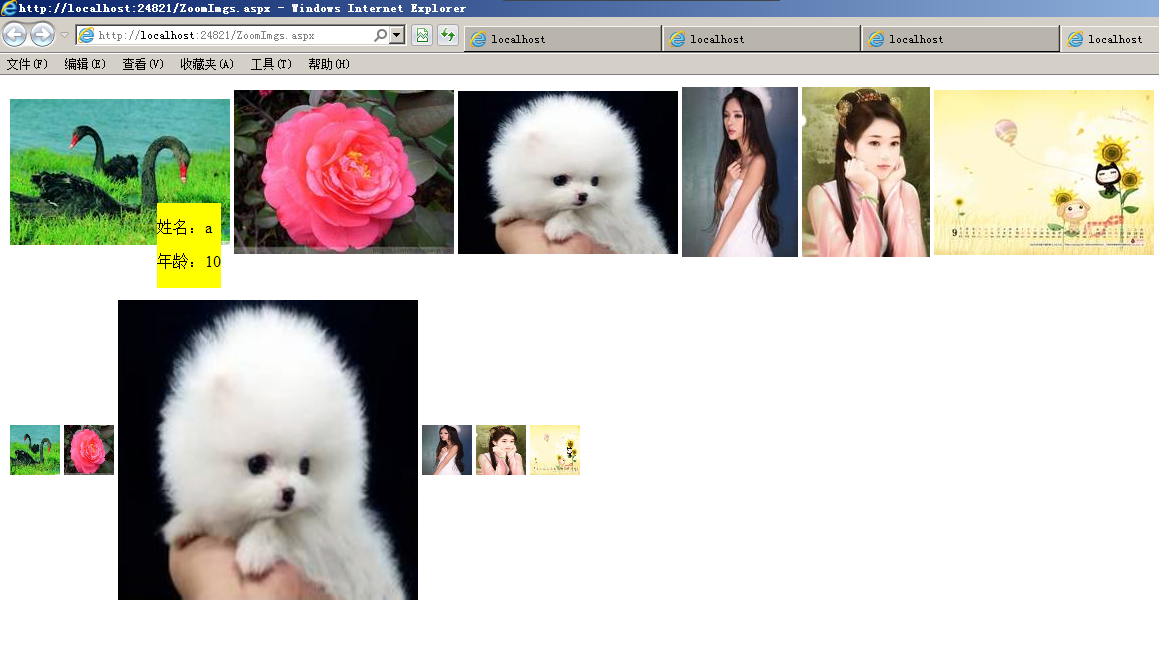
在用repeater显示数据库中的图片时,我们也可以用jquery方法把鼠标移动到图片上放大 。基本的操作方式和上例中的连接数据库是一样的,此处省略操作步骤。这里面有两个Repeater,一个为当鼠标在图片上移动时显示人的名称,另一个为自动放大图片。
它的源码为:
<%@ Page Language="C#" AutoEventWireup="true" CodeBehind="ZoomImgs.aspx.cs" Inherits="Repeater.ZoomImgs" %>

<!DOCTYPE html PUBLIC "-//W3C//DTD XHTML 1.0 Transitional//EN" "http://www.w3.org/TR/xhtml1/DTD/xhtml1-transitional.dtd">

<html xmlns="http://www.w3.org/1999/xhtml">

<head runat="server">

    <title></title>

    <script src="js/jquery-2.0.2.js" type="text/javascript"></script>

</head>

<body>

    <form id="form1" runat="server">

    <div>

        <asp:ObjectDataSource ID="ObjectDataSource1" runat="server"

            DeleteMethod="Delete" InsertMethod="Insert"

            OldValuesParameterFormatString="original_{0}" SelectMethod="GetData"

            TypeName="Repeater.objsrc.DAL.DataSetUserTableAdapters.T_UsersTableAdapter"

            UpdateMethod="Update">

            <DeleteParameters>

                <asp:Parameter Name="Original_id" Type="Int32" />

            </DeleteParameters>

            <InsertParameters>

                <asp:Parameter Name="name" Type="String" />

                <asp:Parameter Name="age" Type="Int32" />

                <asp:Parameter Name="imgname" Type="String" />

            </InsertParameters>

            <UpdateParameters>

                <asp:Parameter Name="name" Type="String" />

                <asp:Parameter Name="age" Type="Int32" />

                <asp:Parameter Name="imgname" Type="String" />

                <asp:Parameter Name="Original_id" Type="Int32" />

            </UpdateParameters>

        </asp:ObjectDataSource>

        <asp:Repeater ID="Repeater1" runat="server" DataSourceID="ObjectDataSource1">

          <HeaderTemplate><table id="imgtable"><tr></HeaderTemplate>

          <ItemTemplate>

            <td><img src='objsrc/imgs/<%#Eval("imgname")%>'  a1='<%#Eval("name") %>' a2='<%#Eval("age") %>' /></td>

          </ItemTemplate>

          <FooterTemplate></tr></table></FooterTemplate>

        </asp:Repeater>

        <br />

        <br />

        <asp:Repeater ID="Repeater2" runat="server" DataSourceID="ObjectDataSource1">

        <HeaderTemplate><table id="zoomtable"><tr></HeaderTemplate>

        <ItemTemplate>

        <td><img src='objsrc/imgs/<%#Eval("imgname") %>' width="" height="" /></td>

        </ItemTemplate>

        <FooterTemplate></tr></table></FooterTemplate>

        </asp:Repeater>

    <script type="text/javascript">

        $("#zoomtable img").mouseover(function () {

            /*$(this).attr("width", 200).attr("height", 200);*/

            $(this).animate({ "width": "", "height": "" }, "slow");

            $("#zoomtable img").not(this).animate({"width":"","height":""});

        });

    </script>

    </div>

    <div id="imgdiv" style="position:absolute;display:none;border:1px;background-color:Yellow">

      <p >姓名:<span id="span1"></span></p>

      <p >年龄:<span id="span2"></span></p>

    </div>

    </form>

    <script type="text/javascript">

        $("#imgtable img").mousemove(function (e) {

            $("#span1").text($(this).attr("a1"));

            $("#span2").text($(this).attr("a2"));

            $("#imgdiv").css("top",e.pageY).css("left", e.pageX).show();

        });

    </script>

</body>

</html>
截图:
5. repeater图片放大的更多相关文章
- (JS+CSS)实现图片放大效果
代码很简单,在这里就不过多阐述,先上示例图: 实现过程: html部分代码很简单 <div id="outer"> <p>点击图片</p> &l ...
- jQuery Lightbox图片放大预览
简介:jQuery Lightbox图片放大预览代码是一款可以在用户点击页面中的小图片时,将该图片的高清版本以Lightbox的方式放大显示在页面的中间,提高用户的体验度. 效果展示 http://h ...
- 网页mp3语音展示,点击图片放大,点击图片跳转链接,调表格
查看mp3语音 <td class="value"><embed src="${sounds.soundName}" type="a ...
- jq随手写图片放大
html: <img id="img1" src="<?php echo $info->business_licence_img; ?>" ...
- 推荐两款简单好用的图片放大jquery插件
一.zoomfiy.js 推荐可以从这里下载 使用说明: 使用该jquery 插件引入该插件的js:zoomfiy.js 或 min引入该插件的css:zoomfiy.css 或 min前后顺序都可j ...
- js图片放大效果
实现购物网站里的图片放大效果,jqzoom很好用.今天才接触它,很快就上手了.看了一个示例,在放大图像上方貌似有水印,后经排查,原来是图片的标题,然后设置title为false,搞定.
- magento中如何实现产品图片放大效果
Magento列表页用jQuery实现产品图片放大效果今天看到个网站,鼠标移到列表页的产品图片上,旁边会弹出一个大图,感觉不错,就自己在Magento里写了个.先看看效果 这个效果比较好实现,打开li ...
- 41.Android之图片放大缩小学习
生活中经常会用到图片放大和缩小,今天简单学习下. 思路:1.添加一个操作图片放大和缩小类; 2. 布局文件中引用这个自定义控件; 3. 主Activity一些修改. 代码如下: 增加图片操作类: ...
- 图片放大方法、、菜单栏的位置随滚轮移动固定方法、、<a></a>去外层虚线方法:a:focus { outline:none; -moz-outline:none;};
图片放大方法一: <style type="text/css">.xt{ width:230px; height:230px;}.tp{ width:230px; he ...
随机推荐
- Notepad++如何安装并使用source code pro 字体 转
http://blog.yucanlin.cn/2015/04/08/linux-%E5%AE%89%E8%A3%85-source-code-pro-%E5%AD%97%E4%BD%93/ ht ...
- [转] npm install 本地安装与全局安装的区别
npm的包安装分为本地安装(local).全局安装(global)两种,从敲的命令行来看,差别只是有没有-g而已,比如 npm install grunt # 本地安装 npm install -g ...
- iOS图片压缩
项目中常会遇到,上传图片的操作,由于iPhone手机直接拍照的图片往往比较大,一般3-4M,如果直接上传不做处理会浪费用户很多流量,再者有很多场景并不需要高清图片,所以在上传图片前对图片进行压缩,是很 ...
- U3D 通过预置对象实现手动创建精灵
一: 这种可以在游戏的一开始,不显示某些物体,而且通过某种时机,来显示所需要显示的物体 这里就用到了实例化预置对象. 实例化更多通常用于实例投射物(如子弹.榴弹.破片.飞行的铁球等),AI敌人,粒子爆 ...
- 在线预览文件(pdf)
1.flash版(借助flexpaper工具) 可以把pdf文件用pdf2swf工具转换成swf文件.下载地址http://www.swftools.org/download.html 转换代码如下: ...
- listview的动态加载数据问题
1:调用adapter.notifyDataSetChanged()却不起作用 原因可能有一下几点 1.数据源没有更新,调用notifyDataSetChanged无效. 2.数据源更新了,但是它指向 ...
- bootstrap 下的 validation插件
http://reactiveraven.github.io/jqBootstrapValidation/
- 在MVC中写Filter时经常filterContext无法代码提示HttpContext的方法和属性的原因
需要用System.Web.Abstractions.dll HttpContextBase是在System.Web.Abstractions下的,添加对System.Web.Abstractions ...
- 服务端配置scan ip
节点1确认当前监听状态 SQL> show parameter listener; NAME TYPE VALUE ...
- 最简单的基于FFmpeg的移动端例子:IOS 推流器
转至:http://blog.csdn.net/leixiaohua1020/article/details/47072519 ================================== ...