
Exercise : Self-Taught Learning
First, you will train your sparse autoencoder on an "unlabeled" training dataset of handwritten digits. This produces feature that are penstroke-like. We then extract these learned features from a labeled dataset of handwritten digits. These features will then be used as inputs to the softmax classifier that you wrote in the previous exercise.
Concretely, for each example in the the labeled training dataset  , we forward propagate the example to obtain the activation of the hidden units
  . We now represent this example using (the "replacement" representation), and use this to as the new feature representation with which to train the softmax classifier.
Finally, we also extract the same features from the test data to obtain predictions.
In this exercise, our goal is to distinguish between the digits from 0 to 4. We will use the digits 5 to 9 as our "unlabeled" dataset with which to learn the features; we will then use a labeled dataset with the digits 0 to 4 with which to train the softmax classifier.
Step 1: Generate the input and test data sets
Step 2: Train the sparse autoencoder
use the unlabeled data (the digits from 5 to 9) to train a sparse autoencoder
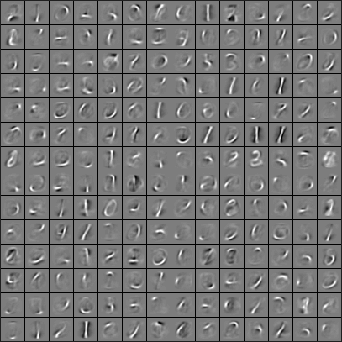
When training is complete, you should get a visualization of pen strokes like the image shown below:
Informally, the features learned by the sparse autoencoder should correspond to penstrokes.
Step 3: Extracting features
After the sparse autoencoder is trained, you will use it to extract features from the handwritten digit images.
Step 4: Training and testing the logistic regression model
Use your code from the softmax exercise (softmaxTrain.m) to train a softmax classifier using the training set features (trainFeatures) and labels (trainLabels).
Step 5: Classifying on the test set
Finally, complete the code to make predictions on the test set (testFeatures) and see how your learned features perform! If you've done all the steps correctly, you should get an accuracy of about 98% percent.
code
%% CS294A/CS294W Self-taught Learning Exercise

%  Instructions

%  ------------

%

%  This file contains code that helps you get started on the

%  self-taught learning. You will need to complete code in feedForwardAutoencoder.m

%  You will also need to have implemented sparseAutoencoderCost.m and

%  softmaxCost.m from previous exercises.

%

%% ======================================================================

%  STEP : Here we provide the relevant parameters values that will

%  allow your sparse autoencoder to get good filters; you do not need to

%  change the parameters below.

inputSize  =  * ;

numLabels  = ;

hiddenSize = ;

sparsityParam = 0.1; % desired average activation of the hidden units.

                     % (This was denoted by the Greek alphabet rho, which looks like a lower-case "p",

                     %  in the lecture notes).

lambda = 3e-;       % weight decay parameter

beta = ;            % weight of sparsity penalty term

maxIter = ;

%% ======================================================================

%  STEP : Load data from the MNIST database

%

%  This loads our training and test data from the MNIST database files.

%  We have sorted the data for you in this so that you will not have to

%  change it.

% Load MNIST database files

mnistData   = loadMNISTImages('train-images.idx3-ubyte');

mnistLabels = loadMNISTLabels('train-labels.idx1-ubyte');

% Set Unlabeled Set (All Images)

% Simulate a Labeled and Unlabeled set

labeledSet   = find(mnistLabels >=  & mnistLabels <= );

unlabeledSet = find(mnistLabels >= );

%%增加的一行代码

unlabeledSet = unlabeledSet(:end/);

numTest = round(numel(labeledSet)/);%拿一半的样本来训练%

numTrain = round(numel(labeledSet)/);

trainSet = labeledSet(:numTrain);

testSet  = labeledSet(numTrain+:*numTrain);

unlabeledData = mnistData(:, unlabeledSet);%%为什么这两句连在一起都要出错呢?

% pack;

trainData   = mnistData(:, trainSet);

trainLabels = mnistLabels(trainSet)' + 1; % Shift Labels to the Range 1-5

% mnistData2 = mnistData;

testData   = mnistData(:, testSet);

testLabels = mnistLabels(testSet)' + 1;   % Shift Labels to the Range 1-5

% Output Some Statistics

fprintf('# examples in unlabeled set: %d\n', size(unlabeledData, ));

fprintf('# examples in supervised training set: %d\n\n', size(trainData, ));

fprintf('# examples in supervised testing set: %d\n\n', size(testData, ));

%% ======================================================================

%  STEP : Train the sparse autoencoder

%  This trains the sparse autoencoder on the unlabeled training

%  images.

%  Randomly initialize the parameters

theta = initializeParameters(hiddenSize, inputSize);

%% ----------------- YOUR CODE HERE ----------------------

%  Find opttheta by running the sparse autoencoder on

%  unlabeledTrainingImages

opttheta = theta;

addpath minFunc/

options.Method = 'lbfgs';

options.maxIter = ;

options.display = 'on';

[opttheta, loss] = minFunc( @(p) sparseAutoencoderLoss(p, ...

      inputSize, hiddenSize, ...

      lambda, sparsityParam, ...

      beta, unlabeledData), ...

      theta, options);

%% -----------------------------------------------------

% Visualize weights

W1 = reshape(opttheta(:hiddenSize * inputSize), hiddenSize, inputSize);

display_network(W1');

%%======================================================================

%% STEP : Extract Features from the Supervised Dataset

%

%  You need to complete the code in feedForwardAutoencoder.m so that the

%  following command will extract features from the data.

trainFeatures = feedForwardAutoencoder(opttheta, hiddenSize, inputSize, ...

                                       trainData);

testFeatures = feedForwardAutoencoder(opttheta, hiddenSize, inputSize, ...

                                       testData);

%%======================================================================

%% STEP : Train the softmax classifier

softmaxModel = struct;

%% ----------------- YOUR CODE HERE ----------------------

%  Use softmaxTrain.m from the previous exercise to train a multi-class

%  classifier.

%  Use lambda = 1e- for the weight regularization for softmax

lambda = 1e-;

inputSize = hiddenSize;

numClasses = numel(unique(trainLabels));%unique为找出向量中的非重复元素并进行排序

% You need to compute softmaxModel using softmaxTrain on trainFeatures and

% trainLabels

% You need to compute softmaxModel using softmaxTrain on trainFeatures and

% trainLabels

options.maxIter = ;

softmaxModel = softmaxTrain(inputSize, numClasses, lambda, ...

                            trainFeatures, trainLabels, options);

%% -----------------------------------------------------

%%======================================================================

%% STEP : Testing

%% ----------------- YOUR CODE HERE ----------------------

% Compute Predictions on the test set (testFeatures) using softmaxPredict

% and softmaxModel

[pred] = softmaxPredict(softmaxModel, testFeatures);

%% -----------------------------------------------------

% Classification Score

fprintf('Test Accuracy: %f%%\n', *mean(pred(:) == testLabels(:)));

% (note that we shift the labels by , so that digit  now corresponds to

%  label )

%

% Accuracy is the proportion of correctly classified images

% The results for our implementation was:

%

% Accuracy: 98.3%

%

%
function [activation] = feedForwardAutoencoder(theta, hiddenSize, visibleSize, data) % theta: trained weights from the autoencoder
% visibleSize: the number of input units (probably )
% hiddenSize: the number of hidden units (probably )
% data: Our matrix containing the training data as columns. So, data(:,i) is the i-th training example. % We first convert theta to the (W1, W2, b1, b2) matrix/vector format, so that this
% follows the notation convention of the lecture notes. W1 = reshape(theta(:hiddenSize*visibleSize), hiddenSize, visibleSize);
b1 = theta(*hiddenSize*visibleSize+:*hiddenSize*visibleSize+hiddenSize); %% ---------- YOUR CODE HERE --------------------------------------
% Instructions: Compute the activation of the hidden layer for the Sparse Autoencoder.
activation = sigmoid(W1*data+repmat(b1,[,size(data,)])); %------------------------------------------------------------------- end %-------------------------------------------------------------------
% Here's an implementation of the sigmoid function, which you may find useful
% in your computation of the costs and the gradients. This inputs a (row or
% column) vector (say (z1, z2, z3)) and returns (f(z1), f(z2), f(z3)). function sigm = sigmoid(x)
sigm = ./ ( + exp(-x));
end
Exercise : Self-Taught Learning的更多相关文章
- 一个Self Taught Learning的简单例子
idea: Concretely, for each example in the the labeled training dataset xl, we forward propagate the ...
- Andrew Ng机器学习 四:Neural Networks Learning
背景:跟上一讲一样,识别手写数字,给一组数据集ex4data1.mat,,每个样例都为灰度化为20*20像素,也就是每个样例的维度为400,加载这组数据后,我们会有5000*400的矩阵X(5000个 ...
- Unsupervised Feature Learning and Deep Learning(UFLDL) Exercise 总结
7.27 暑假开始后,稍有时间,“搞完”金融项目,便开始跑跑 Deep Learning的程序 Hinton 在Nature上文章的代码 跑了3天 也没跑完 后来Debug 把batch 从200改到 ...
- 【DeepLearning】Exercise:Learning color features with Sparse Autoencoders
Exercise:Learning color features with Sparse Autoencoders 习题链接:Exercise:Learning color features with ...
- 【DeepLearning】Exercise:Self-Taught Learning
Exercise:Self-Taught Learning 习题链接:Exercise:Self-Taught Learning feedForwardAutoencoder.m function [ ...
- MachineLearning Exercise 4 :Neural Networks Learning
nnCostFunction 消耗公式: a1 = [ones(m,) X]; z2 = a1*Theta1'; pre = sigmoid(a1*Theta1'); a2 = [ones(m,) p ...
- How do I learn machine learning?
https://www.quora.com/How-do-I-learn-machine-learning-1?redirected_qid=6578644 How Can I Learn X? ...
- A Brief Overview of Deep Learning
A Brief Overview of Deep Learning (This is a guest post by Ilya Sutskever on the intuition behind de ...
- 深度学习Deep learning
In the last chapter we learned that deep neural networks are often much harder to train than shallow ...
随机推荐
- 前端图像 裁剪利器 JQuerJjcrop+裁剪图像保存教程
由于一个项目中需要用到用户头像上传裁剪组件,这两天便网上找了一些相关插件,主要由以下几种插件: 1.Image Cropper:http://elemefe.github.io/image-cropp ...
- Python的matplotlib库画图不能显示中文问题解决
有两种解决办法: 一种是在代码里设置为能显示中文的字体,如微软雅黑(msyh.ttf)和黑体(simsun.ttc) 如下在要画图的代码前添加: import matplotlib.pyplot as ...
- UI Framework-1: Browser Window
Browser Window The Chromium browser window is represented by several objects, some of which are incl ...
- input的选中与否以及将input的value追加到一个数组里
html布局 <div class="mask"> //每一个弹层都有一个隐藏的input <label> <input hidden="& ...
- iOS下调用元素的focus方法,input元素不聚焦,键盘不弹起的问题
页面元素 <input type="text" ref="elInput"/> <div style="margin-top:20p ...
- Python学习笔记(5)--数据结构之字典dict
字典(dict) 定义:键值对集合 初始化:{}, {'1' : 'abc', '2' : 'def'} 1.增加:单个数据直接赋值 update(dict2) ---把dict2的元素加入到dic ...
- 怎么打开/查看MySQL的SQL记录
mysql在执行sql的时候会在日志当中记录很多信息,当然包括执行的所有语句.下面以使用navicat for mysql为例,来展示一下如何打开/查看MySQL的SQL记录: 打开navicat f ...
- 怎样查看电脑的IP地址
在DOW窗体 :cmd->ipconfig 见截图:
- Effective C++ Item 30 inline里里外外
本文为senlie原创.转载请保留此地址:http://blog.csdn.net/zhengsenlie Item 44 46 1.将大多数 inlining 限制在小型.被频繁调用的函数身上.这可 ...
- mysql通过DATE_FORMAT将错误数据恢复
因为如今新开发项目,同事造数据的时候,将时间类型格式造成"20150708".可是实际希望的数据格式是:"2015-07-08" . 数据库使用的是mysql. ...