
Eclipse插件RCP桌面应用开发的点点滴滴
Eclipse插件开发的点点滴滴
新公司做的是桌面应用程序, 与之前一直在做的web页面 ,相差甚大 。
这篇文章是写于2022年10月底,这时在新公司已经入职了快三月。写作目的是:国内对于eclipse插件开发相关的文档是少之又少,这三个月我们小组翻遍了国外文档,勉强将软件拼凑出并release出测试版本,为了方便同行以及自我学习,所以想把这几个月学到的eclipse rcp插件相关知识写下来。
一、 Wizard部分
Wizard 一般用于向导式对话框 ,eclipse的新建项目就是一个典型的wizard 。wizard一般由几个wizard page 组成 ,通过按钮控制 上一页下一页完成取消 。
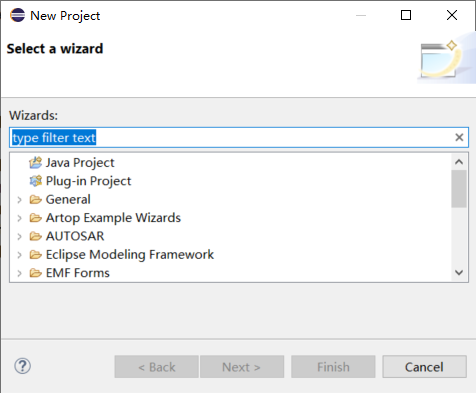
1.wizardpages
wizardpage1
package de.vogella.rcp.intro.wizards.wizard;

import org.eclipse.jface.wizard.WizardPage;

import org.eclipse.swt.SWT;

import org.eclipse.swt.events.KeyEvent;

import org.eclipse.swt.events.KeyListener;

import org.eclipse.swt.layout.GridData;

import org.eclipse.swt.layout.GridLayout;

import org.eclipse.swt.widgets.Composite;

import org.eclipse.swt.widgets.Label;

import org.eclipse.swt.widgets.Text;

public class MyPageOne extends WizardPage {

    private Text text1;

    private Composite container;

    public MyPageOne() {

        super("First Page");

        setTitle("First Page");

        setDescription("Fake Wizard: First page");

    }

    @Override

    public void createControl(Composite parent) {

        container = new Composite(parent, SWT.NONE);

        GridLayout layout = new GridLayout();

        container.setLayout(layout);

        layout.numColumns = 2;

        Label label1 = new Label(container, SWT.NONE);

        label1.setText("Put a value here.");

        text1 = new Text(container, SWT.BORDER | SWT.SINGLE);

        text1.setText("");

        text1.addKeyListener(new KeyListener() {

            @Override

            public void keyPressed(KeyEvent e) {

            }

            @Override

            public void keyReleased(KeyEvent e) {

                if (!text1.getText().isEmpty()) {

                    setPageComplete(true);

                }

            }

        });

        GridData gd = new GridData(GridData.FILL_HORIZONTAL);

        text1.setLayoutData(gd);

        // required to avoid an error in the system

        setControl(container);

        setPageComplete(false);

    }

    public String getText1() {

        return text1.getText();

    }

}
wizardpage2
package de.vogella.rcp.intro.wizards.wizard;

import org.eclipse.jface.wizard.WizardPage;

import org.eclipse.swt.SWT;

import org.eclipse.swt.events.KeyEvent;

import org.eclipse.swt.events.KeyListener;

import org.eclipse.swt.layout.GridData;

import org.eclipse.swt.layout.GridLayout;

import org.eclipse.swt.widgets.Button;

import org.eclipse.swt.widgets.Composite;

import org.eclipse.swt.widgets.Label;

import org.eclipse.swt.widgets.Text;

public class MyPageTwo extends WizardPage {

    private Text text1;

    private Composite container;

    public MyPageTwo() {

        super("Second Page");

        setTitle("Second Page");

        setDescription("Now this is the second page");

        setControl(text1);

    }

    @Override

    public void createControl(Composite parent) {

        container = new Composite(parent, SWT.NONE);

        GridLayout layout = new GridLayout();

        container.setLayout(layout);

        layout.numColumns = 2;

        Label label1 = new Label(container, SWT.NONE);

        label1.setText("Say hello to Fred");

        text1 = new Text(container, SWT.BORDER | SWT.SINGLE);

        text1.setText("");

        text1.addKeyListener(new KeyListener() {

            @Override

            public void keyPressed(KeyEvent e) {

                // TODO Auto-generated method stub

            }

            @Override

            public void keyReleased(KeyEvent e) {

                if (!text1.getText().isEmpty()) {

                    setPageComplete(true);

                }

            }

        });

        GridData gd = new GridData(GridData.FILL_HORIZONTAL);

        text1.setLayoutData(gd);

        Label labelCheck = new Label(container, SWT.NONE);

        labelCheck.setText("This is a check");

        Button check = new Button(container, SWT.CHECK);

        check.setSelection(true);

        // required to avoid an error in the system

        setControl(container);

        setPageComplete(false);

    }

    public String getText1() {

        return text1.getText();

    }

}
①自定义wizardpage主要是继承JFACE 的 WizardPage ,并重写 createControl方法。 在createControl方法中,可以对你的向导页面组件进行布局、添加监听等动作。
②对于当前页面的标题、描述等信息,可以在构造函数中通过setTitle 和 setDescription方法来设置
2.wizard
wizardpage添加好后,需要新建一个wizard类来管理它们 。
MyWizard
package de.vogella.rcp.intro.wizards.wizard;

import org.eclipse.jface.wizard.Wizard;

public class MyWizard extends Wizard {

    protected MyPageOne one;

    protected MyPageTwo two;

    public MyWizard() {

        super();

        setNeedsProgressMonitor(true);

    }

    @Override

    public String getWindowTitle() {

        return "Export My Data";

    }

    @Override

    public void addPages() {

        one = new MyPageOne();

        two = new MyPageTwo();

        addPage(one);

        addPage(two);

    }

    @Override

    public boolean performFinish() {

        // Print the result to the console

        System.out.println(one.getText1());

        System.out.println(two.getText1());

        return true;

    }

}
① 自定义wizard继承 JFACE的 Wizard类 。
重写addPage()方法,为向导添加向导页。
重写performFinish()方法,指定点击finish按钮后完成的动作.
重写canFinish()方法,FINISH按钮是否可以点击,
可以通过这个方法,来判断是否是最后一页,最后一页才可以点FINISH按钮
@Override

	public boolean canFinish() {

		if (this.getContainer().getCurrentPage() instanceof FilePreprocessingWizardPage) // FilePreprocessingWizardPage为最后一个页面

			return true;

		else

			return false;

	}
重写getNextPage()方法, 下一页
3.WizardDialog
wizardDialog 一般用于管理向导页的按钮,如果你想将原有的next/finish/cancel等按钮重写,就需要新建这个类。
下面是我项目中遇到的代码,需求是:最后一个页不再显示next按钮,而是改为start,并执行相关功能。
第一页finish不可点 (这个由wizard类的canfinish方法控制):

第二页finish可以点、next 变为start

点击查看代码
import org.eclipse.jface.dialogs.IDialogConstants;

import org.eclipse.jface.wizard.IWizard;

import org.eclipse.jface.wizard.IWizardPage;

import org.eclipse.jface.wizard.WizardDialog;

import org.eclipse.swt.widgets.Shell;

import org.eclipse.swt.widgets.Button;

public class InputFileWizardDialog extends WizardDialog {

	private Button startBtn;

	private Button nextButton;

	public InputFileWizardDialog(Shell parentShell, IWizard newWizard) {

		super(parentShell, newWizard);

	}

	@Override

	protected void buttonPressed(int buttonId) {

		switch (buttonId) {

		case IDialogConstants.HELP_ID: {

			helpPressed();

			break;

		}

		case IDialogConstants.BACK_ID: {

			backPressed();

			break;

		}

		case IDialogConstants.NEXT_ID: {

			nextPressed();

			break;

		}

		case IDialogConstants.FINISH_ID: {

			finishPressed();

			break;

		}

		}

	}

	@Override

	protected void nextPressed() {

		IWizardPage currentPage = getCurrentPage();

		IWizardPage nextPage = currentPage.getNextPage();

		if (currentPage instanceof FilePreprocessingWizardPage) {

			((FilePreprocessingWizardPage) currentPage).startButtonClick();

		}

		if (nextPage instanceof FilePreprocessingWizardPage) { // last page

			if (nextPage.getControl() != null)

				nextPage.dispose();

			showPage(nextPage);

			startBtn = this.getButton(IDialogConstants.NEXT_ID);

			startBtn.setText("Start");

			startBtn.setEnabled(true);

		}

	}

	/**

	 * The Back button has been pressed.

	 */

	@Override

	protected void backPressed() {

		IWizardPage page = getCurrentPage().getPreviousPage();

		super.backPressed();

		if (!(page instanceof FilePreprocessingWizardPage)) { // last page

			nextButton = this.getButton(IDialogConstants.NEXT_ID);

			nextButton.setText(IDialogConstants.NEXT_LABEL);

		}

	}

}
①buttonPressed()方法监听按钮被点击后执行的方法
②nextPressed()方法,下一页 。 这里判断当前页面的下一页是否为最后一页,如果是则通过setTest方法将按钮改为start按钮,并将其设为可用状态 。 如果当前页面已经是最后一页,则执行在最后一页中定义的startbuttonclick方法 。
③ backPressed()方法,点上一页时,将上个方法中被改变的next按钮复原
4.最后,打开一个wizard
一般写在一个按钮监听中 , 或者菜单功能里 。
按钮监听:
Button button = new Button(parent, SWT.PUSH);

button.setText("Open Wizard");

button.addSelectionListener(new SelectionAdapter() {

    @Override

    public void widgetSelected(SelectionEvent e) {

        WizardDialog wizardDialog = new WizardDialog(parent.getShell(),

            new MyWizard());

        if (wizardDialog.open() == Window.OK) {

            System.out.println("Ok pressed");

        } else {

            System.out.println("Cancel pressed");

        }

    }

});
菜单功能,这里用的是E4的handle机制
import org.eclipse.e4.core.di.annotations.Execute;

import org.eclipse.ui.IWorkbench;

import org.eclipse.jface.window.Window;

import org.eclipse.jface.wizard.WizardDialog;

import org.eclipse.swt.widgets.Shell;

public class InputFilesAssistantHandle {

	@Execute

	public void execute(IWorkbench iWorkbench, Shell shell) {

		WizardDialog wizardDialog = new WizardDialog(shell, new MyWizard());

		WizardDialog.setDefaultImage(ApplicationContext.getImage(Constant.PLUGIN_ID, "icons/module/cn_icon.png"));

		if (wizardDialog.open() == Window.OK) {

		} else {

		}

	}

}
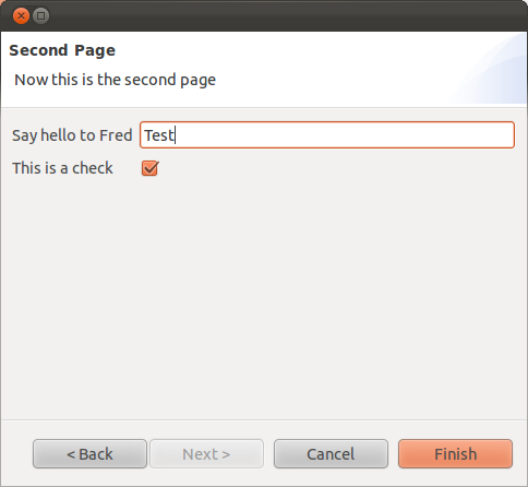
①可以通过setDefaultImage来设置向导的图标
效果:
进阶:
① wizardpage 的动态刷新 、 联动
你的wizardpages 初始化是在wizard打开的时候, 而不是点next或back时再初始化 。 所以,如果你想将两个wizardpage进行联动,通过上面的代码难以实现 。
阅读源码会发现,
源码
    private void updateForPage(IWizardPage page) {

     // ensure this page belongs to the current wizard

     if (wizard != page.getWizard()) {

       setWizard(page.getWizard());

      }

     // ensure that page control has been created

     // (this allows lazy page control creation)

     if (page.getControl() == null) {

         page.createControl(pageContainer);

         // the page is responsible for ensuring the created control is accessable

         // via getControl.

         Assert.isNotNull(page.getControl());

         // ensure the dialog is large enough for this page

         updateSize(page);

     }

     // make the new page visible

     IWizardPage oldPage = currentPage;

     currentPage = page;

     currentPage.setVisible(true);

     if (oldPage != null) {

       oldPage.setVisible(false);

      }

     // update the dialog controls

     update();

    }
点next或back按钮后,页面之所以不会再初始化,是因为他会有个判断page.getControl() == null,因此我们只要将想办法在调转到某个WizardPage的时候,将其control设置为null就可以了.
所以,在点next 或 back 按钮时 ,可以加如下代码:
// 对参数页必须重绘
IWizardPage page = getNextPage();
if (page.getControl() != null)
page.dispose();
并在你想要刷新的页面中重写dispose方法:
public void dispose() {
super.dispose();
setControl(null);
}
二、未完待续。。。
Eclipse插件RCP桌面应用开发的点点滴滴的更多相关文章
- 软件开发工具(第13章: Eclipse插件的使用与开发)
一.插件简介 插件的定义(了解) 插件是一种遵循其所依附的软件的接口规范所编写出来的程序. 插件实际上是对原有软件的扩展,替应用程序增加一些所需要的特定 功能. 插件的构成(重点.记忆) 每个插件都由 ...
- 快速掌握Eclipse Plugin / RCP开发思想
本文转载:https://my.oschina.net/drjones/blog/280337 引言 本文不是快速入门的文章,只面向有一定基础的开发人员,至少看这篇文章之前你应该了解什么是Eclips ...
- 【转】为eclipse安装python、shell开发环境和SVN插件
原文网址:http://www.crazyant.net/1185.html eclipse是一个非常好用的IDE,通常来说我们都用eclipse来开发JAVA程序,为了让开发python.shell ...
- jBPM 6 开发 eclipse 插件安装
jBPM 6 开发 eclipse 插件安装 概述 与之前的jBPM 5相比,jBPM 6 新引入的kjars及mavenized的特性,使流程开发设计与之前有了很大的不同,本文主要说明jBPM 6 ...
- Android 开发之开发插件使用:Eclipse 插件 SQLiteManger eclipse中查看数据内容--翻译
最近研究了一段时间Android开发后发现,google自带的ADT工具,缺失一些开发常用的东西,希望可以构建一个类似使用JAVA EE开发体系一样开发的工具包集合,包括前台开发,调试,到后台数据库的 ...
- 为eclipse安装python、shell开发环境和SVN插件
http://www.crazyant.net/1185.html 为eclipse安装python.shell开发环境和SVN插件 2013/08/27 by Crazyant 暂无评论 eclip ...
- 使用Genymotion作Android开发模拟器:安装Genymotion、部署Genymotion Vitrue Device、安装Genymotion eclipse插件
偶然听说Genymotion Android模拟器非常强大,到网上了解一番后,决定从AVD又慢又卡中解脱出来,折腾了半天终于部署好了,体验了一下,果然启动快,运行流畅,现在总结一下经验教训,供大家参考 ...
- 阿里巴巴Java开发手册及Java代码规约扫描eclipse插件
一.github地址: https://github.com/alibaba/p3c 二..eclipse插件的安装 此处示例采用eclipse,版本为 Neon.1 Release RC3 (4.6 ...
- (转) 在Eclipse中进行C/C++开发的配置方法(20140721最新版)
本文转载自:http://blog.csdn.net/baimafujinji/article/details/38026421 Eclipse 是一个开放源代码的.基于Java的可扩展开发平台.就其 ...
随机推荐
- 老板加薪!看我做的WPF Loading!!!
老板加薪!看我做的WPF Loading!!! 控件名:RingLoading 作者:WPFDevelopersOrg 原文链接: https://github.com/WPFDevelopersOr ...
- 慢SQL,压垮团队的最后一根稻草!
一.什么是慢 SQL 什么是慢SQL?顾名思义,运行时间较长的 SQL 语句即为慢 SQL! 那问题来了,多久才算慢呢? 这个慢其实是一个相对值,不同的业务场景下,标准要求是不一样的. 我们都知道,我 ...
- Excel 统计函数(六):RANK
[语法]RANK(number,ref,[order]) [参数] number:要找到其排位的数字. ref:数字列表的数组,对数字列表的引用.Ref 中的非数字值会被忽略. order:一个指定数 ...
- ORA-01950: no privileges on tablespace 'USERS'-- 解决办法
ORA-01950: no privileges on tablespace 'USERS' 原因: 在表空间 "USERS" 无权限 解决办法: 用户登录,查看当前用户所 ...
- HTML短链接
短链接跳转方法 新建一个目录名称就是短链接字符列如:1 创建一个index.html文件里面添加代码如下 <script type="text/javascript"> ...
- PHP极简短连接
可用于短连接开发 随便找个PHP空间存放即可 点击查看代码 <html> <head> <meta charset="utf-8"/> < ...
- 【manim】学习路径1-安装篇-windows、macOS
下一章:https://www.cnblogs.com/remyuu/p/16462369.html 本系列以大量实战讲解manim数学动画引擎. 文档编辑器推荐:Sublime Text 这里是一些 ...
- Springboot连接数据库 (解决报错)
好家伙,来解决报错 1.新建项目时, 将SQL的" Spring Date 'jdbc' "点上 2.使用idea快速创建springboot项目时会出现连接不到服务器的情况 这里 ...
- 闭包 与 js内存管理
参考:https://developer.mozilla.org/zh-CN/docs/Web/JavaScript/Memory_Management https://blog ...
- IO_对象流
对象流 对象的本质是用来组织和存储数据的,对象本身也是数据.那么,能不能将对象存储到硬盘上的文件中呢?能不能将对象通过网络传输到另一个电脑呢?我们可以通过序列化和反序列化实现. java对象的序列化和 ...