
ES-增删改查
写作目的
供想了解ES数据操作的伙伴学习ES的CRUD操作。
测试环境
ES7.8.1 postman
创建索引库
// PUT请求

localhost:9200/test_alert

{

    "mappings": {

        "properties": {

            "src_ip": {

                "type": "ip"

            },

            "src_port": {

                "type": "integer"

            },

            "domain": {

                "type": "text"

            },

            "ip_type": {

                "type": "byte"

            },

            "protocol": {

                "type": "short"

            },

            "category": {

                "type": "text",

                "fields": {

                    "keyword": {

                        "type": "keyword"

                    }

                }

            },

            "create_time": {

                "type": "date"

            },

            "ioc_threat_tag": {

                "type": "integer"

            },

            "user_id": {

                "type": "long"

            }

        }

    }

}

===返回===

{

    "acknowledged": true,

    "shards_acknowledged": true,

    "index": "test_alert1"

}
查看索引库结构
// GET请求

localhost:9200/test_alert/_mapping

====返回====

{

    "version": 3,

    "mapping_version": 1,

    "settings_version": 1,

    "aliases_version": 1,

    "routing_num_shards": 1024,

    "state": "open",

    "settings": {

        "index": {

            "creation_date": "1676344367294",

            "number_of_shards": "1",

            "number_of_replicas": "1",

            "uuid": "l06g5nl8QiWCwxqbbO_gaQ",

            "version": {

                "created": "7080199"

            },

            "provided_name": "test_alert"

        }

    },

    "mappings": {

        "_doc": {

            "properties": {

                "src_ip": {

                    "type": "ip"

                },

                "src_port": {

                    "type": "integer"

                },

                "protocol": {

                    "type": "short"

                },

                "create_time": {

                    "type": "date"

                },

                "user_id": {

                    "type": "long"

                },

                "domain": {

                    "type": "text"

                },

                "ioc_threat_tag": {

                    "type": "integer"

                },

                "category": {

                    "type": "text",

                    "fields": {

                        "keyword": {

                            "type": "keyword"

                        }

                    }

                },

                "ip_type": {

                    "type": "byte"

                }

            }

        }

    },

    "aliases": [],

    "primary_terms": {

        "0": 1

    },

    "in_sync_allocations": {

        "0": [

            "JW63ZMQRT9W7kSrKAL-Wcw"

        ]

    },

    "rollover_info": {}

}
删除索引库
指定索引库删除
//DELETE请求

http://127.0.0.1:9200/test_alert

===返回===

{

    "acknowledged": true

}
批量删除
http://127.0.0.1:9200/test_alert*

===返回===

{

    "acknowledged": true

}
新增数据
不指定id
自动生成的id,长度为20个字符,URL安全,base64编码,GUID,分布式系统并行生成时不可能会发生冲突,
GUID:GUID算法,可保证在分布式的环境下,不同节点同一时间创建的 _id 一定是不冲突的。
// POST请求

http://127.0.0.1:9200/test_alert/_doc

{

 "src_ip":"1.1.1.1",

 "src_port": 80,

 "domain":"www.juminfo.com",

 "ip_type":4,

 "protocol":1,

 "createTime":"2022-12-12 18:18:18",

 "category":18888.0,

 "ioc_threat_tag":[1,2,3,4],

 "user_id":1

}

===返回===

{

    "_index": "test_alert",

    "_type": "_doc",

    "_id": "jIjwTYYBma4deQZeF0Y3",  // es会随机生成一个id

    "_version": 1,

    "result": "created",

    "_shards": {

        "total": 2,

        "successful": 1,

        "failed": 0

    },

    "_seq_no": 0,

    "_primary_term": 1

}
指定id
// POST请求

http://127.0.0.1:9200/test_alert/_doc/1

{

 "src_ip":"2.2.2.2",

 "src_port": 80,

 "domain":"www.jira.com",

 "ip_type":4,

 "protocol":1,

 "createTime":"2023-02-12 18:18:18",

 "category":18888.0,

 "ioc_threat_tag":[1,2,3,4],

 "user_id":2

}

===返回===

{

    "_index": "test_alert",

    "_type": "_doc",

    "_id": "1",   // 数据的id为我们自定义的id

    "_version": 1,

    "result": "created",

    "_shards": {

        "total": 2,

        "successful": 1,

        "failed": 0

    },

    "_seq_no": 1,

    "_primary_term": 1

}

修改数据
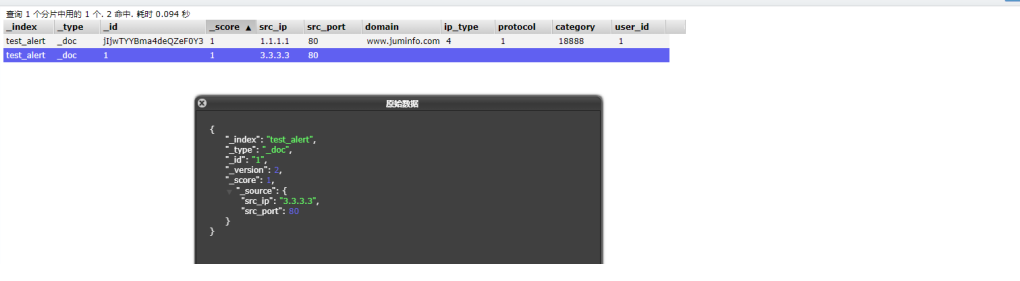
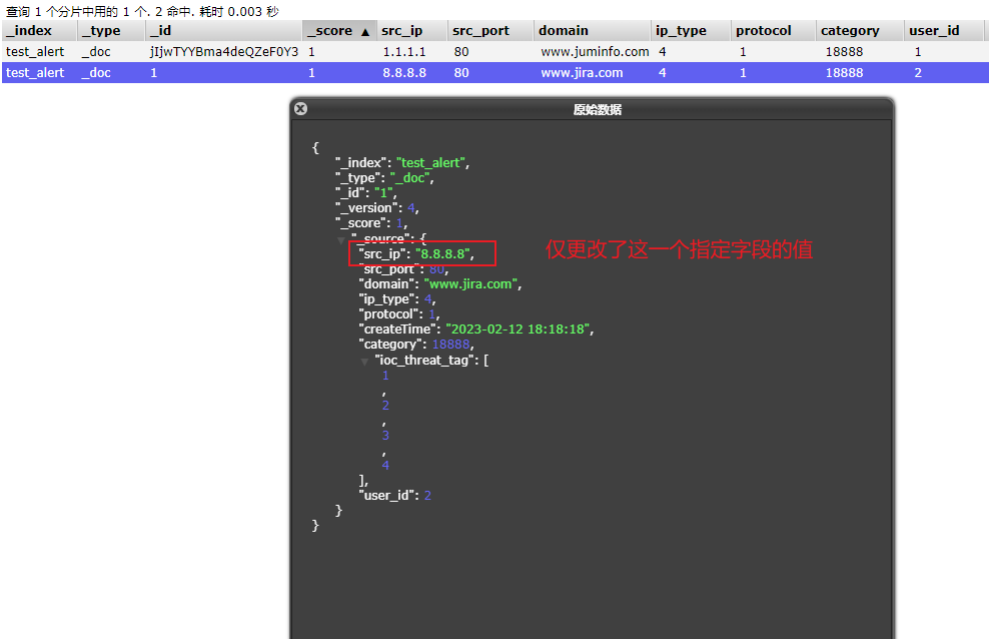
PUT只会将json数据都进行替换, POST只会更新相同字段的值
PUT与DELETE都是幂等性操作, 即不论操作多少次, 结果都一样
【PUT】全量修改
// PUT请求

http://127.0.0.1:9200/test_alert/_doc/1

{

 "src_ip":"3.3.3.3",

 "src_port": 80

}

===返回====

    {

    "_index": "test_alert",

    "_type": "_doc",

    "_id": "1",

    "_version": 2,           // 每次数据修改,版本+1

    "result": "updated",

    "_shards": {

        "total": 2,

        "successful": 1,

        "failed": 0

    },

    "_seq_no": 2,

    "_primary_term": 1

}
// PUT请求  数据恢复

http://127.0.0.1:9200/test_alert/_doc/1

{

 "src_ip":"2.2.2.2",

 "src_port": 80,

 "domain":"www.jira.com",

 "ip_type":4,

 "protocol":1,

 "createTime":"2023-02-12 18:18:18",

 "category":18888.0,

 "ioc_threat_tag":[1,2,3,4],

 "user_id":2

}

===返回===

{

    "_index": "test_alert",

    "_type": "_doc",

    "_id": "1",

    "_version": 3,   // 每次数据修改,版本+1

    "result": "updated",

    "_shards": {

        "total": 2,

        "successful": 1,

        "failed": 0

    },

    "_seq_no": 3,

    "_primary_term": 1

}
【POST】局部修改
// POST请求

http://127.0.0.1:9200/test_alert/_update/1

{

    "doc": {

        "src_ip": "8.8.8.8"

    }

}

===返回===

    {

    "_index": "test_alert",

    "_type": "_doc",

    "_id": "1",

    "_version": 4,    // 每次数据修改,版本+1

    "result": "updated",

    "_shards": {

        "total": 2,

        "successful": 1,

        "failed": 0

    },

    "_seq_no": 4,

    "_primary_term": 1

}
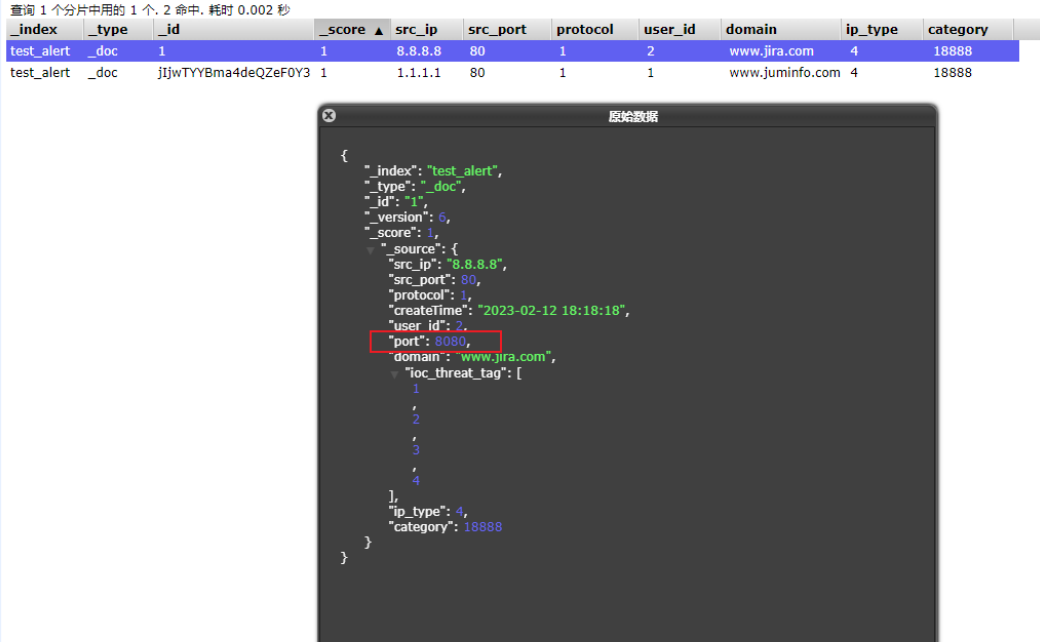
【POST】修改文档-追加值
http://127.0.0.1:9200/test_alert/_update_by_query

// 索引库里追加字段和字段值,如下表示,更新test_alert索引库所有符合条件的文档追加port字段,值为8443

{

  "script": {

    "source": "ctx._source.port = 8080",

    "lang": "painless"

  },

  "query": {

    "bool": {

      "must_not": [

        {

          "exists": {

            "field": "port"

          }

        }

      ]

    }

  }

}

===返回====

    {

    "took": 107,

    "timed_out": false,

    "total": 2,

    "updated": 2,

    "deleted": 0,

    "batches": 1,

    "version_conflicts": 0,

    "noops": 0,

    "retries": {

        "bulk": 0,

        "search": 0

    },

    "throttled_millis": 0,

    "requests_per_second": -1,

    "throttled_until_millis": 0,

    "failures": []

}
【POST】修改文档-修改指定字段值
http://127.0.0.1:9200/test_alert/_update_by_query

//根据条件更新索引库字段值

{

  "script": {

    "source": "ctx._source.port = 8080",

    "lang": "painless"

  },

  "query": {

    "match": {

      "src_ip": "8.8.8.8"

    }

  }

}

====返回====

 {

    "took": 26,

    "timed_out": false,

    "total": 1,

    "updated": 1,

    "deleted": 0,

    "batches": 1,

    "version_conflicts": 0,

    "noops": 0,

    "retries": {

        "bulk": 0,

        "search": 0

    },

    "throttled_millis": 0,

    "requests_per_second": -1,

    "throttled_until_millis": 0,

    "failures": []

}
【POST】修改索引库字段类型
// POST请求

localhost:9200/test_alert/_mapping

{

  "properties": {

    "domain": {

      "type": "text",

      "fields": {

        "keyword": {

          "type": "keyword",

          "ignore_above": 256

        }

      }

    }

  }

}

===返回====

{

    "acknowledged": true

}

改完我们再查看以下索引库结构

// GET请求

localhost:9200/test_alert/_mapping

{

    "version": 5,

    "mapping_version": 3,

    "settings_version": 1,

    "aliases_version": 1,

    "routing_num_shards": 1024,

    "state": "open",

    "settings": {

        "index": {

            "creation_date": "1676346977182",

            "number_of_shards": "1",

            "number_of_replicas": "1",

            "uuid": "UQGRlwAsRkaaoKKCXJRFwQ",

            "version": {

                "created": "7080199"

            },

            "provided_name": "test_alert"

        }

    },

    "mappings": {

        "_doc": {

            "properties": {

                "src_ip": {

                    "type": "ip"

                },

                "src_port": {

                    "type": "integer"

                },

                "protocol": {

                    "type": "short"

                },

                "create_time": {

                    "type": "date"

                },

                "createTime": {

                    "type": "text",

                    "fields": {

                        "keyword": {

                            "ignore_above": 256,

                            "type": "keyword"

                        }

                    }

                },

                "user_id": {

                    "type": "long"

                },

                "domain": {

                    "type": "text",

                    "fields": {

                        "keyword": {      // 注意这里,domain多了一个keyword类型

                            "ignore_above": 256,

                            "type": "keyword"

                        }

                    }

                },

                "ioc_threat_tag": {

                    "type": "integer"

                },

                "category": {

                    "type": "text",

                    "fields": {

                        "keyword": {

                            "type": "keyword"

                        }

                    }

                },

                "ip_type": {

                    "type": "byte"

                }

            }

        }

    },

    "aliases": [],

    "primary_terms": {

        "0": 1

    },

    "in_sync_allocations": {

        "0": [

            "sPz6Ct2RSgiPZGxaaS__7A"

        ]

    },

    "rollover_info": {}

}
删除数据
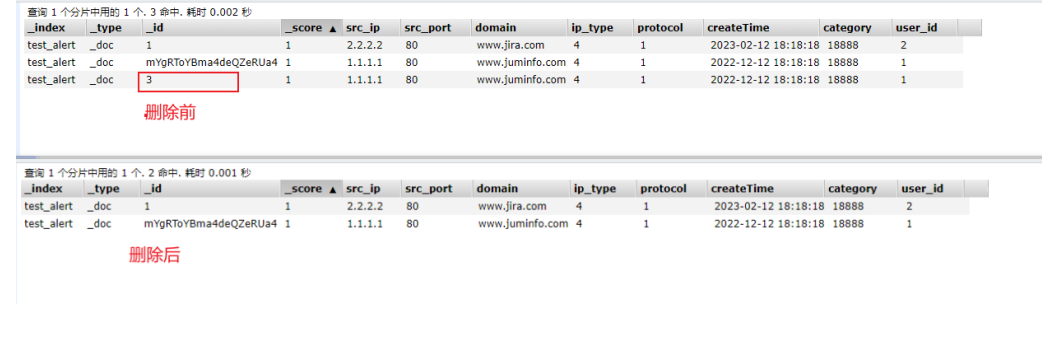
删除文档-根据id
// DELETE请求

http://127.0.0.1:9200/test_alert/_doc/3

===返回===

{

    "_index": "test_alert",

    "_type": "_doc",

    "_id": "3",

    "_version": 3,

    "result": "deleted",

    "_shards": {

        "total": 2,

        "successful": 1,

        "failed": 0

    },

    "_seq_no": 4,

    "_primary_term": 1

}
根据搜索条件删除
先模拟一些数据
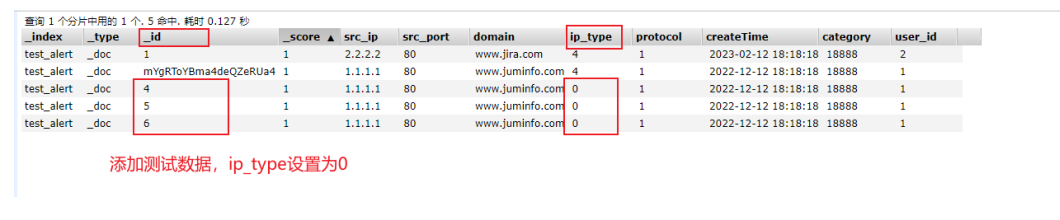
PS: _delete_by_query在开始处理时时获取索引的快照,并使用内部版本控制删除它所查找到的内容。这意味着如果文档在query和处理删除之间发生变化,会报冲突错误。当版本匹配时文档被删除。
执行删除ip_type为0的记录
// POST请求

http://127.0.0.1:9200/test_alert/_delete_by_query

{

   "query":{

      "match":{

         "ip_type":0

      }

   }

}

===返回===

{

    "took": 26,

    "timed_out": false,

    "total": 3,

    "deleted": 3,

    "batches": 1,

    "version_conflicts": 0,

    "noops": 0,

    "retries": {

        "bulk": 0,

        "search": 0

    },

    "throttled_millis": 0,

    "requests_per_second": -1,

    "throttled_until_millis": 0,

    "failures": []

}

清空索引库
// POST请求

http://127.0.0.1:9200/test_alert/_delete_by_query

{

  "query": {

    "match_all": {}

  }

}

===返回====

{

    "took": 14,

    "timed_out": false,

    "total": 2,

    "deleted": 2,

    "batches": 1,

    "version_conflicts": 0,

    "noops": 0,

    "retries": {

        "bulk": 0,

        "search": 0

    },

    "throttled_millis": 0,

    "requests_per_second": -1,

    "throttled_until_millis": 0,

    "failures": []

}
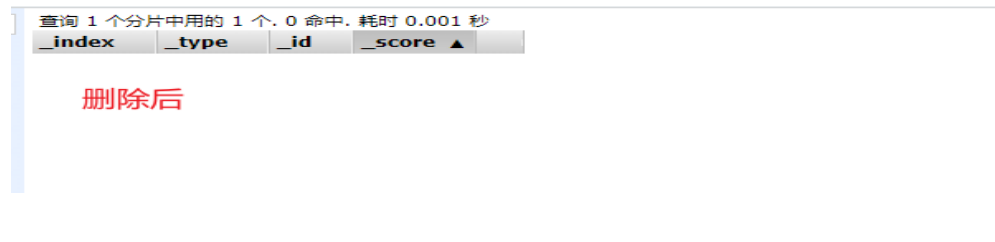
模糊匹配清空索引库
再创建一个test_alert1索引库,用于测试模糊请求操作。
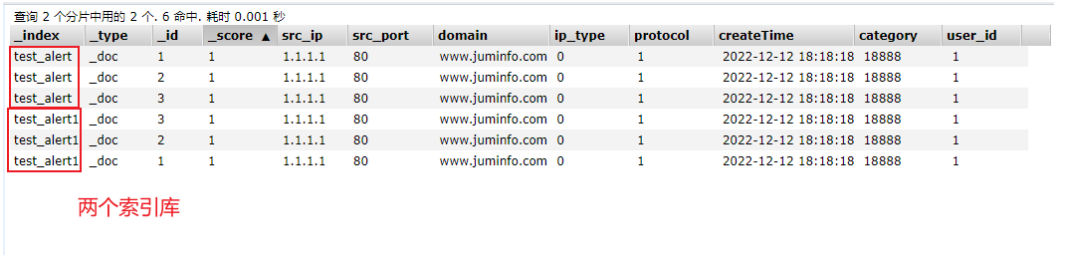
// POST请求

http://127.0.0.1:9200/test_alert*/_delete_by_query

{

  "query": {

    "match_all": {}

  }

}

===返回===

{

    "took": 25,

    "timed_out": false,

    "total": 6,

    "deleted": 6,

    "batches": 1,

    "version_conflicts": 0,

    "noops": 0,

    "retries": {

        "bulk": 0,

        "search": 0

    },

    "throttled_millis": 0,

    "requests_per_second": -1,

    "throttled_until_millis": 0,

    "failures": []

}
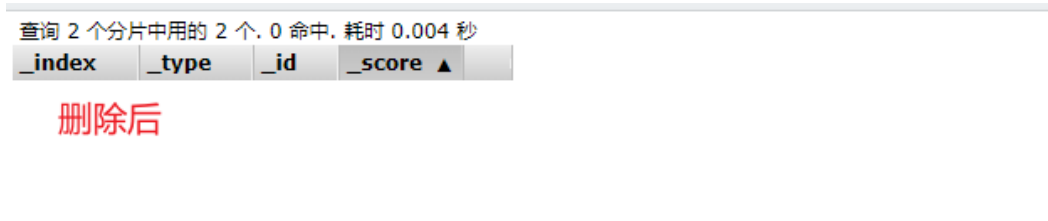
查看测试数据
// GET请求

http://127.0.0.1:9200/test_alert/_search

{

   "query":{

      "match":{

         "ip_type":0

      }

   }

}

=====返回====

{

    "took": 2,

    "timed_out": false,

    "_shards": {

        "total": 1,

        "successful": 1,

        "skipped": 0,

        "failed": 0

    },

    "hits": {

        "total": {

            "value": 3,

            "relation": "eq"

        },

        "max_score": 1,

        "hits": [

            {

                "_index": "test_alert",

                "_type": "_doc",

                "_id": "4",

                "_score": 1,

                "_source": {

                    "src_ip": "1.1.1.1",

                    "src_port": 80,

                    "domain": "www.juminfo.com",

                    "ip_type": 0,

                    "protocol": 1,

                    "createTime": "2022-12-12 18:18:18",

                    "category": 18888,

                    "ioc_threat_tag": [

                        1,

                        2,

                        3,

                        4

                    ],

                    "user_id": 1

                }

            },

            {

                "_index": "test_alert",

                "_type": "_doc",

                "_id": "5",

                "_score": 1,

                "_source": {

                    "src_ip": "1.1.1.1",

                    "src_port": 80,

                    "domain": "www.juminfo.com",

                    "ip_type": 0,

                    "protocol": 1,

                    "createTime": "2022-12-12 18:18:18",

                    "category": 18888,

                    "ioc_threat_tag": [

                        1,

                        2,

                        3,

                        4

                    ],

                    "user_id": 1

                }

            },

            {

                "_index": "test_alert",

                "_type": "_doc",

                "_id": "6",

                "_score": 1,

                "_source": {

                    "src_ip": "1.1.1.1",

                    "src_port": 80,

                    "domain": "www.juminfo.com",

                    "ip_type": 0,

                    "protocol": 1,

                    "createTime": "2022-12-12 18:18:18",

                    "category": 18888,

                    "ioc_threat_tag": [

                        1,

                        2,

                        3,

                        4

                    ],

                    "user_id": 1

                }

            }

        ]

    }

}
ES-增删改查的更多相关文章
- ES增删改查入门1
1.RESTful接口使用方法 为了方便直观我们使用Head插件提供的接口进行演示,实际上内部调用的RESTful接口. RESTful接口URL的格式: http://localhost:9200/ ...
- ES增删改查
了解了一下python对es 7.5的操作,记录下,不难: #!/usr/bin/env python # -*- coding: UTF-8 -*- from settings import Con ...
- [elk]es增删改查最佳实战
PUT app01 GET app01/_settings GET _all/_settings PUT app01/_settings { "number_of_replicas" ...
- 【ES】ElasticSearch初体验之使用Java进行最基本的增删改查~
好久没写博文了, 最近项目中使用到了ElaticSearch相关的一些内容, 刚好自己也来做个总结. 现在自己也只能算得上入门, 总结下自己在工作中使用Java操作ES的一些小经验吧. 本文总共分为三 ...
- Es学习第三课, ElasticSearch基本的增删改查
前面两课我们了解了ES的基本概念并且学会了安装ES,这节课我们就来讲讲ES基本的增删改查:ES主要对外界提供的是REST风格的API,我们通过客户端操作ES本质上就是API的调用.在第一课我们就讲了索 ...
- kibana的Dev Tool中如何对es进行增删改查
kinaba Dev Tool中对es(elasticSearch)进行增删改查 一.查询操作 查询语句基本语法 以下语句类似于mysql的: select * from xxx.yyy.topic ...
- Es图形化软件使用之ElasticSearch-head、Kibana,Elasticsearch之-倒排索引操作、映射管理、文档增删改查
今日内容概要 ElasticSearch之-ElasticSearch-head ElasticSearch之-安装Kibana Elasticsearch之-倒排索引 Elasticsearch之- ...
- elasticsearch索引的增删改查入门
为了方便直观我们使用Head插件提供的接口进行演示,实际上内部调用的RESTful接口. RESTful接口URL的格式: http://localhost:9200/<index>/&l ...
- 分布式搜索elasticsearch 索引文档的增删改查 入门
1.RESTful接口使用方法 为了方便直观我们使用Head插件提供的接口进行演示,实际上内部调用的RESTful接口. RESTful接口URL的格式: http://localhost:9200/ ...
- ElasticSearch6(三)-- Java API实现简单的增删改查
基于ElasticSearch6.2.4, Java API创建索引.查询.修改.删除,pom依赖和获取es连接 可查看此文章. package com.xsjt.learn; import java ...
随机推荐
- C#中的Byte,String,Int,Hex之间的转换函数
/// <summary> Convert a string of hex digits (ex: E4 CA B2) to a byte array. </summary> ...
- .NET Core 项目启动时运行定时任务
1.任务需求 在每次服务启动时定时(如24小时)清理一次缓存文件 2.代码实现 1)新建文件清理类 .NET Core 提供了BackgroundService的抽象类,在 ExecuteAsync ...
- vue + element-ui + vue-clipboard2 实现文字复制粘贴功能与提示
1.在所在项目下安装插件 npm install vue-clipboard2 --save 2.在所在项目的index.js注入vue-clipboard2 import VueClipboard ...
- JZOJ 2020.02.16【NOIP提高组】模拟A 组
2020.02.16[NOIP提高组]模拟A 组 呼呼呼呼呼呼呼呼 今天暴力分可真多啊 第一次 \(A\) 组进前 \(5\) ! 呼呼呼呼呼呼呼呼 总有人虐场,总有人在场中被虐······ 总结 3 ...
- js实现图片选中马上显示图片名,选择后可以预览,即选即显
<!DOCTYPE html> <html> <head> <meta charset="UTF-8"> <title> ...
- fixed 定位元素超出内容 overflow 不滚动
假如,一个父元素的定位是 fixed,其所有子元素的高度加起来超过了父元素,父元素设置 overflow: auto.有可能出现不滚动的问题,发生的情况有横向和竖向的. 竖向滚动:必须要设置父元素的高 ...
- Apache HttpClient使用和源码分析
在上文中分析了 HttpURLConnection的用法,功能还是比较简单的,没有什么封装 接下来看看Apache HttpClient是如何封装httpClient的 目录 组成 请求代码 代码分析 ...
- ChatGpt聊天API使用
昨天ChatGpt发布了聊天API,新增了两个模型,目前还是测试阶段 gpt-3.5-turbo 功能强大的GPT-3.5模型,专门针对聊天做了优化 gpt-3.5-turbo-0301 此模型只支持 ...
- Flutter 下载篇 - 贰 | 当下载器遇上切换网络库
需求背景 继上篇<Flutter 下载篇 - 壹 | flutter_download_manager 源码解析>中详细介绍了 flutter_download_manager 用法和原理 ...
- JavaScript之void
void是什么 void是JavaScript重要的关键字,该操作符指定要计算一个表达式但不返回. 语法格式: void func() javascript:void func() 或 void (f ...