
Apache HttpClient使用和源码分析
在上文中分析了 HttpURLConnection的用法,功能还是比较简单的,没有什么封装
接下来看看Apache HttpClient是如何封装httpClient的
组成
HttpClient 5 的系统架构主要由以下几个部分组成:
- HttpCore:核心包,包含了 HTTP 协议的核心抽象和实现,定义了 HTTP 客户端和服务端的基本组件,例如请求消息、响应消息、传输层等。
- HttpClient:高级 API,封装了 HttpCore 包中的核心抽象,提供了一组简单易用的 API,以便于客户端应用程序发送 HTTP 请求。
- HttpAsyncClient:异步 API,是基于 HttpCore 和 HttpClient 构建的异步 HTTP 客户端,可以通过异步方式实现 HTTP 请求。
- HttpClient 和 HttpAsyncClient 都可以通过扩展进行定制和优化,可以添加拦截器、设置连接管理器、Cookie 管理器、认证器等。
请求代码
GET请求代码
String resultContent = null;

String url = "http://127.0.0.1:8081/get";

HttpGet httpGet = new HttpGet(url);

//通过工厂获取

CloseableHttpClient httpClient = HttpClients.createDefault();

//请求

CloseableHttpResponse response = httpClient.execute(httpGet);

// Get status code

System.out.println(response.getVersion());

// HTTP/1.1

System.out.println(response.getCode());

// 200

System.out.println(response.getReasonPhrase());

// OK

HttpEntity entity = response.getEntity();

// Get response information

resultContent = EntityUtils.toString(entity);

System.out.println(resultContent);
代码分析
创建实例
Apache HttpClient提供了一个工厂类来返回HttpClient实例
但实际上都是通过HttpClientBuilder去创建的,
Apache HttpClient通过构建者模式加上策略模式实现非常灵活的配置,以实现各种不同的业务场景
通过看build()的代码,创建HttpClient主要分为两步
    public static CloseableHttpClient createDefault() {

        return HttpClientBuilder.create().build();

    }
第一步是初始化配置
里边很多策略模式的使用,可以实现相关的类来拓展自己的需求,可以通过HttpClient的set方法把新的策略设置进去,其他配置也可以通过RequestConfig设置好
ConnectionKeepAliveStrategy keepAliveStrategyCopy = this.keepAliveStrategy;

if (keepAliveStrategyCopy == null) {

    keepAliveStrategyCopy = DefaultConnectionKeepAliveStrategy.INSTANCE;

}

AuthenticationStrategy targetAuthStrategyCopy = this.targetAuthStrategy;

if (targetAuthStrategyCopy == null) {

    targetAuthStrategyCopy = DefaultAuthenticationStrategy.INSTANCE;

}

AuthenticationStrategy proxyAuthStrategyCopy = this.proxyAuthStrategy;

if (proxyAuthStrategyCopy == null) {

    proxyAuthStrategyCopy = DefaultAuthenticationStrategy.INSTANCE;

}
在这里会初始化包括连接管理器、请求重试处理器、请求执行器、重定向策略、认证策略、代理、SSL/TLS等配置
第二步是创建处理器链
通过组合多个处理器来构建成处理器链处理请求
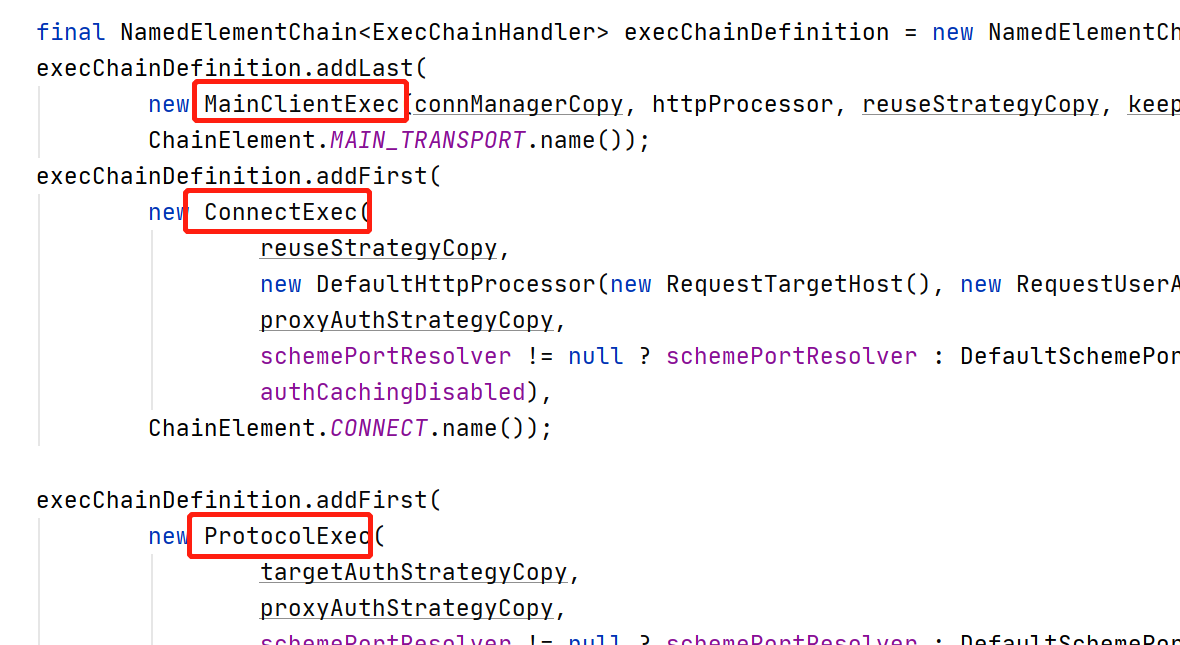
需要注意的是这里的添加顺序的方法,添加最终的执行处理器调用的是addLast()
处理器链中的每个处理器都有不同的功能,例如请求预处理、重试、身份验证、请求发送、响应解析等等。在每个处理器的处理过程中,可以对请求或响应进行修改或扩展,以满足不同的需求
最后再把初始化好的参数传递给InternalHttpClient返回一个HttpClient实例
发起请求
接下来看看请求方法
CloseableHttpResponse response = httpClient.execute(httpGet);
主要请求方法在InternalHttpClient#doExecute中
主要分为三步,第一步是将各种配置填充到上下文中HttpContext
第二步,执行刚刚封装执行链
//execChain就是上一步封装好的执行链

final ClassicHttpResponse response = this.execChain.execute(ClassicRequestBuilder.copy(request).build(), scope);
执行 execute 方法,执行链中的处理器被依次调用,每个元素都可以执行一些预处理、后处理、重试等逻辑
第三步,请求结束后,将结果转换为CloseableHttpResponse返回
自定义拦截器和处理器
接下来试试加一下自定义的拦截器和处理器
拦截器和处理器的实现是不一样的,处理器的实现是ExecChainHandler,拦截器是HttpResponseInterceptor和HttpRequestInterceptor
//执行链处理器

class MyCustomInterceptor implements ExecChainHandler {

    @Override

    public ClassicHttpResponse execute(ClassicHttpRequest request, ExecChain.Scope scope, ExecChain chain) throws IOException, HttpException {

        System.out.println("MyCustomInterceptor-------------");

        //调用下一个链

        return chain.proceed(request,scope);

    }

}

//响应拦截器

class MyCustomResponseInterceptor implements HttpResponseInterceptor {

    @Override

    public void process(HttpResponse response, EntityDetails entity, HttpContext context) throws HttpException, IOException {

        System.out.println("MyCustomResponseInterceptor-------------");

    }

}

//请求拦截器

class MyCustomRequestInterceptor implements HttpRequestInterceptor {

    @Override

    public void process(HttpRequest request, EntityDetails entity, HttpContext context) throws HttpException, IOException {

        System.out.println("MyCustomRequestInterceptor-------------");

    }

}
然后加入到拦截链中,custom()方法返回HttpClientBuilder来支持自定义
CloseableHttpClient httpClient = HttpClients.custom()

.addExecInterceptorLast("myCustomInterceptor", new MyCustomInterceptor())

.addRequestInterceptorFirst(new MyCustomRequestInterceptor())

.addResponseInterceptorLast(new MyCustomResponseInterceptor())

.build();
注意看日志就有输出了
拦截器和处理器都是用于拦截请求和响应的中间件,但它们在功能上有些不同:
- 拦截器:在请求发送前或响应返回后对请求或响应进行修改,例如添加、删除、修改请求头或响应头、修改请求体等。拦截器的主要作用是拦截请求和响应,对它们进行一些操作,并将它们传递给下一个拦截器或处理器
- 处理器:用于执行实际的请求和响应处理,例如建立连接、发送请求、解析响应等。处理器通常是在整个请求-响应流程中的最后一环,负责将最终的响应结果返回给调用方
总之,拦截器和处理器都是用于处理请求和响应的中间件,但它们的职责和功能略有不同
异步请求
异步请求的HttpAsyncClient通过HttpAsyncClients工厂返回
主要的流程和同步请求差不多,包括初始化配置和初始化执行链,主要差异在执行请求那里
因为是异步执行,需要开启异步请求的执行器线程池,通过httpClient.start();方法来设置异步线程的状态,否则异步请求将无法执行
@Override

public final void start() {

    if (status.compareAndSet(Status.READY, Status.RUNNING)) {

        executorService.execute(ioReactor::start);

    }

}
如果没有开启,会抛出异常
if (!isRunning()) {

    throw new CancellationException("Request execution cancelled");

}
因为是异步请求,所以请求方法需要提供回调方法,主要实现三个方法,执行完成、失败和取消
//创建url

SimpleHttpRequest get = SimpleHttpRequest.create("GET", url);

Future<SimpleHttpResponse> future = httpClient.execute(get,

//异步回调

new FutureCallback<SimpleHttpResponse>() {

    @Override

    public void completed(SimpleHttpResponse result) {

        System.out.println("completed---------------");

    }

    @Override

    public void failed(Exception ex) {

        System.out.println("failed---------------");

    }

    @Override

    public void cancelled() {

        System.out.println("cancelled---------------");

    }

});

SimpleHttpResponse response = future.get();
通过future.get()来获取异步结果,接下来看看底层是怎么实现的
//请求

execute(SimpleRequestProducer.create(request), SimpleResponseConsumer.create(), context, callback);
异步请求会创建SimpleRequestProducer和SimpleResponseConsumer来处理请求和响应,execute()也支持我们自己传进去
最终的请求和数据的接收都是依赖管道,过程有点像NIO
当请求时,会调用requestProducer.produce(channel);把请求数据写入channel中,在响应时,responseConsumer从channel中取得数据
源码的整一块请求代码都是通过几个匿名函数的写法完成的,看的有点绕
发起请求,匿名函数段代表的是RequestChannel的请求方法

//requestProducer的sendRequest方法

void sendRequest(RequestChannel channel, HttpContext context)
因为RequestChannel类是一个函数式接口,所以可以通过这种方式调用
public interface RequestChannel {

	//请求方法也是叫sendRequest

    void sendRequest(HttpRequest request, EntityDetails entityDetails, HttpContext context) throws HttpException, IOException;

}
生产和消费数据的代码都在那一刻函数段中,具体的实现细节可以看一下那一段源码,最终requestProducer也是委托RequestChannel来发起请求

消费完后通过一层一层的回调,最终到达最上边自己实现的三个方法上
异步的HttpClient也可以自定义拦截器喝处理器,实现方式和上边的一样,处理异步处理器的实现不同
 CloseableHttpClient httpClient = HttpClients.custom()

                .setDefaultRequestConfig(config)

                .addExecInterceptorLast("myCustomInterceptor", new MyCustomInterceptor())

                .addRequestInterceptorFirst(new MyCustomRequestInterceptor())

                .addResponseInterceptorLast(new MyCustomResponseInterceptor())

                .build();
使用示例
创建HttpClient
如果是同步的就使用HttpClients工厂,异步的使用HttpAsyncClients
//返回默认的

CloseableHttpClient httpClient = HttpClients.createDefault();
如果想实现自定义配置,可以使用HttpClients.custom()方法
基本的配置被封装在RequestConfig类中
RequestConfig config = RequestConfig.custom()

            .setConnectionRequestTimeout(3L, TimeUnit.SECONDS)

            .setResponseTimeout(3L, TimeUnit.SECONDS)

            .setDefaultKeepAlive(10L , TimeUnit.SECONDS)

            .build();
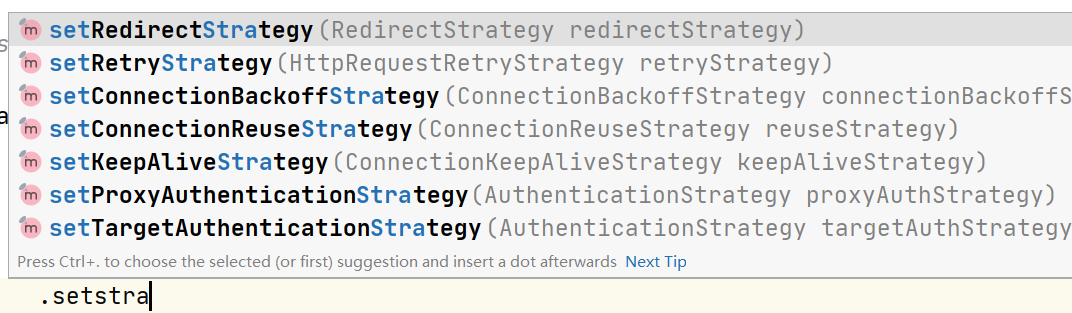
如果还不满足,可以还可以去实现这些策略类
使用自定义配置创建httpClient
CloseableHttpClient httpClient = HttpClients.custom()

            .setDefaultRequestConfig(config)

            .addExecInterceptorLast("myCustomInterceptor", new MyCustomInterceptor())

            .addRequestInterceptorFirst(new MyCustomRequestInterceptor())

            .addResponseInterceptorLast(new MyCustomResponseInterceptor())

            .build();
GET方法请求
 String url = "http://127.0.0.1:8081/get";

List<NameValuePair> nvps = new ArrayList<>();

// GET 请求参数

nvps.add(new BasicNameValuePair("username", "test"));

nvps.add(new BasicNameValuePair("password", "password"));

//将参数填充道url中

URI uri = new URIBuilder(new URI(url))

        .addParameters(nvps)

        .build();

//创建get请求对象

HttpGet httpGet = new HttpGet(uri);

//发起请求

CloseableHttpResponse response = httpClient.execute(httpGet);

// Get status code

System.out.println(response.getVersion()); // HTTP/1.1

System.out.println(response.getCode()); // 200

HttpEntity entity = response.getEntity();

// Get response information

String resultContent = EntityUtils.toString(entity);

System.out.println(resultContent);
POST请求
这次将参数写到HttpEntity里
String url = "http://127.0.0.1:8081/post";

List<NameValuePair> nvps = new ArrayList<>();

// GET 请求参数

nvps.add(new BasicNameValuePair("username", "test"));

nvps.add(new BasicNameValuePair("password", "password"));

UrlEncodedFormEntity formEntity = new UrlEncodedFormEntity(nvps, StandardCharsets.UTF_8);

HttpPost httpPost = new HttpPost(url);

httpPost.setEntity(formEntity);

CloseableHttpClient httpClient = HttpClients.createDefault();

CloseableHttpResponse response = httpClient.execute(httpPost);

// Get status code

System.out.println(response.getVersion()); // HTTP/1.1

System.out.println(response.getCode()); // 200

HttpEntity entity = response.getEntity();

// Get response information

String resultContent = EntityUtils.toString(entity);

System.out.println(resultContent);
和GET请求基本一致,除了用的是HttpPost,参数可以像GET一样填充到url中,也可以使用HttpEntity填充到请求体里
Json请求
String json = "{"

        + "    \"username\": \"test\","

        + "    \"password\": \"password\""

        + "}";

StringEntity entity = new StringEntity(json, ContentType.APPLICATION_JSON);

HttpPost post = new HttpPost("http://127.0.0.1:8081/postJson");

post.setEntity(entity);

CloseableHttpClient client = HttpClients.createDefault();

CloseableHttpResponse response = client.execute(post);

// Get status code

System.out.println(response.getCode()); // 200

// Get response information

String resultContent = EntityUtils.toString(response.getEntity());

System.out.println(resultContent);
总结
和HttpURLConnection相比,做了很多封装,功能也强大了很多,例如连接池、缓存、重试机制、线程池等等,并且对于请求参数的设置更加灵活,还封装了异步请求、HTTPS等、自定义拦截器和处理器等
请求是使用了处理链的方式发起的,可以对请求和响应进行一系列处理,好处是可以将这些处理器封装成一个公共的类库,然后通过自己组合来满足自己的需求,还可以在请求和响应的不同阶段进行拦截和修改,例如添加请求头、修改请求参数、解密响应数据等,不需要在一个大类里写很多代码了,已免代码臃肿
性能方面使用了连接池技术,可以有效地复用连接,提高性能
不得不说是apache的项目,源码使用了包括构建者模式、策略模式、责任链模式等设计模式对整个httpClient进行了封装,学习到了
Apache HttpClient使用和源码分析的更多相关文章
- Quartz学习--二 Hello Quartz! 和源码分析
Quartz学习--二 Hello Quartz! 和源码分析 三. Hello Quartz! 我会跟着 第一章 6.2 的图来 进行同步代码编写 简单入门示例: 创建一个新的java普通工程 ...
- Android Debuggerd 简要介绍和源码分析(转载)
转载: http://dylangao.com/2014/05/16/android-debuggerd-%E7%AE%80%E8%A6%81%E4%BB%8B%E7%BB%8D%E5%92%8C%E ...
- Java并发编程(七)ConcurrentLinkedQueue的实现原理和源码分析
相关文章 Java并发编程(一)线程定义.状态和属性 Java并发编程(二)同步 Java并发编程(三)volatile域 Java并发编程(四)Java内存模型 Java并发编程(五)Concurr ...
- Kubernetes Job Controller 原理和源码分析(一)
概述什么是 JobJob 入门示例Job 的 specPod Template并发问题其他属性 概述 Job 是主要的 Kubernetes 原生 Workload 资源之一,是在 Kubernete ...
- Kubernetes Job Controller 原理和源码分析(二)
概述程序入口Job controller 的创建Controller 对象NewController()podControlEventHandlerJob AddFunc DeleteFuncJob ...
- Kubernetes Job Controller 原理和源码分析(三)
概述Job controller 的启动processNextWorkItem()核心调谐逻辑入口 - syncJob()Pod 数量管理 - manageJob()小结 概述 源码版本:kubern ...
- OpenMP For Construct dynamic 调度方式实现原理和源码分析
OpenMP For Construct dynamic 调度方式实现原理和源码分析 前言 在本篇文章当中主要给大家介绍 OpenMp for construct 的实现原理,以及与他相关的动态库函数 ...
- jQuery静态方法globalEval使用和源码分析
Eval函数大家都很熟悉,但是globalEval方法却很少使用,大多数参考手册也没有相关api,下面就对其用法和源码相应介绍: jQuery.globalEval()函数用于全局性地执行一段Java ...
- Mybatis的缓存——一级缓存和源码分析
目录 什么是缓存? 一级缓存 测试一. 测试二. 总结: 一级缓存源码分析: 1. 一级缓存到底是什么? 得出结论: 2. 一级缓存什么时候被创建? 3. 一级缓存的执行流程 结论: 一级缓存源码分析 ...
- thrift使用和源码分析
1 前言 thrift的官方文档比较差,很多细节没有介绍清楚,比如require.optional和default字段的区别是什么,为什么字段前面要写序号等,带着这些疑问,我们需要阅读生成的源码来了解 ...
随机推荐
- go-dongle 0.2.0 版本发布了,一个轻量级、语义化的 golang 编码解码、加密解密库
dongle 是一个轻量级.语义化.对开发者友好的 Golang 编码解码和加密解密库 Dongle 已被 awesome-go 收录, 如果您觉得不错,请给个 star 吧 github.com/g ...
- Flask框架使用SQLAlchemy的ORM
SQLAlchemy 1.介绍 SQLAlchemy是一个基于Python实现的ORM框架.该框架建立在 DB API之上,使用关系对象映射进行数据库操作,简言之便是:将类和对象转换成SQL,然后使用 ...
- windows上用vs2017静态编译onnxruntime-gpu CUDA cuDNN TensorRT的坎坷之路
因为工作业务需求的关系,需编译onnxruntime引入项目中使用,主项目exe是使用的vs2017+qt5.12. onnxruntime就不用介绍是啥了撒,在优化和加速AI机器学习推理和训练这块赫 ...
- 【译】2022 年回顾:Web 性能有哪些新变化?
原文地址:https://www.debugbear.com/blog/2022-in-web-performance 若对文中提到的一些性能参数不太熟悉,可以参考我之前的一篇博文<性能参数和优 ...
- 可视化—AntV G6 高亮相邻节点的两种方式
目录 内置的高亮节点 自定义高亮 自定义高亮时保持原始颜色 总结 案例完整代码 通过官方文档,可知高亮相邻节点分为两种方法,文档描述并不是很清楚,对刚接触这个库的小白并不是很友好,慢慢总结慢慢来吧 内 ...
- Java开发学习(五十)----MyBatisPlus快速开发之代码生成器解析
1.代码生成器原理分析 造句: 我们可以往空白内容进行填词造句,比如: 在比如: 观察我们之前写的代码,会发现其中也会有很多重复内容,比如: 那我们就想,如果我想做一个Book模块的开发,是不是只需要 ...
- Nacos详解
Nacos是什么 欢迎来到Nocos的世界! 组成部分 全称 描述 Na naming/nameServer 即服务注册中心,与 Spring Cloud Eureka 的功能类似. co confi ...
- Spring项目中用了这种解耦模式,经理对我刮目相看
前言 不知道大家在项目中有没有遇到过这样的场景,根据传入的类型,调用接口不同的实现类或者说服务,比如根据文件的类型使用 CSV解析器或者JSON解析器,在调用的客户端一般都是用if else去做判断, ...
- js获取天气插件
SDK介绍 根据指定入参,传入三个 select 的 id值 及 回调函数,每次选项变更都会拿到对应地区最新天气数据. 必须是三个 Select 标签 有记住选项功能,避免重复相关逻辑. 1.依赖源码 ...
- 突如其来的&quot;中断异常&quot;,我(Java)该如何处理?
# **一.何为异常?** ## 1.生活中的实例 生活中存在许多不正常: 上班路上自行车掉链子 上厕所手机掉马桶 下班回家钥匙丢失 ....... 2.程序中的实例 我们的代码中也许存在许多纰漏,导 ...