
【Vue学习笔记】—— vue的基础语法 { }
学习笔记
作者:oMing
vue
v-on: 简称 @
<div id='app'>

	<button v-on:click='Show1'>   </button>

	<button @click='Show2'>   </button>

</div>
new Vue({

	methods: {

		show1(){

			console.log("show1")

		},

		show2(){

			console.log("show2")

		}

	}

}).$mount('#app')
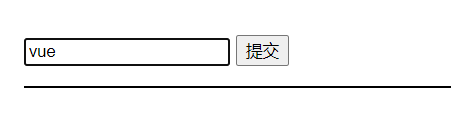
v-model(数据双向绑定)
<div>

	<input type="text" v-model='name'>

</div>
var vm = new Vue({

	el: '#app',

	data: {

		name: ''

	}

}
- 只要 input 内容发生变化,vue app 实例的 data 中的数据也会发生变化,反之亦然

v-bind: (给元素的 ++属性++ 绑定数据)
<div id='app'>

	<h1 v-bind:class="{ white: canWhite }"</h1>

</div>
.white {

    color: #fff;

}
new Vue({

	data: {

		canWhite: false,

	}

}).$mount('#app')
{{ }}、v-text=" " 、v-html=" " (给 ++元素++ 绑定数据)
[v-cloak] {

	display: none;

}
<!-- v-cloak 解决插值表达式闪烁的问题 -->

<p v-cloak>{{ data }}</p>

<p v-text='data'></p>

<p v-html='data'></p>
v-for
<div id="app">

	<input type="text" v-model='name'>

	<input type="submit" @click.prevent='add'>

	<ul>

		<li v-for='(person,index) in persons' :key='person.id'><input type="checkbox">{{ person.name }}</li>

	</ul>

</div>
new Vue({

	el: '#app',

	data: {

		name: '',

		id: 0,

		persons: [

			{name: 'javascript',id: 1},

			{name: 'Vue',id: 2},

			{name: 'jQuery',id: 3}

		]

	},

	methods: {

		add(){

			let lastId = ++this.id

			let newObj = {name: this.name,id: lastId}

			this.persons.unshift(newObj)

			this.name = ''

		}

	},

	created(){

		this.id = this.persons[this.persons.length-1].id

	}

});
组件(component)
- 创建组件
- 方式1
<div id='app'>

	<!-- 使用标签的形式使用已创建好的组件 -->

	<my-com1></my-com1>

	<my_com2></my_com2>

	<my_com3></my_com3>

</div>

<!-- 在被控制的 app 外面,使用 template 元素创建组件的 HTML 模板结构 -->

<template id="tmp_1">

	<div>

		<h1>这是通过 template 创建的组件(myCom3),有代码提示 --- {{ msg }}</h1>

		<span>非常好用!</span>

	</div>

</template>
var com1 = Vue.extend({

	template: '<h1>这是使用 Vue.extend 创建的组件(myCom1)</h1>'

})

// 在注册 组件 的时候使用 “驼峰命名法”

// 在使用组件的时候就要使用 “短横线分割命名法”(my-com1)

Vue.component("myCom1",com1)
- 方式2
Vue.component("my_com2",{

	template: "<div><h1>这是直接使用 Vue.component 创建的组件(myCom2)</h1><span>有且只有一个'根元素'div</span></div>"

})
- 方式3
Vue.component("my_com3",{

	template: "#tmp_1",

	// 组件中的 data

	data: function(){

		return {

			msg: "这是组件中 data 定义的数据"

		}

	},

})
- 渲染组件的另一种方式
new Vue({

	// 注意,这种方式和使用标签渲染的方式只能选择其中一种

	render: function(createElement){

		let myCom1 = createElement("myCom1")

		return myCom1

	},

})
插槽 slot
<!-- 匿名插槽 -->

<div class="app">

	<father></father>

</div>

<template id="father">

	<div>

		<!-- 在使用子组件的时候 动态 给子组件添加内容 -->

		<son>

			<div>我是son中的追加数据1</div>

			<div>我是son中的追加数据2</div>

			<div>我是son中的追加数据3</div>

		</son>

	</div>

</template>

<template id="son">

	<div>

		<div>我是头部</div>

		<slot>我是默认数据</slot>

		<div>我是尾部</div>

	</div>

</template>
<!-- 具名插槽 -->

<div class="app">

	<father></father>

</div>

<template id="father">

	<div>

		<!-- 在使用子组件的时候 动态 给子组件添加内容 -->

		<son>

			<div slot="one">我是son中one的追加数据</div>

			<div slot="two">我是son中two的追加数据</div>

		</son>

	</div>

</template>

<template id="son">

	<div>

		<div>我是头部</div>

		<slot name="one">我是one默认数据</slot>

		<slot name="two">我是two默认数据</slot>

		<div>我是尾部</div>

	</div>

</template>
<!-- v-slot插槽 -->

<div class="app">

	<father></father>

</div>

<template id="father">

	<div>

		<!-- 在使用子组件的时候 动态 给子组件添加内容 -->

		<son>

			<template v-slot:one>

				<div>我是son中one的追加数据</div>

			</template>

			<template v-slot:two>

				<div>我是son中two的追加数据</div>

			</template>

			<!-- #default == v-slot:default="scope" default用于匿名插槽-->

            <!-- <template #default="scope">

                <div>names --- {{ scope.names }}</div>

                <li v-for="(name,i) in scope.names" :key="i">{{ name }}</li>

            </template> -->

            <!-- 具名的v-slot 插槽名字为names -->

            <template #names="scope">

                <div>names --- {{ scope.names }}</div>

                <li v-for="(name,i) in scope.names" :key="i">{{ name }}</li>

            </template>

		</son>

	</div>

</template>

<template id="son">

	<div>

		<div>我是头部</div>

		<slot name="one">我是one默认数据</slot>

		<slot name="two">我是two默认数据</slot>

		<slot name="names" v-bind:names="names">我是names默认数据</slot>

		<div>我是尾部</div>

	</div>

</template>
<!-- 作用域插槽 -->

<div class="app">

	<father></father>

</div>

<template id="father">

	<div>

		<!-- 在使用子组件的时候 动态 给子组件添加内容 -->

		<son>

			<!-- slot-scope="scope"的作用:接收子组件暴露的数据 -->

			<template slot-scope="scope">

				<div>names: {{ scope.names }}</div>

				<li v-for="(name,i) in scope.names" :key="i">{{ name }}</li>

			</template>

		</son>

	</div>

</template>

<template id="son">

	<div>

		<div>我是头部</div>

		<!-- v-bind:names="names"的作用:将当前子组件的names数据暴露给父组件 -->

		<slot v-bind:names="names">我是one默认数据</slot>

		<!-- <slot :names="names">我是one默认数据</slot> -->

		<div>我是尾部</div>

	</div>

</template>
Vue.component("father",{

	template: "#father",

	components: {

		"son": {

			template: "#son",

			data: function(){

                return {

                    names: ['oMing','Unity','Vue','JS'],

                }

            },

		}

	},

})

new Vue({

	el: ".app",

})
vue-router 路由
<div id="app">

	<!-- 第一种赋值方式 -->

	<router-link to="/login?name=oMing&age=21" tag="button">登录</router-link>

	<!-- 第二种赋值方式 -->

	<router-link to="/register/vue/5" tag="button">注册</router-link>

	<transition mode="out-in">

		<router-view></router-view>

	</transition>

</div>
// 1、定义组件

const login = {

	template: "<h1>登录界面</h1>",

	// 生命周期方法

	created(){

		console.log(this.$route)

		// 第一种获取方式

		console.log(this.$route.query.name + " " + this.$route.query.age)

	}

}

const register = {

	template: "<h1>注册界面</h1>",

	// 生命周期方法

	created(){

		console.log(this.$route)

		// 第二种获取方式

		console.log(this.$route.params.name + " " + this.$route.params.age)

	}

}

// 2、根据自定义的路由规则创建 路由对象

const vue_router = new VueRouter({

	// 3、定义路由(切换规则)

	routes: [

		// 数组中的每一个对象就是一条规则

		{ path: '/login', component: login },

		// 第二种赋值方式

		{ path: '/register/:name/:age', component: register },

		// 路由重定向

		{ path: '/', redirect: '/login' }

	],

	// 修改 router-link 的类名

	linkActiveClass: "lr-active",

})

new Vue({

	// 4、将创建好的 路由对象 绑定 到 app实例

	router: vue_router,

}).$mount("#app")
过滤器(格式化文本内容)
- 把 # 替换为 vue
<div id='app'>

	//                        不需要传message

	<p>{{ message | messageFormat('vue') }}</p>

</div>
Vue.filter('messageFormat',function(message,arg){

    return message.replace(/#/g,arg)

})

new Vue({

    el: '#app',

    data: {

        message: 'Fireming love #,# is great'

    }

})
自定义指令(使用 Vue.directive() 定义全局的 指令)
- 全局
<div id='app'>

	<input type="text" v-focus v-color="'blue'" v-fontweight="1000">

</div>
Vue.directive("focus", {

	// el 是一个原生的 js 对象,DOM对象

	// 当指令绑定到元素上的时候触发

    bind: function (el) {

    },

    // 当绑定元素 input 插入到 DOM 中的时候触发

    inserted: function (el) {

    	// 聚焦元素

        el.focus()

    },

    // 当 VNode 更新的时候触发

    updated: function () {

    }

})

Vue.directive("color", {

    bind: function (el, binding) {

        el.style.color = binding.value

    }

})
- 局部
new Vue({

	el: '#app',

	// 自定义私有 指令

    directives: {

        "fontweight": function (el, binding) {

            el.style.fontWeight = binding.value

        }

    }

})
自定义按键修饰符
<input v-on:keyup.113="submit">
// 自定义全局按键修饰符

Vue.config.keyCodes.f2 = 113
watch (用于监听数据变化)
<div id='app'>

	<input type="text" v-model:value='num'>

</div>
new Vue({

	el: '#app',

	data: {

		num: 1,

	}

	watch: {

		num: function(newValue,oldValue){

			console.log(newValue,oldValue)

		}

	}

})
【Vue学习笔记】—— vue的基础语法 { }的更多相关文章
- Vue学习笔记-Vue.js-2.X 学习(二)===>组件化开发
===重点重点开始 ========================== (三) 组件化开发 1.创建组件构造器: Vue.extends() 2.注册组件: Vue.component() 3.使用 ...
- Vue学习笔记-Vue.js-2.X 学习(一)===>基本知识学习
一 使用环境: windows 7 64位操作系统 二 IDE:VSCode/PyCharm 三 Vue.js官网: https://cn.vuejs.org/ 四 下载安装引用 方式1:直接 ...
- Vue学习笔记-Vue.js-2.X 学习(六)===>脚手架Vue-CLI(项目说明-Babel)
五 Vue学习-vue-cli脚手架学习(创建只选一个选项:Babel) 1. 项目目录说明 node_modules : 包管理文件夹 public : 静态资源 src : 源代码 gitign ...
- Vue学习笔记-Vue.js-2.X 学习(四)===>脚手架Vue-CLI(基本工作和创建)
(五) 脚手架Vue-CLI 一 Vue-CLI前提(nodejs和webpack) 二 Vue学习-nodejs按装配置,Node.js 就是运行在服务端的 JavaScript. 1. 去nod ...
- Vue学习笔记-Vue.js-2.X 学习(五)===>脚手架Vue-CLI(PyCharm)
Vue项目在pycharm中配置 退出运行: ctrl+c Vue学习笔记-Vue.js-2.X 学习(六)===>脚手架Vue-CLI(项目说明)
- Vue学习笔记-Vue.js-2.X 学习(三)===>组件化高级
(四) 组件化高级 1.插槽(slot)的基本使用 A:基本使用: <slot></slot> B:默认置:<slot><h1>中间可以放默认值< ...
- Vue学习笔记-Vue基础入门
此篇文章是本人在学习Vue是做的部分笔记的一个整理,内容不是很全面,希望能对阅读文章的同学有点帮助. 什么是Vue? Vue.js (读音 /vjuː/,类似于 view) 是一套构建用户界面的渐进式 ...
- 【Vue学习笔记】—— vuex的语法 { }
学习笔记 作者:o_Ming vuex Vuex ++ state ++ (用于存储全局数据) 组件访问 state 中的全局数据的方式1: this.$store.state.全局数据 组件访问 s ...
- <学习笔记 之 JQuery 基础语法>
jQuery 库 - 特性 jQuery 是一个 JavaScript 函数库. jQuery 库包含以下特性: HTML 元素选取 HTML 元素操作 CSS 操作 HTML 事件函数 JavaSc ...
- Vue学习笔记-Vue.js-2.X 学习(七)===>脚手架Vue-CLI(路由Router)
脚手架Vue-CLI(路由Router) 一 按装(通过新创建脚手架按装),如果在原来的脚手架上按装直接进图型化界面vue ui的插件按装. 二 使用(上面按装下面步骤自动会生成) 第一步:导入路由对 ...
随机推荐
- python小题目练习(三)
题目:输出1!+2!+3!+--+10!的结果代码实现: # 定义一个函数来递归实现阶乘操作def cycle(num): if num == 1: return 1 else: return num ...
- 【MAUI】为 Label、Image 等控件添加点击事件
一.前言 已经习惯了 WPF.WinForm 中"万物皆可点击"的方式. 但是在 MAUI 中却不行了. 在 MAUI 中,点击.双击的效果,是需要通过"手势识别器&qu ...
- Python调用Outlook发邮件
调用Outlook发送邮件 需安装pypiwin32模块:pip install pypiwin32 1. 发送普通邮件 import win32com.client as win32 outlook ...
- PMP 考试常见工具与技术点总结
转载请注明出处: 网络图:项目进度活动之间的逻辑关系,用来推算关键路径,最大浮动时间等: 横道图(甘特图):以图示的方式,通过活动列表和时间刻度,来展示项目获得那个顺序和持续时间 责任分配矩阵:每件事 ...
- 解决报错Error response from daemon: Get https://10.0.0.110/v2/: dial tcp 10.0.0.110:443: connect: connection refused
修改 #https不需要验证,否则要加上以下配置# 意思就是非安全仓库,加上重启就OK了! vim /lib/systemd/system/docker.service --insecure-regi ...
- 【人工智能】【Python】Matplotlib基础
Maplotlib 本文档由萌狼蓝天写于2022年7月24日 目录 Maplotlib (一)Matplotlib三层结构 (二)画布创建.图像绘制.图像显示 (三)图像画布设置.图像保存 (四)自定 ...
- 安卓手机如何无线连接adb?
一般情况,大家adb调试手机,都是通过数据线的,但这样又是不太方便,所以我们可以通过WLAN来adb. 我的是华为手机,进入:设置-关于手机,连续点击版本号,唤出开发者模式.然后去返回设置-系统和更新 ...
- Vue3 生命周期 && Hooks封装 && toRef
1 # 一.Vue3.0与Vue2.0生命周期改动 2 beforDestroy改名为beforeUnmount 3 destroyed改名为unmounted 4 # Vue3.0页提供了Compo ...
- MySQL主从复制之并行复制说明
传统单线程复制说明 众所周知,MySQL在5.6版本之前,主从复制的从节点上有两个线程,分别是I/O线程和SQL线程. I/O线程负责接收二进制日志的Event写入Relay Log. SQL线程读取 ...
- Luogu1064 金明的预算方案 (有依赖的背包)
枚举多个状态 #include <iostream> #include <cstdio> #include <cstring> #include <algor ...