
C# GridView 的使用
1.GridView无代码分页排序:
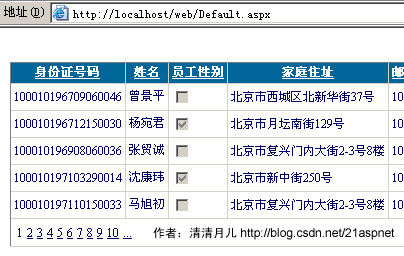
1.AllowSorting设为True,aspx代码中是AllowSorting="True";
2.默认1页10条,如果要修改每页条数,修改PageSize即可,在aspx代码中是PageSize="12"。
3.默认的是单向排序的,右击GridView弹出“属性”,选择AllowSorting为True即可。
2.GridView选中,编辑,取消,删除:
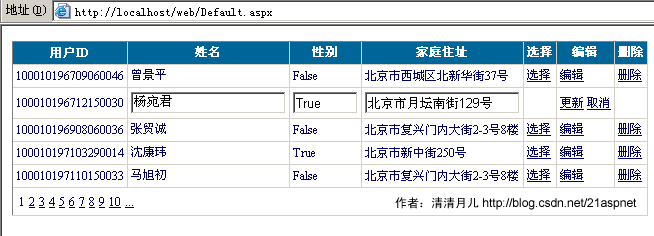
后台代码:
你可以使用sqlhelper,本文没用。代码如下:
using System;
using System.Data;
using System.Configuration;
using System.Web;
using System.Web.Security;
using System.Web.UI;
using System.Web.UI.WebControls;
using System.Web.UI.WebControls.WebParts;
using System.Web.UI.HtmlControls;
using System.Data.SqlClient;
public partial class _Default : System.Web.UI.Page
{
SqlConnection sqlcon;
SqlCommand sqlcom;
string strCon = "Data Source=(local);Database=数据库名;Uid=帐号;Pwd=密码";
protected void Page_Load(object sender, EventArgs e)
{
if (!IsPostBack)
{
bind();
}
}
protected void GridView1_RowEditing(object sender, GridViewEditEventArgs e)
{
GridView1.EditIndex = e.NewEditIndex;
bind();
}
//删除
protected void GridView1_RowDeleting(object sender, GridViewDeleteEventArgs e)
{
string sqlstr = "delete from 表 where id=‘" + GridView1.DataKeys[e.RowIndex].Value.ToString() + "‘";
sqlcon = new SqlConnection(strCon);
sqlcom = new SqlCommand(sqlstr,sqlcon);
sqlcon.Open();
sqlcom.ExecuteNonQuery();
sqlcon.Close();
bind();
}
//更新
protected void GridView1_RowUpdating(object sender, GridViewUpdateEventArgs e)
{
sqlcon = new SqlConnection(strCon);
string sqlstr = "update 表 set 字段1=‘"
+ ((TextBox)(GridView1.Rows[e.RowIndex].Cells[1].Controls[0])).Text.ToString().Trim() + "‘,字段2=‘"
+ ((TextBox)(GridView1.Rows[e.RowIndex].Cells[2].Controls[0])).Text.ToString().Trim() + "‘,字段3=‘"
+ ((TextBox)(GridView1.Rows[e.RowIndex].Cells[3].Controls[0])).Text.ToString().Trim() + "‘ where id=‘"
+ GridView1.DataKeys[e.RowIndex].Value.ToString() + "‘";
sqlcom=new SqlCommand(sqlstr,sqlcon);
sqlcon.Open();
sqlcom.ExecuteNonQuery();
sqlcon.Close();
GridView1.EditIndex = -1;
bind();
}
//取消
protected void GridView1_RowCancelingEdit(object sender, GridViewCancelEditEventArgs e)
{
GridView1.EditIndex = -1;
bind();
}
//绑定
public void bind()
{
string sqlstr = "select * from 表";
sqlcon = new SqlConnection(strCon);
SqlDataAdapter myda = new SqlDataAdapter(sqlstr, sqlcon);
DataSet myds = new DataSet();
sqlcon.Open();
myda.Fill(myds, "表");
GridView1.DataSource = myds;
GridView1.DataKeyNames = new string[] { "id" };//主键
GridView1.DataBind();
sqlcon.Close();
}
}
前台主要代码:
... ...
<asp:GridView ID="GridView1" runat="server" AutoGenerateColumns="False" CellPadding="4"
ForeColor="#333333" GridLines="None" OnRowDeleting="GridView1_RowDeleting" OnRowEditing="GridView1_RowEditing"
OnRowUpdating="GridView1_RowUpdating" OnRowCancelingEdit="GridView1_RowCancelingEdit">
<FooterStyle BackColor="#990000" Font-Bold="True" ForeColor="White" />
<Columns>
<asp:BoundField DataField="身份证号码" HeaderText="用户ID" ReadOnly="True" />
<asp:BoundField DataField="姓名" HeaderText="用户姓名" />
<asp:BoundField DataField="员工性别" HeaderText="性别" />
<asp:BoundField DataField="家庭住址" HeaderText="家庭住址" />
<asp:CommandField HeaderText="选择" ShowSelectButton="True" />
<asp:CommandField HeaderText="编辑" ShowEditButton="True" />
<asp:CommandField HeaderText="删除" ShowDeleteButton="True" />
</Columns>
<RowStyle ForeColor="#000066" />
<SelectedRowStyle BackColor="#669999" Font-Bold="True" ForeColor="White" />
<PagerStyle BackColor="White" ForeColor="#000066" HorizontalAlign="Left" />
<HeaderStyle BackColor="#006699" Font-Bold="True" ForeColor="White" />
</asp:GridView>
C# GridView 的使用的更多相关文章
- Android GridView 通过seletor 设置状态和默认状态
Android中可以通过selector控制GridView Item 的状态,而省去使用代码控制 GridView View Selector Xml文件 <?xml version=&quo ...
- Asp.Net 操作XML文件的增删改查 利用GridView
不废话,直接上如何利用Asp.NET操作XML文件,并对其属性进行修改,刚开始的时候,是打算使用JS来控制生成XML文件的,但是最后却是无法创建文件,读取文件则没有使用了 index.aspx 文件 ...
- 在DevExpress程序中使用GridView直接录入数据的时候,增加列表选择的功能
在我上篇随笔<在DevExpress程序中使用Winform分页控件直接录入数据并保存>中介绍了在GridView以及在其封装的分页控件上做数据的直接录入的处理,介绍情况下数据的保存和校验 ...
- Android listview和gridview以及view的区别
GridView 可以指定显示的条目的列数. listview一般显示的条目的列数都是一列 如果是列表(单列多行形式)的使用ListView,如果是多行多列网状形式的优先使用GridView andr ...
- 在ASP.NET MVC5中实现具有服务器端过滤、排序和分页的GridView
背景 在前一篇文章<[初学者指南]在ASP.NET MVC 5中创建GridView>中,我们学习了如何在 ASP.NET MVC 中实现 GridView,类似于 ASP.NET web ...
- 【初学者指南】在ASP.NET MVC 5中创建GridView
介绍 在这篇文章中,我们将会学习如何在 ASP.NET MVC 中创建一个 gridview,就像 ASP.NET Web 表单中的 gridview 一样.服务器端和客户端有许多可用的第三方库,这些 ...
- ScrollView嵌套ListView,GridView数据加载不全问题的解决
我们大家都知道ListView,GridView加载数据项,如果数据项过多时,就会显示滚动条.ScrollView组件里面只能包含一个组件,当ScrollView里面嵌套listView,GridVi ...
- android 在 ListView 的 item 中插入 GridView 仿微信朋友圈图片显示。
转载请声明出处(http://www.cnblogs.com/linguanh/) 先上张效果图: 1,思路简述 这个肯定是要重写 baseAdapter的了,这里我分了两个数据适配器,一个是自定义的 ...
- android手机旋转屏幕时让GridView的列数与列宽度自适应
无意中打开了一年前做过的一个android应用的代码,看到里面实现的一个小功能点(如题),现写篇文章做个笔记.当时面临的问题是,在旋转屏幕的时候需要让gridview的列数与宽度能自适应屏幕宽度,每个 ...
- GridView的使用(高度封装,不怎么灵活,repeat可替代)
GridView的使用 首先,gridview是封装好的,直接在设计界面使用,基本不需要写代码: 一.绑定数据源 GridView最好与LinQDatasourse配合使用,相匹配绑定数据: 二.样式 ...
随机推荐
- webstorm对引入的css资源进行提示
- IOS IAP APP内支付 Java服务端代码
IOS IAP APP内支付 Java服务端代码 场景:作为后台需要为app提供服务,在ios中,app内进行支付购买时需要进行二次验证. 基础:可以参考上一篇转载的博文In-App Purcha ...
- Centos 修改IP地址、网关、DNS
一.CentOS 修改IP地址 修改对应网卡的IP地址的配置文件 # vi /etc/sysconfig/network-scripts/ifcfg-eth0 电信 # vi /etc/sys ...
- AttnGAN: Fine-Grained Text to Image Generation with Attentional Generative Adversarial Networks 笔记
AttnGAN: Fine-Grained Text to Image Generation with Attentional Generative Adversarial Networks 笔记 这 ...
- Redis过期命令
Redis键的过期时长的设定 ·命令名称:EXPIRE ·语法:EXPIRE key seconds ·功能:为给定key设置生存时间,当key过期时(生存时间为0),它会被自动删除 ·返回值:设置成 ...
- 【Transact-SQL】SQL Server自动把left join自动转化为inner join、以及关联时的数据重复问题
原文:[Transact-SQL]SQL Server自动把left join自动转化为inner join.以及关联时的数据重复问题 1.SQL Server自动把left join自动转化为inn ...
- Angularjs 中 ng-repeat 循环绑定事件
用ng-repeat循环是如果有ng-click之类的事件需要传入参数我们一般这样写 <span class='del' ng-click="RemoveCost({{item.Id} ...
- MySQL存储的字段是不区分大小写的,你知道吗?
做一个积极的人 编码.改bug.提升自己 我有一个乐园,面向编程,春暖花开! 00 简单回顾 之前写过一篇关于mysql 对表大小写敏感的问题,其实在mysql中字段存储的内容是不区分大小写的,本篇进 ...
- POJ1083(Moving Tables)--简单模拟
题目链接:http://poj.org/problem?id=1083 如图所示在一条走廊的两侧各有200个房间,现在给定一些成对的房间相互交换桌子,但是走廊每次只能通过一组搬运, 也就是说如果两个搬 ...
- MGB的生成代码解析
目录 @ 问题描述 文字描述 问题是在我刚刚学习MyBatis逆向工程时出现的,我发现使用Example是可以创建两个Criteria对象,并且两个对象也都可以添加条件,但是在运行过程中只会执行第一次 ...