
C# GridView 的使用
1.GridView无代码分页排序:
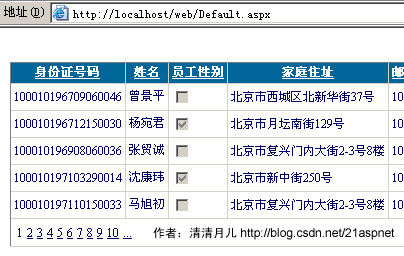
1.AllowSorting设为True,aspx代码中是AllowSorting="True";
2.默认1页10条,如果要修改每页条数,修改PageSize即可,在aspx代码中是PageSize="12"。
3.默认的是单向排序的,右击GridView弹出“属性”,选择AllowSorting为True即可。
2.GridView选中,编辑,取消,删除:
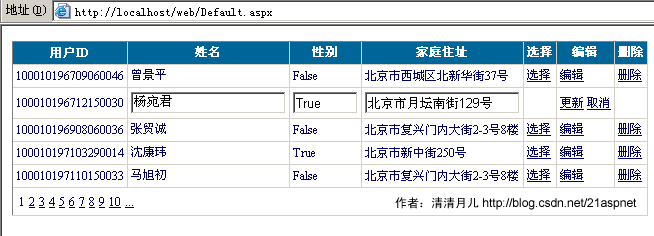
后台代码:
你可以使用sqlhelper,本文没用。代码如下:
using System;
using System.Data;
using System.Configuration;
using System.Web;
using System.Web.Security;
using System.Web.UI;
using System.Web.UI.WebControls;
using System.Web.UI.WebControls.WebParts;
using System.Web.UI.HtmlControls;
using System.Data.SqlClient;
public partial class _Default : System.Web.UI.Page
{
SqlConnection sqlcon;
SqlCommand sqlcom;
string strCon = "Data Source=(local);Database=数据库名;Uid=帐号;Pwd=密码";
protected void Page_Load(object sender, EventArgs e)
{
if (!IsPostBack)
{
bind();
}
}
protected void GridView1_RowEditing(object sender, GridViewEditEventArgs e)
{
GridView1.EditIndex = e.NewEditIndex;
bind();
}
//删除
protected void GridView1_RowDeleting(object sender, GridViewDeleteEventArgs e)
{
string sqlstr = "delete from 表 where id=‘" + GridView1.DataKeys[e.RowIndex].Value.ToString() + "‘";
sqlcon = new SqlConnection(strCon);
sqlcom = new SqlCommand(sqlstr,sqlcon);
sqlcon.Open();
sqlcom.ExecuteNonQuery();
sqlcon.Close();
bind();
}
//更新
protected void GridView1_RowUpdating(object sender, GridViewUpdateEventArgs e)
{
sqlcon = new SqlConnection(strCon);
string sqlstr = "update 表 set 字段1=‘"
+ ((TextBox)(GridView1.Rows[e.RowIndex].Cells[1].Controls[0])).Text.ToString().Trim() + "‘,字段2=‘"
+ ((TextBox)(GridView1.Rows[e.RowIndex].Cells[2].Controls[0])).Text.ToString().Trim() + "‘,字段3=‘"
+ ((TextBox)(GridView1.Rows[e.RowIndex].Cells[3].Controls[0])).Text.ToString().Trim() + "‘ where id=‘"
+ GridView1.DataKeys[e.RowIndex].Value.ToString() + "‘";
sqlcom=new SqlCommand(sqlstr,sqlcon);
sqlcon.Open();
sqlcom.ExecuteNonQuery();
sqlcon.Close();
GridView1.EditIndex = -1;
bind();
}
//取消
protected void GridView1_RowCancelingEdit(object sender, GridViewCancelEditEventArgs e)
{
GridView1.EditIndex = -1;
bind();
}
//绑定
public void bind()
{
string sqlstr = "select * from 表";
sqlcon = new SqlConnection(strCon);
SqlDataAdapter myda = new SqlDataAdapter(sqlstr, sqlcon);
DataSet myds = new DataSet();
sqlcon.Open();
myda.Fill(myds, "表");
GridView1.DataSource = myds;
GridView1.DataKeyNames = new string[] { "id" };//主键
GridView1.DataBind();
sqlcon.Close();
}
}
前台主要代码:
... ...
<asp:GridView ID="GridView1" runat="server" AutoGenerateColumns="False" CellPadding="4"
ForeColor="#333333" GridLines="None" OnRowDeleting="GridView1_RowDeleting" OnRowEditing="GridView1_RowEditing"
OnRowUpdating="GridView1_RowUpdating" OnRowCancelingEdit="GridView1_RowCancelingEdit">
<FooterStyle BackColor="#990000" Font-Bold="True" ForeColor="White" />
<Columns>
<asp:BoundField DataField="身份证号码" HeaderText="用户ID" ReadOnly="True" />
<asp:BoundField DataField="姓名" HeaderText="用户姓名" />
<asp:BoundField DataField="员工性别" HeaderText="性别" />
<asp:BoundField DataField="家庭住址" HeaderText="家庭住址" />
<asp:CommandField HeaderText="选择" ShowSelectButton="True" />
<asp:CommandField HeaderText="编辑" ShowEditButton="True" />
<asp:CommandField HeaderText="删除" ShowDeleteButton="True" />
</Columns>
<RowStyle ForeColor="#000066" />
<SelectedRowStyle BackColor="#669999" Font-Bold="True" ForeColor="White" />
<PagerStyle BackColor="White" ForeColor="#000066" HorizontalAlign="Left" />
<HeaderStyle BackColor="#006699" Font-Bold="True" ForeColor="White" />
</asp:GridView>
C# GridView 的使用的更多相关文章
- Android GridView 通过seletor 设置状态和默认状态
Android中可以通过selector控制GridView Item 的状态,而省去使用代码控制 GridView View Selector Xml文件 <?xml version=&quo ...
- Asp.Net 操作XML文件的增删改查 利用GridView
不废话,直接上如何利用Asp.NET操作XML文件,并对其属性进行修改,刚开始的时候,是打算使用JS来控制生成XML文件的,但是最后却是无法创建文件,读取文件则没有使用了 index.aspx 文件 ...
- 在DevExpress程序中使用GridView直接录入数据的时候,增加列表选择的功能
在我上篇随笔<在DevExpress程序中使用Winform分页控件直接录入数据并保存>中介绍了在GridView以及在其封装的分页控件上做数据的直接录入的处理,介绍情况下数据的保存和校验 ...
- Android listview和gridview以及view的区别
GridView 可以指定显示的条目的列数. listview一般显示的条目的列数都是一列 如果是列表(单列多行形式)的使用ListView,如果是多行多列网状形式的优先使用GridView andr ...
- 在ASP.NET MVC5中实现具有服务器端过滤、排序和分页的GridView
背景 在前一篇文章<[初学者指南]在ASP.NET MVC 5中创建GridView>中,我们学习了如何在 ASP.NET MVC 中实现 GridView,类似于 ASP.NET web ...
- 【初学者指南】在ASP.NET MVC 5中创建GridView
介绍 在这篇文章中,我们将会学习如何在 ASP.NET MVC 中创建一个 gridview,就像 ASP.NET Web 表单中的 gridview 一样.服务器端和客户端有许多可用的第三方库,这些 ...
- ScrollView嵌套ListView,GridView数据加载不全问题的解决
我们大家都知道ListView,GridView加载数据项,如果数据项过多时,就会显示滚动条.ScrollView组件里面只能包含一个组件,当ScrollView里面嵌套listView,GridVi ...
- android 在 ListView 的 item 中插入 GridView 仿微信朋友圈图片显示。
转载请声明出处(http://www.cnblogs.com/linguanh/) 先上张效果图: 1,思路简述 这个肯定是要重写 baseAdapter的了,这里我分了两个数据适配器,一个是自定义的 ...
- android手机旋转屏幕时让GridView的列数与列宽度自适应
无意中打开了一年前做过的一个android应用的代码,看到里面实现的一个小功能点(如题),现写篇文章做个笔记.当时面临的问题是,在旋转屏幕的时候需要让gridview的列数与宽度能自适应屏幕宽度,每个 ...
- GridView的使用(高度封装,不怎么灵活,repeat可替代)
GridView的使用 首先,gridview是封装好的,直接在设计界面使用,基本不需要写代码: 一.绑定数据源 GridView最好与LinQDatasourse配合使用,相匹配绑定数据: 二.样式 ...
随机推荐
- 日常工作问题解决:rhel7下使用teamd配置双网卡绑定
目录 1.情景描述 2.准备工作 2.1 确认网卡信息 2.2 删除原有网卡配置信息 3.配置网卡绑定 3.1 配置千兆网卡双网卡热备用作心跳 3.2 配置网兆网卡双网卡负载均衡用作业务 1.情景描述 ...
- [转帖]持久化journalctl日志清空命令查看配置参数详解
持久化journalctl日志清空命令查看配置参数详解 最近 linux上面部署服务 习惯使用systemd 进行处理 这样最大的好处能够 使用journalctl 进行查看日志信息. 今天清理了下 ...
- [转帖]从壹开始前后端分离【重要】║最全的部署方案 & 最丰富的错误分析
从壹开始前后端分离[重要]║最全的部署方案 & 最丰富的错误分析 https://www.cnblogs.com/laozhang-is-phi/p/beautifulPublish-most ...
- php类常量
类常量类常量可以使用define定义,也可用const定义,但是在类的内部,只允许用const定义,类常量不能更新,也不能删除类常量通常是大写的,两个单词之间用下滑线连接,如MY_NATION类常量在 ...
- C 循环统计输入的单词个数和字符长度
C 循环统计输入的单词个数和字符长度 #include <stdio.h> #include <Windows.h> int main(void) { ]; ; ; print ...
- 网络模式: host-only & NAT & 桥接
基本上,Host-only相当于虚拟机和宿主机通过交叉线相连:NAT,宿主机相当于虚拟机的路由器:桥接,相当于把宿主机和虚拟机同时接到交换机上,然后交换机接到外网. 连接性上说,可参考下表: 连接 宿 ...
- Scratch 母鸡保护鸡蛋
今天我们一起实现一个“母鸡保护鸡蛋”的小游戏 具体思路是这样滴: 1.鸡蛋会不断的从右往左移动: 2.当母鸡快碰到鸡蛋的时候,按下“空格键”让母鸡跳跃起来: 3.如果母鸡落下没碰到鸡蛋,加一分: 4. ...
- vue.js移动端app:初始配置
本系列将会用vue.js2制作一个移动端的webapp单页面,页面不多,大概在7,8个左右,不过麻雀虽小,五脏俱全,常用的效果如轮播图,下拉刷新,上拉加载,图片懒加载都会用到.css方面也会有一些描述 ...
- 怎样解决多层this指向全局对象window的问题
如下所示, 得到的结果里面, 第二个this指向的是window这个全局对象而非f2, 原因就是多层this造成的指向不明引起的. var a = { f1: function(){ console. ...
- 安装Docker step by step
1. 系统要求 centos7以上 使用cat /etc/redhat-release查看系统版本,我的Centos 7.6 centos-extra 仓库 enable,默认是打开的 2.安装d ...