
OpenStack kilo版(5) Neutron部署
neutron简介:
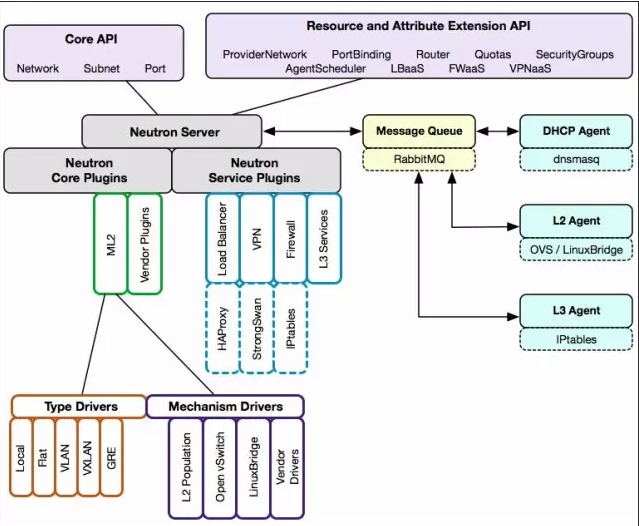
- Neutron 通过 plugin 和 agent 提供的网络服务。
- plugin 位于 Neutron server,包括 core plugin 和 service plugin。
- agent 位于各个节点,负责实现网络服务。
- core plugin 提供 L2 功能,ML2 是推荐的 plugin。
- 使用最广泛的 L2 agent 是 linux bridage 和 open vswitch。
- service plugin 和 agent 提供扩展功能,包括 dhcp, routing, load balance, firewall, vpn 等。
部署flat + linuxbridge网络
在 controller节点、network节点、compute节点部署
配置数据库
MariaDB [(none)]> CREATE DATABASE neutron;

Query OK, 1 row affected (0.00 sec)

MariaDB [(none)]> GRANT ALL PRIVILEGES ON neutron.* TO 'neutron'@'%' IDENTIFIED BY 'neutron';

Query OK, 0 rows affected (0.00 sec)

MariaDB [(none)]> GRANT ALL PRIVILEGES ON neutron.* TO 'neutron'@'localhost' IDENTIFIED BY 'neutron';

Query OK, 0 rows affected (0.00 sec)

MariaDB [(none)]> flush privileges ;

Query OK, 0 rows affected (0.00 sec)
配置Neutron服务认证
创建neutron用户:
root@controller:~# openstack user create --password-prompt neutron

User Password:

Repeat User Password:

+----------+----------------------------------+

| Field    | Value                            |

+----------+----------------------------------+

| email    | None                             |

| enabled  | True                             |

| id       | bc616fedbf9d4e26ad9f23821e723069 |

| name     | neutron                          |

| username | neutron                          |

+----------+----------------------------------+
将admin角色添加给neutron用户:
root@controller:~# openstack role add --project service --user neutron admin

+-------+----------------------------------+

| Field | Value                            |

+-------+----------------------------------+

| id    | f0b9e3c9be924357bf8e918dbc2faf91 |

| name  | admin                            |

+-------+----------------------------------+
创建neutron的服务实体:
root@controller:~# openstack service create --name neutron --description "OpenStack Networking" network

+-------------+----------------------------------+

| Field       | Value                            |

+-------------+----------------------------------+

| description | OpenStack Networking             |

| enabled     | True                             |

| id          | 12238de38aa04ceca7d84f32d4cdd8a2 |

| name        | neutron                          |

| type        | network                          |

+-------------+----------------------------------+
创建neutron服务的API endpoint:
root@controller:~# openstack endpoint create --publicurl http://controller:9696 --adminurl http://controller:9696 --internalurl http://controller:9696 --region RegionOne network

+--------------+----------------------------------+

| Field        | Value                            |

+--------------+----------------------------------+

| adminurl     | http://controller:9696           |

| id           | b1c49fdb9305476a8300a04e32d7c7e7 |

| internalurl  | http://controller:9696           |

| publicurl    | http://controller:9696           |

| region       | RegionOne                        |

| service_id   | 12238de38aa04ceca7d84f32d4cdd8a2 |

| service_name | neutron                          |

| service_type | network                          |

+--------------+----------------------------------+
安装neutron-server
root@controller:~# apt-get install neutron-server neutron-plugin-ml2 python-neutronclient
配置neutron-server
/etc/neutron/neutron.conf:
[DEFAULT]

router_distributed = False

rpc_backend = rabbit

auth_strategy = keystone

#启用Modular Layer2(ML2)插件

core_plugin = ml2

#router服务

service_plugins = router

#overlapping IP addresses

allow_overlapping_ips = True

#网络拓扑变化通知

notify_nova_on_port_status_changes = True

notify_nova_on_port_data_changes = True

nova_url = http://controller:8774/v2

[keystone_authtoken]

auth_uri = http://controller:5000

auth_url = http://controller:35357

auth_plugin = password

project_domain_id = default

user_domain_id = default

project_name = service

username = neutron

password = neutron

[database]

connection = mysql://neutron:neutron@controller/neutron

[nova]

auth_url = http://controller:35357

auth_plugin = password

project_domain_id = default

user_domain_id = default

region_name = RegionOne

project_name = service

username = nova

password = nova

[oslo_messaging_rabbit]

rabbit_host = controller

rabbit_userid = openstack

rabbit_password = openstack
配置Modular Layer 2 (ML2)插件/etc/neutron/plugins/ml2/ml2_conf.ini:
[ml2]

#启动网络类型驱动

type_drivers = flat,vlan,gre,vxlan

#租户网络类型

tenant_network_types = flat

mechanism_drivers = linuxbridge

[ml2_type_flat]

flat_networks = external

[securitygroup]

enable_security_group = True

enable_ipset = True

[linux_bridge]

physical_interface_mappings = external:eth1
nova需要添加配置,/etc/nova/nova.conf:
#添加配置

[DEFAULT]

network_api_class = nova.network.neutronv2.api.API

security_group_api = neutron

linuxnet_interface_driver = nova.network.linux_net.NeutronLinuxBridgeInterfaceDriver

firewall_driver = nova.virt.firewall.NoopFirewallDriver

[neutron]

url = http://controller:9696

auth_strategy = keystone

admin_auth_url = http://controller:35357/v2.0

admin_tenant_name = service

admin_username = neutron

admin_password = neutron
初始化数据库:
root@controller:~# su -s /bin/sh -c "neutron-db-manage --config-file /etc/neutron/neutron.conf --config-file /etc/neutron/plugins/ml2/ml2_conf.ini upgrade head" neutron
重启服务:
root@controller:~# service nova-api restart

root@controller:~# service neutron-server restart
安装neutron-network
network节点环境配置:
root@network:~# vi /etc/sysctl.conf

net.ipv4.ip_forward=1

net.ipv4.conf.all.rp_filter=0

net.ipv4.conf.default.rp_filter=0

#如果有报错

root@network:~# vi /etc/modules

br_netfilter #添加

root@network:~# modprobe br_netfilter

root@network:~# sysctl -p
安装neutron
root@controller:~# apt-get install neutron-plugin-ml2 neutron-plugin-linuxbridge-agent neutron-dhcp-agent neutron-metadata-agent -y
配置neutron-network
/etc/neutron/neutron.conf:
#在 [database] 部分,注释掉connection选项,网络不直接访问数据库

[DEFAULT]

router_distributed = False

rpc_backend = rabbit

auth_strategy = keystone

core_plugin = ml2

service_plugins = router

allow_overlapping_ips = True

[keystone_authtoken]

auth_uri = http://controller:5000

auth_url = http://controller:35357

auth_plugin = password

project_domain_id = default

user_domain_id = default

project_name = service

username = neutron

password = neutron

[oslo_messaging_rabbit]

rabbit_host = controller

rabbit_password = openstack

rabbit_userid = openstack
/etc/neutron/plugins/ml2/ml2_conf.ini:
[ml2]

type_drivers = flat,vlan,gre,vxlan

tenant_network_types = flat

mechanism_drivers = linuxbridge

[ml2_type_flat]

flat_networks = external

[securitygroup]

enable_security_group = True

enable_ipset = True

[linux_bridge]

physical_interface_mappings = external:eth1
/etc/neutron/dhcp_agent.ini:
[DEFAULT]

interface_driver = neutron.agent.linux.interface.BridgeInterfaceDriver

dhcp_driver = neutron.agent.linux.dhcp.Dnsmasq

use_namespaces = True

dhcp_delete_namespaces = True

debug = True

dnsmasq_config_file = /etc/neutron/dnsmasq-neutron.conf

enable_isolated_metadata = True

enable_metadata_network = True
/etc/neutron/dnsmasq-neutron.conf:
dhcp-option-force=26,1500

no-ping
/etc/neutron/metadata_agent.ini:
[DEFAULT]

auth_uri = http://controller:5000

auth_url = http://controller:35357

auth_region = RegionOne

auth_plugin = password

project_domain_id = default

user_domain_id = default

project_name = service

username = neutron

password = neutron

nova_metadata_ip = controller

metadata_proxy_shared_secret = METADATA_SECRET
controller节点/etc/nova/nova.conf的[neutron] 字段追加配置,并重启nova-api服务:
[neutron]

service_metadata_proxy = True

metadata_proxy_shared_secret = METADATA_SECRET
重启network节点相关服务:
root@network:~# /etc/init.d/neutron-dhcp-agent restart

neutron-dhcp-agent stop/waiting

neutron-dhcp-agent start/running, process 4233

root@network:~# /etc/init.d/neutron-metadata-agent restart

neutron-metadata-agent stop/waiting

neutron-metadata-agent start/running, process 4265

root@network:~# /etc/init.d/neutron-plugin-linuxbridge-agent restart

neutron-plugin-linuxbridge-agent stop/waiting

neutron-plugin-linuxbridge-agent start/running, process 4297
安装neutron-compute
compute节点环境配置:
root@compute1:~# vi /etc/sysctl.conf

net.ipv4.conf.all.rp_filter=0

net.ipv4.conf.default.rp_filter=0

net.bridge.bridge-nf-call-iptables=1

net.bridge.bridge-nf-call-ip6tables=1

#如果有报错

root@compute1:~# vi /etc/modules

br_netfilter #添加

root@compute1:~# modprobe br_netfilter

root@compute1:~# sysctl -p
安装neutron:
root@compute1:~# apt-get install neutron-plugin-ml2 neutron-plugin-linuxbridge-agent
配置neutron-compute
/etc/neutron/neutron.conf:
#在 [database] 部分,注释掉connection选项,网络不直接访问数据库

[DEFAULT]

rpc_backend = rabbit

auth_strategy = keystone

core_plugin = ml2

service_plugins = router

allow_overlapping_ips = True

core_plugin = ml2

[keystone_authtoken]

auth_uri = http://controller:5000

auth_url = http://controller:35357

auth_plugin = password

project_domain_id = default

user_domain_id = default

project_name = service

username = neutron

password = neutron

[oslo_messaging_rabbit]

rabbit_host = controller

rabbit_userid = openstack

rabbit_password = openstack
/etc/neutron/plugins/ml2/ml2_conf.ini:
[ml2]

type_drivers = flat,vlan,gre,vxlan

tenant_network_types = flat

mechanism_drivers = linuxbridge

[ml2_type_flat]

flat_networks = external

[securitygroup]

enable_security_group = True

enable_ipset = True

[linux_bridge]

physical_interface_mappings = external:eth1
nova-compute的/etc/nova/nova.conf:
#[DEFAULT]字段添加

network_api_class = nova.network.neutronv2.api.API

security_group_api = neutron

linuxnet_interface_driver = nova.network.linux_net.NeutronLinuxBridgeInterfaceDriver

firewall_driver = nova.virt.firewall.NoopFirewallDriver

[neutron]

url = http://controller:9696

auth_strategy = keystone

admin_auth_url = http://controller:35357/v2.0

admin_tenant_name = service

admin_username = neutron

admin_password = neutron
重启服务:
root@compute1:~# service nova-compute restart

nova-compute stop/waiting

nova-compute start/running, process 23866

root@compute1:~# /etc/init.d/neutron-plugin-linuxbridge-agent restart

neutron-plugin-linuxbridge-agent stop/waiting

neutron-plugin-linuxbridge-agent start/running, process 23919
关掉dnsmasq服务:
root@compute1:~# netstat -tlnp

Active Internet connections (only servers)

Proto Recv-Q Send-Q Local Address           Foreign Address         State       PID/Program name

tcp        0      0 192.168.122.1:53        0.0.0.0:*               LISTEN      23195/dnsmasq

tcp        0      0 0.0.0.0:43999           0.0.0.0:*               LISTEN      1914/sshd

tcp6       0      0 :::43999                :::*                    LISTEN      1914/sshd

root@compute1:~# killall dnsmasq
修改kvm配置
/etc/libvirt/libvirtd.conf
listen_tls = 0

listen_tcp = 1

tcp_port = "16509"

listen_addr = "0.0.0.0"

unix_sock_group = "libvirtd"

unix_sock_ro_perms = "0777"

unix_sock_rw_perms = "0770"

auth_unix_ro = "none"

auth_unix_rw = "none"

auth_tcp = "none"

max_clients = 5000

min_workers = 50

max_workers = 200

max_requests = 1000

max_client_requests = 200
/etc/default/libvirt-bin
start_libvirtd="yes"

libvirtd_opts="-d -l"
/etc/libvirt/qemu.conf
vnc_listen = "0.0.0.0"

security_driver = "none"

user = "nova"

group = "kvm"

dynamic_ownership = 1
重启KVM:
root@compute1:~# /etc/init.d/libvirt-bin restart

libvirt-bin stop/waiting

libvirt-bin start/running, process 9391
验证
在controller节点验证:
root@controller:~# neutron agent-list

+--------------------------------------+--------------------+----------+-------+----------------+---------------------------+

| id                                   | agent_type         | host     | alive | admin_state_up | binary                    |

+--------------------------------------+--------------------+----------+-------+----------------+---------------------------+

| 2127166d-8618-42ee-9735-0e62a9f43b21 | Linux bridge agent | network  | :-)   | True           | neutron-linuxbridge-agent |

| 28fd5729-3c7b-4674-9f99-9c679ad94a83 | Linux bridge agent | compute1 | :-)   | True           | neutron-linuxbridge-agent |

| a38e7e96-787c-49b5-a4e2-28c84051d084 | Metadata agent     | network  | :-)   | True           | neutron-metadata-agent    |

| b24fbd40-66d4-4266-af26-5a969ec40068 | DHCP agent         | network  | :-)   | True           | neutron-dhcp-agent        |

+--------------------------------------+--------------------+----------+-------+----------------+---------------------------+
OpenStack kilo版(5) Neutron部署的更多相关文章
- OpenStack Kilo版加CEPH部署手册
OpenStack Kilo版加CEPH部署手册 作者: yz联系方式: QQ: 949587200日期: 2015-7-13版本: Kilo 转载地址: http://mp.weixin.qq.co ...
- OpenStack kilo版(4) Glance部署
Glance简介 Glance-api:接受云系统镜像的构建.删除.读取请求 Glance-Registry:云系统的镜像注册服务 部署在controller节点 配置数据库 MariaDB [(no ...
- OpenStack kilo版(3) Nova部署
部署在controller和compute节点 配置数据库 MariaDB [(none)]> CREATE DATABASE nova; Query OK, 1 row affected ( ...
- OpenStack kilo版(2) keystone部署
部署在controller节点 配置数据库 MariaDB [(none)]> CREATE DATABASE keystone; Query OK, 1 row affected (0.00 ...
- [译] OpenStack Kilo 版本中 Neutron 的新变化
OpenStack Kilo 版本,OpenStack 这个开源项目的第11个版本,已经于2015年4月正式发布了.现在是个合适的时间来看看这个版本中Neutron到底发生了哪些变化了,以及引入了哪些 ...
- (转)OpenStack Kilo 版本中 Neutron 的新变化
OpenStack Kilo 版本,OpenStack 这个开源项目的第11个版本,已经于2015年4月正式发布了.现在是个合适的时间来看看这个版本中Neutron到底发生了哪些变化了,以及引入了哪些 ...
- OpenStack Train版-7.neutron网络服务概述
网络服务NEUTRON概述 一.NEUTRON架构 OpenStack的网络服务neutron是整个OpenStack中最复杂的一个部分,它的基本架构是一个中心服务(neutron-server)外加 ...
- OpenStack kilo版(1) 部署环境
硬件 VMware workstation虚拟机 Ubuntu14.04操作系统 虚拟机网络规划 管理网络: eth0, 桥接模式 10.0.0.0/24 外部网络: eth1, nat模式(需要关闭 ...
- OpenStack kilo版(8) 部署cinder
直接将cinder服务和块设备都部署在controller节点上 在controller节点添加一块100G的块设备/dev/sdb 配置数据库 (root@localhost) [(none)]&g ...
随机推荐
- 逐层解析请求json参数字符串【我】
import net.sf.json.JSONObject; 逐层解析请求json参数字符串: InputStream inStream =null; BufferedReader br =null; ...
- netty5拆包问题解决实例
基于之前的例子(参见netty5自定义私有协议实例),我们修改下客户端handler,让发送的数据超过1024字节: NettyClientHandler: /** * 构造PCM请求消息体 * * ...
- ISCSI多路径配置(二)
搭建iscsi存储系统(一) (1).配置ISCSI多路径实现磁盘挂载高可用 如果存储服务器到交换机只有一条线路的时候,那么一条线路出现故障,整个就没法使用了,所以多线路可以解决这个问题,避免单点故障 ...
- iOS电商类App研发学习总结
一.涵盖知识点: 1.电商类App架构: https://www.cnblogs.com/loying/p/4801194.html 2.快速搭建电商平台: https://www.jianshu.c ...
- 静态站点生成器-md-mkdocs
推荐指数:
- Python3 IO编程之文件读写
读写文件是最常见的IO操作.python内置了读写文件的函数,用法和C是兼容的. 读写文件前,我们先必须了解一个,在磁盘上读写文件的功能都是由操作系统提供的,现代操作系统不允许普通的程序终结操作磁盘, ...
- AWS 数据分析服务(十)
Amazon Kinesis 概念 处理AWS上大量流数据的数据平台 Kinesis Streams 用于搜集数据,Client Library 用于分析后的展示 构建用于处理或分析流数据的自定义应用 ...
- docker ubuntu桌面
docker run -it --rm -p 8080:80 dorowu/ubuntu-desktop-lxde-vnc
- Teaset-React Native UI 组件库
GitHub地址 https://github.com/rilyu/teaset/blob/master/docs/cn/README.md React Native UI 组件库, 超过 20 个纯 ...
- 二、部署DHCP
*本文转自https://blog.51cto.com/lumay0526/2046957 简述 DHCP是Dynamic Host Configuration Protocol的缩写,中文称动态主机 ...