
Flume-安装与 NetCat UDP Source 监控端口
Flume 文档:https://flume.apache.org/FlumeUserGuide.html
Flume 下载:https://archive.apache.org/dist/flume/ & https://flume.apache.org/download.html
JDK 下载:https://mirrors.huaweicloud.com/java/jdk/
Flume 不是一个分布式程序,也不需要启动什么进程。在有任务时,运行程序,指定任务即可。
一、安装
# 下载

curl -o /opt/apache-flume-1.9.-bin.tar.gz http://mirrors.tuna.tsinghua.edu.cn/apache/flume/1.9.0/apache-flume-1.9.0-bin.tar.gz

# 解压

tar -zxf /opt/apache-flume-1.9.-bin.tar.gz -C /opt/

# 配置

cd /opt/apache-flume-1.9.-bin/conf/

cp flume-env.sh.template flume-env.sh

vim flume-env.sh
flume-env.sh 改一个 JDK 路径即可
# Licensed to the Apache Software Foundation (ASF) under one

# or more contributor license agreements.  See the NOTICE file

# distributed with this work for additional information

# regarding copyright ownership.  The ASF licenses this file

# to you under the Apache License, Version 2.0 (the

# "License"); you may not use this file except in compliance

# with the License.  You may obtain a copy of the License at

#

#     http://www.apache.org/licenses/LICENSE-2.0

#

# Unless required by applicable law or agreed to in writing, software

# distributed under the License is distributed on an "AS IS" BASIS,

# WITHOUT WARRANTIES OR CONDITIONS OF ANY KIND, either express or implied.

# See the License for the specific language governing permissions and

# limitations under the License.

# If this file is placed at FLUME_CONF_DIR/flume-env.sh, it will be sourced

# during Flume startup.

# Enviroment variables can be set here.

export JAVA_HOME=/opt/jdk1.8.0_202

# Give Flume more memory and pre-allocate, enable remote monitoring via JMX

# export JAVA_OPTS="-Xms100m -Xmx2000m -Dcom.sun.management.jmxremote"

# Let Flume write raw event data and configuration information to its log files for debugging

# purposes. Enabling these flags is not recommended in production,

# as it may result in logging sensitive user information or encryption secrets.

# export JAVA_OPTS="$JAVA_OPTS -Dorg.apache.flume.log.rawdata=true -Dorg.apache.flume.log.printconfig=true "

# Note that the Flume conf directory is always included in the classpath.

#FLUME_CLASSPATH=""
二、HelloWorld
https://flume.apache.org/FlumeUserGuide.html#a-simple-example
监控端口数据官方案例:使用 Flume 监听一个端口,收集该端口数据,并打印到控制台。
1.使用 nc 做为网络通信
yum install -y nc

# 服务端,接受消息

nc -lk

# 客户端,发送消息

nc 127.0.0.1
2.编写 Flume Agent 配置文件
https://flume.apache.org/FlumeUserGuide.html#netcat-tcp-source
https://flume.apache.org/FlumeUserGuide.html#netcat-udp-source
flume-netcat-logger.conf
# Name the components on this agent

# a1:表示 agent 的名称

# r1:表示 a1 的 Source 的名称

a1.sources = r1

# k1:表示 a1 的 Sink 的名称

a1.sinks = k1

# c1:表示 a1 的 Channel 的名称

a1.channels = c1

# Describe/configure the source

# 表示 a1 的输入源类型为 netcat 端口类型

a1.sources.r1.type = netcat

# 表示 a1 的监听的主机

a1.sources.r1.bind = 127.0.0.1

# 表示 a1 的监听的端口号

a1.sources.r1.port = 4444

# Describe the sink

# 表示 a1 的输出目的地是控制台 logger 类型

a1.sinks.k1.type = logger

# Use a channel which buffers events in memory

# 表示 a1 的 channel 类型是 memory 内存型

a1.channels.c1.type = memory

# 表示 a1 的 channel 总容量 1000 个 event

a1.channels.c1.capacity = 1000

# 表示 a1 的 channel 传输时收集到了 100 条 event 以后再去提交事务

a1.channels.c1.transactionCapacity = 100

# Bind the source and sink to the channel

# 表示将 r1 和 c1 连接起来

a1.sources.r1.channels = c1

# 表示将 k1 和 c1 连接起来

a1.sinks.k1.channel = c1
3.开启 Flume 监听端口
cd /opt/apache-flume-1.9.-bin/

# 第一种写法

bin/flume-ng agent --conf conf/ --name a1 --conf-file /tmp/flume-netcat-logger.conf -Dflume.root.logger=INFO,console

# 第二种写法

bin/flume-ng agent -c conf/ -n a1 -f /tmp/flume-netcat-logger.conf -Dflume.root.logger=INFO,console

# --conf/-c:表示配置文件存储在 conf/目录

# --name/-n:表示给 agent 起名为 a1

# --conf-file/-f:flume 本次启动读取的配置文件是在 /tmp 文件夹下的 flume-telnet.conf 文件。

# -Dflume.root.logger=INFO,console :-D 表示 flume 运行时动态修改 flume.root.logger 参数属性值,并将控制台日志打印级别设置为 INFO 级别。日志级别包括:log、info、warn、error。

4.向监听的网络端口发送数据
nc 127.0.0.1
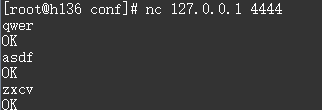
再看 Flume 监控日志

Flume-安装与 NetCat UDP Source 监控端口的更多相关文章
- Flume简介与使用(一)——Flume安装与配置
Flume简介与使用(一)——Flume安装与配置 Flume简介 Flume是一个分布式的.可靠的.实用的服务——从不同的数据源高效的采集.整合.移动海量数据. 分布式:可以多台机器同时运行采集数据 ...
- Flume篇---Flume安装配置与相关使用
一.前述 Copy过来一段介绍Apache Flume 是一个从可以收集例如日志,事件等数据资源,并将这些数量庞大的数据从各项数据资源中集中起来存储的工具/服务,或者数集中机制.flume具有高可用, ...
- flume学习以及ganglia(若是要监控hive日志,hive存放在/tmp/hadoop/hive.log里,只要运行过hive就会有)
python3.6hdfs的使用 https://blog.csdn.net/qq_29863961/article/details/80291654 https://pypi.org/ 官网直接搜 ...
- 大数据学习day35----flume01-------1 agent(关于agent的一些问题),2 event,3 有关agent和event的一些问题,4 transaction(事务控制机制),5 flume安装 6.Flume入门案例
具体见文档,以下只是简单笔记(内容不全) 1.agent Flume中最核心的角色是agent,flume采集系统就是由一个个agent连接起来所形成的一个或简单或复杂的数据传输通道.对于每一个Age ...
- flume安装配置
1 下载安装包并解压 下载地址:http://flume.apache.org/download.html 解压:tar zxvf apache-flume-1.8.0-bin.tar.gz 2 配置 ...
- Flume 安装和配置
安装步骤 1.安装jdk,1.6版本以上 2.上传flume的安装包 3.解压安装 4.在conf目录下,创建一个配置文件,比如:template.conf(名字可以不固定,后缀也可以不固定) 5.配 ...
- Flume安装部署
Flume安装部署 Flume的安装(非常简单) 上传安装包到数据源所在节点上,实际上不是数据源节点也是可以的,只要运行Flume的这台机器与数据源节点的这台机器能够通过某种协议进行通信即可. 然后解 ...
- 大数据笔记(十九)——数据采集引擎Sqoop和Flume安装测试详解
一.Sqoop数据采集引擎 采集关系型数据库中的数据 用在离线计算的应用中 强调:批量 (1)数据交换引擎: RDBMS <---> Sqoop <---> HDFS.HBas ...
- flume安装及使用
最近在学习hadoop大数据平台,但是却感觉无从下手,于是看了一些专业的书籍,觉得还是先从下往上为学习也就是从源数据--数据抽取--存储--计算--展示这个路线来学习比较容易一些,所以就先从非结构化数 ...
随机推荐
- python中括号知识点
Python语言中括号分为几个类型,常见的三个圆括号是圆括号().中间圆括号[]和大括号.它的函数也不同,代表不同的Python基本内置数据类型. python括号 python()中的括号:表示tu ...
- ActiveMQ入门系列三:发布/订阅模式
在上一篇<ActiveMQ入门系列二:入门代码实例(点对点模式)>中提到了ActiveMQ中的两种模式:点对点模式(PTP)和发布/订阅模式(Pub & Sub),详细介绍了点对点 ...
- selenium在爬虫中的应用之动态数据爬取
一.selenium概念 selenium 是一个基于浏览器自动化的模块 selenium爬虫之间的关联: 1.便捷的获取动态加载的数据 2.实现模拟登录 基本使用 pip install selen ...
- SpringBoot之Redis访问(spring-boot-starter-data-redis)
依赖注入: <!--dependency for redis--> <!-- https://mvnrepository.com/artifact/org.springframewo ...
- TCP的keepalive和应用层的heart
从长链接说起 TCP是长链接的,也就是说连接建立后,及时数年没有通信连接仍然存在.这样做的好处是:免去了DNS解析的时间,连接建立等时间,大大加快了请求的速度,同时也有利于接受服务器的实时消息.但前提 ...
- Oracle笔记(十二) 集合、序列
一.集合 在数学的操作之中存在交.差.并.补的概念,而在数据的查询中也存在此概念,有如下几个连接符号: UNION:连接两个查询,相同的部分不显示: UNION ALL:连接两个查询,相同的部分显示: ...
- 从Windows文件夹到Linux分区
1. 先说几句 如果你, 知道什么是Windows系统 简单使用Windows系统 想要了解或安装Linux 刚接触Linux会有以下疑惑, 什么是分区? 如何建立分区? 怎么安装系统到到D盘? 安装 ...
- 014.存储过程(sql实例)
--存储过程--GO--先编译,再执行 --1.GO:批处理语句,GO之前作为一个批次发送服务器编译执行 USE master GO CREATE DATABASE TEST_DB GO USE TE ...
- Django_05_模板
模板 如何向请求者返回一个漂亮的页面呢?肯定需要用到html.css,如果想要更炫的效果还要加入js,问题来了,这么一堆字段串全都写到视图中,作为HttpResponse()的参数吗?这样定义就太麻烦 ...
- java——多线程—启动线程
继承Thread启动线程 package com.mycom.继承Thread启动线程; /** * * 继承Thread类启动线程的步骤 * 1.定义自定义线程类并继承Thread * 2.重写ru ...